
Finding the right video capture card for live streaming involves balancing performance, compatibility, and budget. The Elgato 4K X Capture Card stands out as the best overall because of its 4K support and ultra-low latency. For those on a tighter budget, the UGREEN 2K@30Hz HDMI to USB 3.0 Capture Card offers decent quality at a lower price, while the XIIXMASK 4K HDMI Capture Card provides solid 4K passthrough for advanced users. The main tradeoffs include resolution versus latency, ease of setup versus feature set, and cost versus future-proofing. Keep reading for a detailed breakdown to help you choose the perfect capture card for your live streaming needs.

Get business pricing on office and shipping supplies
- Business-only prices and quantity discounts
- Tax-exempt purchasing
- Multiple users, one account, clear invoices
Key Takeaways
- The best overall pick combines 4K support, low latency, and broad device compatibility.
- Budget options often sacrifice some resolution or input/output features to keep costs low.
- High-end capture cards tend to offer pass-through features and better build quality for professional streaming.
- Compatibility with streaming software and consoles is a key factor often overlooked by buyers.
- Ease of setup and driver stability can significantly impact the streaming experience, especially for beginners.
| Elgato 4K X Capture Card, HDMI 2.1, 4K144 Ultra-Low Latency, VRR Passthrough, HDR10, Up to 1080p240 Capture, USB 3.2 Gen 2, Compatible with PS5, Xbox, Switch, PC, Mac |  | Best Overall for High-Performance Streaming and Gaming | Resolution: 4K at 144 fps, 1080p at 240 fps | HDMI Version: 2.1 | Latency: Ultra-low | VIEW ON AMAZON | See Our Full Breakdown |
| UGREEN 2K@30Hz HDMI to USB 3.0 Capture Card for Streaming and Recording |  | Best Value for Versatile 2K/1080p Streaming on a Budget | Input Resolution: 4K@30Hz | Output Resolution: 2K@30Hz, 1080p@60Hz | Connection: USB 3.0, USB-C, USB-A | VIEW ON AMAZON | See Our Full Breakdown |
| 4K HDMI Capture Card USB 3.0 – 1080P 60FPS Gaming & Streaming Video Capture Card with HDMI Loop-Out |  | Best Portable 1080P Capture for On-the-Go Content Creators | Video Resolution: 1080P 60FPS | Input: HDMI | Output: HDMI Loop-Out | VIEW ON AMAZON | See Our Full Breakdown |
| 4K Capture Card Game Capture Card 1080P 60FPS for Streaming |  | Best for Entry-Level Streaming and Gaming | Input Resolution: 4K30Hz | Output Resolution: 1080P 60FPS | Connectivity: USB 3.0 | VIEW ON AMAZON | See Our Full Breakdown |
| Acer USB 3.0 HDMI Capture Card, 4K HDMI Loop-Out, 1080P 60Hz for Streaming |  | Best for Wide Compatibility and Easy Setup | Resolution: 1080P 60Hz | Input: 4K HDMI | Loop-Out: Yes | VIEW ON AMAZON | See Our Full Breakdown |
| XIIXMASK 4K HDMI Capture Card, USB 3.0, 4K60FPS with Pass-Through |  | Best Overall for High-Quality 4K Streaming | Video Capture Resolution: 4K@60FPS | Passthrough Resolution: 4K@60Hz | High Frame Rate Recording: 1080P@120FPS | VIEW ON AMAZON | See Our Full Breakdown |
| 4K HDMI Video Capture Card, 1080P 60FPS Game Capture Device for Streaming | 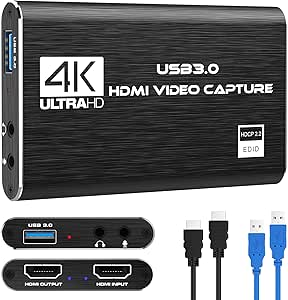 | Best for Budget-Friendly 1080p Streaming | Resolution: 1080p at 60FPS | Input Support: 4K30/60Hz | Output Support: up to 2K30Hz | VIEW ON AMAZON | See Our Full Breakdown |
| Guermok USB 3.0 HDMI Capture Card, 1080P 60FPS & 2K30 Video Capture Device with 4K Pass-Through, Mic Input & Audio Output |  | Best for Flexible Streaming with Multiple Audio Options | Video Capture Resolution: 1080P@60Hz, 2K@30Hz | HDMI Pass-Through: 4K@60Hz (YUV420), 4K@30Hz (RGB/YUV444) | Input/Output Ports: Mic In, Audio In, Headphone, Speaker | VIEW ON AMAZON | See Our Full Breakdown |
| 4K HDMI Capture Card, USB3.0/Type-C, 1080P60FPS, Compatible with Switch, Xbox, PS4, OBS, Windows, Mac OS |  | Best Compact for Portable High-Quality Capture | Hardware Interface: HDMI, USB 3.0/Type-C | Video Capture Resolution: 1080p at 60FPS | Input Resolution: Up to 4K@30Hz | VIEW ON AMAZON | See Our Full Breakdown |
| Guermok Video Capture Card, 4K USB3.0 HDMI to USB-C, 1080P 60FPS & 2K 30FPS, Compatible with Windows, Mac, iPad, Quest 3, PS5/4, Switch, Xbox, Camera |  | Best for Versatile Device Compatibility and 4K Pass-Through | Input Resolution: Up to 4K@30Hz | Output Resolution: 1080P@60Hz, 2K@30Hz | Interface: USB 3.0, USB-C | VIEW ON AMAZON | See Our Full Breakdown |
| Audio Express AXHDCAP 4K HDMI Video Capture Card |  | Best Overall for Versatile 4K Capture and Broad Compatibility | Input resolution: 3840×2160@30Hz | Output resolution: 1920×1080@30Hz | Connection: HDMI to USB 2.0 | VIEW ON AMAZON | See Our Full Breakdown |
| XIIXMASK Video Capture Card, 4K HDMI Loop-Out, USB 3.0, 1080P 60FPS/2K 30FPS for Streaming and Gaming |  | Best for High-Quality 4K Loop-Out and Gaming Performance | Hardware Interface: USB 3.0 | Video Capture Resolution: 1080p, 1440p | Operating System: Windows 8.1/10/11, macOS, Linux, Android 5.0+ | VIEW ON AMAZON | See Our Full Breakdown |
| Elgato Cam Link 4K Capture Card for DSLR, Camcorder, Action Cam |  | Best for High-Quality Webcam Conversion with Ultra-Low Latency | Hardware Interface: USB 3.0 | Video Capture Resolution: 1080p60, 4K60 (MJPG only) | Supported Resolutions: 4K60 (MJPG only), 4K30, 1080p60 | VIEW ON AMAZON | See Our Full Breakdown |
| 1080p60 4-PCI-E Capture Card for Live Streaming and Recording |  | Best for Multi-Input Professional Streaming and Recording | Hardware Interface: PCIe x4 | Video Capture Resolution: 1080p | Operating System: Windows 7 and above, Linux | VIEW ON AMAZON | See Our Full Breakdown |
| Fifine AmpliGame Video Capture Card, HD 1080p 60fps, 4K HDMI to USB |  | Best for Gaming and Entry-Level Streaming | Hardware Interface: HDMI, USB 3.0 Type A | Video Capture Resolution: 1080p60 | Output Resolution: 4K 30fps | VIEW ON AMAZON | See Our Full Breakdown |
| video capture card for live streaming | Compatibility |
|---|---|
| Elgato 4K X Capture Card | PS5, Xbox, Switch, PC, Mac |
| UGREEN 2K@30Hz HDMI to USB 3.0 | Windows, MacOS, Linux, iPadOS 17+ |
| 4K HDMI Capture Card USB 3.0 | Multiple devices including PS5, Xbox, DSLR |
| 4K Capture Card Game Capture C | Multiple gaming consoles and PCs |
| Acer USB 3.0 HDMI Capture Card | Windows, Linux |
| XIIXMASK 4K HDMI Capture Card | Windows 7/8/10/11, macOS, Linux, Android 5.0+, iPadOS 17+ |
| 4K HDMI Video Capture Card | Windows, Mac OS |
| Guermok USB 3.0 HDMI Capture C | Windows, macOS, PS5, Switch, Xbox Series X/S |
| 4K HDMI Capture Card | — |
| Guermok Video Capture Card | Windows, Mac, iPad, Quest 3, PS5/4, Switch, Xbox |
| Audio Express AXHDCAP 4K HDMI | Windows, MacOS, Linux |
| XIIXMASK Video Capture Card | — |
| Elgato Cam Link 4K Capture Car | — |
| 1080p60 4-PCI-E Capture Card f | — |
| Fifine AmpliGame Video Capture | — |
More Details on Our Top Picks
Elgato 4K X Capture Card, HDMI 2.1, 4K144 Ultra-Low Latency, VRR Passthrough, HDR10, Up to 1080p240 Capture, USB 3.2 Gen 2, Compatible with PS5, Xbox, Switch, PC, Mac
The Elgato 4K X Capture Card stands out for its impressive ability to handle 4K at 144 fps, making it ideal for streamers who demand ultra-smooth visuals. Unlike the UGREEN HDMI Capture Card, which maxes out at 2K at 30Hz, this model offers far higher resolutions and frame rates, though it requires a powerful PC or Mac to run smoothly. Its support for HDMI 2.1 and VRR passthrough ensures seamless gaming with minimal latency, a feature less emphasized in lower-tier options. The main tradeoff is its high price and setup complexity, which might deter casual users. Overall, this pick makes the most sense for dedicated streamers and gamers prioritizing top-tier quality and performance.
Pros:- Supports 4K resolution at 144 fps for ultra-smooth streaming
- Ultra-low latency with HDMI 2.1 VRR passthrough
- Compatible across multiple platforms including PS5, Xbox, PC, and Mac
Cons:- High cost may be prohibitive for casual users
- Setup can be complicated for those unfamiliar with advanced hardware
Best for: Pro gamers and professional streamers who want the highest quality and smoothest gameplay.
Not ideal for: Casual streamers or beginners with limited tech experience or budget constraints.
- Resolution:4K at 144 fps, 1080p at 240 fps
- HDMI Version:2.1
- Latency:Ultra-low
- Connectivity:USB 3.2 Gen 2
- VRR:Supported
- HDR:HDR10
- Compatibility:PS5, Xbox, Switch, PC, Mac
Our verdict“This is the best choice for serious gamers and streamers seeking top-quality, high-resolution output with minimal latency.”
UGREEN 2K@30Hz HDMI to USB 3.0 Capture Card for Streaming and Recording
The UGREEN HDMI Capture Card offers support for 2K at 30Hz and 1080p at 60Hz, making it a reliable choice for those who need decent quality without the high price tag. Compared with the Elgato 4K X, it sacrifices resolution and frame rate for affordability and broad device compatibility, including mobile devices via USB-C. Its aluminum casing ensures durability, while the low latency supports smooth streaming. However, its support for only HDMI input and the need to disable HDCP on some consoles can cause setup headaches. This device is better suited to hobbyists or content creators who prioritize versatility and affordability over ultra-high resolution or frame rates.
Pros:- Supports 2K at 30Hz and 1080p at 60Hz for versatile recording
- Compatible with a wide range of devices including consoles and tablets
- Durable aluminum casing with effective heat dissipation
Cons:- Limited to HDMI input, no output support for pass-through
- Requires disabling HDCP on some consoles for use
Best for: Hobbyist streamers and content creators on a budget needing broad device support.
Not ideal for: Professional streamers or gamers demanding 4K at high frame rates or minimal latency.
- Input Resolution:4K@30Hz
- Output Resolution:2K@30Hz, 1080p@60Hz
- Connection:USB 3.0, USB-C, USB-A
- Compatibility:Windows, MacOS, Linux, iPadOS 17+
- Supported Devices:Switch, PS4, PS5, Xbox Series X, Quest 3/2
- Material:Aluminum alloy
Our verdict“This pick is ideal for budget-conscious streamers needing flexible device support without demanding high resolutions or frame rates.”
4K HDMI Capture Card USB 3.0 – 1080P 60FPS Gaming & Streaming Video Capture Card with HDMI Loop-Out
The 4K HDMI Capture Card USB 3.0 is tailored for streamers who need a compact, portable solution to record 1080P at 60FPS. Unlike the Elgato 4K X, which offers higher resolutions, this device emphasizes simplicity and mobility, making it perfect for on-the-fly streaming or gaming. Its plug-and-play design with no drivers needed simplifies setup for less tech-savvy users. The HDMI loop-out ensures seamless pass-through, but it’s limited to 1080P output, which could disappoint those wanting true 4K recording. It’s best suited for casual gamers or content creators who prioritize portability over maximum resolution or advanced features.
Pros:- Compact and lightweight for portability
- Supports 1080P at 60FPS for high-quality streaming
- Plug-and-play with no drivers required
Cons:- Limited to 1080P output, not true 4K recording
- No external storage options or advanced features
Best for: Travelers or mobile streamers who need an easy and portable capture device.
Not ideal for: Professional broadcasters or gamers who need 4K recording and advanced features.
- Video Resolution:1080P 60FPS
- Input:HDMI
- Output:HDMI Loop-Out
- Connectivity:USB 3.0
- Compatibility:Multiple devices including PS5, Xbox, DSLR
- Size:Compact and lightweight
Our verdict“This is the best portable option for content creators who prioritize mobility and simple setup over ultra-high resolution.”
4K Capture Card Game Capture Card 1080P 60FPS for Streaming
The 4K Capture Card USB 3.0 supports 4K input at 30Hz but caps output at 1080P 60FPS, making it suitable for streamers who want decent quality without the need for ultra-high resolutions. Compared with the Elgato 4K X, it’s more affordable and easier to set up, with broad compatibility and basic features like microphone and headphone ports. Its limitations include the inability to record in true 4K and the reliance on USB 3.0 ports without external power options, which could hinder performance on some systems. This device makes sense for beginners or casual streamers who want straightforward, reliable capture for standard HD streaming.
Pros:- Supports 4K30Hz input and 1080P60FPS output
- Plug-and-play with no drivers needed
- Compatible with multiple consoles and devices
Cons:- Limited to 1080P output despite 4K input
- Lacks external power or advanced features
Best for: Novice streamers and gamers starting out with limited budgets.
Not ideal for: Advanced content creators or those needing 4K recording and high frame rates.
- Input Resolution:4K30Hz
- Output Resolution:1080P 60FPS
- Connectivity:USB 3.0
- Compatibility:Multiple gaming consoles and PCs
- Additional Features:HDMI loop-out
- Size:Compact
Our verdict“This capture card is ideal for beginners seeking an affordable, straightforward device for HD streaming and recording.”
Acer USB 3.0 HDMI Capture Card, 4K HDMI Loop-Out, 1080P 60Hz for Streaming
The Acer USB 3.0 HDMI Capture Card offers a straightforward solution for streaming with support for 4K input and 1080P at 60Hz output, similar to the 4K HDMI Capture Card USB 3.0. Its plug-and-play operation and compatibility with both Windows and Linux make it appealing for users who want minimal fuss. Unlike some cheaper options, it includes a microphone input, adding convenience for commentary. Its main limitation is it doesn’t support true 4K recording, only pass-through, and performance can depend heavily on system specifications. This device suits users who need a reliable, easy-to-use capture card with broad OS compatibility and decent performance for streaming or light recording.
Pros:- Supports 4K input with 1080P60Hz output
- Plug-and-play with no driver installation needed
- Includes microphone input for commentary
Cons:- Limited to 1080P output for streaming
- Performance depends on system specifications
Best for: Streamers and gamers requiring broad OS support and simple setup with good quality.
Not ideal for: High-end broadcasters or those requiring true 4K recording capabilities.
- Resolution:1080P 60Hz
- Input:4K HDMI
- Loop-Out:Yes
- Compatibility:Windows, Linux
- Special Features:Mic-in
- Connectivity:USB 3.0
Our verdict“This capture card is a reliable, easy-to-use choice for users needing broad compatibility and decent streaming quality.”
XIIXMASK 4K HDMI Capture Card, USB 3.0, 4K60FPS with Pass-Through
This pick stands out for supporting 4K@60FPS capture and passthrough, making it ideal for streamers aiming for crisp visuals. Compared with the Guermok USB 3.0 HDMI Capture Card, it offers higher resolution capability, but it requires a USB 3.0 port for optimal performance, unlike some more flexible options. Its broad device compatibility, including consoles and cameras, makes it a versatile choice. A key tradeoff is the lack of detailed latency specs, which might concern users sensitive to delay. Nonetheless, its plug-and-play setup and audio input support make it suitable for professional-quality streams.
Pros:- Supports 4K@60FPS capture and passthrough for high-quality streaming
- Plug-and-play setup with broad device compatibility
- Includes audio input and microphone output for commentary
Cons:- Requires USB 3.0 port for optimal performance
- Limited details on latency or delay specifications
Best for: Streamers and content creators who prioritize 4K quality and wide device compatibility.
Not ideal for: Casual streamers or those with limited USB 3.0 ports, as performance may be compromised.
- Video Capture Resolution:4K@60FPS
- Passthrough Resolution:4K@60Hz
- High Frame Rate Recording:1080P@120FPS
- Input/Output:USB 3.0, HDMI, 3.5mm audio
- Compatibility:Windows 7/8/10/11, macOS, Linux, Android 5.0+, iPadOS 17+
- Device Compatibility:PS4/5, Xbox Series X/S, Switch, DSLR, webcams
Our verdict“Best suited for professional and high-resolution streamers who need reliable 4K output without complex setup.”
4K HDMI Video Capture Card, 1080P 60FPS Game Capture Device for Streaming
This device makes the most sense for gamers and streamers who prioritize 1080p at 60FPS without the need for 4K. Unlike the XIIXMASK model, it does not support 4K input, but its simple setup and broad system compatibility make it accessible for newcomers. It offers a plug-and-play experience with no driver installation, yet its output is limited to 1080p, which might be a drawback for those wanting higher resolution. Its focus on ease of use and affordability makes it a good starter option, though it may fall short for high-end professional streaming where 4K is essential.
Pros:- High-quality 1080p 60FPS video capture
- Plug-and-play with no driver needed
- Compatible with Windows and Mac OS
Cons:- Does not support 4K120Hz/144Hz input
- Limited to 1080p output resolution
Best for: Casual gamers or streamers seeking a straightforward, affordable 1080p capture solution.
Not ideal for: High-end streamers requiring 4K recording or ultra-low latency for competitive gaming.
- Resolution:1080p at 60FPS
- Input Support:4K30/60Hz
- Output Support:up to 2K30Hz
- Connection:USB 3.0
- Compatibility:Windows, Mac OS
- Microphone Input:3.5mm TRS
Our verdict“Ideal for budget-conscious users who want reliable 1080p streaming without complex features.”
Guermok USB 3.0 HDMI Capture Card, 1080P 60FPS & 2K30 Video Capture Device with 4K Pass-Through, Mic Input & Audio Output
This model excels for users needing both 1080p and 2K capture, plus 4K pass-through for real-time display. Compared to the Elgato Cam Link 4K, it offers broader compatibility with gaming consoles and PCs, and supports ultra-low latency pass-through, making it suitable for live gameplay. Its multiple audio input/output ports provide greater flexibility, though it may require capture software for display and recording functions, unlike some plug-and-play options. The broad compatibility and multiple resolutions make it a versatile choice for content creators who want both quality and flexibility.
Pros:- Supports 1080P@60FPS and 2K@30FPS capture
- Features 4K HDMI pass-through with ultra-low latency
- Multiple audio input/output options for flexible setups
Cons:- Requires capture software for display and recording
- May not support TRRS headsets or USB microphones directly
Best for: Streamers and gamers who need multi-resolution support and extensive audio options.
Not ideal for: Users seeking a simple, high-resolution capture device without the need for additional software or setup complexity.
- Video Capture Resolution:1080P@60Hz, 2K@30Hz
- HDMI Pass-Through:4K@60Hz (YUV420), 4K@30Hz (RGB/YUV444)
- Input/Output Ports:Mic In, Audio In, Headphone, Speaker
- Compatibility:Windows, macOS, PS5, Switch, Xbox Series X/S
- Connection:USB 3.0
- Latency:Ultra low
Our verdict“Best for gamers and streamers who value multi-resolution flexibility and audio connectivity in one device.”
4K HDMI Capture Card, USB3.0/Type-C, 1080P60FPS, Compatible with Switch, Xbox, PS4, OBS, Windows, Mac OS
This compact device is perfect for users needing portability without sacrificing quality, supporting 4K input at 30Hz and recorded at 1080p60. Its ultra-low latency and plug-and-play setup make it ideal for mobile streamers or those with limited desk space. Compared with larger models like the Guermok, it offers a more portable form factor, but its 4K input at only 30Hz may disappoint high-frame-rate users. Its wide device compatibility, including USB Type-C, broadens its utility across gaming, streaming, and content creation, though it might require a more powerful PC for smooth 1080p60 recording.
Pros:- Supports 4K HDMI input at 30Hz and 1080p60 recording
- Ultra low latency for real-time streaming
- Compact and portable design with wide device compatibility
Cons:- Limited to 30Hz at 4K input
- Requires sufficient processing power for 1080p recording
Best for: Streamers and gamers who need a portable, high-quality device for on-the-go streaming.
Not ideal for: High-end professional streamers requiring 4K at 60Hz or higher frame rates for competitive gaming.
- Hardware Interface:HDMI, USB 3.0/Type-C
- Video Capture Resolution:1080p at 60FPS
- Input Resolution:Up to 4K@30Hz
- Features:Ultra Low Latency, Plug-and-Play
- Compatible Devices:Switch, Xbox, PS4, OBS, Windows, Mac
Our verdict“Ideal for mobile streamers seeking reliable, portable high-quality capture with straightforward setup.”
Guermok Video Capture Card, 4K USB3.0 HDMI to USB-C, 1080P 60FPS & 2K 30FPS, Compatible with Windows, Mac, iPad, Quest 3, PS5/4, Switch, Xbox, Camera
This device excels where broad compatibility and multi-resolution support are needed, supporting 1080P at 60FPS and 2K at 30FPS, with 4K pass-through for real-time display. The inclusion of both USB 3.0 and USB-C interfaces broadens its usability across PCs, tablets, and gaming consoles, making it a flexible choice for varied setups. Compared with the XIIXMASK model, it offers more portable options and compatibility, but requires capture software for recording and streaming, which could introduce additional complexity. Its ultra-low latency pass-through is valuable for real-time gameplay.
Pros:- Supports 1080P@60FPS and 2K@30FPS capture
- Supports 4K HDMI pass-through with ultra-low latency
- Broad compatibility including tablets, consoles, and PCs
Cons:- Requires capture software for display and recording
- Limited to HDMI to USB-C transmission only
Best for: Content creators and gamers who need flexible device compatibility and real-time pass-through for live streaming.
Not ideal for: Streamers who prefer plug-and-play solutions or those who need native recording without extra software.
- Input Resolution:Up to 4K@30Hz
- Output Resolution:1080P@60Hz, 2K@30Hz
- Interface:USB 3.0, USB-C
- Compatibility:Windows, Mac, iPad, Quest 3, PS5/4, Switch, Xbox
- Latency:Ultra low
Our verdict“Suitable for users who prioritize versatility and real-time 4K pass-through across multiple devices and platforms.”
Audio Express AXHDCAP 4K HDMI Video Capture Card
This option stands out for supporting 4K HDMI input at 30Hz while delivering 1080p output at 30Hz, making it a strong choice for those seeking high-quality recordings without the complexity of higher-end options like the Elgato 4K60. Its plug-and-play design simplifies setup across Windows, Mac, and Linux, and the real-time preview ensures lag-free streaming. Compared with the Elgato Cam Link 4K, which excels in ultra-low latency and higher resolutions, the AXHDCAP’s limitation to 1080p output on the USB 2.0 interface means it’s better suited for users prioritizing ease and broad OS compatibility rather than ultra-high resolution needs. The thermal dissipation design helps maintain performance during extended streams, but the USB 2.0 restriction caps its recording resolution, making it less ideal for high-end production. This pick makes the most sense for streamers and broadcasters who need versatile setup options with decent 4K input support but don’t require 4K recording at 60Hz.
Pros:- Supports 4K HDMI input with 1080p output for versatile high-quality capture
- Plug-and-play with no drivers needed, compatible across multiple OS
- Real-time, lag-free preview with low latency technology
Cons:- Limited to 1080p 30FPS recording due to USB 2.0 interface
- Not suitable for devices without HDMI output or for HDMI out functionality
Best for: Streamers and broadcasters who want a flexible, easy-to-use capture card with 4K input support and broad OS compatibility.
Not ideal for: Professional content creators aiming for 4K60 recording or ultra-low latency performance, as this device is limited by USB 2.0 bandwidth.
- Input resolution:3840×2160@30Hz
- Output resolution:1920×1080@30Hz
- Connection:HDMI to USB 2.0
- Compatibility:Windows, MacOS, Linux
- Frame rate:Supports 4K 60FPS input, 1080P 30FPS output
- Power:USB bus-powered
- Built-in dissipation:Thermal dissipation design
Our verdict“This is a solid choice for users seeking a versatile, easy-to-setup capture card with decent 4K input support but no high-frame-rate or 4K60 recording capabilities.”
XIIXMASK Video Capture Card, 4K HDMI Loop-Out, USB 3.0, 1080P 60FPS/2K 30FPS for Streaming and Gaming
This model makes the most sense for gamers and streamers who value 4K HDMI loop-out at 60Hz alongside stable performance. Its USB 3.0 interface supports high-bandwidth transmission, enabling 1080p60 recording and 4K60 pass-through, surpassing the bandwidth limitations of the Audio Express AXHDCAP. The inclusion of multiple device compatibility, including consoles like PS5 and Switch, broadens its appeal. However, it doesn’t record party chats and requires software restarts after audio adjustments, which could interrupt workflows. Compared to the Elgato Cam Link 4K, which emphasizes ultra-low latency and seamless camera integration, the XIIXMASK excels in multi-input scenarios and higher resolution pass-through, but sacrifices some ease of use for more advanced features. This pick is ideal for users who want reliable 4K pass-through for live gaming or streaming with minimal latency.
Pros:- Supports 4K HDMI input with 60Hz pass-through for high-quality gaming
- Low latency and stable performance suitable for streaming and recording
- Compatible with multiple devices including consoles and PCs
Cons:- Does not record party chats or commentary internally
- Requires software restart after audio setup adjustments
Best for: Gamers and streamers needing 4K HDMI pass-through at 60Hz and multi-device compatibility for live gaming or broadcasting.
Not ideal for: Content creators prioritizing simple setup or needing integrated commentary features, as this device focuses on high-quality pass-through and performance rather than ease.
- Hardware Interface:USB 3.0
- Video Capture Resolution:1080p, 1440p
- Operating System:Windows 8.1/10/11, macOS, Linux, Android 5.0+
- Antenna Location:Video Recording
- Special Features:Mic-in for Commentary
- Compatible Devices:Laptop, Tablet, PS4, PS5, Switch, Camera, TV Box
Our verdict“This is a strong choice for gamers who want 4K pass-through with reliable 1080p60 recording for live streaming or gameplay captures.”
Elgato Cam Link 4K Capture Card for DSLR, Camcorder, Action Cam
The Elgato Cam Link 4K stands out for transforming DSLRs, mirrorless cameras, or action cams into professional-quality webcams, supporting up to 4K60 but optimized for 1080p60 streaming. Its ultra-low latency makes it ideal for live video conferencing and streaming where real-time sync is critical. Compared to the Audio Express AXHDCAP, which supports broader OS compatibility and 4K input but limits output resolution, the Cam Link focuses on delivering the best possible webcam quality with minimal delay. Its reliance on USB 3.0 and specific input devices means it’s not suitable for generic HDMI sources or high-resolution recording beyond 4K30, unless paired with compatible cameras. For content creators needing a simple, reliable way to upgrade their camera quality, this device offers a straightforward, plug-and-play solution, but it’s less suited for multi-input or high-resolution recording workflows.
Pros:- Supports 4K60 (MJPG only) and 1080p60 for high-quality streaming
- Ultra-low latency ideal for live interactions
- Compatible with popular streaming and conferencing apps
Cons:- Limited to HDMI input devices—no multi-input support
- No included extension cable, which might be needed for flexible setups
Best for: Streamers and professionals wanting to convert high-quality cameras into webcams with low latency and easy setup.
Not ideal for: Users needing multi-input capture or high-resolution recording at 4K60, as this device is primarily designed for single-camera input at 1080p60.
- Hardware Interface:USB 3.0
- Video Capture Resolution:1080p60, 4K60 (MJPG only)
- Supported Resolutions:4K60 (MJPG only), 4K30, 1080p60
- Dimensions:3.19 x 1.22 x 0.47 inches
- Weight:20.14 g
- Input:HDMI (unencrypted)
Our verdict“This is best suited for streamers who want to upgrade their camera into a high-quality webcam with minimal delay, especially with DSLR or mirrorless cameras.”
1080p60 4-PCI-E Capture Card for Live Streaming and Recording
This PCIe capture card excels in scenarios requiring multiple HDMI inputs, making it a top choice for professional broadcasters needing simultaneous feeds. Its four HDMI ports enable complex setups, surpassing the single-input limitations of devices like the Fifine AmpliGame. With support for 1080p60 recording, high bit rates, and ultra-low latency, it offers a robust platform for multi-camera productions. The card’s reliance on PCIe and compatibility with Windows and Linux means it’s less suited for casual users or those lacking upgrade-ready hardware. While the lack of bundled software or detailed documentation might pose a challenge, this card’s ability to handle multiple high-quality streams makes it ideal for live events, esports, or studio setups. Compared to external options, the PCIe provides superior bandwidth but demands more technical skill and hardware compatibility.
Pros:- Supports four HDMI inputs for multi-device streaming
- High-quality 1080p60 recording with high bit rates
- Ultra-low latency suitable for live broadcasting
Cons:- Requires PCIe slot and compatible hardware
- No bundled software or detailed setup instructions
Best for: Professional broadcasters, live event producers, and esports streamers needing multi-camera input and high-quality recording.
Not ideal for: Casual streamers or gamers without a PCIe slot, as installation and setup are more complex and hardware-dependent.
- Hardware Interface:PCIe x4
- Video Capture Resolution:1080p
- Operating System:Windows 7 and above, Linux
- Video Recording:Yes
- Special Features:1080i hardware deinterlacing, 3D noise reduction
- Platform:Mac (via drivers)
Our verdict“This is a powerful solution for professional multi-camera streaming, but it demands technical expertise and suitable hardware infrastructure.”
Fifine AmpliGame Video Capture Card, HD 1080p 60fps, 4K HDMI to USB
This capture card makes sense for gamers and casual streamers who prioritize simple setup and compatibility with multiple platforms. It supports 1080p at 60fps for smooth gameplay and passes through 4K at 30fps, providing flexibility for different streaming needs. Its plug-and-play design with USB 3.0 connectivity ensures quick setup, although the absence of included cables might frustrate some users. Compared with the Elgato Cam Link 4K, which offers higher quality camera integration, the Fifine device is more of a straightforward, budget-friendly option for those starting out or streaming on a variety of consoles like PS4, Switch, or Xbox. The RGB lighting adds a visual flair, but some users might find it unnecessary or distracting. Overall, this is a practical, affordable choice for gamers seeking reliable 1080p60 streaming and 4K pass-through.
Pros:- Supports 1080p60 recording for smooth gameplay
- Simple plug-and-play setup with USB 3.0
- Supports 4K HDMI pass-through at 30fps
Cons:- HDMI and USB cables are not included
- Limited to single-input capture with no multi-camera support
Best for: Entry-level gamers and casual streamers needing easy setup and broad device compatibility.
Not ideal for: Professional streamers or content creators requiring multi-input setups or advanced features, as this device is limited to single HDMI input.
- Hardware Interface:HDMI, USB 3.0 Type A
- Video Capture Resolution:1080p60
- Output Resolution:4K 30fps
- Supported Devices:PS4/PS5, Xbox, Switch, Windows, Mac
- Item Weight:3.36 ounces
- Item Dimensions:4.24 x 2.8 x 1.21 inches
Our verdict“This capture card is well-suited for new streamers or gamers looking for a reliable, affordable device with versatile compatibility.”
How We Picked
I evaluated these capture cards based on several critical factors that matter most to live streamers. Performance metrics such as resolution support, latency, and frame rates were prioritized to ensure smooth streaming. Usability features, including compatibility with popular streaming platforms, ease of setup, and device compatibility, also played a key role. Build quality and future-proofing—like 4K passthrough and USB-C support—were considered for those aiming for longevity. Lastly, value for money was important, balancing features against price to recommend options suitable for different budgets and skill levels.Factors to Consider When Choosing Video Capture Card For Live Streaming
Choosing the right video capture card for live streaming requires more than just looking at specs. Understanding key factors such as resolution, latency, and device compatibility helps ensure your setup runs smoothly and meets your needs. Considering future upgrades and your current equipment will also influence your choice, preventing costly mistakes. Here are the main factors to keep in mind when shopping for a capture card.Resolution and Frame Rate Support
Deciding on resolution and frame rate support is fundamental. If you plan to stream in 4K, look for a capture card that explicitly supports 4K at 60fps or higher. However, higher resolution options often come with increased costs and hardware demands. For most streamers focused on gameplay, 1080p at 60fps offers a good balance between quality and performance. Keep in mind that your PC, streaming software, and internet connection also need to support these higher settings for a seamless experience.
Latency and Pass-Through Features
Low latency is critical for live interactions, especially if you’re gaming and streaming simultaneously. Capture cards with HDMI pass-through or ultra-low latency modes reduce delay between your console or camera and the stream. If you’re a competitive gamer or want minimal lag, prioritize cards that advertise low latency and include pass-through support. Bear in mind that some devices might claim low latency but still introduce noticeable delay depending on your setup and connection quality.
Compatibility and Ease of Use
Check whether the capture card is compatible with your operating system, streaming software (like OBS or Streamlabs), and your gaming consoles or cameras. Some cards are plug-and-play, ideal for beginners, while others may require drivers or additional configuration. Ease of setup can save you frustration, particularly if you’re new to streaming. Also, verify if the device supports USB-C or Thunderbolt, which can offer better performance and future-proofing.
Build Quality and Future-Proofing
Investing in a well-built device ensures reliability over time. Premium models often feature better shielding, more robust connectors, and higher-quality components that resist wear and tear. Future-proofing includes support for upcoming resolutions, higher frame rates, and newer interfaces like USB-C or Thunderbolt. While pricier, these features can extend the lifespan of your setup, saving you from early upgrades and compatibility issues.
Value and Budget Considerations
Balancing features against cost is essential. Entry-level options might suffice for casual streaming or testing, but they often lack advanced features like 4K or pass-through. Mid-range cards typically strike a good compromise, providing high resolution support and decent latency without breaking the bank. Premium models are suited for professional streamers needing ultra-reliable performance and additional features, but they may be overkill for beginners or hobbyists. Assess your specific needs and budget carefully to avoid overspending or settling for underperforming hardware.
Frequently Asked Questions
Can I use a lower-resolution capture card for 4K streaming?
While it’s technically possible to connect a lower-resolution capture card to a 4K source, the stream will be limited to the capture card’s maximum supported resolution, typically 1080p or 1440p. This means you won’t get true 4K quality, and your stream resolution will be capped accordingly. For consistent high-quality 4K streams, selecting a capture card that explicitly supports 4K at 60fps is necessary. Additionally, ensure your streaming setup can handle the higher bandwidth and processing demands of 4K video.
Is USB 3.0 sufficient for live streaming or should I look for USB-C?
USB 3.0 is generally sufficient for most live streaming needs, supporting high data transfer rates necessary for 1080p and even 4K video at moderate frame rates. However, USB-C can offer cleaner connections, better compatibility with newer devices, and potentially higher data throughput depending on the port specifications. If your PC or laptop supports USB-C with Thunderbolt 3 or 4, opting for a capture card with USB-C can provide marginal improvements in transfer stability and future compatibility, especially for high-bitrate 4K streams.
Do I need a capture card with HDMI pass-through if I only stream gameplay?
Having HDMI pass-through on a capture card is highly advantageous for gameplay streaming, as it allows you to connect your gaming console directly to your monitor or TV without latency. This means you can play and view the game on your display without delay while streaming in the background. Without pass-through, you might experience input lag or need a separate monitor setup, which can complicate your streaming environment. For a smoother, more integrated experience, choose a card that supports HDMI pass-through.
How important is build quality in choosing a capture card?
Build quality affects the reliability and longevity of your capture card, especially if you plan to stream frequently or transport your setup. A sturdy, well-shielded device is less prone to hardware issues and signal interference. High-quality connectors prevent damage and ensure consistent performance over time. While premium models tend to have better durability, even budget options should have solid construction and reliable connections. Investing in a well-made capture card reduces the risk of technical hiccups during critical streams.
Conclusion
For most users seeking a straightforward, reliable streaming experience, the Elgato 4K X Capture Card offers the best overall performance with 4K support and low latency. Budget streamers or hobbyists will find the UGREEN 2K@30Hz HDMI to USB 3.0 Capture Card a cost-effective choice, though with some resolution limitations. Advanced users requiring professional-grade features might prefer the XIIXMASK 4K HDMI Capture Card or premium options with robust pass-through and build quality. Beginners should prioritize plug-and-play models with simple setup, whereas seasoned streamers aiming for high-end quality should consider more feature-rich, durable cards. Match your choice to your current equipment, budget, and future plans for a satisfying streaming setup.
Columbus Day / Indigenous Peoples' Day Picks
long weekend sales
As an affiliate, we earn on qualifying purchases.