
Welcome to our 2026 Business & Marketing Gadgets Checklist, designed specifically for entrepreneurs, marketers, and digital professionals seeking to optimize their workspace. Whether you’re setting up a new office or upgrading your current gear, this guide helps you identify the must-have gadgets that enhance productivity and communication. We’ve organized the list into key categories to make your shopping experience straightforward and efficient.

Get business pricing on office and shipping supplies
- Business-only prices and quantity discounts
- Tax-exempt purchasing
- Multiple users, one account, clear invoices
Each section provides detailed insights into the most important features to consider, common pitfalls to avoid, and practical sizing and compatibility tips. Use this checklist as a handy reference to select the right tools tailored to your business needs, ensuring you make informed decisions that support your growth and success.
To get started, simply review each category, examine the recommended products, and compare their features against your specific requirements. Remember, investing in quality gadgets can significantly boost your efficiency and professionalism in the competitive business landscape.
Laptops & Tablets
Choosing the right laptop or tablet is critical for mobile productivity and multitasking. In 2026, powerful specs like AMD Ryzen processors and high-quality displays are standard, ensuring smooth performance for demanding tasks. The Acer Nitro V 16S AI Gaming Laptop, for example, offers a blend of gaming-grade graphics and professional-grade processing, making it a versatile choice for business users who need performance and portability. When shopping, pay attention to screen size, battery life, and connectivity options, as these can impact your daily workflow. A common mistake is selecting a device based solely on price or brand, neglecting essential features like compatibility with your existing accessories or software.
Ensure the laptop has adequate RAM, storage, and ports for your specific needs. For tablet users, consider models with stylus support, high-resolution displays, and long battery life to maximize versatility in presentations, note-taking, or creative tasks. Compatibility with accessories like external monitors, keyboards, and docking stations can significantly enhance your setup, so verify these before purchasing.
What to look for:
- Powerful processor (AMD Ryzen 7 or higher)
- Adequate RAM (16GB or more)
- High-resolution display (Full HD or better)
- Good battery life for mobility
- Multiple connectivity options
Acer Nitro V 16S AI Gaming Laptop with AMD Ryzen 7 2600, NVIDIA GeForce RTX 5060
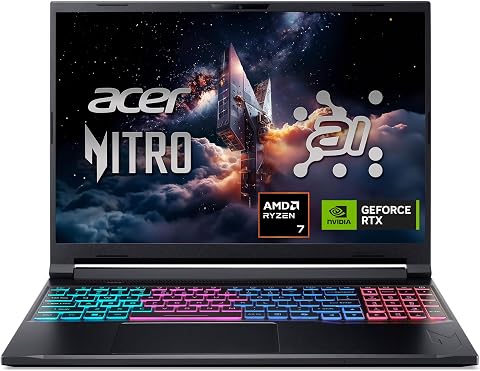
The Acer Nitro V 16S is a high-performance gaming laptop featuring an AMD Ryzen 7 2600 processor and NVIDIA GeForce RTX 5060 GPU, delivering AI-powered gaming and content creation capabilities. It sports a 16-inch WUXGA IPS display with a 180Hz refresh rate for smooth visuals, along with 32GB DDR5 RAM and a 1TB PCIe Gen 4 SSD for fast storage.
Pros:
- Powerful AI-enhanced gaming performance with high TOPS
- Vivid 16" display with 180Hz refresh rate for smooth visuals
- Large 32GB DDR5 RAM and fast 1TB SSD for multitasking and storage
Cons:
- Processor model may be outdated compared to newer Ryzen series
- No mention of dedicated cooling system for high-performance gaming
- Potentially high power consumption due to high-end components
Best for: Power users needing performance and portability
Not ideal for: Basic users with light tasks
Bottom line: Choose a device that balances power, portability, and compatibility.
Smartphones & Accessories
While specific smartphones and accessories are not highlighted here, it’s important to select devices that support your business communication and productivity needs. Look for models with strong security features, excellent camera quality for content creation, and compatibility with your existing app ecosystem. Accessories like protective cases, portable chargers, and external lenses can extend your device’s functionality and durability. When choosing a smartphone, consider the operating system, screen size, and battery life to ensure it fits seamlessly into your daily routine. Remember, a reliable device minimizes downtime and keeps you connected with clients and team members effortlessly.
What to look for:
- Strong security features
- Compatibility with essential apps
- Long battery life
- High-quality camera
- Durable build
Presentation Equipment
Effective presentations hinge on clear visuals and reliable equipment. The Portable Smart Projector with Google TV, 4K Support, Dolby, WiFi, and Bluetooth is an excellent choice for professionals who need mobility without sacrificing quality. It allows you to project high-resolution content directly from your device, making meetings and pitches more engaging. When shopping, focus on compatibility with your devices, ease of setup, and connectivity options like WiFi and Bluetooth. A common mistake is neglecting the projector’s brightness and throw distance, which can affect visibility in different environments. Ensure the projector supports 4K resolution for sharp images and has built-in audio or supports external speakers for sound clarity.
Consider your typical presentation environment—smaller conference rooms or larger auditoriums—and choose a projector with appropriate brightness levels. Also, check for features like keystone correction and portability to streamline setup and transport. Investing in quality presentation gear ensures your message comes across clearly and professionally every time.
What to look for:
- 4K resolution support
- WiFi and Bluetooth connectivity
- Portable and lightweight design
- High brightness (lumens)
- Easy setup and controls
Portable Smart Projector with Google TV, 4K Support, Dolby, WiFi & Bluetooth

This compact smart projector features Android 14.0 with access to over 10,000 apps, native 1080P resolution with 4K decoding, HDR10, and AI auto-setup for easy installation. It offers versatile connectivity options, including WiFi 6, Bluetooth 5.3, HDMI, and USB, making it ideal for home, outdoor, or travel entertainment.
Pros:
- Supports native 1080P resolution with 4K decoding for sharp images
- Android TV 14.0 with access to over 10,000 apps for versatile entertainment
- AI auto-setup for quick, hassle-free installation and adjustment
- Compact and lightweight design ideal for portability and outdoor use
Cons:
- Image clarity may soften at larger distances from the screen
- Requires careful placement for optimal focus and keystone correction
- Limited details on battery life or internal speakers
Best for: Mobile professionals and educators
Not ideal for: Large conference centers without power outlets
Bottom line: Opt for a portable projector with high resolution and connectivity.
Networking Devices
Reliable networking devices are the backbone of any business setup. While specific products are not listed here, focus on selecting routers, switches, and extenders that support your bandwidth requirements and security protocols. Look for devices with the latest WiFi standards (such as WiFi 6) to ensure fast, stable connections across your office or remote locations. Many common mistakes include choosing equipment based solely on brand or outdated specifications, which can lead to sluggish performance or security vulnerabilities. Compatibility with your existing network infrastructure and scalability for future growth should also be key considerations.
Proper placement and configuration of your networking gear can prevent dead zones and ensure seamless connectivity. For larger spaces, consider mesh systems to enhance coverage. Prioritize security features like WPA3 encryption and guest network options to protect your sensitive business data. Investing in quality networking hardware reduces downtime and supports the demands of cloud-based applications and remote work.
What to look for:
- Support for WiFi 6 or higher
- Strong security features
- Scalable and future-proof
- Easy setup and management
- Coverage for multiple devices
Office Printing & Scanning
The Epson EcoTank ET-4760 is a standout choice for office printing and scanning needs, especially for those who desire efficiency and cost savings. With its cartridge-free design and wireless capabilities, it simplifies the workflow and reduces ongoing expenses. When selecting printers, consider the print volume, connectivity options, and compatibility with your devices. Avoid common mistakes such as underestimating your monthly print volume or choosing a model with limited connectivity, which can hinder productivity. The ET-4760’s multifunctionality supports printing, scanning, copying, and faxing, making it a versatile addition to any business environment.
Ensure the printer’s features align with your typical workload—high-yield ink options and fast print speeds are desirable. Wireless setup and mobile printing support can streamline your operations, especially in dynamic office settings. If you frequently print large documents or handle sensitive materials, look for models with security features and high-capacity trays. Properly evaluating your needs will help you select a printer that boosts efficiency and reduces costs over time.
What to look for:
- High-yield ink capacity
- Wireless and mobile printing support
- Multifunction capabilities
- Fast print speeds
- Compatibility with multiple devices
Epson EcoTank ET-4760 Wireless Color All-in-One Cartridge-Free Supertank Printer

The Epson EcoTank ET-4760 is an all-in-one printer designed for office productivity, featuring high-capacity refillable ink tanks, fast printing, scanning, copying, faxing, and versatile connectivity options. It offers significant savings on ink, eco-friendly operation, and easy-to-use features like a color touchscreen and automatic document feeder.
Pros:
- Cost-effective with high-capacity refillable ink tanks
- Versatile features including fax, scanner, and copier
- Eco-friendly with zero cartridge waste
- Easy to use with a color touchscreen and mobile printing app
Cons:
- Initial setup may be complex for some users
- Bulkier size may require dedicated space
- Print speed may be slower compared to laser printers
Best for: Busy offices with high print volume
Not ideal for: Casual or infrequent printing needs
Bottom line: Pick a multifunction printer with wireless and high capacity.
Video Conferencing Gear
The Webcam 1080P with Microphone & Privacy Cover is essential for maintaining professional communication in today’s remote work environment. A high-definition camera ensures clear video quality, while an integrated microphone captures your voice accurately. Privacy covers add an extra layer of security, preventing unauthorized access to your camera when not in use. When selecting a webcam, consider compatibility with your PC or laptop, ease of installation, and adjustable mounting options. A common mistake is choosing a webcam with lower resolution or poor audio quality, which can diminish your professional image during virtual meetings.
To optimize your video conferencing setup, position the camera at eye level and ensure good lighting in your workspace. Look for models with adjustable focus and wide-angle lenses to capture a broader view, especially if you share your workspace with others. Investing in quality conferencing gear improves your communication clarity and leaves a positive impression on clients, partners, and team members, making it a worthwhile addition to your business toolkit.
What to look for:
- 1080P resolution or higher
- Built-in microphone with noise reduction
- Privacy cover for security
- Adjustable mount or stand
- Compatibility with major conferencing platforms
Webcam 1080P with Microphone & Privacy Cover for PC/Laptop, USB Plug & Play, Aut

This 1080p webcam delivers sharp Full HD video at 30 fps with HDR for clear images in various lighting conditions. It features a built-in noise-canceling microphone, privacy cover, auto light correction, and universal compatibility for video calls, streaming, and online meetings.
Pros:
- High-quality 1080P HD video with HDR for clear images
- Built-in noise-canceling microphone ensures clear audio
- Privacy cover provides security and dust protection
- Plug and play with universal compatibility
Cons:
- Fixed focus may not suit all users’ needs
- Requires USB 2.0 port, which may be outdated on some devices
Best for: Remote professionals and virtual teams
Not ideal for: Basic webcams with lower resolution
Bottom line: Choose a webcam with clear video and audio quality.
When building your business tech arsenal, start with your priority needs and budget. Focus on essential gadgets that provide the most value and scalability for your growing enterprise. Remember, investing thoughtfully in quality equipment today can save you time and money tomorrow.
Keep exploring, comparing options, and stay updated with the latest innovations. Your smart choices in business gadgets will empower you to communicate, collaborate, and succeed more effectively in 2026 and beyond. Happy shopping!
Halloween Picks
halloween
As an affiliate, we earn on qualifying purchases.