
To respond promptly and respectfully to emails, always aim to reply within 24 hours during business days, showing you value the sender’s message. Use polite language, clear and focused responses, and maintain a professional tone. Proofread your message to avoid errors and include relevant information or attachments. Consistently practicing these habits builds trust and enhances your professional image. Keep going to discover more effective strategies for maintaining excellent email communication.
Key Takeaways
- Reply within 24 hours during business days to demonstrate attentiveness and professionalism.
- Use polite, friendly language with proper greetings and sign-offs to maintain a respectful tone.
- Carefully read the original email and address all questions or points clearly and concisely.
- Proofread your response to avoid typos and ensure clarity, including noting any attachments or additional info.
- Maintain a professional tone to reflect credibility, fostering trust and positive communication.

Have you ever wondered how to reply to emails effectively? Mastering this skill is vital for maintaining clear communication and building strong professional relationships. One of the most important aspects is adhering to proper email etiquette. This means being respectful, attentive, and considerate of the recipient’s time. When you respond promptly, it shows you value their message and are engaged in the conversation. Promptness doesn’t mean rushing; it’s about replying within a reasonable timeframe, ideally within 24 hours during business days. Delayed responses can give the impression that you’re inattentive or uninterested, which could harm your credibility.
Respond promptly to emails to show respect and maintain professional credibility.
In addition to timing, maintaining a professional tone is essential. Your email tone should be polite, friendly, yet businesslike. Avoid slang, overly casual language, or anything that might come across as disrespectful or unprofessional. Even if the email is informal or familiar, it’s important to stay courteous. Use proper greetings and closings, such as “Dear” or “Hello,” and sign off with your name and contact details if necessary. This demonstrates respect and attention to detail.
When replying, read the original message carefully before crafting your response. Address all questions or points raised to avoid back-and-forth emails that could have been condensed into a single, clear reply. Keep your message focused and concise, avoiding unnecessary details or tangents. Use active voice to make your responses more direct and engaging. For example, instead of saying, “It was decided that the project should be completed by next week,” say, “We decided to complete the project by next week.” This clarity helps prevent misunderstandings.
Always proofread your email before hitting send. Check for typos, grammatical errors, and ensure your message is clear. A well-written, error-free email reflects professionalism and attention to detail. If you need to include attachments or additional information, mention them explicitly in your message. Be courteous if you’re declining a request or asking for more time—explain your reasons politely without sounding dismissive. Additionally, understanding the importance of contrast ratio in projectors can help you communicate more effectively about visual quality and technical specifications when discussing or selecting equipment.
Finally, remember that your email is a reflection of you and your professional image. Responding promptly and respectfully not only aligns with good email etiquette but also helps foster trust and respect. By balancing timeliness, professionalism, and clarity, you guarantee your emails are effective tools for communication rather than sources of confusion or frustration. Practicing these principles consistently will make your email interactions smoother, more productive, and more professional.
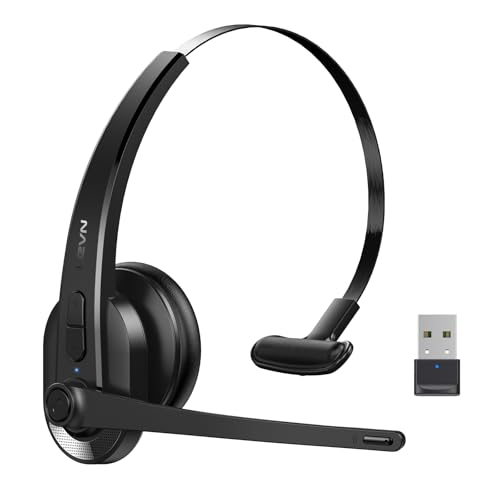
LEVN Wireless Headset with Mic for Work, Bluetooth Headset with Microphone-AI Noise Cancelling, Single-Ear Wireless Headphones with Mic & USB Dongle for PC/Computer/Call Center/Laptop/Teams/Zoom/Home
Crystal-Clear Calls Anywhere: Equipped with an advanced Environmental Noise Cancelling (ENC) chip, LEVN wireless headset with mic for...
As an affiliate, we earn on qualifying purchases.
Frequently Asked Questions
How Quickly Should I Respond to Urgent Emails?
You should respond to urgent emails within one hour to follow proper email etiquette and maintain a professional image. Quick response times show respect and help resolve issues efficiently. If you can’t reply immediately, send a brief acknowledgment to let the sender know you’re aware and working on it. Keeping your response time short demonstrates your commitment and guarantees you stay on top of important communications.
What Tone Is Appropriate for Formal Email Replies?
Research shows that 75% of professionals believe email etiquette impacts career success. When replying to formal emails, use a respectful, professional tone with clear, polite language. Avoid slang or overly casual language, and match your tone to the recipient’s level of formality. Keep your message concise, respectful, and positive, demonstrating professionalism and courtesy. This approach helps build trust and leaves a strong impression, ensuring your communication remains effective and respectful.
How Do I Handle Multiple Emails at Once?
To handle multiple emails at once, practice email batching by setting aside specific times for responses. Prioritize your emails based on urgency and importance, addressing high-priority messages first. Use clear, respectful language in your replies, and keep your responses concise. This approach helps you stay organized, reduces stress, and guarantees you respond promptly and professionally to all messages without feeling overwhelmed.
Is It Okay to Delay Responses Due to Workload?
Delaying responses due to workload is like letting a pot simmer—sometimes you need to pause to prevent boiling over. Prioritize your emails based on urgency and importance, practicing good workload management. It’s okay to delay a reply if you’re handling critical tasks, but always acknowledge receipt to show respect. Clear communication helps maintain professionalism, ensuring your contacts know you’re attentive even when your response takes a bit longer.
How Can I Prevent Misunderstandings in Email Replies?
You can prevent misunderstandings in email replies by prioritizing clarity and conciseness. Use simple language, avoid jargon, and be specific with your details. Maintain a professional tone, staying polite and respectful. Double-check your message for tone and clarity before sending. If needed, ask clarifying questions to guarantee both sides understand correctly. This approach reduces confusion and fosters effective communication through your email responses.

Rownfusny Wireless Headset with Mic for Work, Clear Sound & Comfortable Computer Headset with Microphone, Bluetooth Headset with Charging Base & USB Dongle for Home/CallCenter/Teams/Zoom/Skype(Black)
❗❗❗For operation questions, visit @RownFusny’s YouTube channel and check the 'Playlists' for tutorials.📞【ENC Noise Cancellation】This wireless headset with...
As an affiliate, we earn on qualifying purchases.
Conclusion
By responding promptly and respectfully, you keep communication flowing smoothly and build stronger relationships. Remember, a timely reply can be the key that unlocks new opportunities and prevents small issues from snowballing. Think of each email as a seed—you nurture it with care, and it will grow into trust and understanding. So, stay attentive and respectful in your responses; your efforts will pay off in the long run, opening doors you never imagined.

Wireless Headset with Mic for Work, Bluetooth Headset with Microphone (Noise Cancelling & Mute Button), Wireless Headphones with Mic for Work from Home/Office/PC/Call Center/Computer/Laptop/Teams/Zoom
AI Noise Cancelling for Clear Calls: This LEVN wireless headset with Mic for work blocks 99.9% of background...
As an affiliate, we earn on qualifying purchases.

LEVN Wireless Headset with Mic for Work, Wireless Headset (Charging Base, Noise Cancelling & Mute Button), Long Battery Life, Bluetooth Headsets for Home/Office/Call Center/Laptop/Teams/Zoom, Black
AI Noise Cancellation & One-Tap Privacy: Engineered for the modern professional, the LEVN wireless headset features advanced ENC...
As an affiliate, we earn on qualifying purchases.