
🔍 Read the full analysis: 8 Picks For Smooth, Responsive Gaming With High Refresh Monitors on ThorstenMeyerAI.com

Get business pricing on office and shipping supplies
- Business-only prices and quantity discounts
- Tax-exempt purchasing
- Multiple users, one account, clear invoices
TL;DR
A ThorstenMeyerAI.com comparison names eight high-refresh gaming monitors for different budgets and setups, led by MSI’s 4K, 320Hz model. The picks range from QHD and QD-OLED displays to 1080p and curved ultrawide options; the right choice depends on GPU capability, viewing distance and game preferences.
ThorstenMeyerAI.com has compared eight high-refresh gaming monitors for players choosing between speed, resolution and screen format, naming the MSI MAG 272URDFA E16 its best overall pick for an unusual combination of 4K resolution and 320Hz refresh. The list also includes QHD, QD-OLED, 1080p and curved ultrawide models, reflecting the practical tradeoff: a screen’s maximum refresh rate only helps if a gaming PC can produce enough frames at its resolution, as detailed in the original analysis.
The comparison’s other leading picks serve different priorities. The AOC Q27G41ZE is presented as a more conventional 27-inch QHD option, with a 240Hz native refresh rate and a 260Hz overclocked mode. The Samsung Odyssey OLED G6 is distinguished by its QD-OLED panel, positioning it as an image-quality alternative to the listed IPS models rather than simply another refresh-rate choice, much like other high-refresh gaming monitor picks.
The remaining selections address lower GPU demands or larger formats: the ASUS VG259QM5A and Dell SE2426HG are 24-inch-class 1080p options described for responsive play; the Sceptre 34-inch ultrawide offers a wider screen; the SANSUI 32-inch provides a larger display; and the AOC C27G4ZH combines a 27-inch curved screen with 1080p resolution. The source does not provide full specifications for every model, so features beyond those stated should not be assumed; readers can also compare other 2027 monitor options.
ThorstenMeyerAI.com says its ranking weighs how refresh rate, resolution and screen format work together, alongside panel type, specified adaptive-sync support, connectivity and adjustment details. It does not treat the highest refresh figure as an automatic winner, and the source cautions that missing product details are not evidence that a feature is included.
The 8 picks
- 1
 Samsung 27" Odyssey OLED G6 (G61SH) QD-OLED Gaming MonitorView on Amazon →
- 2
 msi MAG 272URDFA E16 27-inch 3840 x 2160 (UHD) Gaming Office Monitor, 320Hz,…View on Amazon →
- 3
 Sceptre C345B-QU240T 34-inch Curved Ultrawide Gaming MonitorView on Amazon →
- 4
 SANSUI 32 Inch Curved 240Hz Gaming Monitor High Refresh Rate, FHD 1080PView on Amazon →
- 5
 AOC 27" Gaming Monitor QHD 240Hz Overclocked IPS NVIDIA G‑Sync Q27G41ZEView on Amazon →
- 6
 AOC C27G4ZH 27-Inch Curved FHD Gaming MonitorView on Amazon →
- 7
 ASUS TUF Gaming VG259QM5A 24.5-Inch 1080p 240Hz Gaming MonitorView on Amazon →
- 8
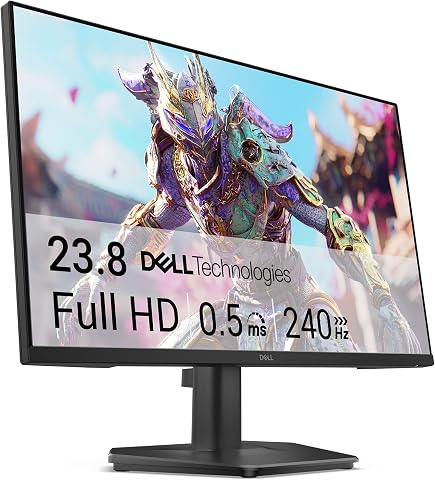 Dell 24 240Hz Gaming Monitor – SE2426HG – 23.8-inch FHD (1920×1080) 240Hz Dis…View on Amazon →
Choosing Speed Your PC Can Use
The comparison matters because monitor specifications can look impressive without matching a buyer’s computer or playing habits. A 4K display at 320Hz offers substantial refresh headroom on paper, but reaching high frame rates at 4K can require more graphics power than gaming at QHD or 1080p. Buyers who mainly play competitive games may prefer a lower-resolution display that makes high frame rates easier to reach.
Screen size also changes the experience. At a close desk distance, 1080p on a larger screen may appear less crisp than on a 24-inch-class display. Ultrawide and curved formats can suit players seeking a broader or more enveloping view, but they do not guarantee that every game will display correctly or that the shape will work for shared viewing. The list is most useful as a comparison of compromises, not as evidence that one monitor suits everyone.
Popular right now

Dyson V8 Cordless Vacuum

Apple AirPods Pro 3 Wireless Earbuds with Active Noise Cancellation

Vitamix Propel Series 510 Professional-Grade Blender, 48 oz, Slate
As an affiliate, we earn on qualifying purchases.
How the Eight Picks Differ
The selection spans three broad approaches. The MSI MAG 272URDFA E16 pairs the highest stated resolution and refresh combination in the source material, while the AOC QHD model offers a middle ground between 1080p and 4K. The Samsung’s QD-OLED panel marks a separate priority: panel technology and image presentation, rather than resolution or refresh alone.
Several models instead emphasize 1080p at high refresh, a format the source associates with competitive play and less demanding rendering. Larger and curved screens bring other tradeoffs: the Sceptre is ultrawide, the SANSUI is 32 inches, and the AOC C27G4ZH is a curved 27-inch 1080p display. The comparison’s guidance is to check the games a buyer plays, available desk space and typical viewing distance before choosing a format.
“I ranked these monitors by how well their refresh rate, resolution, and screen format work together, rather than treating the largest refresh number as an automatic win.”
— ThorstenMeyerAI.com
Specifications Still Missing
The source material does not give a publication date, prices, regional availability or a complete specification sheet for all eight monitors. It also does not provide test results showing measured input lag, brightness, color performance or gaming performance. The picks should therefore be read as a feature-based comparison, not a lab-tested ranking or a guarantee that a particular model will perform a certain way.
Some practical details remain model-specific. The comparison says adaptive-sync support was considered where specified, but it does not establish that every display includes it. It also does not identify which games work well in ultrawide formats or quantify how much GPU performance each resolution requires. Those questions depend on the exact monitor, PC configuration and games.
Check Fit Before Buying
Prospective buyers should confirm each monitor’s current price and full manufacturer specifications, then compare those details with their own graphics card, preferred games and desk setup. For performance, the most relevant check is whether the PC can sustain useful frame rates in the games played at the monitor’s native resolution—not just whether the display advertises a high maximum refresh rate.
Before choosing a curved or ultrawide model, check game support and measure the available desk space. A buyer considering 1080p on a larger display should also assess viewing distance and image sharpness. The source material does not identify a follow-up test or a future update to the list, so changes to rankings, prices or availability are not confirmed.
Key Questions
Which monitor does the comparison name as its best overall pick?
ThorstenMeyerAI.com names the MSI MAG 272URDFA E16, citing its unusual combination of 4K resolution and 320Hz refresh. The source says that pairing is most relevant to buyers with a PC capable of driving high frame rates at 4K.
Is 320Hz always better than 240Hz for gaming?
Not necessarily. The comparison says the difference between 240Hz and higher refresh rates is more specialized and depends on the PC producing very high, stable frame rates. It advises prioritizing a refresh rate the system can use consistently.
Which picks are aimed at lower GPU demands?
The source identifies the ASUS VG259QM5A and Dell SE2426HG as 24-inch-class 1080p options for buyers prioritizing responsive play and manageable GPU demands over sharper resolution.
What should buyers check before choosing an ultrawide monitor?
Check whether the games you play support the ultrawide format. The comparison notes that some games may not support it well and can show side borders or stretched interface elements.
Source: ThorstenMeyerAI.com