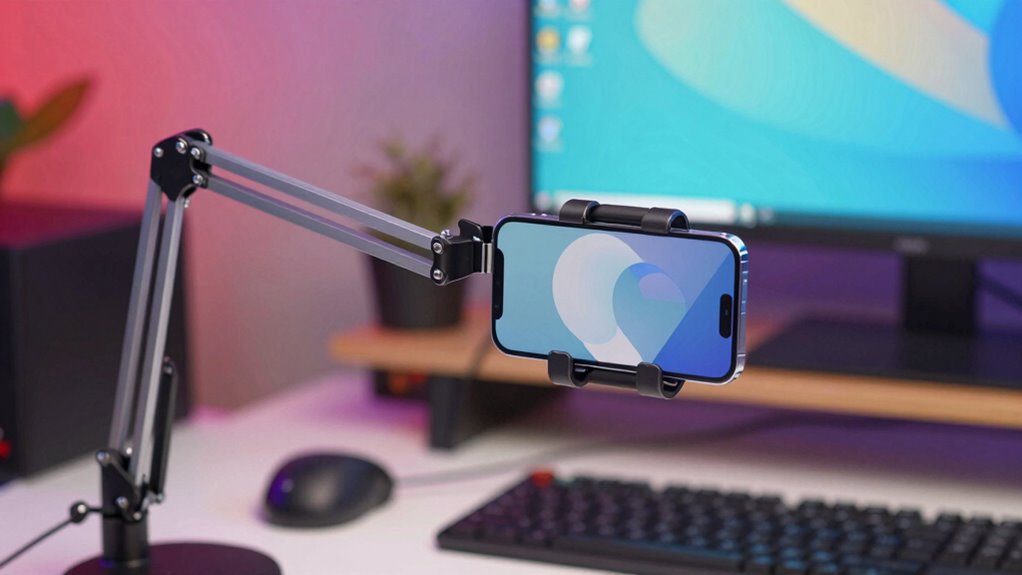

For creators seeking a premium overhead phone mount rig, the goal is a setup that combines stability, versatility, and ease of use. The SmallRig Universal Phone Holder Mount stands out as the best overall, offering a solid blend of build quality and adaptability. The JUSMO LS15 Pro Aluminum Mount delivers exceptional durability for more intensive use, while the NEEWER Magic Arm with Desk Clamp provides flexible positioning at a more accessible price. Buyers in this category often face tradeoffs between premium build and ease of installation, or between versatility and cost. Keep reading for a detailed breakdown of these options and what to consider before making your choice.

Get business pricing on office and shipping supplies
- Business-only prices and quantity discounts
- Tax-exempt purchasing
- Multiple users, one account, clear invoices
Key Takeaways
- The best overhead rigs combine sturdy build quality with flexible positioning options.
- Premium models tend to be heavier but offer more reliable stability for professional use.
- Clamping mechanisms and mounting versatility are key factors for easy setup and adjustment.
- Higher-priced options often include integrated accessories like ring lights or multiple mounting points.
- Balancing cost against durability and ease of use is critical for long-term satisfaction.
| SMALLRIG Universal Phone Holder Mount with Cold Shoe |  | Best for Versatile Mounting and Accessibility | Compatibility: Smartphones 57-88mm wide | Mounting Options: 1/4″-20 threaded hole, cold shoe | Adjustment: 180 degrees | VIEW ON AMAZON | See Our Full Breakdown |
| JUSMO LS15 Pro Aluminum Overhead Camera Desk Mount |  | Best Heavy-Duty, Adjustable Overhead Rig | Material: Aluminum alloy | Max Load Capacity: 10kg / 22.05 lbs | C-Clamp Width: 90mm / 3.54 in | VIEW ON AMAZON | See Our Full Breakdown |
| NEWER 22″ Magic Arm with Desk Clamp and Articulating Mic Boom Arm (UA057) |  | Best for Flexible Articulating Mounting | Arm Length: 55 cm / 22″ | Max Load: 500 g / 17.6 oz | Clamp Capacity (Flat): Up to 2″ / 50 mm | VIEW ON AMAZON | See Our Full Breakdown |
| NEWER Overhead Camera Mount Rig with 2 Ball Heads, Super Clamp, NK002 |  | Best Heavy-Duty Multi-Device Rig | Max Load: 26.5 lb / 12 kg | Clamp Width: 2.6 inches / 6.5 cm | Height Adjustment: 27.2 to 48 inches | VIEW ON AMAZON | See Our Full Breakdown |
| NEWER Overhead Camera Mount Rig with Dual Ball Head Super Clamp, Phone Holder & C-Clamp for Desktop Top-Down Shots |  | Best for All-in-One Desktop Overhead Setup | Stand Height Range: 27.2″ – 48.0″ | Crossbar Length Range: 25.2″ – 47.2″ | Max Load (Super Clamp/Magic Arm): 6.6 lbs / 3 kg | VIEW ON AMAZON | See Our Full Breakdown |
| SmallRig Triangle Camera Desk Mount, Overhead Desk Clamp Phone Mount |  | Best for Versatile Stability and Heavy Devices | Load Capacity: 3kg | Clamp Thickness: up to 7cm | Horizontal Rod Length: 42cm-68.5cm | VIEW ON AMAZON | See Our Full Breakdown |
| ARKON Mounts Phone Holder Full Kit – Adjustable Overhead Arm Cell Phone Table Top Stand and Tablet Mount with Ring Light |  | Best for All-in-One Overhead Filming with Lighting | Phone Compatibility: Up to 3.9 inches wide | Tablet Compatibility: Up to 7″ x 18.4″ | Adjustable Points: 5 | VIEW ON AMAZON | See Our Full Breakdown |
| SMALLRIG Camera Desk Mount Overhead Camera Arm Stand for Desk |  | Best for Adjustable Height and Multi-Device Support | Maximum Load: 2kg | Main Pole Height Range: 30 to 73cm | Secondary Arm Length: 30 to 50cm | VIEW ON AMAZON | See Our Full Breakdown |
| SMALLRIG 22″ Magic Arm Clamp, Overhead Phone Mount Holder Stand, Camera Arm |  | Best for Extended Reach and Flexible Positioning | Length: 22 inches | Load Capacity: 600g / 21oz | Clamp Opening: 63.5mm | VIEW ON AMAZON | See Our Full Breakdown |
| EMART Overhead Camera Mount Rig with Adjustable Height/Width and Phone Holder |  | Best for Heavy-Duty, Large-Scale Overhead Setups | Max Load: 26.5 lbs (12 kg) | Height Range: 27.2″ – 48″ | Width Range: 25.2″ – 47.2″ | VIEW ON AMAZON | See Our Full Breakdown |
| premium overhead phone mount rig for creator | Material |
|---|---|
| SMALLRIG Universal Phone Holde | — |
| JUSMO LS15 Pro Aluminum Overhe | Aluminum alloy |
| NEWER 22" Magic Arm with Desk | — |
| NEWER Overhead Camera Mount Ri | — |
| NEWER Overhead Camera Mount Ri | — |
| SmallRig Triangle Camera Desk | Metal |
| ARKON Mounts Phone Holder Full | Plastic and metal |
| SMALLRIG Camera Desk Mount Ove | Metal |
| SMALLRIG 22" Magic Arm Clamp | Aluminum alloy |
| EMART Overhead Camera Mount Ri | Aluminum alloy |
More Details on Our Top Picks
SMALLRIG Universal Phone Holder Mount with Cold Shoe
This phone holder from SMALLRIG excels in versatility, seamlessly switching between landscape and portrait modes thanks to its 180-degree adjustment, making it ideal for creators needing quick orientation changes. Compared to larger overhead rigs like the NK003, it offers a more compact and portable solution, but its 500g load limit can restrict heavier phones or accessories. Its compatibility with a wide range of smartphones and the inclusion of threaded holes and a cold shoe make it adaptable for various setups. However, for complex multi-device rigs, the need for extra accessories might add complexity and cost. This pick is suited for creators who prioritize flexibility and easy integration with other equipment, especially in smaller or mobile setups.
Pros:- Supports quick switching between landscape and portrait modes
- Compatible with a wide range of smartphones (57-88mm wide)
- Includes threaded holes and cold shoe for accessories
Cons:- Maximum load capacity is only 500g, limiting heavier phones or add-ons
- Requires additional accessories for some setups, increasing complexity
Best for: Vloggers and live streamers who need quick, on-the-fly orientation changes and accessory compatibility
Not ideal for: Heavy content creators using large, professional smartphones or heavy accessories, due to its limited load capacity
- Compatibility:Smartphones 57-88mm wide
- Mounting Options:1/4″-20 threaded hole, cold shoe
- Adjustment:180 degrees
- Load Capacity:500g
Our verdict“This holder is best for creators needing a flexible, portable phone mount with accessory options, but not for those using heavier gear.”
JUSMO LS15 Pro Aluminum Overhead Camera Desk Mount
The JUSMO LS15 Pro stands out for its robust aluminum alloy construction and impressive 10kg load capacity, making it suitable for heavier cameras, lights, and microphones. Its segmented, adjustable design offers a high degree of DIY customization, unlike simpler mounts such as the SMALLRIG holder. The enlarged C-clamp fits most desktops up to 90mm wide, providing a stable base while saving space. However, the need to purchase additional poles and clamps separately can increase setup costs, and the assembly process may be more involved for beginners. This rig is ideal for creators seeking a durable, high-capacity overhead solution with flexible adjustments for professional-quality setups.
Pros:- Sturdy aluminum construction supports up to 10kg (22 lbs)
- Flexible segmented design allows customized height and length
- Enlarged C-clamp fits most desktops and saves space
- Expandable with additional poles and accessories
Cons:- Additional poles and clamps are sold separately, increasing total cost
- Assembly may be complex for users unfamiliar with modular rigs
Best for: Professional content creators and streamers working with heavier equipment requiring maximum stability
Not ideal for: Casual or mobile creators who prefer quick setup and lightweight gear, as assembly can be time-consuming
- Material:Aluminum alloy
- Max Load Capacity:10kg / 22.05 lbs
- C-Clamp Width:90mm / 3.54 in
- Design:Segmented, adjustable length and height
Our verdict“This mount is perfect for creators who need a durable, high-capacity overhead setup and are comfortable with assembly, but less so for casual users.”
NEWER 22″ Magic Arm with Desk Clamp and Articulating Mic Boom Arm (UA057)
This 22-inch aluminum alloy magic arm offers exceptional flexibility with 3 sets of 360° dual ball heads, making it ideal for precise positioning of cameras, microphones, and phones on flat or round surfaces. Compared to larger overhead rigs like the NK003, it provides a more compact, articulating solution suited for tight spaces or detailed setups. However, its 500g weight limit restricts heavier gear, and the friction-based joints may loosen over time with frequent adjustments. The clamp’s capacity (up to 2 inches thick or 1.6 inches round) supports most desks and poles, but the arm’s limited payload makes it better suited to lighter devices. This product is best for creators needing versatile, precise angles in small or intricate workspaces.
Pros:- Versatile mounting for cameras, phones, microphones, and lights
- 360° dual ball heads for flexible angle and height adjustments
- Clamps to flat surfaces and round poles/stands
Cons:- Limited to 500g payload, unsuitable for heavier gear
- Friction joints may loosen over time with frequent adjustments
Best for: Photographers, videographers, and streamers needing flexible, precise mounting for lightweight gear
Not ideal for: Heavy equipment users or those seeking a more permanent overhead rig, due to its limited weight capacity
- Arm Length:55 cm / 22″
- Max Load:500 g / 17.6 oz
- Clamp Capacity (Flat):Up to 2″ / 50 mm
- Clamp Capacity (Round):Up to 1.6″ / 40 mm
Our verdict“This articulating arm is excellent for precision positioning of lightweight equipment, but not for heavy-duty content creation.”
NEWER Overhead Camera Mount Rig with 2 Ball Heads, Super Clamp, NK002
The NK002 offers a robust solution for creators needing a high-capacity overhead rig, supporting up to 26.5 lbs with its heavy-duty anodized aluminum design. Its adjustable height (27.2 to 48 inches) and width (25.2 to 47.2 inches) make it highly adaptable for various studio setups, surpassing smaller options like the SMALLRIG holder. The dual ball heads provide versatile angles, but the need to purchase accessories separately, such as crossbars, can add to the overall investment. Assembly might challenge beginners, but for those with experience, this rig delivers outstanding stability for large cameras and multiple devices. It’s a prime choice for complex setups demanding maximum support and flexibility.
Pros:- Supports up to 26.5 lbs (12 kg), ideal for heavy gear
- Adjustable height and width for custom setups
- Dual ball heads for versatile angles
- Heavy-duty anodized aluminum construction
Cons:- Additional accessories like crossbars are sold separately
- Assembly can be complex for beginners
Best for: Professional videographers and streamers working with large cameras and multiple accessories in a fixed studio environment
Not ideal for: Casual creators or those with limited space or budget, given its size and additional accessory costs
- Max Load:26.5 lb / 12 kg
- Clamp Width:2.6 inches / 6.5 cm
- Height Adjustment:27.2 to 48 inches
- Width Adjustment:25.2 to 47.2 inches
Our verdict“This rig is best for creators needing maximum support and flexibility in a professional or studio setting, but requires some setup effort.”
NEWER Overhead Camera Mount Rig with Dual Ball Head Super Clamp, Phone Holder & C-Clamp for Desktop Top-Down Shots
The NK003 provides an extensive, multi-device overhead setup with height (27.2 to 48 inches) and crossbar length (25.2 to 47.2 inches) adjustability, making it highly adaptable for top-down photography and streaming. Its sturdy anodized aluminum construction and high load capacities (up to 26.5 lbs for stands, 6.6 lbs for super clamp) support a range of devices from smartphones to cameras. The multiple mounting points and threaded options allow for extensive customization, setting it apart from simpler rigs like the SMALLRIG holder. However, additional accessories such as lights and telescopic arms are sold separately, and it requires a stable table or desk for clamping. This rig best suits creators who need a comprehensive, multi-device setup for studio-style production.
Pros:- Supports multiple devices including cameras, phones, and microphones
- Height and length adjustable for flexible layouts
- Dual ball heads for multi-angle shooting
- High load capacity supports professional gear
Cons:- Additional accessories are sold separately, increasing overall cost
- Requires sturdy desk or table for effective clamping
Best for: Studio-based creators needing a versatile, multi-device overhead rig with extensive adjustability
Not ideal for: Mobile or on-the-go creators who require lightweight, quick-setup options, as this rig is more complex and stationary
- Stand Height Range:27.2″ – 48.0″
- Crossbar Length Range:25.2″ – 47.2″
- Max Load (Super Clamp/Magic Arm):6.6 lbs / 3 kg
- Max Load (Stands):26.5 lbs / 12 kg
Our verdict“This comprehensive overhead rig is ideal for creators with a studio setup seeking maximum flexibility and device support, but less suitable for portable needs.”
SmallRig Triangle Camera Desk Mount, Overhead Desk Clamp Phone Mount
The SmallRig Triangle Camera Desk Mount stands out for its robust triangular support structure, offering improved stability compared to simpler adjustable arms like the SMALLRIG 22″ Magic Arm. Its ability to support up to 3kg makes it suitable for heavier cameras and webcams, making it a solid choice for creators needing reliable overhead setups. However, its bulkier design may be less ideal for small or cluttered desks, and the locking knobs can be less intuitive. Compared to the ARKON Mounts Full Kit, it lacks a built-in lighting component but compensates with a sturdier, more stable mount for heavier gear. Tradeoffs include increased size and weight, which could limit portability, but it offers superior stability for demanding shooting scenarios.
Pros:- Stable triangular support enhances shooting stability
- Adjustable angles for versatile positioning
- Supports a wide range of devices up to 3kg
Cons:- Bulky design may clutter small desks
- Locking knobs can be less user-friendly
- Limited to devices under 3kg weight
Best for: Creators who need a stable, heavy-duty overhead mount for cameras or webcams on larger desks
Not ideal for: Small-space creators or those seeking a lightweight, portable setup
- Load Capacity:3kg
- Clamp Thickness:up to 7cm
- Horizontal Rod Length:42cm-68.5cm
- Material:Metal
- Compatibility:Cameras, action cameras, webcams, smartphones
- Design:Triangular support structure
Our verdict“This mount is perfect for creators prioritizing stability and heavy device support over portability.”
ARKON Mounts Phone Holder Full Kit – Adjustable Overhead Arm Cell Phone Table Top Stand and Tablet Mount with Ring Light
The ARKON Mounts Full Kit excels in offering a comprehensive overhead filming setup, including a ring light, adjustable arm, and mounts for phones and tablets. Its five-point articulation compares favorably to simpler setups like the SMALLRIG 22″ Magic Arm, delivering precise control over position and lighting. While it provides excellent versatility, it requires a stable tabletop or surface and can be bulky for limited spaces. The inclusion of a ring light enhances video quality, making it ideal for beauty, crafting, or tutorial creators. Tradeoffs involve a larger footprint and the need for a flat surface, which could be a drawback for mobile or minimalist setups, but it offers unmatched flexibility for studio-style overhead recordings.
Pros:- Versatile five-point articulation for precise positioning
- Includes ring light for improved video quality
- Universal fit for most phones and tablets
Cons:- Requires flat surface for stable setup
- Bulkier than simple arms, may clutter small spaces
Best for: Content creators who want an all-in-one overhead rig with integrated lighting for tutorials and product demos
Not ideal for: Creators with limited desk space or those needing a portable, lightweight solution
- Phone Compatibility:Up to 3.9 inches wide
- Tablet Compatibility:Up to 7″ x 18.4″
- Adjustable Points:5
- Includes:Ring light, overhead arm, phone holder, tablet mount, tabletop base
- Material:Plastic and metal
- Base Type:Tabletop
Our verdict“This kit is ideal for creators seeking a complete, adjustable overhead setup with integrated lighting for professional-looking videos.”
SMALLRIG Camera Desk Mount Overhead Camera Arm Stand for Desk
The SMALLRIG Desk Mount offers a practical solution for live streaming, tabletop photography, and conferencing, with adjustable height and angle features that rival the flexibility of the NEEWER Overhead Mount Rig. Its maximum load of 2kg makes it suitable for smartphones and lightweight cameras but falls short compared to larger setups like the EMART Rig, which supports heavier gear. Its base compatibility with desks up to 6cm thick provides versatility, but manual adjustments can be time-consuming. It’s a suitable choice for users needing a stable, multi-device setup without the bulk of larger rigs. Tradeoffs include a slightly lower load capacity and more manual setup, but it benefits from easy adjustability and stability for moderate devices.
Pros:- Adjustable height and angle for flexible shooting
- Supports multiple devices simultaneously
- Compatible with various desk thicknesses up to 6cm
Cons:- Limited to 2kg load capacity
- Requires manual setup and adjustments
- Base compatibility restrictions for very thick surfaces
Best for: Streamers or content creators who need flexible height and device support on standard desks
Not ideal for: Heavy equipment users or those with very thick desks needing higher load capacity
- Maximum Load:2kg
- Main Pole Height Range:30 to 73cm
- Secondary Arm Length:30 to 50cm
- Base Thickness Compatibility:1 to 6 cm
- Threaded Holes:1/4″-20 and 3/8″-16
- Material:Metal
Our verdict“This mount suits creators seeking a versatile, multi-device overhead solution with adjustable height for standard desks.”
SMALLRIG 22″ Magic Arm Clamp, Overhead Phone Mount Holder Stand, Camera Arm
The SMALLRIG 22″ Magic Arm provides an extended length ideal for dynamic overhead angles, surpassing shorter arms like the ARKON Mounts in reach. Its aluminum alloy construction ensures durability while the double-ball clamps allow for versatile positioning. However, the 600g load capacity limits it to lighter equipment such as smartphones and small microphones, unlike the EMART Rig, which can handle heavier DSLR setups. Precise adjustment is essential to prevent slippage, and some users may find the setup complex. Still, its long reach makes it a favorite for creative overhead shots and streaming setups that require flexibility.
Pros:- Long 22-inch arm for extended reach
- Multiple clamps and adapters for device variety
- Anti-slip pads protect devices and surfaces
Cons:- Limited to 600g load capacity, unsuitable for heavier gear
- Requires careful adjustment to avoid slipping
- Complex setup for some users
Best for: Content creators needing extended reach and adaptable positioning for overhead shots
Not ideal for: Users with heavier equipment or seeking a simple, quick-to-set mount
- Length:22 inches
- Load Capacity:600g / 21oz
- Clamp Opening:63.5mm
- Material:Aluminum alloy
- Compatible Devices:Phones 5.5-8.5cm wide, microphones, webcams, lights
- Joint Type:Double-ball clamps
Our verdict“This arm is perfect for creators who need maximum reach and flexible positioning for lightweight devices.”
EMART Overhead Camera Mount Rig with Adjustable Height/Width and Phone Holder
The EMART Overhead Camera Mount Rig offers a heavy-duty solution capable of supporting up to 26.5 lbs, making it suitable for DSLR cameras, larger lighting gear, or multiple devices simultaneously. Its telescopic arms with clear scales provide precise control over height and width, surpassing the flexibility of smaller setups like the SMALLRIG Desk Mount. The robust aluminum alloy construction and C-clamp base ensure stability on desks up to 3.5″ thick, but the large size and disassembly requirement might deter those seeking a quick or portable rig. For demanding creators, this rig offers unmatched capacity and adjustability, but it is less suited for compact or mobile workflows.
Pros:- Supports up to 26.5 lbs, suitable for DSLRs and lighting
- Telescopic height and width with clear scales for precise setup
- Wide compatibility with cameras, phones, webcams, and lighting gear
Cons:- Requires disassembly for storage and transport
- Large footprint may not fit small or cluttered spaces
- Higher price point compared to smaller rigs
Best for: Professional creators needing a heavy-duty, adjustable overhead rig for high-capacity equipment
Not ideal for: Casual or mobile creators who prefer lightweight, easy-to-transport setups
- Max Load:26.5 lbs (12 kg)
- Height Range:27.2″ – 48″
- Width Range:25.2″ – 47.2″
- Material:Aluminum alloy
- Phone Holder Width:2.2″ – 3.3″
- Mounting:C-clamp
Our verdict“This rig is ideal for professionals needing maximum load capacity and precise adjustability for large gear.”
How We Picked
Each product was evaluated based on build quality, stability, ease of installation, versatility, and value for money. We prioritized rigs that offered reliable positioning and durable materials, as these are essential for professional-quality content creation. Products were also assessed for their compatibility with various phone sizes and their ability to support different filming angles. Our ranking reflects the best combination of these factors, ensuring creators can find a rig that meets their needs without unnecessary complexity or cost.| premium overhead phone mount rig for creator | Material |
|---|---|
| SMALLRIG Universal Phone Holde | — |
| JUSMO LS15 Pro Aluminum Overhe | Aluminum alloy |
| NEWER 22" Magic Arm with Desk | — |
| NEWER Overhead Camera Mount Ri | — |
| NEWER Overhead Camera Mount Ri | — |
| SmallRig Triangle Camera Desk | Metal |
| ARKON Mounts Phone Holder Full | Plastic and metal |
| SMALLRIG Camera Desk Mount Ove | Metal |
| SMALLRIG 22" Magic Arm Clamp | Aluminum alloy |
| EMART Overhead Camera Mount Ri | Aluminum alloy |
Factors to Consider When Choosing Premium Overhead Phone Mount Rig For Creators
Choosing the right premium overhead phone mount rig involves understanding several key factors that impact your filming experience. Beyond basic features, consider how the rig’s stability, adjustability, and compatibility will affect your workflow. A good rig should be easy to install, versatile enough to adapt to different setups, and durable enough to withstand regular use. Being mindful of these elements helps prevent buyer’s remorse and ensures your investment supports your creative goals.Build Quality and Durability
Premium rigs should be made from high-quality materials such as aluminum or reinforced plastics that resist wear and provide reliable stability. Cheaper options may wobble or loosen over time, especially with frequent adjustments. Investing in a sturdy build pays off through consistent performance, especially if you film often or need to support heavier phones or accessories.
Adjustability and Range of Motion
Look for rigs offering multiple points of articulation, such as adjustable arms, flexible joints, or ball heads. This flexibility ensures you can achieve the perfect angle quickly. However, more adjustable setups can sometimes feel less stable if not well-designed, so balance range of motion with locking mechanisms for security during filming.
Compatibility and Size Support
Premium rigs should accommodate a wide range of phone sizes and models without difficulty. Check the clamp or holder specifications to confirm fit. If you plan to switch between devices or use accessories like ring lights, ensure compatibility to avoid needing multiple mounts or adapters.
Ease of Installation and Adjustment
Ease of setup is essential, especially if you frequently reposition your rig. Quick-release clamps, smooth adjustment knobs, and intuitive locking mechanisms save time. Complex setups can become frustrating, so prioritize designs that strike a balance between versatility and simplicity.
Additional Features and Accessories
Many premium rigs include extras such as integrated lighting, multiple mounting points, or built-in cable management. While these add convenience, they can also increase cost and complexity. Consider whether these features align with your content creation needs or if a simpler rig will suffice.
Frequently Asked Questions
Will a heavier rig affect the stability of my setup?
Yes, a heavier rig generally provides better stability, especially for professional filming or long sessions. However, it also means you need a sturdy mounting surface and may require stronger clamps or support arms. Balance weight with ease of handling to ensure your setup remains secure and manageable during use.
Can these rigs support larger phones or accessories like ring lights?
Most premium overhead rigs are designed to accommodate a range of phone sizes, but it’s important to verify the clamp’s maximum supported width. For additional accessories like ring lights or microphones, look for rigs with multiple mounting points or integrated features. Compatibility is key to avoiding the need for multiple mounts and ensuring stability.
Are adjustable arms prone to slipping or loosening over time?
Adjustable arms can loosen if not equipped with high-quality locking mechanisms, which is a common issue in less premium models. Investing in rigs with reliable locking joints or tension controls helps maintain your desired position during filming. Regularly tightening or checking these joints can also prolong their lifespan.
Is it better to choose a rig with integrated lighting?
Integrated lighting can simplify your setup, especially in tight or poorly lit environments, but it often adds to the cost and complexity. If lighting is crucial to your workflow, a rig with built-in or compatible lighting options might be worth the investment. Otherwise, modular setups allow more flexibility and potential upgrades down the line.
How much should I expect to pay for a high-quality overhead phone mount rig?
Premium rigs typically range from around $100 to over $250, depending on features and build quality. Spending more often yields better durability, stability, and adjustability, which can be worth it for professional content creators. However, carefully assessing your specific needs will help you find a rig that offers the best value for your budget.