
TL;DR
Building your own AI workstation used to be cheaper, but supply shortages and market shifts mean prebuilt systems often match or beat DIY costs today. The choice depends on your time, expertise, and support needs, not just price.
Imagine plugging in a machine that’s ready to run your AI models in minutes. No fuss, no troubleshooting. Now ask yourself: should you build that machine yourself or buy it preassembled? The answer isn’t what it used to be. For years, building was the clear winner for cost and customization. Today? It’s a different game. Prices for GPU, RAM, and SSD components have skyrocketed, making DIY less of a no-brainer. The AI boom has reshaped the landscape, turning the decision into a balancing act between cost, time, support, and control. This guide will help you weigh the pros and cons so you can make the smartest choice for your workload and workflow.
Build vs buy
an AI workstation.
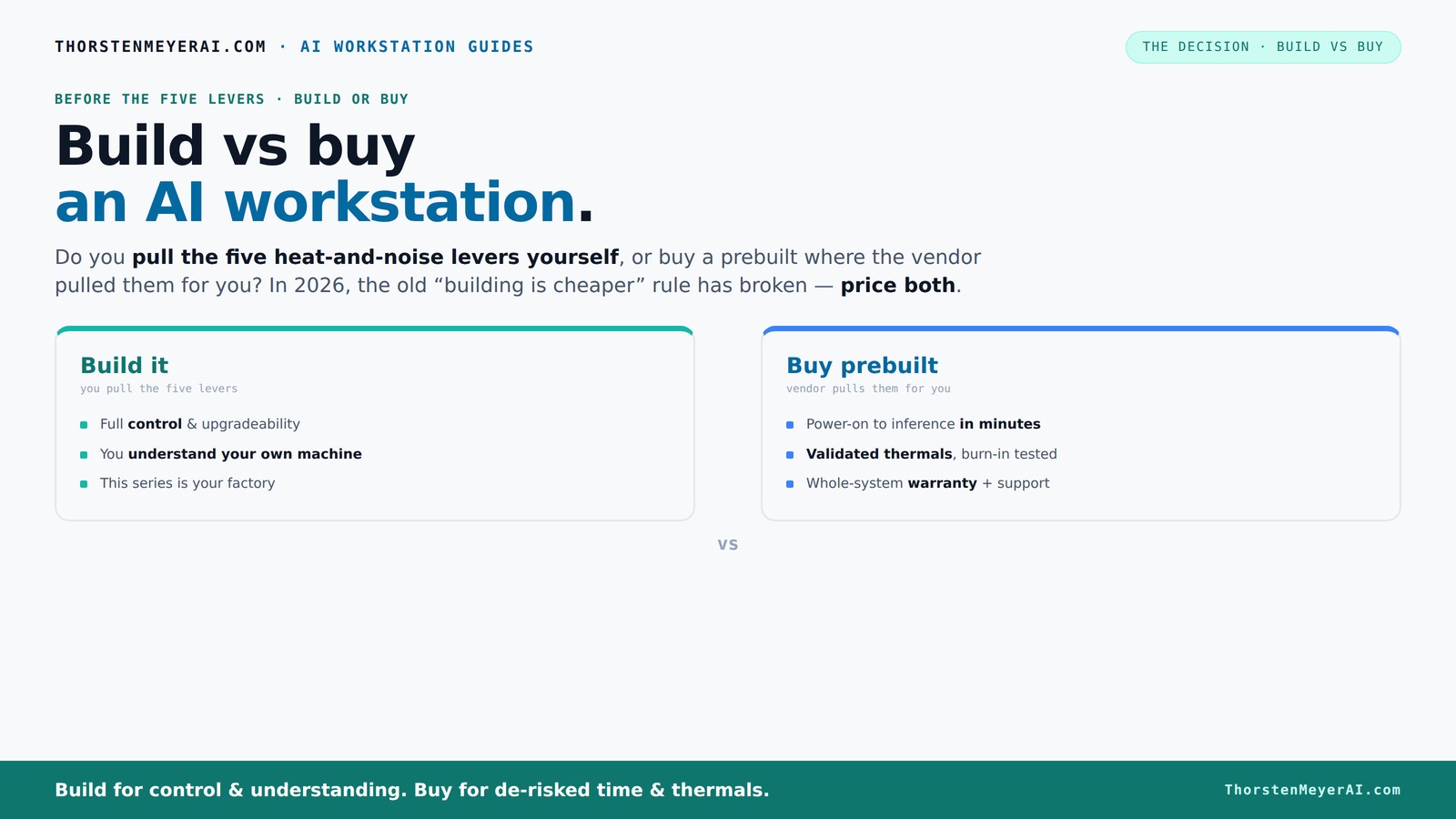
The real question behind this whole series: do you pull the five heat-and-noise levers yourself, or buy a prebuilt where the vendor pulled them for you? And in 2026, the old “building is cheaper” rule has broken. Match your situation in Part 3.
Key Takeaways
- Component shortages in 2026 mean prebuilt AI workstations often match or beat DIY costs for high-end specs.
- Support, warranty, and thermal validation are major advantages of prebuilt systems, especially for multi-GPU setups.
- DIY offers unmatched customization and upgradeability but requires time, effort, and troubleshooting skills.
- Evaluate your workload, budget, and patience before choosing between build and buy — the best option varies per user.
- Prioritize GPU VRAM, cooling, and power supply quality for a smooth AI experience, regardless of your choice.
As an affiliate, we earn on qualifying purchases.
What an AI Workstation Needs to Do for You
Before diving into build or buy, know what your AI workstation must handle. Think about your workload: training models, running inferences, or both. You’ll want a powerful GPU—think 24+ GB VRAM for big models—and a CPU that can keep up without bottlenecking. Speedy SSD storage helps data flow smoothly, and enough RAM keeps everything running without hiccups. Cooling and noise levels matter too, especially if your machine runs 24/7.
Picture a machine humming quietly in the corner, handling thousands of inferences daily—its thermal and acoustic design makes all the difference. This is what makes the choice real: do you want a machine tuned for your specific needs, or one that just works out of the box?
Build vs Buy: The Core Tradeoffs You Can’t Ignore
Building your own AI workstation used to be a no-brainer for cost. Now? Component shortages and bulk buying have turned that on its head. A custom build might still give you control, but it can cost more and take longer to get right.
Prebuilt systems come with validation, support, and often better thermal management. They’re ready to go—no assembly or troubleshooting needed. But that convenience can come at a premium, and sometimes they use proprietary parts that limit upgrades.
Here’s a quick comparison:
| Feature | Build Your Own | Buy Prebuilt |
|---|---|---|
| Cost | Often less, but only if prices are stable and you have time | Usually more upfront, but includes validation and support |
| Time to Ready | Weeks, depending on parts availability and assembly time | Days, sometimes same day if local or online vendor |
| Customization | Full control over parts, cooling, and setup | Limited by vendor options, but optimized for AI workloads |
| Support & Warranty | Own responsibility, DIY troubleshooting | Vendor-backed, often with support and warranty |
Deciding hinges on what you value more: control and cost or convenience and support. It’s essential to consider how each option aligns with your workflow needs, technical skills, and the importance of quick deployment versus long-term flexibility. A DIY build can offer unparalleled customization and learning opportunities, but it also introduces risks of delays and troubleshooting. Conversely, prebuilt systems provide reliability and peace of mind, which can be critical for professional or time-sensitive projects. The tradeoff is ultimately about balancing these factors against your specific priorities and resources.
When Buying a Prebuilt Makes Sense in 2026
If you want a plug-and-play solution with reliable thermals and support, a prebuilt is your best bet. Vendors like Lambda, Puget, and BIZON test every system under load, tune fans, and validate cooling—so you get a machine that won’t throttle or overheat during long training runs.
Imagine you’re running a multi-GPU setup for deep learning. The vendor’s expertise in power delivery and cooling means your system stays stable and quiet. Plus, a good warranty means less stress if hardware hiccups happen during a marathon training session.
And yes, sometimes the upfront cost is justified. If your time is valuable, paying a bit more for a ready-to-run system might save you days of troubleshooting and tuning. Reliability and support become even more critical when your workload depends on consistent performance, especially in professional environments where downtime can be costly. Prebuilts often undergo rigorous validation, reducing the risk of hardware failures and ensuring thermal stability, which directly impacts the longevity and performance of your investment.
When Building It Yourself Is Still the Right Move
Are you a hobbyist, researcher, or student with time on your hands? Do you enjoy the puzzle of selecting each part and tuning your system? Building lets you tailor everything—from choosing a super-quiet GPU (see how to find quiet GPUs) to undervolting for power efficiency (learn undervolting techniques).
Plus, if you’re working with niche hardware or want to squeeze out every ounce of performance, DIY offers flexibility. You can swap components, upgrade later, and learn the ins and outs of your machine. This deep level of customization not only allows you to optimize for specific tasks but also provides a valuable learning experience. Understanding how each component interacts and affects overall performance enables more effective troubleshooting and future upgrades, ultimately leading to a more efficient and tailored system that can evolve with your needs.
Just remember: this takes time, patience, and a willingness to troubleshoot. But if you’re passionate about hardware or building for long-term upgradeability, it’s still a smart move.
Balancing Cost, Time, and Support in 2026
The old rule — build cheap, buy fast — no longer applies without caveats. Today, component shortages mean a DIY build might cost more than you think, especially with recent GPU price hikes. Meanwhile, prebuilt vendors leverage bulk buying and validation to offer systems that are often competitively priced or even cheaper for high-end configs.
Consider the hidden costs: time spent troubleshooting, potential delays, and the risk of mismatched parts. Support and warranty are also key—if your machine crashes during a critical project, do you want to be on hold with parts sourcing or talking to a vendor with a dedicated support team?
Ultimately, your choice depends on what you value most: immediate deployment, guaranteed support, or total control and customization. Recognizing these tradeoffs helps you make an informed decision aligned with your project timelines and long-term goals.
Hardware Checklist for an AI Workstation
Here’s what you should prioritize regardless of build or buy:
- GPU: 24+ GB VRAM, quiet, power-efficient models like RTX 4090 or A100
- CPU: High-core-count, latest generation, e.g., AMD Ryzen 7950X or Intel Core i9-13900K
- RAM: At least 64 GB DDR5, ECC if your workload demands it
- Storage: NVMe SSDs, 2+ TB for fast data access
- Cooling & Noise: Quiet coolers, sound-dampening cases, well-placed fans
- Power Supply: 80 Plus Platinum, 1000+ W for headroom
Upgrading and Maintaining Your AI Workstation
If you build your own system, upgrading is straightforward—swap out a GPU or add RAM. But be cautious about proprietary parts in prebuilts that can limit future upgrades. Support and warranty are key when something breaks or performance drops.
For prebuilt systems, check if the vendor offers upgrade paths or support for component replacements. For DIY, keep track of compatibility (e.g., motherboard slots, PSU connectors) and document your setup.
Remember: thermal management and power delivery are critical for sustained AI workloads. Proper cooling and reliable power supplies extend your machine’s lifespan and keep it running smoothly.
Your Top Questions About Build vs Buy Answered
Is it cheaper to build an AI workstation or buy prebuilt? Usually, a DIY build is cheaper if you have time and expertise, but recent market swings have made prebuilts competitive or even cheaper at high-end specs. However, the real savings depend on your ability to source parts, the time you invest, and your technical skills. In some cases, the hidden costs of troubleshooting and delays can outweigh initial savings, especially if you’re balancing multiple projects or tight deadlines.
Which option gives better performance for the money? It depends. Builders can customize for maximum efficiency tailored to your workload, but prebuilt vendors often optimize thermal and power management, sometimes matching or exceeding DIY performance due to rigorous testing and validation. The choice hinges on whether you value fine-tuning or reliable factory validation more.
Do I need ECC memory for AI work? If your work involves long training sessions, critical data integrity, or error-sensitive tasks, ECC memory provides an extra layer of error detection, reducing the risk of silent data corruption that can skew results. For inference or less critical workloads, standard RAM usually suffices, but understanding your workload’s tolerance for errors is key.
How important is warranty support? Critical if you’re deploying in a professional environment where downtime can be costly. Prebuilts typically come with support and warranties, offering quick repairs and replacements, which minimizes downtime. DIY setups require self-troubleshooting or third-party repairs, which can be time-consuming and stressful, especially during critical phases.
Can a prebuilt be upgraded later? Usually yes, but some proprietary parts or limited upgrade slots can restrict future enhancements. It’s important to examine the vendor’s upgrade policies, compatibility of components, and available expansion options before purchasing. Planning for future upgrades ensures your investment remains relevant and adaptable as your workload evolves.
Frequently Asked Questions
Is it cheaper to build an AI workstation or buy prebuilt?
Usually, building is cheaper if you have time and know-how, but recent market swings have made high-end prebuilts competitive or even less expensive for top configurations [2]. The actual cost savings depend heavily on your ability to source parts, your technical skills, and the time you are willing to invest. Hidden costs like troubleshooting and delays can sometimes outweigh initial savings, especially if your workload is time-sensitive.Which option gives better performance for the money?
It depends on your priorities. Building your own system allows for fine-tuning and custom hardware choices tailored to your specific workload, potentially maximizing performance. However, prebuilt systems often undergo extensive testing, thermal validation, and optimization, which can result in comparable or superior performance for certain configurations. The decision hinges on whether you prefer customization or reliability through factory validation.Do I need ECC memory for AI work?
If your AI projects involve long training runs, critical data, or applications where errors can significantly impact results, ECC memory provides an important safeguard by detecting and correcting memory errors. This reduces the risk of silent data corruption that can skew your models or data. For inference or less critical tasks, standard RAM usually suffices, but understanding your workload’s tolerance for errors helps determine if ECC is worth the extra cost.How important is warranty support?
Support and warranty are vital if your AI workstation is a core part of your professional or research workflow. Prebuilt systems typically come with comprehensive support, quick replacements, and warranty services, minimizing downtime during hardware failures. DIY setups require self-troubleshooting or third-party repairs, which can introduce delays and stress during critical periods. Weighing the importance of support depends on your reliance on uptime and your technical comfort level.Can a prebuilt workstation be upgraded later?
Most prebuilts can be upgraded, but proprietary components, limited expansion slots, or integrated designs can restrict future upgrades. It's essential to review vendor specifications and upgrade policies before purchasing. Planning for future expansion ensures your investment remains flexible and adaptable as your workload or technology standards evolve, preventing obsolescence and enabling continued performance improvements.Conclusion
Choosing between building or buying your AI workstation is no longer just about saving money. It’s about how much control you want, how quickly you need results, and how much support you value. In 2026, the best choice depends on your workflow, expertise, and long-term plans.
Think about your goals, then pick the path that aligns. Whether you build or buy, remember: your machine is your tool—make it work for you, not against you.