The best AI auto-framing webcams keep you in view without forcing you to adjust the camera during calls. My best overall pick is the OBSBOT Tiny 3, which pairs AI tracking with PTZ movement and spatial audio; the Insta360 Link 2C Pro is a strong choice for a polished desktop setup, while the TONGVEO 4K NDI PTZ suits rooms that need optical zoom and flexible video connections. The tradeoffs are practical: compact webcams are simple to set up, but dedicated PTZ and video-bar systems better suit shared rooms and presenters who move around. Sensor quality, tracking behavior, microphone needs, and connection options all affect which camera makes sense. Read on for my full comparison of these 12 AI auto-framing webcams.

Get business pricing on office and shipping supplies
- Business-only prices and quantity discounts
- Tax-exempt purchasing
- Multiple users, one account, clear invoices
Complete the kit

Key Takeaways
- Room size changes the shortlist: The TONGVEO‘s 20X optical zoom and NDI, HDMI, SDI, USB, and IP connections target installed or live-production setups, not a typical laptop desk.
- Tracking hardware matters more than the AI label: PTZ models such as the OBSBOT Tiny 3 and SVBONY SVN W2 can physically follow movement, while many desk webcams frame you without the same room-scale flexibility.
- Several listings describe the same OBSBOT Meet 2: The standard versions appear twice, and another listing adds a mini tripod; compare the bundle and included accessories rather than treating each as a distinct camera.
- All-in-one meeting units trade simplicity for specialization: The 5-in-1, TOALLIN, and ROCWARE options combine camera functions with audio or lighting, but buyers should match those extras to their room and conferencing needs.
- Not every 4K webcam is a moving-camera system: The Insta360 Link 2C and Link 2C Pro are compact desktop picks; buyers who need continuous physical tracking should prioritize a PTZ design.



| ai autoframing webcam | Resolution | Connectivity | Sensor |
|---|---|---|---|
| 5-in-1 4K Webcam with Speaker | 4K | USB-C | — |
| Hollyland Lyra 4K Webcam with | 4K at 30 fps | USB | 1/1.5-inch CMOS |
| OBSBOT Meet 2 4K Webcam for PC | 4K UHD | USB | 1/2-inch CMOS |
| TONGVEO 4K NDI PTZ Camera with | 4K at 30 fps over HDMI and USB; up to 1080p via IP/NDI | — | — |
| SVBONY SVN W2 4K PTZ Webcam | 4K UHD | USB | 1/2-inch CMOS |
| TOALLIN 4K All-in-One Webcam w | 3840 × 2160 at 30fps | USB | 1/2.8-inch CMOS |
| OBSBOT Meet 2 4K Webcam for PC | UHD 4K | USB-C | 1/2-inch CMOS |
| OBSBOT Meet 2 4K Webcam for PC | 4K at 30fps; 1080p at 60fps | USB | 1/2-inch CMOS |
| OBSBOT Tiny 3 AI-Powered Spati | 4K | USB-C | 1/1.28-inch CMOS |
| ROCWARE 4K UHD Video Conferenc | — | USB; Bluetooth compatibility listed | 1/2.7-inch CMOS |
| Insta360 Link 2C 4K Webcam for | 4K | — | 1/2-inch |
| Insta360 Link 2C Pro 4K Webcam | — | USB | 1/1.3-inch CMOS |
More Details on Our Top Picks
5-in-1 4K Webcam with Speaker, Microphone, Built‑in Light, Privacy Cover and AI Auto‑Framing
AI auto-framing is one part of this webcam’s appeal: it also combines a 4K camera, speaker, noise-reducing microphone, fill light, and privacy cover in one USB-C video bar. That makes it a more complete meeting setup than the OBSBOT Meet 2, which focuses on a compact camera and framing rather than built-in call audio and lighting. The listed 15-foot microphone pickup is useful when you sit back from your desk, while the fill light can help brighten a dim workspace without adding another accessory. The tradeoff is flexibility: separate speakers, microphones, and lights are easier to upgrade individually, and this model connects through USB-C only. I’d choose it for a tidy, mostly stationary workstation, not for someone building a modular streaming rig.
Pros:- AI auto-framing keeps the speaker centered without manual repositioning.
- Integrated speaker and noise-reducing microphone simplify video calls.
- Built-in fill light can brighten a desk setup without a separate lamp.
- Privacy cover and 4K resolution combine convenience with detailed video.
Cons:- USB-C-only connectivity may require an adapter for older computers.
- The integrated audio and lighting are less modular than separate peripherals.
- The supplied details do not specify advanced tracking controls or framing modes.
Best for: Remote workers who want auto-framing, call audio, a fill light, and a privacy cover in one compact desk device.
Not ideal for: People with older computers that lack USB-C, or streamers who want to upgrade their camera, microphone, and lighting separately.
- Resolution:4K
- AI feature:Auto-framing
- Connectivity:USB-C
- Microphone:Noise-reducing; pickup range up to 15 ft
- Speaker:Hi-Fi stereo
- Lighting:Built-in fill light
- Privacy:Integrated privacy cover
- Compatibility:Windows, macOS, conferencing and streaming apps
Our verdict“Choose this if you want a tidy workstation with auto-framing and the main meeting accessories built into one USB-C device.”
Hollyland Lyra 4K Webcam with 1/1.5″ Sensor, 50MP PDAF Autofocus, AI Tracking & Auto-Framing, Direct Wireless Mic Support, Privacy Shutter, PC/Mac Camera for Zoom, TikTok & Streaming
The Hollyland Lyra pairs AI tracking and auto-framing with a 1/1.5-inch sensor, PDAF autofocus, and direct support for a compatible wireless microphone. That combination suits presenters who move around more than a typical desk user: the camera can follow movement, while wireless mic pairing supports demonstrations from up to 33 feet away. Compared with the OBSBOT Meet 2, Lyra offers a larger listed sensor and a broader creator toolkit, including portrait mounting, green-screen software, and saved camera angles. The extra flexibility comes with more setup choices, and some software features—such as green screen and skin tuning—are not available in the Mac app according to the product details. Buyers should also note that direct wireless mic support depends on the compatible LARK A1 microphone.
Pros:- AI tracking and auto-framing follow a moving presenter and can include multiple speakers.
- Large 1/1.5-inch sensor, f/1.8 aperture, and 4K at 30 fps are suited to detailed video in dimmer rooms.
- Direct compatible wireless-mic support allows movement without a separate receiver.
- Magnetic mounting supports both landscape and portrait orientation.
Cons:- Several advanced HollyStudio features are not supported by the Mac app.
- Wireless audio benefits depend on having the compatible LARK A1 microphone.
- The range of software and camera options may take more setup than a basic webcam.
Best for: PC creators, instructors, and presenters who move around on camera and want AI tracking, portrait mounting, and compatible wireless-mic support.
Not ideal for: Mac users who need the advertised advanced software tools, or buyers seeking a simple plug-and-play webcam without app-dependent features.
- Resolution:4K at 30 fps
- Sensor:1/1.5-inch CMOS
- Autofocus:50MP PDAF autofocus
- Lens aperture:f/1.8
- AI features:AI tracking and auto-framing
- Connectivity:USB
- Wireless microphone support:Direct pairing with compatible LARK A1 microphone; up to 33 ft (10 m)
- Privacy:Twist-to-close physical shutter
- Compatibility:Windows and macOS; HollyStudio advanced features vary by platform
Our verdict“Pick the Lyra for a mobile creator setup where tracking, portrait framing, and compatible wireless audio matter more than simple operation.”
OBSBOT Meet 2 4K Webcam for PC with 1/2″ Sensor, AI Framing & Autofocus
For buyers who want AI framing without a bulky camera rig, the OBSBOT Meet 2 keeps the package focused: a compact 4K camera, 1/2-inch CMOS sensor, autofocus, gesture control, and plug-and-play USB connectivity. Its 40.5 g listed weight makes it easier to carry between workspaces than the TONGVEO 4K PTZ, which is designed for installed rooms and multi-output production rather than laptop calls. The Meet 2 is the simpler everyday choice, but it does not match the TONGVEO’s 20X optical zoom or the Hollyland Lyra’s stated support for wireless microphone pairing and creator software. It also relies on the connected computer for recording and storage. I’d favor it for routine meetings and light streaming where compactness and automated framing matter more than room-scale control.
Pros:- Compact 40.5 g design is convenient for portable desk setups.
- AI framing and autofocus reduce manual adjustment during calls.
- 4K UHD resolution and a 1/2-inch sensor provide a capable image foundation.
- Gesture control offers hands-free operation.
Cons:- No built-in storage; recording depends on a connected computer.
- The listed features do not include a built-in speaker or microphone.
- USB connection may require an adapter on devices without a compatible port.
Best for: Laptop users, hybrid workers, and casual streamers who want a lightweight 4K webcam with automatic framing and autofocus.
Not ideal for: Presenters who need long-range optical zoom, independent recording, integrated audio, or a camera built for a fixed event venue.
- Resolution:4K UHD
- Sensor:1/2-inch CMOS
- AI feature:AI framing
- Focus:Autofocus
- Connectivity:USB
- Weight:40.5 g
- Digital zoom:Up to 4x
- Controls:Gesture control
- Storage:No built-in storage; relies on PC or Mac
Our verdict“Choose the Meet 2 if you want a compact, straightforward AI-framing webcam for calls and light streaming rather than a production camera.”
TONGVEO 4K NDI PTZ Camera with AI Auto-Tracking, 20X Optical Zoom, HDMI/SDI/USB3.0/IP Live Streaming, PoE
The TONGVEO 4K PTZ brings AI tracking into a different category from desk webcams: its 20X optical zoom, HDMI, SDI, USB 3.0, IP/NDI, and PoE support target classrooms, houses of worship, and production spaces. Rather than relying on a small digital crop, optical zoom lets an operator frame a presenter across a room while preserving detail. The SVBONY SVN W2 is the more approachable choice for a single computer and a moving subject near the camera; TONGVEO makes more sense as installed video infrastructure. Its tracking follows one person at a time and is not aimed at high-speed motion, while IP/NDI output is limited to 1080p even though HDMI and USB support 4K at 30 fps. Setup and control are more involved than a typical webcam.
Pros:- 20X optical zoom supports detailed framing across larger rooms.
- AI presenter tracking and auto-framing support face and body recognition.
- HDMI, SDI, USB 3.0, and licensed NDI provide flexible integration options.
- PoE can carry power and data through a single cable.
Cons:- Tracks one person at a time and is not suited to high-speed movement.
- IP/NDI output is limited to 1080p; 4K at 30 fps is specified for HDMI and USB.
- More complex installation and controls make it excessive for ordinary desk calls.
Best for: Schools, churches, studios, and event operators who need room-scale presenter tracking, optical zoom, and professional video outputs.
Not ideal for: Desk-call users, fast-moving presenters, or buyers who need 4K over IP/NDI or a simple plug-in webcam setup.
- Resolution:4K at 30 fps over HDMI and USB; up to 1080p via IP/NDI
- Optical zoom:20X
- AI features:Presenter tracking and auto-framing with facial and body recognition
- Outputs:HDMI, SDI, USB 3.0, IP/NDI
- NDI:Officially licensed; license included
- Power:PoE supported
- SDI cable range:Up to 300 ft
- Control:Web browser, camera management software, and IR remote
Our verdict“Choose the TONGVEO when AI tracking must cover a room and connect to production equipment, not when you just need a desktop webcam.”
SVBONY SVN W2 4K PTZ Webcam, 1/2″ CMOS Sensor, AI Tracking & Auto-Framing
The SVBONY SVN W2 adds a dual-axis gimbal to AI tracking and auto-framing, making it better suited to someone who moves around a desk or demonstrates objects on camera than a fixed-view webcam. Its 6X zoom, remote, and gesture controls provide more direct framing options than the compact OBSBOT Meet 2, whose listed feature set centers on AI framing, autofocus, and portability. The 1/2-inch sensor, 4K output, and HDR support are promising ingredients for calls with bright and dark areas, while dual noise-canceling microphones provide onboard audio. The tradeoff is extra control complexity: many adjustments rely on the remote, and the listed compatibility covers Windows and macOS, with no native Linux support mentioned. I’d pick it for a single-person setup where camera movement is useful, not for a multi-camera venue.
Pros:- AI tracking, auto-framing, and dual-axis gimbal follow movement across the frame.
- 6X zoom and remote controls offer more framing flexibility than a basic compact webcam.
- 4K video, a 1/2-inch CMOS sensor, and HDR are suited to detailed, high-contrast scenes.
- Dual noise-canceling microphones and privacy features add convenience for calls.
Cons:- Many functions rely on the included remote, adding another device to manage.
- Compatibility is listed for Windows and macOS; native Linux support is not specified.
- Its gimbal and zoom controls are more than stationary desk-call users may need.
Best for: Windows or Mac presenters who move during calls and want a gimbal, remote control, zoom, and automatic subject framing.
Not ideal for: Linux users, buyers who prefer a fixed camera with minimal controls, or production teams needing professional SDI or NDI connections.
- Resolution:4K UHD
- Sensor:1/2-inch CMOS
- AI features:AI tracking and auto-framing
- Movement:Dual-axis gimbal; ±170° pan and ±90° tilt
- Zoom:6X
- Connectivity:USB
- Audio:Dual noise-canceling microphones
- Controls:Remote control and gesture control
- Compatibility:Windows and macOS
Our verdict“Pick the SVN W2 if you move around on camera and want gimbal-based AI framing with remote-controlled zoom and controls.”
TOALLIN 4K All-in-One Webcam with Microphones and Speaker, AI Auto Framing
The TOALLIN Aione-Lite suits buyers who want AI auto-framing and meeting audio in one USB-connected unit, rather than a webcam that depends on separate speakers and microphones. Its 4K image and 92-degree view cover a solo presenter or a small desk-side meeting, while 5× digital zoom gives some framing flexibility without moving the camera. Compared with the compact OBSBOT Meet 2, the TOALLIN takes up more of the setup role by including a speaker and a touch-control display; the Meet 2 is the more portable choice. The tradeoff is that this video-bar format is less suited to wireless setups, and 4K tops out at 30fps. Buyers should also be ready to learn its framing controls rather than expect a bare-bones webcam experience.
Pros:- Combines a webcam, speaker, and microphones in one device
- 4K resolution at 30fps supports detailed video calls
- 92-degree wide-angle view accommodates a presenter and nearby participants
- 5× digital zoom and touch controls offer framing adjustments
Cons:- Requires a USB connection, with no wireless setup described
- 4K recording is limited to 30fps
- AI framing controls may take more effort to learn than a simpler webcam
Best for: Remote workers who want one USB-connected device for webcam video, speaker audio, and microphones at a fixed desk.
Not ideal for: Mobile presenters and buyers who need wireless operation or 4K video above 30fps.
- Resolution:3840 × 2160 at 30fps
- Sensor:1/2.8-inch CMOS
- Field of view:92 degrees
- Zoom:5× digital
- Connectivity:USB
- Audio:Built-in microphones and speaker
- Form factor:Video bar
Our verdict“Choose the TOALLIN if a fixed-desk setup benefits more from integrated meeting audio than from portability or higher frame rates.”
OBSBOT Meet 2 4K Webcam for PC with 1/2″ Sensor, AI Framing & Autofocus
At just 40.5 grams, the OBSBOT Meet 2 is the lineup’s clearest fit for people who move between workspaces or pack a webcam for streaming away from home. Its 1/2-inch sensor, 4K video, autofocus, and AI framing bring subject-centering into a much smaller package than the TOALLIN or ROCWARE video bars. Gesture controls can also make framing adjustments easier when the presenter cannot reach the camera. The tradeoff is a more modest all-in-one setup: the listed features include dual noise-canceling microphones, but no integrated speaker or room-scale 150-degree view like the ROCWARE. Extended use may also make the device hot. I’d favor this version for portability, while buyers who want a supplied stand and 1080p at 60fps should compare it with the other Meet 2 package.
Pros:- Very light at 40.5 grams for easy travel
- 1/2-inch CMOS sensor supports 4K video
- AI framing and autofocus help keep the presenter centered and sharp
- Gesture controls allow hands-free operation
Cons:- May become hot during extended use
- No integrated speaker is listed
- Compact webcam framing is less suited to covering a group across a conference room
Best for: Mobile professionals and streamers who need a lightweight 4K webcam with AI framing and autofocus for changing desk setups.
Not ideal for: Small-room meeting hosts seeking an integrated speaker, broad room coverage, or a larger all-in-one conference bar.
- Resolution:UHD 4K
- Sensor:1/2-inch CMOS
- Weight:40.5 grams
- Connectivity:USB-C
- Microphones:Dual omni-directional noise-canceling
- AI features:AI framing and autofocus
- Gesture control:Dynamic gesture control 2.0
Our verdict“Pick this Meet 2 when a portable, gesture-controlled 4K webcam matters more than integrated room audio or wide group coverage.”
OBSBOT Meet 2 4K Webcam for PC with AI-Powered 1/2″ CMOS and Mini Tripod
This Meet 2 package pairs AI auto-framing with a magnetic mini tripod, making it easier to change the camera angle or move between setups than with a webcam intended to stay clipped to a monitor. It also offers a useful choice of 4K at 30fps or 1080p at 60fps: the former favors detail, while the latter can suit motion-heavy calls and streams. HDR is another advantage for scenes with uneven lighting. Compared with the other OBSBOT Meet 2 in this roundup, this version lists the tripod and clearer frame-rate options; that model emphasizes its 40.5-gram weight and gesture control. The limitation is still USB-only connectivity, and a magnetic mount may not feel secure on every surface. It is a better fit for adaptable desk placement than for wireless use.
Pros:- AI auto-framing adapts to individual presenters and groups
- Offers 4K at 30fps and 1080p at 60fps
- HDR can help balance scenes with uneven lighting
- Magnetic mini tripod adds flexible placement options
Cons:- USB connection is required; wireless video streaming is not listed
- Magnetic mounting may be less stable on some surfaces
- No integrated speaker is listed
Best for: Presenters and streamers who reposition their camera between a monitor, desk, or mini-tripod setup and want AI framing with selectable frame rates.
Not ideal for: Buyers who need wireless streaming or a mount suited to rough, unstable, or frequently bumped surfaces.
- Resolution:4K at 30fps; 1080p at 60fps
- Sensor:1/2-inch CMOS
- Image feature:HDR
- Connectivity:USB
- Focus:Autofocus
- Microphones:Dual noise-reducing microphones
- Mount:Magnetic mini tripod
Our verdict“Choose this Meet 2 package if flexible mounting and a 1080p 60fps option matter more than wireless operation.”
OBSBOT Tiny 3 AI-Powered Spatial Audio 4K Webcam, AI Tracking PTZ Camera
The OBSBOT Tiny 3 is the most feature-led personal webcam in this group: AI tracking modes, voice control, and autofocus are aimed at presenters who move around rather than sit squarely in front of a lens. Its triple-mic spatial audio system also gives it a different pitch from the Meet 2 models, which list dual microphones and simpler AI framing. That combination may suit a presenter who wants camera movement and audio features in one compact device. The tradeoff is greater setup complexity: the description says software is needed to access the full feature set, so this is not the simplest plug-in-and-call pick. It has 4× digital zoom, not optical zoom, and no Wi-Fi or Bluetooth is listed. For mostly stationary calls, the lighter Meet 2 is the more straightforward choice.
Pros:- Multiple AI tracking modes suit presenters who move around
- Triple-mic array supports spatial audio features
- Voice control adds a hands-free way to operate the camera
- 4K video and autofocus support detailed, focused footage
Cons:- Full feature use requires software setup
- No Wi-Fi or Bluetooth connectivity is listed
- 4× zoom is digital rather than optical
Best for: Presenters and streamers who move during recordings or calls and want AI tracking, voice control, and spatial audio features.
Not ideal for: People seeking a simple, fixed-framing webcam or wireless connectivity without software setup.
- Resolution:4K
- Sensor:1/1.28-inch CMOS
- Connectivity:USB-C
- Tracking:Multiple AI tracking modes
- Audio:Spatial audio system with triple-mic array
- Controls:Voice control
- Zoom:4× digital
- Focus:Autofocus and manual focus
Our verdict“Choose the Tiny 3 for mobile on-camera presentation and advanced tracking, but choose a Meet 2 for a simpler stationary setup.”
ROCWARE 4K UHD Video Conference System Camera with Voice Tracking, AI Auto-Framing, Speaker and 4 Microphones – All-in-One Video Bar, 150° Wide Angle, 5X Digital Zoom
For a small meeting room, the ROCWARE’s defining advantage is 150-degree coverage paired with voice tracking and auto-framing. That wide view can include several people without placing the camera far from the table, while the integrated speaker and four microphones reduce the number of separate devices to arrange. Compared with the personal-use TOALLIN, ROCWARE is designed around broader room coverage and a larger group; the TOALLIN is better suited to a single desk and lists a smaller 92-degree view. This bar is physically much wider than either OBSBOT Meet 2, though, and its specifications list no image stabilization. The 5× zoom is digital, so it offers framing adjustment rather than the reach of optical zoom. I’d shortlist it for a fixed USB conference setup, not travel or handheld use.
Pros:- 150-degree wide-angle view covers a broader meeting area
- AI voice tracking and auto-framing support hands-free room calls
- Built-in speaker and four microphones simplify conference-room equipment
- Supports 4K, 1080p, and 720p video
Cons:- At 23.62 inches wide, it is less portable than the compact OBSBOT Meet 2
- 5× zoom is digital, not optical
- Image stabilization is listed as none
Best for: Small-team meeting rooms that need wide-angle coverage, voice tracking, and built-in speaker and microphone hardware over USB.
Not ideal for: Traveling users and buyers who need a compact webcam, image stabilization, or optical zoom.
- Video resolution:4K, 1080p, and 720p
- Sensor:1/2.7-inch CMOS
- Field of view:150 degrees
- Zoom:5× digital
- Audio:Integrated speaker and four microphones
- Connectivity:USB; Bluetooth compatibility listed
- Dimensions:5.51 × 23.62 × 4.53 inches
- Supported operating systems:Windows 7/8/10, macOS, Linux, Android
Our verdict“Choose the ROCWARE for a fixed small-room setup where broad group coverage and integrated audio outweigh compact size.”
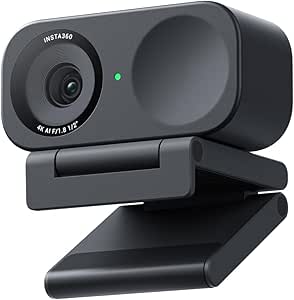
Insta360 Link 2C 4K Webcam for PC/Mac
The Link 2C pairs 4K video and HDR with AI auto-framing, making it a strong fit for presenters who move around or switch between speaking and showing their workspace. Gesture control can reduce interruptions during a call, while DeskView and Whiteboard modes make it more flexible than a basic framing webcam such as the OBSBOT Meet 2. Its 1/2-inch sensor and low-light performance also suit rooms where lighting is less than ideal. The tradeoff is that the Link 2C lacks the larger 1/1.3-inch sensor specified for the Link 2C Pro, which is the stronger pick when low-light image quality and natural background separation take priority. I’d also rule this model out for ARM-based Windows systems, and it does not support Windows Hello face recognition.
Pros:- 4K resolution, HDR, and a 1/2-inch sensor support detailed video across varied lighting.
- AI auto-framing helps keep a moving speaker in view.
- Gesture control offers hands-free operation during calls and presentations.
- DeskView and Whiteboard modes support demonstrations beyond face-to-camera video.
Cons:- Not compatible with ARM-based Windows systems.
- Does not support Windows Hello face recognition.
- Its 1/2-inch sensor is smaller than the Link 2C Pro’s 1/1.3-inch sensor.
Best for: Presenters and educators who want AI framing, gesture controls, and quick switches to desk or whiteboard views on a compatible PC or Mac.
Not ideal for: ARM-based Windows users and buyers prioritizing the larger sensor or natural bokeh offered by the Link 2C Pro.
- Resolution:4K
- Sensor:1/2-inch
- HDR:Yes
- Auto framing:Yes
- Microphone:AI noise-canceling
- Gesture control:Yes
- Special modes:DeskView and Whiteboard
- Compatibility:PC and Mac; Windows, Zoom, Teams, and Twitch
- Privacy mode:Yes
Our verdict“Choose the Link 2C if presentation-friendly gesture control and DeskView or Whiteboard modes matter more than the Pro model’s larger sensor.”
Insta360 Link 2C Pro 4K Webcam
The Link 2C Pro is the more image-focused choice in this pair: its 1/1.3-inch CMOS sensor is larger than the Link 2C’s 1/2-inch sensor, a meaningful advantage for low-light calls and a more natural background blur. AI auto-framing and gesture control keep it convenient for solo presenters, while directional dual microphones are designed to prioritize the speaker’s voice. DeskView, Whiteboard, and 4K Portrait modes extend its reach from meetings to demonstrations and content creation. Compared with the Link 2C, it also lists Elgato Stream Deck integration, useful for creators who want camera controls alongside their streaming setup. The compromises are practical: zoom is digital rather than optical, and the model is not compatible with ARM-based Windows or Windows Hello face recognition.
Pros:- The 1/1.3-inch CMOS sensor is specified for stronger low-light clarity and natural bokeh.
- AI auto-framing and gesture control support hands-free, on-camera work.
- Dual beamforming microphones use directional pickup to focus on the speaker.
- DeskView, Whiteboard, and 4K Portrait modes suit varied meeting and content workflows.
Cons:- Digital zoom does not provide the detail-preserving reach of optical zoom.
- Not compatible with ARM-based Windows systems.
- Does not support Windows Hello face recognition.
Best for: Streamers and remote professionals who work in dimmer rooms, want a larger sensor, and may control their setup through Elgato Stream Deck.
Not ideal for: ARM-based Windows users, Windows Hello users, or buyers who need optical zoom rather than digital magnification.
- Video resolution:4K
- Sensor:1/1.3-inch CMOS
- Auto framing:AI-driven
- Microphone:Dual-mic with beamforming directional pickup
- Zoom:4x digital
- Focus:Autofocus
- Shooting modes:DeskView, Whiteboard, and 4K Portrait Mode
- Connectivity:USB
- Compatibility:PC, Mac, Zoom, Teams, Twitch, and Elgato Stream Deck
Our verdict“Pick the Link 2C Pro for a larger sensor and creator-oriented controls, provided digital zoom and its Windows compatibility limits fit your setup.”

How We Picked
I ranked these cameras by how well their framing approach fits the setting, rather than treating every AI feature as equivalent. I weighed sensor and autofocus claims, whether tracking physically moves the camera or adjusts framing digitally, and the practical reach of each design. I also considered setup complexity, microphone and speaker integration, privacy features, connection options, and the flexibility a buyer gets for desk calls, presentations, or shared rooms.
The ordering favors useful performance for the widest range of individual and small-team calls, then gives dedicated roles to premium desktop cameras, compact options, all-in-one systems, and installation-oriented PTZ hardware. A product with more connections or zoom does not automatically rank higher if most home-office users will not need them. Where listings repeat the OBSBOT Meet 2, I treat those entries as similar product configurations and distinguish them by the stated bundle rather than implying different camera performance.
| ai autoframing webcam | Connectivity |
|---|---|
| 5-in-1 4K Webcam with Speaker | USB-C |
| Hollyland Lyra 4K Webcam with | USB |
| OBSBOT Meet 2 4K Webcam for PC | USB |
| TONGVEO 4K NDI PTZ Camera with | — |
| SVBONY SVN W2 4K PTZ Webcam | USB |
| TOALLIN 4K All-in-One Webcam w | USB |
| OBSBOT Meet 2 4K Webcam for PC | USB-C |
| OBSBOT Meet 2 4K Webcam for PC | USB |
| OBSBOT Tiny 3 AI-Powered Spati | USB-C |
| ROCWARE 4K UHD Video Conferenc | USB; Bluetooth compatibility listed |
| Insta360 Link 2C 4K Webcam for | — |
| Insta360 Link 2C Pro 4K Webcam | USB |
Factors to Consider When Choosing Ai Autoframing Webcams
To choose among AI auto-framing webcams, start with the movement in your calls and the space around the camera. Then work outward to image, audio, privacy, and compatibility. These decisions can prevent paying for room-installation features you will not use—or buying a simple desk webcam that cannot cover a shared meeting space.
Match Tracking Style to How You Move
Auto-framing can mean digitally cropping a wider image, or physically panning and tilting a PTZ camera to follow you. Digital framing keeps the device still and can suit a seated speaker who shifts within a small area. Physical tracking can follow a presenter across more of a room, but moving hardware may be unnecessary for a fixed desk and can draw attention during a call. Decide whether you need to stay framed while seated, walk and talk, or show more than one person. Check whether tracking can be paused or adjusted, since a camera that follows every small movement may feel distracting.
Choose for the Room, Not Just the Resolution
A 4K label does not tell you whether the camera can frame a person clearly from across a room. Sensor size, autofocus, lens field of view, camera distance, and available light all shape the result. A wide view helps include several people, but it can make a single speaker look small unless framing can crop effectively. Optical zoom, like the TONGVEO’s, is a different tool from digital zoom: it can bring a distant subject closer without relying solely on cropping. Measure the camera-to-subject distance and think about how many people need to fit before choosing a lens and tracking style.
Treat Built-In Audio as a Room-Specific Choice
Integrated microphones and speakers can reduce desk clutter and simplify a small meeting setup, but they do not guarantee clear speech in every room. Echo, keyboard noise, air conditioning, and distance from the camera can matter more than the number of microphones listed. A standalone microphone or headset may work better for noisy spaces or recordings where voice quality is a priority. All-in-one units make the most sense when convenience and fewer devices matter more than choosing each audio component separately. Before relying on built-in audio, check how the camera connects to your conferencing app and whether your usual microphone can still be selected.
Check Connections and Software Before Buying
For a plug-and-play desk setup, a standard USB connection may be all you need. A meeting room or streaming installation may call for HDMI, SDI, NDI, IP video, or PoE, but those options can add network and configuration work. Confirm operating-system support, the camera control software, and compatibility with the video-call or streaming apps you actually use. Do not assume that a feature described as AI tracking behaves the same across every app; some controls may depend on a companion application or specific connection mode. If the camera will be shared, also check how settings are saved and whether another user can reset them easily.
Set Privacy and Placement Expectations
A physical privacy shutter or cover offers a clear way to block the lens when the camera is idle; software controls alone may not provide the same reassurance. PTZ cameras also need space to rotate without hitting a monitor, wall, or other equipment. Consider whether a tripod, monitor mount, or fixed installation is included, especially when listings describe different bundles of an otherwise similar camera. A good position should leave the camera near eye level and give tracking room to move. For shared rooms, check whether the camera can be aimed away or shut down quickly between meetings.
Spend More Only for Capabilities You Will Use
Paying for PTZ movement, long-range optical zoom, or production connections can be worthwhile for a presenter, classroom, or installed conference room. Those features add little for someone who sits at a desk and wants a simple face-framing call. Conversely, a compact webcam may fall short when several people need to be captured or the speaker moves around. All-in-one designs can reduce the number of devices to manage, but they make the camera, audio, and lighting a more bundled decision. Write down your must-haves first, then treat extras as worthwhile only when they solve a real constraint in your setup.
Frequently Asked Questions
Do I need a PTZ webcam if I only move around at my desk?
Probably not. If you stay near your chair and make small movements, a compact webcam with reliable digital auto-framing may keep you in view without a motorized camera. PTZ tracking is more useful when you stand, present, or move across a room. It also takes more care to position because the camera needs unobstructed space to pan and tilt. Choose PTZ for the movement you actually make, not just because the feature sounds more advanced.
Is optical zoom worth choosing over digital zoom for a meeting room?
Optical zoom is useful when the camera sits far from speakers or needs to show a specific part of a large room. It changes the lens view instead of relying only on cropping, which gives a dedicated room camera more reach. Digital zoom can be adequate for closer subjects, but cropping has less room to work as the view is magnified. For a standard desk call, long-range optical zoom is often unnecessary. For presentations or installed conference spaces, it can be a deciding feature.
Are the three OBSBOT Meet 2 listings different webcams?
The roundup includes two listings for the OBSBOT Meet 2 4K webcam and another listing that specifies a mini tripod. The supplied product details do not establish that the camera itself differs across these entries, so compare the exact bundle and included accessories before choosing. A tripod may help with placement if your monitor or desk position is awkward, but it does not by itself indicate better framing performance. Check the product listing for the included mount, cables, and stated software support. Avoid treating repeated listings as three distinct camera designs.
Can an all-in-one webcam replace a separate microphone and speaker?
It can simplify a small room where participants sit near the camera and a single device is preferable. Results depend on room acoustics, seating distance, background noise, and how the conferencing system handles echo. If you record content, sit far from the camera, or work in a noisy space, a separate microphone or headset may deliver more consistent speech. All-in-one systems also make upgrades less flexible because their audio components are bundled with the camera. Check whether your preferred external audio device can still be selected when the camera is connected.
Which features should a first-time webcam buyer prioritize over 4K?
Start with dependable autofocus, framing that suits how you move, a mount that puts the lens near eye level, and compatibility with your computer and video-call apps. Good lighting and a stable camera position can improve a call more than extra resolution. If you need privacy, choose a model with a physical shutter or cover. Audio deserves equal attention: built-in microphones may be convenient, but they are not automatically a substitute for a headset in a noisy room. Choose 4K when you have a clear reason for the extra detail, such as cropping or higher-quality content capture.
Conclusion
For a broad mix of calls and movement, I recommend the OBSBOT Tiny 3 as best overall, thanks to its AI tracking PTZ design and spatial audio. The OBSBOT Meet 2 is my best value-style fit for straightforward desk calls, while the Insta360 Link 2C Pro is the best premium desktop direction for buyers who want a compact, polished 4K webcam rather than a room camera. Beginners should start with a USB desktop webcam such as the Meet 2 and confirm which mount or tripod bundle they are buying. For a presenter or installed space that needs long reach and production connections, choose the TONGVEO 4K NDI PTZ; for a shared meeting room with integrated audio, compare the ROCWARE video bar and the other all-in-one options. Pick the camera for your room and movement first, then pay for extra zoom, connections, or bundled audio only when they solve a specific need.