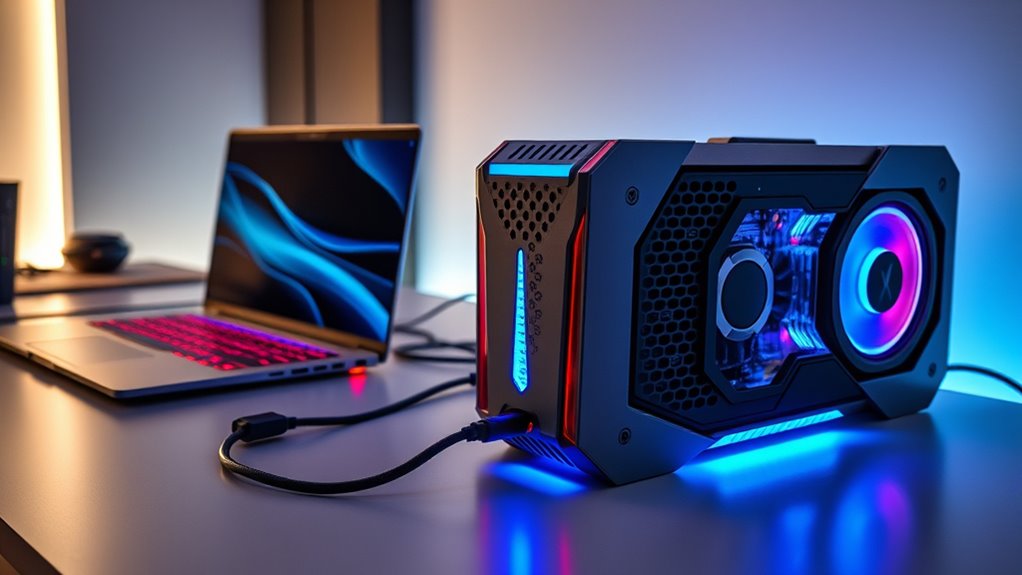

External GPU enclosures have become essential for anyone wanting to boost graphics performance from a portable or compact system. The best options today support Thunderbolt 4 and 5, offering high-speed data transfer and compatibility with a range of GPUs. The Sonnet Breakaway Box 850 T5 stands out as the top overall pick for its robust power delivery and broad compatibility, while the Razer Core X V2 offers a straightforward, reliable experience at a more affordable price. However, these enclosures often involve tradeoffs such as size, price, and compatibility with certain GPUs. Continue reading for a detailed breakdown of each option to find the best fit for your needs.

Get business pricing on office and shipping supplies
- Business-only prices and quantity discounts
- Tax-exempt purchasing
- Multiple users, one account, clear invoices
Key Takeaways
- The best external GPU enclosures balance high bandwidth support with sufficient power delivery for demanding GPUs.
- Thunderbolt 4 and 5 enclosures are generally more versatile, but often come at a higher price compared to USB-C options.
- Build quality and cooling design significantly influence long-term reliability, especially with high-performance GPUs.
- Compatibility varies widely; buyers must ensure their GPU fits physically and that the enclosure supports their preferred connectivity standards.
- Price ranges reflect feature sets and build quality, with premium enclosures offering better durability and future-proofing.
| Sonnet Echo II DV T5 2-Slot Thunderbolt 5 PCIe Expansion Enclosure |  | Best Overall for High-Performance PCIe Expansion in Enclosures | Number of Slots: 2 | Interface: Thunderbolt 5 | Bandwidth per Slot: 6000 MB/s | VIEW ON AMAZON | See Our Full Breakdown |
| Sonnet Breakaway Box 850 T5 eGPU Enclosure – Thunderbolt 5 / Thunderbolt 4 / USB4 – External GPU with 850W Power for Windows |  | Best for High-Power GPU Performance with Built-In Docking | Bandwidth: 80 Gbps | Power: 850W | Supported GPU Series: NVIDIA GeForce RX 50, 40, 30 Series; AMD Radeon RX 9000, 7000, 6000 Series | VIEW ON AMAZON | See Our Full Breakdown |
| Sonnet eGPU Breakaway Box 750ex – External GPU Chassis |  | Best for Compatibility with a Wide Range of GPUs on Thunderbolt 3 | Power Supply: 750W | Connectivity: Thunderbolt 3, 4 USB Type A, RJ45 Ethernet | GPU Compatibility: AMD Radeon VII, RX, RX Vega, NVIDIA GeForce RTX, TITAN, Quadro | VIEW ON AMAZON | See Our Full Breakdown |
| Sonnet DuoModo xMac mini (Intel & M1) / Echo III Rackmount |  | Best for Mac Mini Users Needing PCIe Expansion | Compatibility: Intel & M1 Mac mini | Enclosure Type: Dual-Module Rackmount | Thunderbolt 3 Ports: 4 | VIEW ON AMAZON | See Our Full Breakdown |
| MINISFORUM DEG2 USB4 V2 (TBT5 Compatible) & OCuLink eGPU Dock |  | Best for High-Speed Data and Storage in a Modular Design | Transfer Speeds: 80Gbps (TB5), 64Gbps (OCuLink) | Interfaces: USB4 V2 (TBT5), OCuLink | M.2 Slot: 2280 NVMe | VIEW ON AMAZON | See Our Full Breakdown |
| eGPU Enclosure Thunderbolt 3/4 USB4 40Gbps PD 85W Charging External GPU Dock Compatible with NVIDIA/AMD Graphics Cards |  | Best for AI and Deep Learning Enthusiasts | Connectivity: Thunderbolt 3/4, USB4 | Supported GPUs: NVIDIA/AMD RTX 50 Series, RX 7000 Series | Power Delivery: 85W | VIEW ON AMAZON | See Our Full Breakdown |
| Razer Core X V2 External Graphics Enclosure (eGPU) |  | Best for Gaming and Creative Users on Thunderbolt 4/5 | Compatibility: Windows 11 Thunderbolt 4/5, USB 4 | GPU Support: Up to 4 slots wide PCIe desktop GPUs | Bandwidth: Up to 80 Gbps with Thunderbolt 5 | VIEW ON AMAZON | See Our Full Breakdown |
| PCIe 4.0 x4 64Gbps Compatible eGPU Dock with OCuLink SFF-8612 and PCIe x16 Enclosure |  | Best for Portable High-Speed PCIe Connectivity | Transfer Speed: PCIe 4.0 x4 (64Gbps) | Cable Length: 50cm / 19.7inch | Cable Type: SFF-8611 Male to Male | VIEW ON AMAZON | See Our Full Breakdown |
| MINISFORUM DEG1 eGPU Docking Station for RTX 4090 and AMD RX 7900 XTX |  | Best for Mini PC Users Requiring High-End GPU Support | Up Link: Oculink 4i (PCIe 4.0 x4) | Down Link: PCIe x16 (PCIe 4.0 x4) | Power Supply Support: ATX and SFX | VIEW ON AMAZON | See Our Full Breakdown |
More Details on Our Top Picks
Sonnet Echo II DV T5 2-Slot Thunderbolt 5 PCIe Expansion Enclosure
The Sonnet Echo II DV T5 stands out for its dual-slot design that delivers full bandwidth per slot, making it ideal for professionals needing multiple high-end PCIe cards in a single enclosure. Compared with the Sonnet eGPU Breakaway Box 750ex, which focuses on GPU performance via Thunderbolt 3, this model emphasizes expansion versatility across operating systems, including Linux. Its rugged aluminum chassis with a 400W power supply ensures durability and steady power delivery, though it does require Thunderbolt 5 or compatible interfaces, limiting its immediate use for some users. The dual-slot configuration offers a clear advantage for users who need to run multiple PCIe cards simultaneously, but the higher cost and limited to two slots may deter casual users or those with simpler setups. This enclosure makes the most sense for professionals with demanding workflows who need reliable, high-bandwidth PCIe expansion in a durable, versatile package.
Pros:- Supports high-performance PCIe cards with full bandwidth
- Broad compatibility across macOS, Windows, and Linux
- Durable, quiet aluminum chassis with robust power supply
Cons:- Requires Thunderbolt 5 or compatible interfaces
- Limited to dual-slot configurations, restricting expansion options
Best for: Professionals needing high-bandwidth PCIe expansion across multiple operating systems, especially Mac, Windows, or Linux.
Not ideal for: Casual users or gamers who only need a single GPU or simple external expansion, given its expense and dual-slot limitation.
- Number of Slots:2
- Interface:Thunderbolt 5
- Bandwidth per Slot:6000 MB/s
- Power Supply:400W
- Compatibility:macOS, Windows, Linux
- Power Connectors:Dual 75W PCIe, 15W from Thunderbolt ports
Our verdict“This enclosure is best suited for professionals who need robust PCIe expansion with cross-platform support and can accommodate the higher price point.”
Sonnet Breakaway Box 850 T5 eGPU Enclosure – Thunderbolt 5 / Thunderbolt 4 / USB4 – External GPU with 850W Power for Windows
The Sonnet Breakaway Box 850 T5 makes a compelling choice for Windows users needing maximum GPU power, supporting triple-wide cards and offering an impressive 850W power supply. Compared to the Razer Core X V2, which is more plug-and-play and compatible with multiple OS, this model emphasizes raw GPU performance and expanded connectivity via its integrated Thunderbolt 5 dock with multiple ports. Its 80 Gbps bandwidth ensures minimal bottlenecking for demanding tasks like 3D rendering and AI workflows. However, this enclosure is quite large and primarily designed for Windows 11, which limits its versatility for Mac users. Its high power and extensive port options justify its premium price but might be overkill for casual or less demanding setups. This makes it ideal for professionals who need a high-power GPU solution with integrated additional connectivity, especially on Windows platforms.
Pros:- Supports triple-wide high-power GPUs with 850W supply
- High bandwidth (80 Gbps) for fast GPU performance
- Built-in Thunderbolt 5 dock with multiple ports
Cons:- Designed primarily for Windows 11, limiting Mac compatibility
- Large and bulky, less portable
Best for: Power users on Windows 11 requiring high-performance GPU support and integrated connectivity for professional workflows.
Not ideal for: Mac users or those seeking a compact, budget-friendly GPU enclosure, as it is bulky and Windows-centric.
- Bandwidth:80 Gbps
- Power:850W
- Supported GPU Series:NVIDIA GeForce RX 50, 40, 30 Series; AMD Radeon RX 9000, 7000, 6000 Series
- Connectivity Ports:Thunderbolt 5, three USB Type A, 5GbE Ethernet
- Supported OS:Windows 11
Our verdict“This enclosure is best suited for Windows professionals who need maximum GPU performance combined with expanded connectivity in a single, high-capacity unit.”
Sonnet eGPU Breakaway Box 750ex – External GPU Chassis
The Sonnet eGPU Breakaway Box 750ex offers broad GPU support, capable of housing high-performance AMD and NVIDIA cards, making it a flexible choice for demanding gaming, editing, and rendering tasks. When compared with the Sonnet Breakaway Box 850 T5, which emphasizes maximum GPU power and bandwidth, the 750ex provides a solid middle ground with a 750W power supply and additional USB and Ethernet ports. Its Thunderbolt 3 interface, however, limits maximum bandwidth relative to newer Thunderbolt 4 or 5 options, and it isn’t compatible with M1 Macs. The size can also be a concern for smaller setups. This enclosure makes sense for users who want broad GPU compatibility and additional connectivity but do not require the highest possible GPU wattage or the latest Thunderbolt standards.
Pros:- Supports a wide range of high-performance GPUs
- Includes USB ports and Ethernet for additional connectivity
- Future-proof 750W power supply
Cons:- Not compatible with M1 Macs
- Limited to Thunderbolt 3, restricting bandwidth
Best for: Advanced PC gamers or creative professionals seeking broad GPU support via Thunderbolt 3 with added USB and Ethernet options.
Not ideal for: Mac users with M1 chips or those needing the latest Thunderbolt 4/5 speeds, due to compatibility constraints.
- Power Supply:750W
- Connectivity:Thunderbolt 3, 4 USB Type A, RJ45 Ethernet
- GPU Compatibility:AMD Radeon VII, RX, RX Vega, NVIDIA GeForce RTX, TITAN, Quadro
- Compatibility Note:Not compatible with M1 Macs
Our verdict“This enclosure suits power users with Windows PCs wanting high GPU compatibility and extra ports, but it’s less future-proof for Mac users or those needing Thunderbolt 4/5 speeds.”
Sonnet DuoModo xMac mini (Intel & M1) / Echo III Rackmount
The Sonnet DuoModo xMac mini/Echo III Rackmount provides a unique solution for Mac mini owners, combining a secure rackmount enclosure with three PCIe slots, including full-length options. Compared to the Sonnet Echo II DV T5, which offers PCIe expansion for multiple OS, this model is tailored specifically for Mac mini integration, with support for both Intel and M1 models. Its built-in Thunderbolt 3 dock and dual M.2 NVMe slots enhance connectivity and storage options, but the setup involves purchasing a separate Mac mini and SSDs, adding complexity and cost. It’s heavy and bulky, making it less portable but highly suitable for stationary professional setups. This makes the most sense for Mac mini users who need PCIe expansion and a tidy, integrated workspace rather than casual or mobile users.
Pros:- Extensive PCIe expansion for professional workflows
- Securely mounts Mac mini with accessible ports
- Includes built-in Thunderbolt 3 dock and M.2 NVMe slots
Cons:- Requires separate purchase of Mac mini and SSDs
- Heavy and bulky, less portable
Best for: Mac mini owners seeking PCIe expansion and a professional, integrated rackmount solution.
Not ideal for: Users without a Mac mini or those who prefer portable setups, due to its bulk and complexity.
- Compatibility:Intel & M1 Mac mini
- Enclosure Type:Dual-Module Rackmount
- Thunderbolt 3 Ports:4
- Internal SSD Sockets:2 M.2 NVMe
- PCIe Slots:3 (1 x16, 2 x8)
- Supports:Full-height, full-length PCIe cards
Our verdict“This enclosure is ideal for Mac mini users who need PCIe expansion in a professional, stationary setup with extensive connectivity options.”
MINISFORUM DEG2 USB4 V2 (TBT5 Compatible) & OCuLink eGPU Dock
The MINISFORUM DEG2 USB4 V2 offers a flexible and high-speed solution for users needing both GPU and storage expansion, supporting data transfer speeds up to 80Gbps via USB4 V2 (TBT5) and OCuLink. Compared with the Sonnet Breakaway Box 850 T5, which emphasizes GPU power and connectivity, this model integrates an M.2 NVMe slot for additional storage, making it more versatile for workflows that demand both high-speed data and graphics performance. Its support for universal power supplies and a single-cable setup simplifies desktop configurations, but it requires compatible host devices with USB4 V2 or OCuLink support to realize full speed. Its modular approach suits tech-savvy users who want high-performance GPU and storage support in one enclosure, though it may be complex for newcomers.
Pros:- Supports ultra-fast data transfer speeds up to 80Gbps
- Built-in M.2 NVMe slot for added storage
- Universal power supply compatibility and single-cable setup
Cons:- Requires compatible host with USB4 V2 or OCuLink support
- Potential complexity for users unfamiliar with high-end setups
Best for: Power users needing high-speed GPU and storage expansion with flexible and modular connectivity.
Not ideal for: Users without compatible host devices or those seeking a simple, plug-and-play GPU enclosure.
- Transfer Speeds:80Gbps (TB5), 64Gbps (OCuLink)
- Interfaces:USB4 V2 (TBT5), OCuLink
- M.2 Slot:2280 NVMe
- Power Support:Universal ATX/SFX
- Signal Stability:Built-in re-drive signal booster
- Cable:Single TB5 cable
Our verdict“This dock is best for advanced users who want a high-speed, flexible GPU and storage solution in a single, modular enclosure, provided their host supports USB4 V2 or OCuLink.”
eGPU Enclosure Thunderbolt 3/4 USB4 40Gbps PD 85W Charging External GPU Dock Compatible with NVIDIA/AMD Graphics Cards
This enclosure stands out for supporting the latest NVIDIA and AMD GPUs, including RTX 50 series, making it ideal for AI and deep learning workloads. Its high-speed 40Gbps bandwidth and 85W power delivery ensure quick data transfer and efficient charging with a single cable. Compared to the Razer Core X V2, which is more geared toward gaming and creative tasks, this model emphasizes maximum airflow and open design for thermal efficiency during intensive computations. However, it’s not suitable for gaming or 3D rendering, as its optimized for AI deployment rather than graphics performance. The open-frame structure is perfect for cooling but less protected in transport, and it requires Thunderbolt 3/4 or USB4 ports to function. If your focus is deep learning with compatibility for the latest GPUs, this enclosure offers a tailored solution.
Pros:- Supports the latest NVIDIA and AMD graphics cards, including RTX 50 series
- High-speed 40Gbps data transfer ensures minimal bottlenecks
- Powerful 85W charging simplifies setup with a single cable
- Open-frame design maximizes airflow during intensive tasks
Cons:- Limited to Thunderbolt 3/4 and USB4 ports, excluding other connection types
- Designed primarily for AI and deep learning, less suitable for gaming or 3D rendering
Best for: AI researchers, deep learning practitioners, and users needing GPU support for computational tasks
Not ideal for: Gamers or creative professionals prioritizing GPU enclosure for rendering or gaming, due to its focus on AI workflows and open design
- Connectivity:Thunderbolt 3/4, USB4
- Supported GPUs:NVIDIA/AMD RTX 50 Series, RX 7000 Series
- Power Delivery:85W
- Controller:JHL7540/7440
- Bandwidth:32Gbps
- Material:Anodized aluminum alloy
Our verdict“This enclosure is best suited for professionals working with AI and deep learning, needing maximum airflow and GPU compatibility in an enclosure-friendly design.”
Razer Core X V2 External Graphics Enclosure (eGPU)
The Razer Core X V2 makes a compelling choice for gamers and creative professionals seeking straightforward, high-performance GPU support. Its compatibility with Thunderbolt 4/5 and USB4, along with support for PCIe desktop GPUs up to four slots wide, ensures it can handle demanding graphics applications. The active 120mm fan provides reliable cooling during prolonged workloads, and its tool-free installation simplifies upgrades or swaps. Compared to the more specialized Thunderbolt 3/4-only solution, the Core X V2’s support for PCIe Gen 4 and larger GPUs makes it more versatile for high-end gaming and content creation. However, it requires users to purchase a compatible GPU and PSU separately, adding to the total cost. Its lack of Mac compatibility with M1 chips limits its use for Mac users. If you want a flexible, high-performance enclosure primarily for gaming or creative work, this model makes sense.
Pros:- Supports high-performance NVIDIA and AMD GPUs
- Ultra-fast Thunderbolt 5 bandwidth for demanding tasks
- Easy tool-free GPU and PSU installation
- Active cooling maintains stable performance
Cons:- GPU and power supply sold separately, increasing overall cost
- Limited compatibility with Mac devices with M1 chips
Best for: Gamers and creative professionals needing a reliable, high-power GPU enclosure compatible with Windows systems
Not ideal for: Mac users with M1 or later chips, or those seeking an all-in-one solution with included GPU and PSU
- Compatibility:Windows 11 Thunderbolt 4/5, USB 4
- GPU Support:Up to 4 slots wide PCIe desktop GPUs
- Bandwidth:Up to 80 Gbps with Thunderbolt 5
- Power Delivery:140W PD via USB-C
- Cooling:120 mm active fan
- Material:Vented steel chassis
Our verdict“This enclosure is best suited for gamers and creative users on Windows who want a versatile, high-power GPU dock with robust cooling.”
PCIe 4.0 x4 64Gbps Compatible eGPU Dock with OCuLink SFF-8612 and PCIe x16 Enclosure
This PCIe 4.0 x4 dock emphasizes portability with its detachable design, making it suitable for users who need high-speed GPU connectivity on the go. Its gold-plated contacts and EMI-resistant shielding promise reliable, consistent performance, especially with demanding GPUs like RTX 4090 or RX 7900 XTX. Compared to the Thunderbolt-based options, this dock relies on Oculink, which requires the system to be turned off for unplugging, a notable tradeoff for portability. Its compatibility with standard ATX power supplies and large GPUs makes it versatile for desktop use, but it’s not compatible with hot plugging or other connection types. This model is ideal for users who prioritize PCIe speed and portability but are comfortable with non-hot-swappable setups.
Pros:- Supports PCIe 4.0 x4 transfer speeds for fast data and GPU performance
- Detachable design enhances portability
- Compatible with large GPUs like RTX 4090 and RX 7900 XTX
- High-quality gold-plated contacts ensure durability
Cons:- No hot-plug support; system must be powered down for disconnection
- Requires a standard ATX power supply, limiting flexibility
Best for: Professionals needing portable, high-speed GPU connectivity compatible with large GPUs and standard PCs
Not ideal for: Casual users or those seeking hot-swappable enclosures, or Mac users lacking Oculink support
- Transfer Speed:PCIe 4.0 x4 (64Gbps)
- Cable Length:50cm / 19.7inch
- Cable Type:SFF-8611 Male to Male
- Compatibility:Standard ATX Power Supply, RTX 4090, RX 7900 XTX
- Design:Detachable, portable, LED indicators
- Note:OCulink does not support hot plugging
Our verdict“This dock is best for professionals who need portable, high-speed PCIe GPU connections with reliable conductivity, accepting the need to power down for disconnections.”
MINISFORUM DEG1 eGPU Docking Station for RTX 4090 and AMD RX 7900 XTX
The MINISFORUM DEG1 targets users with Mini PCs or those who need a compact yet capable GPU dock. Its support for high-performance GPUs like RTX 4090 and RX 7900 XTX, along with Oculink interfaces, offers substantial graphical power in a small footprint. Its compatibility with ATX and SFX power supplies provides flexibility for different setups, but it lacks built-in GPU or power supply, and requires the machine to be powered off for Oculink connections. Compared with the PCIe 4.0 x4 dock, the DEG1 emphasizes compatibility with MINISFORUM Mini PCs, making it less suited for traditional desktop setups. This model is ideal for users who prioritize space-saving designs and already have compatible hardware, willing to handle the limitations of non-hot-plug Oculink connections.
Pros:- Supports high-performance GPUs like RTX 4090 and AMD RX 7900 XTX
- Flexible power supply options with ATX and SFX compatibility
- Designed for compatibility with MINISFORUM Mini PCs
- Supports PCIe 4.0 x4 links for strong graphics performance
Cons:- Does not include GPU or power supply, increasing setup complexity
- Oculink does not support hot plugging, requiring system shutdown for connection changes
Best for: Mini PC owners and space-conscious users needing high-end GPU support within a compact enclosure
Not ideal for: Users expecting hot-swappable features or those with standard desktop systems without Oculink support
- Up Link:Oculink 4i (PCIe 4.0 x4)
- Down Link:PCIe x16 (PCIe 4.0 x4)
- Power Supply Support:ATX and SFX
- Interface Support:Oculink only
- Hot Plug Support:No
- Follow-start Function:Yes, with MINISFORUM Mini PCs
Our verdict“This docking station suits space-constrained users with compatible mini PCs who need high-end GPU support without hot-plug convenience.”

How We Picked
The products in this roundup were selected based on a combination of performance, build quality, compatibility, and value. Priority was given to enclosures supporting Thunderbolt 4 and 5 for maximum bandwidth, along with sufficient power delivery to run high-end GPUs. Ease of installation and thermal management also played key roles, as these affect long-term reliability and user experience. We ranked the options by considering real-world use cases, including gaming, professional workstations, and compact setups, to ensure broad relevance. The final list reflects a balance between premium features and affordability, catering to different buyer needs.Factors to Consider When Choosing External Gpu Enclosures
Choosing the right external GPU enclosure involves understanding several key factors that impact performance, compatibility, and usability. While high bandwidth support is critical for fast data transfer, power delivery and cooling are just as important to prevent overheating and ensure stable operation. Compatibility with your GPU’s size and connector types can make or break your setup. Budget considerations and future-proofing also matter, especially if you plan to upgrade components over time. The following sections highlight the most important aspects to consider before making a purchase.Connectivity Standards and Bandwidth
Most high-performance external GPU enclosures now support Thunderbolt 4 and 5, which provide the bandwidth necessary for demanding graphics workloads. USB4 is a more affordable alternative but typically offers slightly lower data transfer speeds. Choosing an enclosure with the latest connectivity ensures compatibility with future devices and minimizes bottlenecks. Keep in mind that even the fastest connection can’t compensate for a GPU that isn’t supported or that exceeds the enclosure’s thermal capacity.
Power Delivery and Compatibility
Power delivery (PD) is a vital feature, especially if you want to run a high-end GPU without a separate power source. Enclosures with 650W or higher support most modern GPUs and simplify cable management. However, ensure your power supply unit (PSU) is compatible with the enclosure’s requirements and physical form factor. Incompatibility can lead to insufficient power or fitment issues, which can compromise performance or damage components over time.
Thermal Management and Cooling
Good cooling design prolongs GPU lifespan and maintains performance during intensive tasks. Look for enclosures with efficient airflow, active cooling fans, or heat sinks. Cheaper or poorly ventilated enclosures risk overheating, throttling performance, or even hardware failure. Consider your typical workload and ambient environment when evaluating cooling features to avoid thermal bottlenecks.
Physical Size and GPU Compatibility
The physical dimensions of the enclosure determine whether your GPU will fit comfortably. Larger, high-end GPUs like the RTX 4090 require spacious enclosures with ample clearance. Conversely, compact enclosures are suitable for smaller cards but may limit upgrade options. Always verify the maximum GPU length, width, and power draw supported before making a purchase to prevent compatibility issues.
Price Range and Future-Proofing
External GPU enclosures span a broad price spectrum, reflecting build quality, features, and compatibility. Investing in a premium model may offer better thermal management, longer durability, and support for upcoming GPU models. However, budget options can be suitable for lighter workloads or temporary setups. Consider your long-term needs and whether the enclosure can accommodate future upgrades to maximize value.
Frequently Asked Questions
Can I use any GPU inside an external enclosure?
Not all GPUs are compatible with every external enclosure. It’s essential to check the physical dimensions, connector types, and power requirements of your GPU against the enclosure’s specifications. High-performance cards like the RTX 4090 or AMD RX 7900 XTX often need larger enclosures with higher wattage support. Incompatibility can lead to fitment issues or insufficient power delivery, so always verify compatibility before purchasing.
Is Thunderbolt 4 necessary for a good external GPU experience?
Thunderbolt 4 offers the highest bandwidth currently available for external GPU enclosures, enabling near-native performance for demanding tasks like gaming and professional 3D work. While USB4 enclosures are more affordable, they often provide slightly lower data transfer rates, which can impact performance during intensive workloads. If you want the best performance and future-proofing, investing in a Thunderbolt 4-compatible enclosure is advisable.
How important is thermal management in choosing an enclosure?
Thermal management directly affects the longevity and stability of your GPU. Enclosures with effective cooling—such as active fans or heat sinks—help prevent overheating during prolonged use. Poor cooling can cause throttling, reduced performance, and hardware damage over time. Prioritizing thermal features ensures your GPU runs efficiently and lasts longer, especially under demanding workloads.
Do I need a dedicated power supply for my external GPU enclosure?
Many enclosures include their own power supplies, especially high-end models supporting powerful GPUs. If your enclosure doesn’t have an integrated PSU, you’ll need to connect a compatible external power source. The wattage and connector type are critical; insufficient power can cause instability or prevent the GPU from functioning correctly. Always check the enclosure’s power specifications to match your GPU’s requirements.
Are external GPU enclosures suitable for laptop gaming?
Yes, external GPU enclosures are popular among laptop gamers seeking desktop-level graphics performance. They allow laptops with Thunderbolt or USB4 ports to harness high-end GPUs, significantly boosting gaming capacity. However, performance depends on the enclosure’s bandwidth and cooling, and there can be latency issues. Ensure your laptop has a compatible port and that the enclosure supports your GPU choice for a seamless experience.
Conclusion
For most users seeking a reliable, high-performance external GPU setup, the Sonnet Breakaway Box 850 T5 offers a compelling balance of power, compatibility, and future-proof features—making it the best overall choice. Budget-conscious buyers or those new to external GPUs might prefer the Razer Core X V2 for its straightforward design and affordability. Professionals requiring maximum throughput and expandability should consider premium options like the Sonnet Echo II DV T5 or MINISFORUM DEG2. Ultimately, your choice depends on your specific needs, whether gaming, content creation, or professional workloads, along with your budget and compatibility considerations.