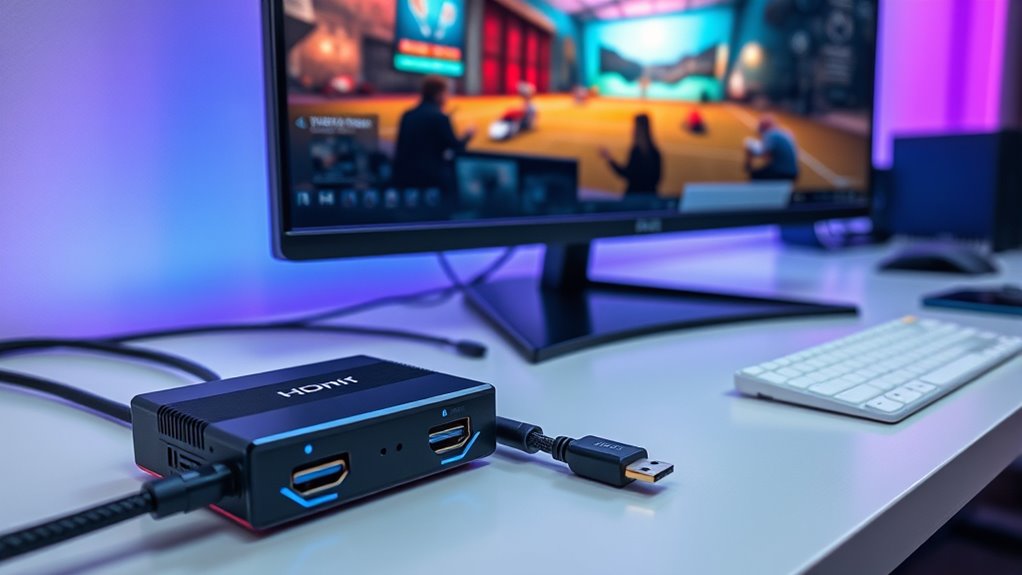

HDMI capture cards are essential tools for streamers, content creators, and gamers aiming for high-quality video capture. The best models offer a balance of 4K support, low latency, and compatibility with popular devices, but they often come with tradeoffs like price or complexity. The Elgato Cam Link 4K stands out as the overall top pick for its reliability and ease of use. Meanwhile, options like the 4K HDMI Capture Card USB 3.0 provide more budget-friendly alternatives, though sometimes at the expense of features or build quality. Continue reading to find out how these options compare and which one fits your needs best.

Get business pricing on office and shipping supplies
- Business-only prices and quantity discounts
- Tax-exempt purchasing
- Multiple users, one account, clear invoices
Key Takeaways
- High-resolution support like 4K is often paired with higher price tags and increased system demands.
- Low latency is critical for live streaming and gaming, but achieving it can involve tradeoffs in compatibility or cost.
- Build quality and driver stability significantly impact long-term reliability, especially for frequent streamers.
- Compatibility with devices like PS5, Switch, or DSLR cameras varies; ensure your chosen card supports your gear.
- Budget options often sacrifice some features but can be suitable for casual or beginner streamers.
| 4K USB3.0 HDMI to USB-C Video Capture Card for Streaming and Recording |  | Best Compact and Portable Capture Card | Hardware Interface: HDMI, USB 3.0, USB Type C | Video Capture Resolution: 1080p | Operating System: Windows | VIEW ON AMAZON | See Our Full Breakdown |
| Elgato Cam Link 4K External Capture Card for DSLR & Camcorder |  | Best for High-Quality DSLR & Camcorder Streaming | Hardware Interface: USB 3.0 | Video Capture Resolution: 1080p, 4K60 | Dimensions: 3.19 x 1.22 x 0.47 inches | VIEW ON AMAZON | See Our Full Breakdown |
| Acer USB 3.0 Video Capture Card, HDMI Capture Card for Streaming with 4K Loop-Out & USB A/C, 1080P 60Hz HD, Game Capture for PS5/PS4/Switch/Xbox/Camera/PC/Mac |  | Best Versatile Choice for Gamers and Educators | Video Resolution: 4K input, 1080P@60Hz output | Connectivity: USB 3.0, HDMI | Features: YUY2 technology, mic-in, 4K loop-out | VIEW ON AMAZON | See Our Full Breakdown |
| 4K HDMI Capture Card USB 3.0 – 1080P 60FPS Gaming & Streaming Video Capture Card with HDMI Loop-Out, Plug & Play, Low-Latency Recording for PS5/PS4/Xbox/Switch/OBS/PC/Mac |  | Best for Gamers Needing Seamless HDMI Passthrough | Hardware Interface: USB | Video Capture Resolution: 1080p | Special Features: 4K 60fps Capture, HDMI Loop-Out, Plug & Play, Low-Latency | VIEW ON AMAZON | See Our Full Breakdown |
| UGREEN 2K@30Hz 1080P 60FPS HDMI Capture Card with 4K Input, USB 3.0 & USB-C, Low Latency for Streaming and Recording |  | Best for Versatile Multi-Device Compatibility | Resolution Input: 4K@30Hz | Resolution Output: 2K@30Hz | Frame Rate: 1080p 60FPS | VIEW ON AMAZON | See Our Full Breakdown |
| Acer HDMI to USB 3.0 Video Capture Card, 1080P 60FPS for Streaming and Recording |  | Best Overall for Versatile, High-Quality Streaming | Video Resolution: 1080P 60FPS | HDMI Input: Supports up to 4K 30FPS | Interface: USB 3.0, Type-C/A | VIEW ON AMAZON | See Our Full Breakdown |
| Elgato 4K S External Capture Card for PS5, Xbox Series X/S, Switch 2, PC, Mac, iPad |  | Best for High-Performance 4K Gaming and Streaming | Hardware Interface: USB 3.0 Type C | Video Capture Resolution: 1080p | Operating System: Windows 11, macOS 13+, iPadOS | VIEW ON AMAZON | See Our Full Breakdown |
| Capture Card Nintendo Switch, 4K HDMI Video Capture Card, 1080P 60FPS, HDMI to USB 3.0 for Streaming | 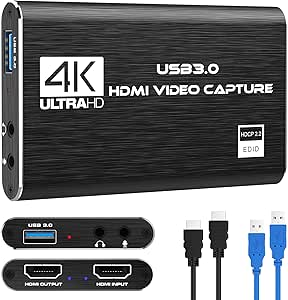 | Best for Console Gamers Needing Reliable 1080P Capture | Resolution: 1080p at 60FPS | Input Support: 4K30/60Hz | Output Support: up to 2K30Hz | VIEW ON AMAZON | See Our Full Breakdown |
| Guermok 4K USB3.0 HDMI Capture Card for Streaming and Recording |  | Best Portable 4K Capture with Broad Compatibility | Hardware Interface: HDMI, USB 3.0 Type A and C | Video Capture Resolution: 1080p, 4K | Operating System: Mac OS, Windows 10/11, Linux, Android | VIEW ON AMAZON | See Our Full Breakdown |
| 4K Video Capture Card, HDMI to USB Capture Card 1080P for Streaming, Recording, Gaming |  | Best for Budget-Conscious Streamers and Gamers | Video Resolution: 1080p 60FPS | Connectivity: HDMI to USB | Compatibility: Windows, Mac | VIEW ON AMAZON | See Our Full Breakdown |
| Audio Express AXHDCAP 4K HDMI Video Capture Card, USB 2.0, 1080P Recording for Streaming and Broadcasting |  | Best for Versatile Streaming with Broad Compatibility | Input Resolution: 3840×2160@30Hz | Output Resolution: 1920×1080@30Hz | Connection: USB 2.0 | VIEW ON AMAZON | See Our Full Breakdown |
| XIIXMASK Video Capture Card, 4K HDMI Loop-Out, 1080P 60FPS/2K 30FPS, USB 3.0, Compatible with PS5, Switch, PC, Camera |  | Best for High-Frame-Rate Gaming and Multi-Device Compatibility | Video Input: 4K HDMI | Loop-Out: 4K 60Hz | Video Output: 1080P 60FPS / 2K 30FPS | VIEW ON AMAZON | See Our Full Breakdown |
| hdmi capture card | Compatibility |
|---|---|
| 4K USB3.0 HDMI to USB-C Video | — |
| Elgato Cam Link 4K External Ca | — |
| Acer USB 3.0 Video Capture Car | PS5, PS4, Switch, Xbox, PC, Mac, Android |
| 4K HDMI Capture Card USB 3.0 | — |
| UGREEN 2K@30Hz 1080P 60FPS HDM | — |
| Acer HDMI to USB 3.0 Video Cap | Windows 7/8/8.1/10, macOS, Linux, Android, iPadOS 17+ |
| Elgato 4K S External Capture C | — |
| Capture Card Nintendo Switch | Windows, Mac OS |
| Guermok 4K USB3.0 HDMI Capture | — |
| 4K Video Capture Card | Windows, Mac |
| Audio Express AXHDCAP 4K HDMI | Windows, MacOS, Linux |
| XIIXMASK Video Capture Card | Windows 7/8/10, Mac OS, Linux, Android, Xbox One, PS3/PS4/PS5, Switch, Camera |
More Details on Our Top Picks
4K USB3.0 HDMI to USB-C Video Capture Card for Streaming and Recording
This capture card excels in providing high-quality 1080P60 recording from a 4K HDMI input, making it ideal for streamers who want a lightweight, portable option. Unlike the Elgato Cam Link 4K, which supports higher resolutions and broader device compatibility, this model focuses on ultra-low latency and simple plug-and-play operation, but it only records at 1080P in most configurations. Its small size and wide compatibility make it perfect for on-the-go streaming setups, though it demands compatible hardware and sufficient processing power for optimal performance. The absence of built-in audio input may be a drawback for users needing integrated audio solutions, but its versatility across devices is a significant advantage.
Pros:- Supports 4K HDMI input with high-quality 1080P60 recording
- Ultra-low latency for smooth live streaming and gaming
- Plug-and-play with wide device and software compatibility
- Compact and portable design for easy transport
Cons:- Limited to 1080P recording resolution in some configurations
- Requires compatible hardware and sufficient processing power
Best for: Traveling streamers and content creators who need a compact, easy-to-use capture device.
Not ideal for: High-end streamers aiming for 4K recording or professional broadcast setups, as it limits resolution and lacks advanced features.
- Hardware Interface:HDMI, USB 3.0, USB Type C
- Video Capture Resolution:1080p
- Operating System:Windows
- Platform:Mac, Windows
- Special Features:4K Input, Ultra-Low Latency, Plug-and-Play, Wide Compatibility, Compact & Portable
- Compatible Devices:Camera, DSLR, Gaming Console, Laptop, TV
Our verdict“This pick is best suited for streamers who prioritize portability and ease of use over 4K recording capabilities.”
Elgato Cam Link 4K External Capture Card for DSLR & Camcorder
The Elgato Cam Link 4K is the go-to choice for creators who want to turn their DSLR or camcorder into a premium webcam. It offers support for 1080p60 and 4K60, providing excellent flexibility for streaming and recording at high resolutions. Compared with the other models, it stands out for its ultra-low latency and broad device compatibility across PC, Mac, and iPad, making it ideal for professional-quality streams. However, it requires a compatible camera and may encounter issues with older hardware or software, which can limit its plug-and-play ease for some users. Its small size and high resolution support justify the premium price for serious content creators.
Pros:- Supports high-quality streaming in 4K60 and 1080p60
- Compatible with multiple devices including PC, Mac, and iPad
- Ultra-low latency for real-time streaming
- Compact design for easy setup
Cons:- Requires compatible camera with the latest Cam Link 4K model
- Limited to HDMI input devices only
- Potential compatibility issues with older hardware
Best for: Professional streamers and content creators using DSLR or mirrorless cameras for high-quality streams.
Not ideal for: Casual gamers or users with older cameras and hardware, due to potential compatibility issues and higher cost.
- Hardware Interface:USB 3.0
- Video Capture Resolution:1080p, 4K60
- Dimensions:3.19 x 1.22 x 0.47 inches
- Weight:0.71 ounces
- Supported Devices:PC, Mac, iPad
- System Requirements:Windows 10 (64-bit), macOS 13, iPadOS 17
Our verdict“This device is ideal for high-end creators seeking professional 4K streaming from DSLR or mirrorless cameras.”
Acer USB 3.0 Video Capture Card, HDMI Capture Card for Streaming with 4K Loop-Out & USB A/C, 1080P 60Hz HD, Game Capture for PS5/PS4/Switch/Xbox/Camera/PC/Mac
This Acer capture card offers a robust set of features, including 4K input and 1080P@60Hz output, making it suitable for both streaming and recording. Its inclusion of a microphone-in port simplifies live commentary, and support for a variety of gaming consoles and computers broadens its appeal. Compared to the UGREEN model, it emphasizes versatility with 4K loop-out, beneficial for multi-monitor setups or real-time preview. Nevertheless, the product’s build quality and durability are less documented, and it might lack the polish of premium brands like Elgato. Its broad compatibility makes it a solid choice for educators and casual streamers, though power users might find it lacking in advanced features.
Pros:- High-quality 4K input with smooth 1080P output
- Includes microphone-in for live commentary
- Compatible with a wide range of devices and platforms
- Supports 4K loop-out for multi-display setups
Cons:- Limited information on build quality and durability
- No bundled accessories or cables specified
- Potential compatibility issues with some older devices
Best for: Gamers and educators seeking a reliable, multi-platform capture device with microphone support.
Not ideal for: Professional broadcasters or streamers needing highly durable equipment or advanced controls, as build quality details are limited.
- Video Resolution:4K input, 1080P@60Hz output
- Connectivity:USB 3.0, HDMI
- Features:YUY2 technology, mic-in, 4K loop-out
- Compatibility:PS5, PS4, Switch, Xbox, PC, Mac, Android
Our verdict“Ideal for versatile streaming needs where broad device support and microphone input are priorities.”
4K HDMI Capture Card USB 3.0 – 1080P 60FPS Gaming & Streaming Video Capture Card with HDMI Loop-Out, Plug & Play, Low-Latency Recording for PS5/PS4/Xbox/Switch/OBS/PC/Mac
This 4K HDMI capture card is tailored for gamers wanting reliable 1080P60 recording with minimal latency and HDMI passthrough. It emphasizes ease of use with straightforward plug-and-play operation and supports a variety of gaming consoles and PCs. When compared with the UGREEN model, it offers similar 1080P capture but lacks explicit mention of 4K input support, focusing instead on stable 1080P performance. Its HDMI loop-out feature allows uninterrupted gameplay, making it suitable for live streaming while gaming. The absence of a built-in microphone or audio input means users will need separate solutions for commentary, which could be a drawback for some streamers.
Pros:- High-quality 1080P 60FPS video capture with low latency
- Supports HDMI passthrough for uninterrupted gaming
- Plug-and-play with multiple devices and OS compatibility
- Compact and portable for on-the-go streaming
Cons:- Limited to 1080P recording, no 4K input support
- No built-in microphone or audio input features
- Requires USB 3.0 port for optimal performance
Best for: Gamers who prioritize seamless gameplay and straightforward setup for streaming at 1080P.
Not ideal for: Content creators seeking 4K input or integrated audio features, as it is focused on 1080P performance and simple setup.
- Hardware Interface:USB
- Video Capture Resolution:1080p
- Special Features:4K 60fps Capture, HDMI Loop-Out, Plug & Play, Low-Latency
- Supported Devices:PS5, PS4, Xbox, Switch, PC, Mac
Our verdict“This device is best suited for gamers who want reliable, low-latency 1080P streaming with HDMI passthrough convenience.”
UGREEN 2K@30Hz 1080P 60FPS HDMI Capture Card with 4K Input, USB 3.0 & USB-C, Low Latency for Streaming and Recording
The UGREEN HDMI capture card supports 2K at 30Hz and 1080P at 60FPS, making it a flexible choice for users needing broad device compatibility across gaming consoles, PCs, and mobile devices. Its support for 4K input at 30Hz adds some future-proofing, although the actual recording remains at 1080P60. Compared to the Acer device, it offers a more durable build with an aluminum casing and extensive compatibility, including support for Android and iPadOS. The main tradeoff involves its limited HDMI output capabilities and the need to disable HDCP on some consoles, which can be inconvenient. Still, it provides a good balance of versatility and performance for casual to intermediate users.
Pros:- Supports 2K@30Hz and 1080P@60FPS for flexible recording
- Broad device compatibility including consoles, PCs, and mobile devices
- Low latency with high data transfer speeds
- Durable aluminum alloy casing for heat dissipation
Cons:- Supports only HDMI input sources, not HDMI output
- Requires HDCP disabling for some consoles
- Limited to 1080P for recording, despite 4K input support
Best for: Multi-platform gamers and streamers who need compatibility with a variety of devices including mobile and console systems.
Not ideal for: Professional broadcasters requiring 4K recording or advanced features, since it mainly supports 1080P and 2K resolutions for recording.
- Resolution Input:4K@30Hz
- Resolution Output:2K@30Hz
- Frame Rate:1080p 60FPS
- Connectivity:USB 3.0, USB-C
- Supported Devices:Switch, PS4/5, Xbox, PC, Mac, Android, iPadOS
Our verdict“This pick fits users seeking broad compatibility and reliable performance across multiple devices and platforms.”
Acer HDMI to USB 3.0 Video Capture Card, 1080P 60FPS for Streaming and Recording
This Acer capture card stands out for offering reliable 1080P 60FPS streaming, making it a solid choice for both gamers and content creators. Compared with the Guermok 4K USB3.0 HDMI Capture Card, it provides slightly lower input resolution but excels in compatibility and ease of use. Its plug-and-play design requires no driver installation, which benefits users seeking simplicity. However, it supports only HDMI to USB transmission and maxes out at 4K 30FPS input, so users wanting 4K at 60FPS or bidirectional features will find it limiting. Still, for those prioritizing straightforward, high-quality 1080P video, this model offers dependable performance without complexity.
Pros:- High-quality 1080P 60FPS streaming and recording
- Universal compatibility with diverse devices and OS
- Plug-and-play with no driver needed
- Compact and portable for mobility
Cons:- Supports only HDMI to USB transmission, not bidirectional
- Maximum HDMI input is 4K 30FPS, not 4K 60FPS
Best for: Content creators and streamers who need a reliable, easy-to-use device that works across multiple operating systems and devices.
Not ideal for: Professional streamers requiring 4K60 or bidirectional HDMI features, or users needing advanced on-device processing.
- Video Resolution:1080P 60FPS
- HDMI Input:Supports up to 4K 30FPS
- Interface:USB 3.0, Type-C/A
- Compatibility:Windows 7/8/8.1/10, macOS, Linux, Android, iPadOS 17+
- Supported Devices:Switch, PS5/4, Quest 3, Cameras, Xbox, TV boxes
Our verdict“Ideal for users seeking straightforward, high-quality 1080P streaming across multiple platforms without fuss.”
Elgato 4K S External Capture Card for PS5, Xbox Series X/S, Switch 2, PC, Mac, iPad
The Elgato 4K S makes a compelling case for high-end gamers and streamers, supporting 4K60 capture and HDR10, with near-zero latency. Unlike the Guermok 4K USB3.0 HDMI Capture Card, which caps recording at 1080P, the Elgato offers higher resolution and HDR support, but it’s limited to Windows and macOS systems with specific hardware requirements. Its HDMI passthrough preserves the gaming experience, and its compact size makes it portable. The key tradeoff is that HDR capture is not supported on iPadOS, and the device demands a relatively powerful system for optimal performance. For streamers who prioritize ultra-high-definition, real-time gaming, this pick is a clear standout.
Pros:- Supports 4K60 and HDR10 passthrough
- Compact and portable design
- Low-latency, near-zero delay passthrough
- Compatible with multiple platforms including iPad
Cons:- HDR10 capture limited to Windows
- Requires high-performance hardware and specific OS versions
Best for: Gamers and professional streamers aiming for premium 4K60 recording with minimal latency on PC, Mac, or iPad.
Not ideal for: Casual users or those with limited system specs, since HDR and 4K capture require recent hardware and OS versions.
- Hardware Interface:USB 3.0 Type C
- Video Capture Resolution:1080p
- Operating System:Windows 11, macOS 13+, iPadOS
- Input:HDMI 2.0, 3.5 mm analog audio in
- Output:HDMI 2.0 passthrough
- Passthrough Resolutions:Up to 2160p60
Our verdict“Best suited for demanding gamers and streamers who want top-tier 4K HDR capture with minimal delay.”
Capture Card Nintendo Switch, 4K HDMI Video Capture Card, 1080P 60FPS, HDMI to USB 3.0 for Streaming
This capture card is designed with Nintendo Switch users in mind, delivering 1080P at 60FPS with easy setup and HDMI loop-out for smooth gameplay. Compared with the Guermok 4K USB3.0 HDMI Capture Card, it offers a more straightforward, plug-and-play experience tailored for console gaming. It supports HDMI input up to 4K30/60Hz but only outputs at 2K30Hz, which may limit some streaming quality. Its inclusion of a microphone input makes it versatile for streamers who want commentary without extra gear. The main tradeoff is its lack of support for higher refresh rates or 4K capture, which could be a drawback for users seeking advanced features.
Pros:- High-quality 1080P 60FPS video capture
- Plug-and-play with no driver needed
- HDMI loop-out for seamless gameplay
- Includes microphone input for commentary
Cons:- Limited to 2K30Hz output resolution
- Does not support 4K120Hz or 144Hz input
Best for: Casual streamers and gamers using Nintendo Switch or similar consoles looking for reliable 1080P capture with microphone support.
Not ideal for: High-end streamers or PC gamers seeking 4K60 or higher refresh rate captures, due to output limitations.
- Resolution:1080p at 60FPS
- Input Support:4K30/60Hz
- Output Support:up to 2K30Hz
- Connection:USB 3.0
- Compatibility:Windows, Mac OS
- Microphone Input:3.5mm TRS
Our verdict“Best for casual console gamers who want easy, reliable 1080P streaming with microphone support.”
Guermok 4K USB3.0 HDMI Capture Card for Streaming and Recording
The Guermok 4K USB3.0 HDMI Capture Card supports input resolutions up to 4K@30Hz and captures at 1080P 60FPS, making it versatile for a variety of streaming needs. It offers broad compatibility with Windows, Mac, Linux, and Android, surpassing many competitors that limit features to specific systems. Its compact, plug-and-play design makes it ideal for on-the-go streaming or recording, especially when portability matters. Nonetheless, it requires software for recording and doesn’t function as a direct display device, which could be a hurdle for some users. Its signal stability might also vary depending on cable quality and device connection, demanding careful setup.
Pros:- Supports 4K30 HDMI input and 1080P60 capture
- Wide compatibility across OS and devices
- Portable and easy to set up
- Low latency for real-time applications
Cons:- Requires separate capture software, not standalone
- Potential signal loss with certain cables or disconnections
Best for: Travelers and on-the-go streamers who need a portable, compatible capture device supporting 4K input.
Not ideal for: Users seeking a plug-and-play device with built-in recording or direct display functionality, or those needing 4K60 capture.
- Hardware Interface:HDMI, USB 3.0 Type A and C
- Video Capture Resolution:1080p, 4K
- Operating System:Mac OS, Windows 10/11, Linux, Android
- Supported Devices:Gaming consoles, laptops, Quest 3, Switch, PS, Xbox
- Features:4K30 HDMI input, portable, plug-and-play
Our verdict“Excellent for mobile streamers needing a versatile, portable HDMI capture solution supporting multiple systems.”
4K Video Capture Card, HDMI to USB Capture Card 1080P for Streaming, Recording, Gaming
This capture card offers a straightforward way to record 1080P at 60FPS without breaking the bank. Compared to the Elgato 4K S, it omits 4K60 and HDR features but excels in cost-efficiency for entry-level users. Its plug-and-play design requires no drivers, making it simple for beginners. However, being limited to 1080P means it might fall short for those seeking higher resolution or future-proofing. Its reliance on USB 2.0 can also restrict bandwidth, potentially affecting stream stability at higher bitrates. For casual gaming, it provides solid performance at an accessible price point.
Pros:- High-quality 1080P 60FPS capture
- Plug-and-play, no drivers needed
- Affordable price for beginners
- Compact and portable
Cons:- Limited to 1080P resolution, no 4K support
- Uses USB 2.0, which may limit bandwidth and stability
Best for: Beginner streamers, casual gamers, and those on a tight budget who need reliable 1080P capture without advanced features.
Not ideal for: Professional content creators or users wanting 4K recording and HDR support, due to resolution and feature limitations.
- Video Resolution:1080p 60FPS
- Connectivity:HDMI to USB
- Compatibility:Windows, Mac
- Technology:USB 2.0
- Features:Plug & Play, portable
Our verdict“A solid choice for newcomers or casual users prioritizing affordability over higher resolution features.”
Audio Express AXHDCAP 4K HDMI Video Capture Card, USB 2.0, 1080P Recording for Streaming and Broadcasting
This capture card stands out for its support of 4K input at 30Hz while delivering 1080P output at 30Hz, making it suitable for high-quality streaming without overloading your system. Compared to the Elgato Cam Link 4K, which offers higher frame rates and slightly better color fidelity, the AXHDCAP’s strength lies in its broad compatibility across Windows, MacOS, and Linux, plus its plug-and-play setup. The main tradeoff is the USB 2.0 connection, which limits output to 1080P at 30FPS, potentially restricting smoothness for fast-paced gaming or high-end professional use. This makes it ideal for content creators prioritizing ease and multi-platform use over ultra-high frame rates or the latest hardware support.
Pros:- Supports 4K input at 30Hz for high-quality source footage
- Plug-and-play setup simplifies installation across multiple operating systems
- Compatible with popular streaming platforms and software
Cons:- Limited to 1080P output at 30FPS due to USB 2.0 bandwidth constraints
- No HDMI output for pass-through to other devices
Best for: Content creators or streamers who need flexible, straightforward 4K input support without high bandwidth requirements.
Not ideal for: Gamers or professionals needing ultra-smooth 60FPS output or high-end gaming stream quality, as USB 2.0 bottlenecks limit higher frame rates at 1080P.
- Input Resolution:3840×2160@30Hz
- Output Resolution:1920×1080@30Hz
- Connection:USB 2.0
- Compatibility:Windows, MacOS, Linux
- Max Input:4K 60FPS
- Max Output:1080P 30FPS
Our verdict“This pick suits creators who value wide compatibility and simple setup over ultra-high frame rate performance.”
XIIXMASK Video Capture Card, 4K HDMI Loop-Out, 1080P 60FPS/2K 30FPS, USB 3.0, Compatible with PS5, Switch, PC, Camera
Compared with the Audio Express AXHDCAP, the XIIXMASK excels in offering higher frame rates at 1080P and 2K, making it better suited for fast-paced gaming and live streaming. Its support for 4K HDMI input with loop-out at 60Hz ensures smooth, high-quality video transfer, even during demanding sessions. The inclusion of a microphone input adds convenience for streamers wanting commentary without extra equipment. However, it does not record party chat audio, and some users report needing to restart their software after adjusting audio settings, which can interrupt workflow. This device makes the most sense for gamers or streamers who prioritize high frame rates and wide device compatibility, especially with consoles like PS5 and Switch.
Pros:- Supports 4K HDMI input with 4K 60Hz loop-out for smooth pass-through
- High frame rate output at 1080P 60FPS and 2K 30FPS for fluid gameplay
- Wide compatibility across gaming consoles, PCs, and cameras
Cons:- Does not record party chat audio, limiting communication capture
- Requires software restart after audio setup adjustments, potentially disrupting streaming flow
- Limited detailed specs on maximum resolution for some device types
Best for: Gamers and streamers demanding high frame rate support and broad device compatibility, including consoles and cameras.
Not ideal for: Streamers focusing on audio chat recording or those with limited technical setup, due to audio configuration quirks and lack of chat recording features.
- Video Input:4K HDMI
- Loop-Out:4K 60Hz
- Video Output:1080P 60FPS / 2K 30FPS
- Connection:USB 3.0
- Compatibility:Windows 7/8/10, Mac OS, Linux, Android, Xbox One, PS3/PS4/PS5, Switch, Camera
- Additional Features:Mic-in for commentary, aluminum alloy construction, supports YUY2
Our verdict“This card is best suited for gamers and streamers needing high frame rates and broad device support at a reasonable price point.”
How We Picked
To evaluate these HDMI capture cards, I focused on key factors that influence real-world performance and usability. These included video quality at various resolutions and frame rates, low latency for live streaming, build quality and reliability, ease of setup, and compatibility with popular devices. We also considered price-to-value ratio, user reviews, and manufacturer support. The ranking reflects a balance between high-end features and practical performance for different user needs, prioritizing options that deliver consistent results across common streaming and recording scenarios.| hdmi capture card | Compatibility |
|---|---|
| 4K USB3.0 HDMI to USB-C Video | — |
| Elgato Cam Link 4K External Ca | — |
| Acer USB 3.0 Video Capture Car | PS5, PS4, Switch, Xbox, PC, Mac, Android |
| 4K HDMI Capture Card USB 3.0 | — |
| UGREEN 2K@30Hz 1080P 60FPS HDM | — |
| Acer HDMI to USB 3.0 Video Cap | Windows 7/8/8.1/10, macOS, Linux, Android, iPadOS 17+ |
| Elgato 4K S External Capture C | — |
| Capture Card Nintendo Switch | Windows, Mac OS |
| Guermok 4K USB3.0 HDMI Capture | — |
| 4K Video Capture Card | Windows, Mac |
| Audio Express AXHDCAP 4K HDMI | Windows, MacOS, Linux |
| XIIXMASK Video Capture Card | Windows 7/8/10, Mac OS, Linux, Android, Xbox One, PS3/PS4/PS5, Switch, Camera |
Factors to Consider When Choosing Hdmi Capture Cards
Choosing the right HDMI capture card involves understanding several core factors that influence your setup’s performance and usability. Beyond features, you should consider compatibility with your devices, resolution support, and latency. Budget constraints also shape your options, but investing a little more can often lead to a more reliable and future-proof solution. Whether you’re streaming casually or creating professional content, understanding these key factors helps you avoid common pitfalls and find a model that truly fits your workflow.Resolution and Frame Rate Support
Matching your capture card’s resolution and frame rate with your content and output devices is vital. For 4K streaming, ensure the card supports 4K at 30 or 60 FPS; lower resolutions like 1080p are more affordable and less demanding on your system. Keep in mind that higher frame rates provide smoother video, especially for fast-paced gaming, but may require more powerful hardware and higher bandwidth. If you’re only streaming or recording at 1080p, investing in 4K support may be unnecessary, which can save money.
Latency and Compatibility
Low latency is essential for real-time interactions, such as gaming or live commentary. Some capture cards are optimized for minimal delay, making them better suited for live streaming. Compatibility also matters: confirm that the card supports your device, whether it’s a DSLR, gaming console, or PC. USB 3.0 or USB-C connections typically offer better performance and reliability than older USB 2.0 options—be mindful of your system’s ports and bandwidth capabilities.
Build Quality and Reliability
Durability and driver stability are often overlooked but can make or break your experience. Cheaper models may develop connection issues or driver conflicts over time, especially with frequent use. Investing in reputable brands can reduce these risks, but even within trusted brands, check user reviews for insights about longevity and stability. A well-built, stable device minimizes downtime and technical headaches, especially during critical live sessions.
Ease of Setup and Use
An intuitive setup process and user-friendly software can save time and frustration. Some capture cards feature plug-and-play operation, making them ideal for beginners, while others may require more manual configuration. Consider the availability of compatible streaming or recording software, and whether the device offers additional features like HDMI loop-out or multi-platform support. Simpler devices are better for users who prioritize quick setup, while more advanced options might add complexity for greater customization.
Price and Future-Proofing
Price varies widely, but paying more often yields better build quality, higher resolutions, and longer software support. Think about your current needs versus future plans—if you plan to upgrade your hardware or streaming quality, investing in a higher-end model now could be worthwhile. Conversely, if you’re just starting out or stream casually, a budget-friendly option may suffice. Always weigh the features you need against the price to avoid overspending or missing out on critical capabilities.
Frequently Asked Questions
Can I use an HDMI capture card with a gaming console like PlayStation or Xbox?
Yes, HDMI capture cards are commonly used with gaming consoles like PS5, Xbox Series X/S, and Switch. Most models support HDMI input, allowing you to connect your console directly. However, check compatibility details—some capture cards may have limitations on resolution or frame rate support with certain consoles. Also, ensure your setup includes the appropriate adapters or cables if needed. Proper configuration will enable you to stream or record gameplay smoothly without lag or quality loss.
Is it necessary to buy a 4K capture card for streaming in 1080p?
Not necessarily. While a 4K capture card can handle 1080p content comfortably, it might be overkill if you only plan to stream or record in 1080p. Many budget-friendly 1080p capture cards perform well at lower resolutions and are simpler to set up. Choosing a device with 1080p or 2K support can often save money and reduce system strain. Consider your streaming platform’s resolution requirements and your hardware capabilities when making this decision.
What is the difference between USB 2.0 and USB 3.0 capture cards?
USB 3.0 capture cards generally offer higher data transfer speeds, resulting in better video quality and lower latency, which is crucial for live streaming and gaming. USB 2.0 models tend to have more limitations in bandwidth, potentially leading to reduced resolution or increased lag. If your computer has USB 3.0 ports, opting for a USB 3.0 device will typically provide a smoother experience. However, compatibility with older systems might favor USB 2.0 options if necessary.
Do I need special software to use an HDMI capture card?
Most HDMI capture cards are compatible with standard streaming and recording software like OBS, Streamlabs, or XSplit. Many come with their own bundled software or drivers to facilitate setup. Compatibility and ease of use vary; some devices are plug-and-play, while others require manual driver installation. Always verify that the capture card supports your preferred streaming platform or editing tools before purchasing to ensure seamless integration.
How important is build quality in a capture card?
Build quality directly impacts the device’s durability and long-term performance. A well-constructed capture card is less likely to develop connection issues or hardware failures over time, especially with frequent use. Cheaper, poorly made options might work initially but can cause frustration with driver conflicts or physical damage. Investing in reputable brands and reading user reviews can help you find a model that remains reliable throughout your streaming or recording projects.
Conclusion
For casual streamers or beginners, a budget-friendly model that offers reliable 1080p support and easy setup, like the Acer HDMI to USB 3.0 Video Capture Card, makes the most sense. Power users or professionals aiming for crisp 4K quality with minimal latency should consider premium options like the Elgato Cam Link 4K or the Elgato 4K S. Those looking for a balanced mix of price and features might find the 4K HDMI Capture Card USB 3.0 to be the best value. Ultimately, your choice depends on your current setup, future plans, and how critical high resolution or low latency is to your workflow.
Halloween Picks
halloween
As an affiliate, we earn on qualifying purchases.