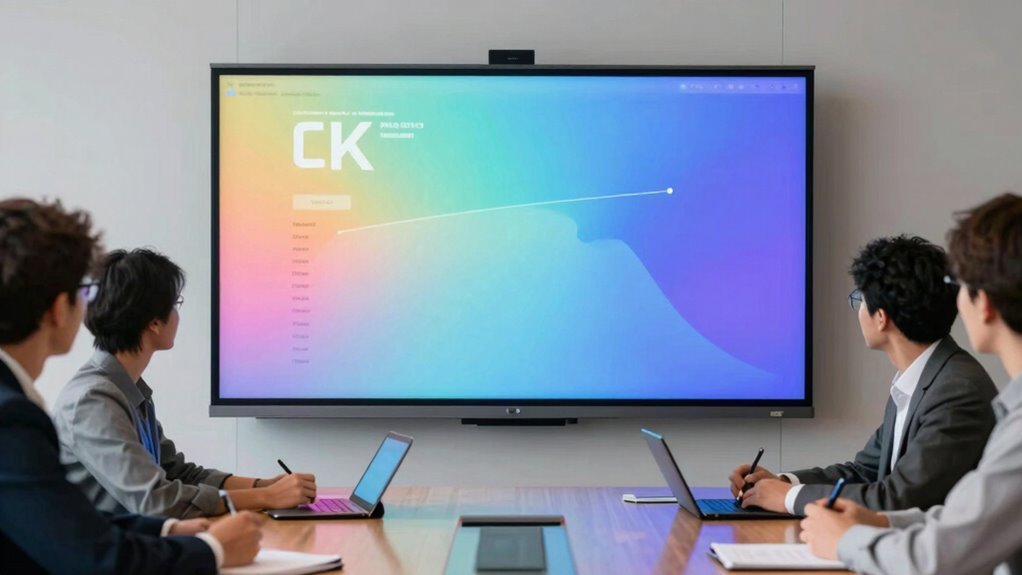

Choosing a high end digital whiteboard display for team workshops involves balancing size, interactivity, connectivity, and ease of use. The LG CreateBoard 86TR3DQ-B stands out as the best overall thanks to its large 86-inch display and robust collaboration features. The NearHub S Pro 75″ offers a sleek 4K experience with integrated Windows 11, making it ideal for tech-savvy teams. Meanwhile, the HORION 86-Inch 4K Pro combines impressive size with AI-powered tools for smarter meetings. Each option presents tradeoffs—larger screens can be pricier and more complex to install, while integrated software can limit flexibility. Keep reading for a detailed breakdown of the top choices to help you find the perfect fit for your team.

Get business pricing on office and shipping supplies
- Business-only prices and quantity discounts
- Tax-exempt purchasing
- Multiple users, one account, clear invoices
Key Takeaways
- Size and resolution are critical for clear visibility in large team environments, with 86-inch models offering the most impact.
- Integrated operating systems like Windows 11 or Android affect ease of use and software compatibility, shaping the user experience.
- Higher-end models tend to include AI features and advanced connectivity options, but often come at a significantly increased cost.
- Compatibility with existing collaboration tools and ecosystems is vital for seamless integration into team workflows.
- Build quality and ease of installation matter more at this price point, where durability and setup complexity can impact long-term value.
| LG CreateBoard 86TR3DQ-B Collaboration Display – 86-inch LCD |  | Best Overall for Creative Teams and Educational Environments | Screen Size: 86 inches | Display Type: LCD | Processor: ARM Cortex A73 + A53 | VIEW ON AMAZON | See Our Full Breakdown |
| NearHub S Pro 75″ Interactive Whiteboard 4K with Windows 11, Camera & Mics |  | Best for Professional Conferencing and Enterprise Use | Display Size: 75 inches | Display Resolution: 3840 x 2160 pixels (4K UHD) | Operating System: Windows 11 | VIEW ON AMAZON | See Our Full Breakdown |
| COOLHOOD 65-Inch 4K UHD Touchscreen Interactive Whiteboard |  | Best for Classroom and Small Office Environments | Display Size: 65 inches | Resolution: 3840×2160 (4K UHD) | Display Technology: IPS LCD | VIEW ON AMAZON | See Our Full Breakdown |
| HORION 86-Inch 4K Pro Digital Whiteboard Smart Board |  | Best for Corporate Enterprise and High-End Boardrooms | Screen Size: 86 inches | Resolution: 4K | Touch Points: 50 | VIEW ON AMAZON | See Our Full Breakdown |
| NewBoard P Series 75-Inch All-in-One Smart Board Interactive Whiteboard |  | Best for Hybrid Conference and Classroom Integration | Display Size: 75 inches | Display Resolution: 4K UHD | Operating System: Android 14 | VIEW ON AMAZON | See Our Full Breakdown |
| HORION 86-Inch 4K AI Digital Whiteboard, Smart Board for Office & Business |  | Best Overall High-End Digital Whiteboard for Large Teams | Screen Size: 86 inches | Resolution: 4K | Touchscreen: 50-point capacitive | VIEW ON AMAZON | See Our Full Breakdown |
| JAV 86 Inch Smart Board Pro, 4K UHD Interactive Whiteboard with Android 14, AI Camera, Wi-Fi & Bluetooth |  | Best for Versatile Classroom and Office Collaboration | Size: 86 inches | Resolution: 4K UHD | Operating System: Android 14 | VIEW ON AMAZON | See Our Full Breakdown |
| JAV 55-Inch Smart Board Pro Google EDLA Certified 4K UHD Interactive Whiteboard with AI Camera and Soundbar |  | Best for Compact, High-Quality Collaboration in Smaller Spaces | Size: 55 inches | Resolution: 4K UHD | Touch Points: 20 | VIEW ON AMAZON | See Our Full Breakdown |
| NewBoard 65E 65-Inch 4K Google EDLA-Certified Interactive Smart Board |  | Best for Google Ecosystem Integration and Classroom Use | Size: 65 inches | Resolution: 4K UHD | Viewing Angle: 178° | VIEW ON AMAZON | See Our Full Breakdown |
| HORION 65-Inch 4K Pro Digital Smart Whiteboard |  | Best for Enterprise-Grade Collaboration with Video Conferencing | Screen Size: 65 inches | Resolution: 4K | Touch Points: 50 | VIEW ON AMAZON | See Our Full Breakdown |
| 55″ Interactive Smart Whiteboard with Google EDLA Certification |  | Best for Secure, Flexible Collaboration in Medium to Large Rooms | Screen Size: 55 inches | Product Type: Interactive Whiteboard | Certification: Google EDLA Certified | VIEW ON AMAZON | See Our Full Breakdown |
| high end digital whiteboard display for team workshop | Resolution |
|---|---|
| LG CreateBoard 86TR3DQ-B Colla | — |
| NearHub S Pro 75" Interactive | — |
| COOLHOOD 65-Inch 4K UHD Touchs | 3840×2160 (4K UHD) |
| HORION 86-Inch 4K Pro Digital | 4K |
| NewBoard P Series 75-Inch All- | — |
| HORION 86-Inch 4K AI Digital W | 4K |
| JAV 86 Inch Smart Board Pro | 4K UHD |
| JAV 55-Inch Smart Board Pro Go | 4K UHD |
| NewBoard 65E 65-Inch 4K Google | 4K UHD |
| HORION 65-Inch 4K Pro Digital | 4K |
| 55" Interactive Smart Whiteboa | — |
More Details on Our Top Picks
LG CreateBoard 86TR3DQ-B Collaboration Display – 86-inch LCD
The LG CreateBoard 86TR3DQ-B stands out for its expansive 86-inch LCD screen combined with lifelike touch interaction, making it ideal for large group workshops and classrooms. Unlike smaller or more integrated options like the NearHub S Pro, this display offers a more flexible, content-rich platform with support for multiple devices and extensive templates, facilitating diverse collaboration styles. Its broad feature set, however, can be overwhelming for first-time users and may require a learning curve. The absence of a built-in PC or conferencing tools limits its standalone functionality, but its focus on touch accuracy and content export makes it a versatile choice for creative and educational settings.
Pros:- Lifelike touch interaction for precise writing and drawing
- Supports seamless content sharing and export
- Includes customizable templates and tools
- Compatible with multiple devices and OS platforms
Cons:- No integrated computer or conferencing system
- Potential complexity for new users due to feature richness
Best for: Creative teams, educators, and facilitators who need a large, highly interactive display with versatile content sharing capabilities.
Not ideal for: Small teams or users seeking a plug-and-play device without extensive setup or learning requirements.
- Screen Size:86 inches
- Display Type:LCD
- Processor:ARM Cortex A73 + A53
- Memory:8 GB
Our verdict“This model is best for large, collaborative environments that prioritize expansive, high-quality touch interaction over simplicity.”
NearHub S Pro 75″ Interactive Whiteboard 4K with Windows 11, Camera & Mics
The NearHub S Pro delivers full Windows 11 desktop capabilities on a 75-inch 4K display, making it a robust choice for meeting rooms and training sessions. Its built-in Intel Core i5 processor and 16GB RAM support heavy multitasking and enterprise applications, outperforming simpler Android-based displays like the COOLHOOD. The integrated 4K camera and multiple microphones enable high-quality video conferencing directly from the device, a feature that sets it apart from more basic models. However, its size and power requirements mean it’s best suited for dedicated spaces with professional installation, and its premium price may be prohibitive for smaller teams or casual users.
Pros:- Full Windows 11 support for desktop applications
- High-resolution 4K display with multi-touch
- Integrated professional-grade camera and microphones
- Supports real-time content sharing and collaboration
Cons:- Requires significant space and proper installation
- Higher price point and possible technical complexity
Best for: Large organizations, corporate training rooms, and teams needing a powerful all-in-one collaborative workstation.
Not ideal for: Small offices or teams seeking a portable, budget-friendly solution with simple setup.
- Display Size:75 inches
- Display Resolution:3840 x 2160 pixels (4K UHD)
- Operating System:Windows 11
- Processor:12th Gen Intel Core i5
Our verdict“This pick makes the most sense for enterprise environments that require a fully functional Windows PC combined with high-end collaboration tools.”
COOLHOOD 65-Inch 4K UHD Touchscreen Interactive Whiteboard
The COOLHOOD 65-Inch 4K UHD serves as a vibrant, versatile display with a focus on ease of use and wireless collaboration. Its 4K IPS LCD delivers vivid colors suitable for visual presentations, and its Android 13 platform ensures smooth performance with a rich app ecosystem. Compared with larger, more complex displays like the HORION 86-Inch, this smaller model offers simpler operation, making it ideal for educational settings or smaller conference rooms. Nonetheless, its size limits its use in larger spaces, and the need for wall mounting or separate stands adds additional setup considerations.
Pros:- High-resolution 4K display with vivid color reproduction
- Wireless screen sharing and collaboration tools
- Runs on Android 13 with access to a broad app ecosystem
- Decent multi-touch support for interactive work
Cons:- Stand sold separately, adding to overall cost
- Size may be restrictive in very large spaces
Best for: Educational institutions, small business teams, and conference rooms that prioritize ease of use and high-quality visuals.
Not ideal for: Large-scale workshops or teams needing extensive multi-user collaboration and customization.
- Display Size:65 inches
- Resolution:3840×2160 (4K UHD)
- Display Technology:IPS LCD
- Operating System:Android 13
Our verdict“This whiteboard makes the most sense for smaller environments that need straightforward, high-quality interactive display capabilities.”
HORION 86-Inch 4K Pro Digital Whiteboard Smart Board
The HORION 86-Inch 4K Pro combines a massive 86-inch 4K display with enterprise-grade features like a 50-point anti-glare touchscreen and ultra-low latency under 30ms, making it ideal for high-stakes meetings and corporate collaboration. Its built-in 48MP camera, AI-powered noise reduction microphones, and multiple speakers support professional video conferencing with tools like Zoom and Teams, rivaling dedicated conference equipment. Compared to the LG CreateBoard, this device emphasizes robust video conferencing hardware and enterprise security, but its size and weight demand professional installation and may be excessive for smaller teams or casual uses.
Pros:- Large 86-inch 4K display with multi-user touch
- Enterprise-grade video conferencing hardware
- AI noise reduction and 48MP camera
- Includes wall mount, remote, stylus and extended warranty
Cons:- Heavy and requires professional installation
- Overly sophisticated for small or casual teams
Best for: Large organizations, executive conference rooms, and teams that need a top-tier, integrated video conferencing solution.
Not ideal for: Small offices or groups that prefer portable or budget-friendly options without enterprise features.
- Screen Size:86 inches
- Resolution:4K
- Touch Points:50
- Microphones:8-array with AI noise reduction
Our verdict“This device is best for organizations seeking a comprehensive, enterprise-ready interactive display for large-scale collaboration.”
NewBoard P Series 75-Inch All-in-One Smart Board Interactive Whiteboard
The NewBoard P Series stands out for integrating a 75-inch 4K display, high-quality 48MP camera, 8-mic array, and speakers into a single Android 14 device, streamlining setup in conference rooms and classrooms. Its true all-in-one design eliminates the need for external webcams, microphones, or PCs, unlike the NearHub S Pro, which relies on external hardware. The device’s rapid <5ms touch latency> and Google EDLA certification support seamless hybrid collaboration and video meetings, but the relatively limited storage (64GB) could restrict extensive app use, and its size might not suit very small spaces. The inconsistency between the title and specs (75 vs. 65 inches) warrants clarification for buyers.
Pros:- All-in-one design with built-in camera, mic, and speakers
- High-quality 48MP 4K camera with auto focus
- Fast touch response with under 5ms latency
- Google EDLA certification with full Google Play and Workspace access
Cons:- Display size inconsistency between title and specs
- Limited storage for heavy enterprise applications
Best for: Hybrid teams, educational settings, and conference rooms seeking a compact, integrated collaboration device.
Not ideal for: Teams requiring extensive local storage or external PC flexibility, or very small rooms where size is a concern.
- Display Size:75 inches
- Display Resolution:4K UHD
- Operating System:Android 14
- Microphones:8-mic array with AI noise cancellation
Our verdict“This device offers a compact, fully integrated solution perfect for hybrid classrooms and conference spaces prioritizing simplicity.”
HORION 86-Inch 4K AI Digital Whiteboard, Smart Board for Office & Business
This HORION 86-inch model stands out for its combination of a 4K display, advanced AI features, and enterprise-grade security, making it ideal for large, tech-savvy teams seeking a comprehensive collaboration solution. Compared with the JAV 86 Inch Smart Board Pro, it offers superior AI-powered meeting summaries and real-time translation, though it comes with a higher price tag and a need for professional setup. Its large size and complex features may not suit small or casual environments but excel in conference rooms demanding seamless wireless connectivity, multiple user touch, and high-quality video conferencing. The high-resolution 50-point capacitive touchscreen, 48MP telephoto camera, and AI noise reduction microphones ensure robust, multi-user collaboration, while the Android 14 OS provides flexibility for app integration. Overall, this pick makes the most sense for organizations prioritizing security, AI-driven tools, and top-tier video conferencing capabilities.
Pros:- High-resolution 4K display with multi-user touch support
- Advanced AI features for meeting summaries and real-time translation
- Enterprise-grade security and seamless wireless connectivity
- Integrated high-quality video conferencing hardware
Cons:- Potentially high cost for small or budget-conscious organizations
- Requires professional setup and calibration due to large size
Best for: Large enterprises or corporate teams needing integrated AI tools and high-end security in a dedicated meeting space
Not ideal for: Small businesses or startups with limited budgets or casual use, due to its high cost and setup complexity
- Screen Size:86 inches
- Resolution:4K
- Touchscreen:50-point capacitive
- Camera:48MP telephoto quad-camera
- Microphones:8-microphone array with AI noise reduction
- Connectivity:Wi-Fi 6, Bluetooth 5.3, Type-C 65W
Our verdict“This device is best suited for large, security-conscious organizations seeking an all-in-one, AI-enhanced collaboration platform.”
JAV 86 Inch Smart Board Pro, 4K UHD Interactive Whiteboard with Android 14, AI Camera, Wi-Fi & Bluetooth
The JAV 86 Inch Smart Board Pro is designed for environments where seamless device compatibility and ease of use are priorities. Its 4K UHD display, anti-glare tempered glass, and built-in AI camera make remote and in-room collaboration straightforward. Compared to the HORION 86-Inch model, it offers a more user-friendly setup with Android 14 running on an 8GB RAM system, though it has a slightly lower 128GB storage capacity. Its large size and advanced features make it suitable for educational institutions and open office spaces but may require substantial installation space. The high-quality AI camera and wireless connectivity make remote participation smooth, while the anti-glare screen enhances visibility. This model is ideal for those seeking a balance between advanced features and user-friendly operation, especially in environments with multiple device compatibility needs.
Pros:- Large 86-inch 4K UHD display with anti-glare tempered glass
- Seamless wireless device compatibility and connectivity
- Built-in 48MP AI camera facilitates remote collaboration
- Runs on Android 14 with ample storage for apps and files
Cons:- High cost due to large size and advanced features
- Requires significant installation space and setup effort
Best for: Educational institutions or collaborative offices needing an easy-to-use, large-format interactive whiteboard
Not ideal for: Small meeting rooms or teams looking for compact, portable solutions, due to its size and installation needs
- Size:86 inches
- Resolution:4K UHD
- Operating System:Android 14
- RAM:8GB
- Storage:128GB
- Camera:48MP AI Camera
Our verdict“Best suited for users valuing ease of use and remote collaboration in large classroom or office settings.”
JAV 55-Inch Smart Board Pro Google EDLA Certified 4K UHD Interactive Whiteboard with AI Camera and Soundbar
This 55-inch model offers a more manageable size while still providing a 4K UHD touchscreen, AI camera, and integrated soundbar, making it ideal for smaller meeting rooms or classrooms. Compared to the larger 86-inch options, it emphasizes high-quality audio and video in a more space-efficient package. Its Google EDLA certification ensures full access to Google Play and Workspace, making it especially appealing for users embedded in the Google ecosystem. However, the smaller display and fewer touch points (20) might limit multi-user interaction compared with larger models like the HORION 65-inch or NewBoard 65E. Its complex features may pose a learning curve, but its compact size and integrated audio make it a flexible choice for environments with space constraints or those requiring high-quality multimedia.
Pros:- High-resolution 4K UHD touchscreen with multi-touch support
- Integrated AI camera and 100W soundbar for clear audio-visual collaboration
- Supports wireless sharing and collaboration tools
- Preloaded with templates and educational features
Cons:- Limited touch points may restrict multi-user interaction
- Size may still be too large for very small spaces and requires careful installation planning
Best for: Small to medium-sized conference rooms or classrooms needing a high-quality, space-efficient interactive whiteboard
Not ideal for: Large enterprise boardrooms or teams requiring extensive multi-touch collaboration, due to its smaller touch surface and size
- Size:55 inches
- Resolution:4K UHD
- Touch Points:20
- Camera:48MP AI Camera
- Soundbar Power:100W
- Operating System:Android 14
Our verdict“Ideal for environments where high-quality multimedia and space efficiency are key, especially in smaller rooms.”
NewBoard 65E 65-Inch 4K Google EDLA-Certified Interactive Smart Board
The NewBoard 65E delivers a 4K display with excellent viewing angles and full Google ecosystem access, making it a strong candidate for schools and offices deeply integrated with Google Workspace. Its 50-point multi-touch support up to 10 users and wireless sharing of up to 16 devices promote collaborative group work. Compared with the HORION 65-inch, it offers native Google services, which can streamline workflows for Google-centric teams, but the limited onboard storage of 64GB might require cloud reliance or external storage. Its 65-inch size strikes a balance between visibility and space requirements, though it may need professional installation. The full Google ecosystem access makes it particularly appealing for educational environments and collaborative teams invested in Google tools.
Pros:- Google EDLA certification with full access to Play Store and Workspace
- 50-point multi-touch supports up to 10 users
- Wide 178° viewing angle with 4K UHD resolution
- Wireless sharing for up to 16 devices
Cons:- Only 64GB onboard storage, which may limit app installations and files
- Large format requires professional mounting and space
Best for: Educational institutions and Google Workspace users seeking seamless integration and collaborative multi-touch features
Not ideal for: Teams requiring extensive onboard storage or those outside the Google ecosystem, due to limited storage and Google-specific features
- Size:65 inches
- Resolution:4K UHD
- Viewing Angle:178°
- Multi-Touch:50-point
- Storage:64GB
- Certification:Google EDLA
Our verdict“A smart choice for Google ecosystem users needing reliable, collaborative, large-format displays in educational or flexible office settings.”
HORION 65-Inch 4K Pro Digital Smart Whiteboard
This HORION 65-inch model emphasizes an all-in-one approach, combining 4K video conferencing, wireless sharing, and a digital whiteboard into a single device. Its 50-point anti-glare touchscreen with sub-30ms latency supports smooth multi-user collaboration, making it ideal for busy conference rooms. Compared to the JAV 55-inch, it offers a larger display and more robust conferencing hardware, including a 48MP built-in camera and AI noise reduction microphones. While its size suits medium to large rooms, its lack of native Windows OS and the need for external computing for full desktop workflows may be drawbacks for some enterprise users. The included accessories and 18-month warranty add value, but the size and complexity could be overkill in smaller or more casual settings.
Pros:- All-in-one solution with whiteboard, screen sharing, and video conferencing
- High-quality hardware including 48MP camera and AI noise-reducing microphones
- Low-latency multi-touch support for seamless collaboration
- Includes wall mount, remote, stylus pens, and extended warranty
Cons:- Large 65-inch size may limit flexibility in small rooms
- No native Windows OS; external computing needed for full desktop workflows
Best for: Medium to large corporate conference rooms needing integrated video conferencing and whiteboard features
Not ideal for: Small or casual meeting spaces where portability or simplicity are preferred, due to its size and setup requirements
- Screen Size:65 inches
- Resolution:4K
- Touch Points:50
- Latency:<30ms
- Camera:48MP built-in
- Microphones:8-microphone array with AI noise reduction
Our verdict“Designed for professional environments where integrated collaboration hardware simplifies meetings and whiteboarding.”
55″ Interactive Smart Whiteboard with Google EDLA Certification
This 55-inch interactive whiteboard stands out for its combination of enterprise-level security via Google EDLA certification and versatile collaboration features. Unlike larger displays such as the LG CreateBoard 86TR3DQ-B, it offers a more manageable size for medium-sized conference rooms while still supporting up to 16 wireless casting connections, making it ideal for teams that rely on multi-device sharing. The addition of app access through the Google Play Store broadens its functionality compared to simpler models, though it requires a separate OPS module for Windows upgrades, which could add complexity. Its low-latency writing and cloud saving enable smooth, real-time collaboration, while QR code sharing simplifies remote participation. The main tradeoff is that its 55-inch size may not be suitable for very large spaces, and network performance can impact wireless casting quality.
Pros:- Low-latency, responsive writing experience
- Supports up to 16 wireless device connections for seamless collaboration
- Access to a wide range of apps via Google Play Store
- Enterprise-grade security with Google EDLA certification
Cons:- Requires an additional OPS module for Windows OS expansion, increasing setup complexity and cost
- Large 55-inch display may need substantial wall space and can be less suitable for smaller rooms
- Wireless casting performance can vary depending on network quality and device compatibility
Best for: Mid-sized corporate teams needing secure, app-rich collaboration with flexible device sharing
Not ideal for: Very large conference rooms or teams requiring a giant display — its 55-inch size may feel cramped in expansive spaces
- Screen Size:55 inches
- Product Type:Interactive Whiteboard
- Certification:Google EDLA Certified
- App Access:Google Play Store
- Wireless Casting:Supports up to 16 connections
- Display Features:Split-screen multitasking
- Whiteboard Features:Unlimited canvas, cloud saving, QR code sharing
- Expansion:OPS slot for optional Windows OS upgrade
Our verdict“This whiteboard is best suited for medium-sized teams that prioritize security, app flexibility, and multi-device collaboration over sheer display size.”
How We Picked
These products were evaluated based on their display size, resolution, build quality, and ease of integration into team workflows. Performance features such as touch responsiveness, AI capabilities, and connectivity options were also key considerations. Value was assessed by comparing features against price, ensuring that each model offers a meaningful benefit for its cost. We prioritized devices with proven reliability and broad compatibility, selecting those that serve diverse team environments while highlighting notable tradeoffs like size, complexity, and software ecosystem limitations. The ranking reflects a balance of these factors to help buyers find the best high end options for their needs.Factors to Consider When Choosing High End Digital Whiteboard Display For Team Workshops
When selecting a high end digital whiteboard display for team workshops, it’s important to consider multiple factors to ensure long-term satisfaction. Size and resolution directly impact collaboration clarity, especially in large rooms. Operating system compatibility affects ease of use and integration with your existing tools. Connectivity options like HDMI, USB, and wireless support are critical for seamless collaboration. Additionally, build quality and installation complexity can influence both upfront setup and ongoing durability. Finally, consider AI features and software ecosystems, which can enhance productivity but often come with higher costs and learning curves.Display Size and Resolution
Size and resolution determine how well your team members can see and interact with the content, especially in sizable conference rooms. Larger screens, like 86-inch models, are ideal for visibility from across the room but often come with higher costs and installation challenges. Resolution matters for clarity—4K displays provide sharp, detailed visuals that facilitate more engaging collaboration. Choosing the right balance depends on your room size and the typical number of participants, but investing in larger, high-resolution screens generally yields the best engagement outcomes.
Operating System and Software Ecosystem
The choice of operating system—whether Windows, Android, or proprietary platforms—impacts how easily your team can use the device. Windows-based displays like NearHub S Pro offer familiar interfaces and broad software compatibility, making them suitable for teams that rely on Windows apps. Android-based models tend to be more user-friendly and straightforward for quick setups but may have limited enterprise features. Proprietary systems can offer tighter integration but might restrict flexibility or require additional investments. Understanding your team’s tech familiarity is essential to avoid usability frustrations.
Connectivity and Integration
Efficient collaboration depends on flexible connectivity options, including wired inputs, Wi-Fi, Bluetooth, and cloud integrations. Devices supporting multiple wireless protocols facilitate seamless sharing from various devices, whether laptops, tablets, or smartphones. Compatibility with common collaboration tools—like Zoom, Microsoft Teams, or Google Meet—is equally important, especially if your workflows depend on remote participation. Ensuring your chosen display can connect effortlessly to your existing ecosystem minimizes friction and enhances overall productivity.
Build Quality and Ease of Installation
Durability and straightforward setup are often underestimated but vital at this price point. Heavy, well-constructed screens with stable mounting options ensure longevity, especially in busy workshop environments. Some models feature simplified mounting systems or integrated stands to reduce installation time, while others may require professional setup. Considering the weight, mounting complexity, and available space helps avoid surprises once the device arrives. Long-term durability and ease of maintenance justify investments in higher-quality builds, but be aware of potential installation costs.
AI Features and Advanced Capabilities
Higher-end displays increasingly include AI-powered features like intelligent image recognition, voice commands, or automated content management. These can significantly streamline your workflow, making meetings more interactive and engaging. However, they also add to the purchase price and may require ongoing software updates or training. Carefully evaluate whether these smart features genuinely enhance your team’s productivity or if they are more of a luxury that could be bypassed with simpler models.
Frequently Asked Questions
How do I determine the right size for my team workshop?
The optimal size depends on your room dimensions and number of participants. For large rooms with many attendees, an 86-inch display ensures visibility for everyone, but smaller teams might find a 65-inch screen sufficient and easier to install. Consider the distance between the screen and viewers, and aim for content to be clearly visible from the farthest seat. Larger screens provide immersive experiences, but they also require more space and higher investment, so balance room size and budget carefully.
Are Android or Windows-based displays better for team collaboration?
Android-based displays tend to be more intuitive and quicker to set up, making them suitable for teams that prioritize simplicity. Windows-based models offer broader software compatibility and more advanced collaboration features, appealing to organizations with complex workflows. Your choice should align with your existing software ecosystem and user familiarity—if your team depends heavily on Windows applications, a Windows-powered display will integrate more smoothly, whereas Android models excel in ease of use for quick, straightforward sessions.
What should I consider regarding installation and mounting?
Installation complexity varies by model, with some featuring built-in stands or simplified mounting systems, while others require professional setup. Heavier, larger screens demand sturdy mounts and sufficient space, which can add to overall costs. Check the weight specifications and mounting compatibility before purchasing. Also, consider if your team has the resources or expertise to handle installation or if you will need to hire professionals—this can significantly influence the total investment.
How important are AI features in high end digital whiteboards?
AI features can make meetings more interactive by enabling voice commands, intelligent content recognition, or automated annotations, which can boost engagement and productivity. However, these capabilities come at a premium and may require ongoing updates and training. Evaluate whether your team can benefit from AI enhancements or if simpler, manual interaction features suffice. In most cases, AI is a value-added feature rather than a necessity, especially if your primary goal is straightforward collaboration.
Is it worth investing in a 4K display for team workshops?
Yes, a 4K display provides sharper images and clearer text, making it easier for teams to read content, especially in larger rooms. The increased resolution enhances visual clarity for detailed presentations, diagrams, or collaborative annotations. However, 4K models tend to be more expensive and may require more powerful hardware for optimal performance. If your workspace prioritizes high-quality visuals and has the budget, choosing a 4K display can significantly improve engagement and reduce eye strain during long sessions.
Conclusion
For organizations seeking the best overall experience, the LG CreateBoard 86TR3DQ-B offers unmatched size and collaboration features, ideal for large or high-demand environments. Budget-conscious teams that still want quality might prefer the COOLHOOD 65-Inch 4K UHD, which balances performance with cost. Those aiming for advanced AI integration and smart features should consider the HORION 86-Inch 4K AI Digital Whiteboard, though at a higher price. Beginners or smaller teams will benefit from simpler, more manageable models like the 55″ Interactive Smart Whiteboard. Ultimately, your choice depends on your room size, workflow complexity, and budget—matching the right model to your specific needs will ensure productive and engaging workshops.