

Finding the right iPad keyboard for productivity involves balancing comfort, functionality, and price. The Apple Magic Keyboard Folio stands out as the best overall with its seamless integration and premium build quality. For a more flexible, budget-friendly choice, the Logitech Combo Touch offers excellent versatility and value. However, some users might prefer a more compact or rugged option, which means tradeoffs between portability and features. Keep reading to see how these options compare and find the perfect fit for your work needs.

Get business pricing on office and shipping supplies
- Business-only prices and quantity discounts
- Tax-exempt purchasing
- Multiple users, one account, clear invoices
Key Takeaways
- The best iPad keyboards for productivity typically combine a good keyboard feel with a stable stand or case design.
- Top picks often balance price and features, with premium models offering better build quality and seamless integration.
- Versatility in stand and attachment options is a key factor, especially for users who switch between work and casual use.
- Compact and detachable keyboards tend to sacrifice some functionality for portability, which can impact productivity.
- Compatibility across different iPad models remains a critical consideration for long-term value.
| Typecase Touch iPad A16 11th/10th Gen Case with Keyboard, 360° Rotating |  | Best for Versatile Productivity and Customization | Compatibility: iPad A16 11-inch 2025 models, iPad 10th Gen 2022 | Trackpad: Multi-touch gesture controls | Hinge: 360° rotating with 7 modes | VIEW ON AMAZON | See Our Full Breakdown |
| Apple Smart Keyboard for iPad (7th-9th Gen, Air 3rd Gen, 10.5-inch iPad Pro) – Black |  | Best for Seamless, No-Fuss Typing | Compatibility: iPad 7th-9th Gen, iPad Air 3rd Gen, 10.5-inch iPad Pro | Dimensions: 10.31 x 7.64 x 0.55 inches | Weight: 1.06 pounds | VIEW ON AMAZON | See Our Full Breakdown |
| Logitech Combo Touch Detachable iPad Keyboard Case for 10th Gen – Oxford Gray |  | Best for Multi-Mode Flexibility and Creative Work | Compatibility: iPad (10th gen & A16 models) | Features: Backlit keyboard, multi-gesture trackpad, four modes | Design: Detachable keyboard, premium materials | VIEW ON AMAZON | See Our Full Breakdown |
| Logitech Combo Touch iPad Air 11-inch Keyboard Case – Midnight Black |  | Best for Multi-Tasking and Large Screen Productivity | Compatibility: iPad Air 11-inch (M2, M3, M4) | Modes: Type, sketch, watch videos, read, video call | Keyboard: Wireless backlit, detachable | VIEW ON AMAZON | See Our Full Breakdown |
| Logitech Combo Touch iPad 7th, 8th, and 9th Generation Keyboard – Graphite |  | Best for Cost-Effective, Laptop-Like Productivity | Compatibility: iPad 7th-9th Gen | Trackpad: Yes | Backlit Keys: Yes | VIEW ON AMAZON | See Our Full Breakdown |
| Apple Magic Keyboard for iPad Air (White) |  | Best Overall for iPad Air Users | Compatibility: iPad Air 11-inch (4th, 5th, M2, M3, M4) | Color: White | Dimensions: 10.7 x 10 x 1.1 inches | VIEW ON AMAZON | See Our Full Breakdown |
| Apple Magic Keyboard Folio for iPad (A16 & 10th Gen) – White | 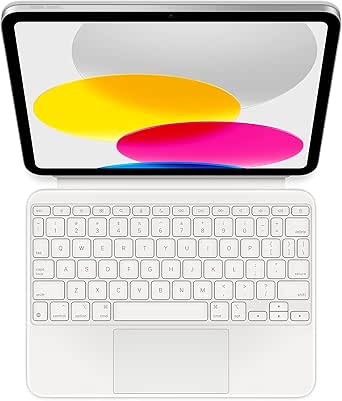 | Best for Versatile iPad Productivity with Detachable Design | Compatibility: iPad (A16 and 10th generation) | Color: White | Item Weight: 1.96 pounds | VIEW ON AMAZON | See Our Full Breakdown |
| Typecase Edge iPad A16 11th/10th Gen Keyboard Case with Floating Magnetic Stand |  | Best for Creative and Dynamic Workspaces | Compatible Devices: iPad 10.9-inch (2022), iPad 11-inch (2025) | Connectivity Technology: Bluetooth | Backlit Keyboard Colors: 11 | VIEW ON AMAZON | See Our Full Breakdown |
| Apple iPad Magic Keyboard Case for iPad Pro 13-inch (M4 and M5), Black | 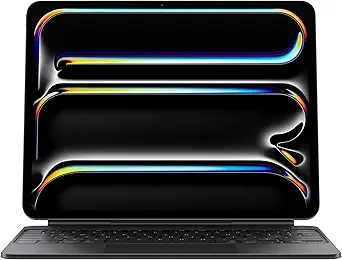 | Best for Power Users with iPad Pro 13-inch | Compatibility: iPad Pro 13-inch (M4 and M5) | Dimensions: 5.9 x 10 x 5.9 inches | Item Weight: 8.6 ounces | VIEW ON AMAZON | See Our Full Breakdown |
| Apple Magic Keyboard with Numeric Keypad – White |  | Best for Extended Productivity and Data Entry | Connectivity: Bluetooth | Battery: Rechargeable, lasts about a month or more | Compatibility: Mac, iPadOS 13.4+, iOS 10.3+ | VIEW ON AMAZON | See Our Full Breakdown |
| Apple Magic Keyboard for iPad Pro 11-inch and iPad Air (4th & 5th Gen) |  | Best Overall for Seamless Apple Ecosystem Integration | Compatibility: iPad Pro 11-inch (1st-4th gen), iPad Air (4th & 5th gen) | Features: Backlit keys, built-in trackpad, pass-through USB-C charging, floating cantilever design | Color options: Black, White | VIEW ON AMAZON | See Our Full Breakdown |
| Logitech Combo Touch iPad Pro 12.9 Inch 5th-6th Gen Keyboard – Oxford Gray |  | Best for Versatile Multi-Mode Productivity | Compatibility: iPad Pro 12.9-inch (5th, 6th gen – 2021, 2022) | Dimensions: 11.24 x 8.89 x 0.69 inches | Weight: 27.51 oz | VIEW ON AMAZON | See Our Full Breakdown |
| ipad keyboards for productivity | Compatibility |
|---|---|
| Typecase Touch iPad A16 11th/1 | iPad A16 11-inch 2025 models, iPad 10th Gen 2022 |
| Apple Smart Keyboard for iPad | iPad 7th-9th Gen, iPad Air 3rd Gen, 10.5-inch iPad Pro |
| Logitech Combo Touch Detachabl | iPad (10th gen & A16 models) |
| Logitech Combo Touch iPad Air | iPad Air 11-inch (M2, M3, M4) |
| Logitech Combo Touch iPad 7th | iPad 7th-9th Gen |
| Apple Magic Keyboard for iPad | iPad Air 11-inch (4th, 5th, M2, M3, M4) |
| Apple Magic Keyboard Folio for | iPad (A16 and 10th generation) |
| Typecase Edge iPad A16 11th/10 | — |
| Apple iPad Magic Keyboard Case | iPad Pro 13-inch (M4 and M5) |
| Apple Magic Keyboard with Nume | Mac, iPadOS 13.4+, iOS 10.3+ |
| Apple Magic Keyboard for iPad | iPad Pro 11-inch (1st-4th gen), iPad Air (4th & 5th gen) |
| Logitech Combo Touch iPad Pro | iPad Pro 12.9-inch (5th, 6th gen – 2021, 2022) |
More Details on Our Top Picks
Typecase Touch iPad A16 11th/10th Gen Case with Keyboard, 360° Rotating
This case stands out for its flexible 360° rotating hinge that offers seven different modes, making it ideal for switching between typing, sketching, or media viewing. Unlike the Logitech Combo Touch, which emphasizes multiple modes but with a heavier, bulkier design, the Typecase provides a more seamless transition between tasks. The backlit RGB keyboard enhances productivity in low-light settings, and the inclusion of an Apple Pencil holder supports creative workflows. However, its compatibility is limited to specific iPad A16 and 10th gen models, and the overall bulkiness may be a concern for those prioritizing portability. This pick makes the most sense for users who value adaptability and creative flexibility in a single device.
Pros:- Versatile 360° rotating hinge with multiple modes
- Backlit RGB keyboard for low-light productivity
- Includes Apple Pencil holder and auto sleep/wake
Cons:- Compatibility limited to specific iPad models
- Potentially bulky with multiple features
Best for: Creative professionals and students who need a multi-mode device for varied tasks
Not ideal for: Frequent travelers seeking a lightweight solution, as the case adds bulk
- Compatibility:iPad A16 11-inch 2025 models, iPad 10th Gen 2022
- Trackpad:Multi-touch gesture controls
- Hinge:360° rotating with 7 modes
- Keyboard:Backlit with RGB lighting, includes shortcut keys
- Protection:Hard-shell case with auto sleep/wake
- Additional features:Apple Pencil holder, USB-C rechargeable battery
Our verdict“Best suited for users who need a highly adaptable case that supports both work and creative tasks without sacrificing protection.”
Apple Smart Keyboard for iPad (7th-9th Gen, Air 3rd Gen, 10.5-inch iPad Pro) – Black
This keyboard is all about simplicity and immediacy, attaching directly to compatible iPads without the need for pairing or charging. Compared to the Logitech Combo Touch, which offers more modes and a trackpad, the Apple Smart Keyboard focuses solely on providing a straightforward typing experience and a protective cover. Its slim profile makes it ideal for on-the-go use, though the lack of backlit keys limits usability in dim environments. If you prefer a minimal setup that stays out of the way, this keyboard makes sense, but it may fall short for those needing backlit keys or advanced productivity features.
Pros:- Attaches easily without pairing or charging
- Provides a comfortable, reliable typing experience
- Serves as a protective cover
Cons:- No backlit keys for low-light conditions
- Limited to specific iPad models
Best for: Users who prioritize portability and quick setup for everyday typing tasks
Not ideal for: Power users who need backlit keys or multi-mode versatility
- Compatibility:iPad 7th-9th Gen, iPad Air 3rd Gen, 10.5-inch iPad Pro
- Dimensions:10.31 x 7.64 x 0.55 inches
- Weight:1.06 pounds
- Color:Black
- Connectivity:Smart Connector
- Features:No backlit keys, protective cover
Our verdict“Ideal for users who want a simple, reliable keyboard that enhances portability without extra features.”
Logitech Combo Touch Detachable iPad Keyboard Case for 10th Gen – Oxford Gray
The Logitech Combo Touch excels in offering four distinct modes—typing, reading, sketching, and viewing—which makes it highly adaptable for productivity and creative tasks. Its detachable keyboard and flexible kickstand set it apart from more rigid options like the Apple Magic Keyboard. Unlike the Apple Magic Keyboard Folio, which emphasizes a sleek, integrated design, the Combo Touch prioritizes versatility with a backlit keyboard and a precision trackpad. The tradeoff is that it’s somewhat bulkier and limited to the iPad 10th generation and A16 models. This case is perfect for users who want a multi-purpose device that can switch effortlessly between work and entertainment.
Pros:- Four modes for diverse productivity and entertainment tasks
- Detachable keyboard for flexibility
- Backlit keys and a precision trackpad enhance usability
Cons:- Limited to specific iPad models
- Potentially bulkier than slim cases
Best for: Content creators and students who need a flexible, multi-mode setup
Not ideal for: Those seeking a lightweight, ultra-slim case for frequent travel
- Compatibility:iPad (10th gen & A16 models)
- Features:Backlit keyboard, multi-gesture trackpad, four modes
- Design:Detachable keyboard, premium materials
- Power:Powered via Smart Connector
- Materials:FSC-certified packaging
Our verdict“Best for users who value multi-mode versatility and creative workflows in a single device.”
Logitech Combo Touch iPad Air 11-inch Keyboard Case – Midnight Black
The Logitech Combo Touch for iPad Air 11-inch is tailored for users who juggle multiple tasks, offering a large trackpad and a detachable, backlit keyboard that supports extensive productivity. Its multi-mode functionality allows users to switch seamlessly between typing, sketching, media viewing, or reading, similar to the 10th gen model but optimized for the Air’s larger screen. Compared to the 7th-9th gen Logitech models, this one provides a more spacious workspace and a more robust keyboard experience. The inclusion of a secure, lightweight design makes it suitable for busy professionals who need versatility without excess weight. However, it requires the iPad to have a Smart Connector, limiting universal compatibility.
Pros:- Multiple modes for various tasks and media consumption
- Large multi-touch trackpad for precise navigation
- Secure, lightweight protective design
Cons:- Requires iPad with Smart Connector
- Limited compatibility to specific iPad Air models
Best for: Professionals and students who need a larger display and versatile modes for multitasking
Not ideal for: Travelers seeking a compact, lightweight solution, since it adds some bulk
- Compatibility:iPad Air 11-inch (M2, M3, M4)
- Modes:Type, sketch, watch videos, read, video call
- Keyboard:Wireless backlit, detachable
- Trackpad:Large Multi-Touch
- Protection:Secure, form-fit
- Material:Post-consumer recycled plastic
Our verdict“Ideal for users wanting a larger screen with multi-tasking capabilities in a flexible, protective case.”
Logitech Combo Touch iPad 7th, 8th, and 9th Generation Keyboard – Graphite
This model offers a familiar laptop-like experience with a full row of backlit keys and a large trackpad, making it a practical choice for everyday productivity. Compared to the Apple Magic Keyboard Folio, which is sleek but more expensive, the Logitech Combo Touch provides more modes and a more flexible stand, making it a better fit for users who want versatility at a more accessible price. It’s best suited for those who already own an older iPad or are budget-conscious but still want a productive, multi-mode case. Its reliance on the Smart Connector means it’s not compatible with newer models, which is a notable restriction for those upgrading.
Pros:- Four modes for different tasks
- Full row of backlit shortcut keys
- Easy connection via Smart Connector
Cons:- Requires specific older iPad models
- Potentially heavy for portability
Best for: Cost-conscious users seeking a full-featured, laptop-like experience for older iPads
Not ideal for: Owners of the latest iPad models who need a universal or newer solution
- Compatibility:iPad 7th-9th Gen
- Trackpad:Yes
- Backlit Keys:Yes
- Connection:Smart Connector
- Modes:Four modes
- Kickstand:Adjustable
Our verdict“Best for budget-minded users with older iPads who want a versatile, laptop-style keyboard solution.”
Apple Magic Keyboard for iPad Air (White)
This keyboard excels in providing a seamless, integrated experience for iPad Air owners who want portability combined with productivity. Its slim design and built-in trackpad make it ideal for those who need a compact setup without sacrificing functionality. Compared to the Typecase Edge, it offers a more refined typing feel and native Apple integration, but it is heavier and lacks backlit keys, which might be a drawback for working in low light. Its pass-through charging and protective case make it convenient for everyday carry, though its weight could be a concern for frequent travelers. For those seeking a premium, Apple-designed solution that doubles as a case, this stands out as the best choice.
Pros:- Slim, portable design that integrates seamlessly with iPad Air
- Includes a built-in trackpad for enhanced productivity
- Protective case with pass-through charging
Cons:- Relatively heavy for a portable keyboard
- Limited to specific iPad Air models with no backlit keys
Best for: iPad Air owners who prioritize seamless integration and portability without a need for backlit keys.
Not ideal for: Users who need a lightweight keyboard for extended travel or work in dim environments, due to its weight and lack of backlit keys.
- Compatibility:iPad Air 11-inch (4th, 5th, M2, M3, M4)
- Color:White
- Dimensions:10.7 x 10 x 1.1 inches
- Weight:2 pounds
- Connectivity:USB-C pass-through charging
- Features:Full 14-key function row, built-in trackpad, magnetic attachment, adjustable viewing angles
Our verdict“This option is ideal for iPad Air users seeking a sleek, integrated keyboard with a trackpad for everyday productivity.”
Apple Magic Keyboard Folio for iPad (A16 & 10th Gen) – White
This keyboard makes the most sense for users who want flexibility and protection, especially with its detachable design that allows switching between laptop-like typing and tablet modes. Its built-in trackpad supports Multi-Touch gestures, comparable to the Apple Magic Keyboard for iPad Pro, but the Folio’s front and back protection adds extra durability, which is missing in simpler keyboard cases. While the premium price might deter some, its ease of use—no pairing or charging—adds to its appeal. For professionals or students who need a versatile setup that adapts to different tasks, this offers a balanced combination of convenience and functionality.
Pros:- Detachable keyboard and protective back panel for versatile use
- Built-in trackpad with Multi-Touch gesture support
- No charging or pairing required, easy to attach and detach
Cons:- Limited to specific iPad models (A16 and 10th gen)
- Higher price point that may not suit all budgets
Best for: Users who want a flexible, protective keyboard solution for the latest iPads, especially in professional or educational settings.
Not ideal for: Budget-conscious buyers or those who prefer a non-detachable, lighter keyboard without the need for full protection.
- Compatibility:iPad (A16 and 10th generation)
- Color:White
- Item Weight:1.96 pounds
- Product Dimensions:10.22 x 7.68 x 0.89 inches
- Features:Detachable, built-in trackpad, no pairing needed
Our verdict“Perfect for users who value flexibility, protection, and ease of use in a premium keyboard case solution for newer iPads.”
Typecase Edge iPad A16 11th/10th Gen Keyboard Case with Floating Magnetic Stand
This keyboard case is tailored for users who demand both a sturdy protective case and flexible viewing angles, thanks to its magnetic floating stand. Its 11-color backlit keyboard enhances usability in various lighting conditions, making it ideal for late-night work sessions. The built-in Apple Pencil holder adds convenience for artists or note-takers. Unlike the Apple Magic Keyboard, which is sleek but less adjustable, this model offers more viewing flexibility, though it requires iPadOS 16 and has limited color options. Its vegan leather build combines style with durability, making it suitable for professionals on the go.
Pros:- Compatible with latest iPad models (2022 and 2025)
- Adjustable floating magnetic stand for versatile viewing angles
- 11-color backlit keyboard for day and night use
- Includes Apple Pencil holder and vegan leather protection
Cons:- Requires iPadOS 16 or later for full features
- Limited color options and unspecified battery life
Best for: Creative professionals or students needing an adjustable, backlit keyboard with protective features for iPad 10th or 2025 models.
Not ideal for: Users seeking a minimal, lightweight keyboard for frequent travel, as this case adds bulk and requires specific iPadOS versions.
- Compatible Devices:iPad 10.9-inch (2022), iPad 11-inch (2025)
- Connectivity Technology:Bluetooth
- Backlit Keyboard Colors:11
- Battery:Rechargeable
- Material:Synthetic vegan leather
- Stand Type:Floating magnetic
Our verdict“A solid choice for creatives and students who want a highly adjustable, backlit keyboard case with premium protection.”
Apple iPad Magic Keyboard Case for iPad Pro 13-inch (M4 and M5), Black
This keyboard offers a sleek, ultra-portable solution tailored for iPad Pro 13-inch owners who need a high-end typing experience with precise control. Its glass trackpad with haptic feedback rivals traditional laptops, and the adjustable two-cantilever hinge ensures comfortable viewing angles. While the design is thin and lightweight—only 8.6 ounces—it comes with some tradeoffs: accessories are sold separately, and compatibility varies by iPad generation. Unlike larger, more feature-rich options, this focuses on a clean, minimal setup for those who prioritize portability over extensive features. It’s ideal for professionals who want a premium, slim keyboard on the go.
Pros:- Extremely thin and portable design
- Glass trackpad with haptic feedback for precise control
- Adjustable viewing angles with two-cantilever hinge
Cons:- Accessories like power adapters sold separately
- Compatibility varies by iPad model and generation
Best for: Power users or professionals with latest iPad Pro 13-inch models seeking a compact, high-quality keyboard for frequent travel.
Not ideal for: Users who need a more comprehensive keyboard with included accessories or broader compatibility with older iPad models.
- Compatibility:iPad Pro 13-inch (M4 and M5)
- Dimensions:5.9 x 10 x 5.9 inches
- Item Weight:8.6 ounces
- Batteries:Nonstandard battery
- First Available:May 7, 2024
Our verdict“Designed for professionals who want a sleek, portable keyboard without extra bulk or features, but need to verify iPad compatibility.”
Apple Magic Keyboard with Numeric Keypad – White
This extended keyboard excels for users who often work with spreadsheets, databases, or need dedicated numeric keys. Its wireless, rechargeable design makes it convenient for prolonged use, and the long battery life reduces charging interruptions. Compared to standalone iPad keyboards, this offers a familiar, full-size layout that boosts efficiency—especially when paired with compatible iPads or Macs. However, it requires Bluetooth and may not be as portable as smaller options. It’s best suited for users who favor comfort and precision over ultra-lightweight design, particularly those handling intensive data tasks regularly.
Pros:- Wireless and rechargeable, minimizing cable clutter
- Extended layout with numeric keypad and navigation keys
- Long-lasting battery with weeks of use per charge
Cons:- Requires Bluetooth-enabled device and pairing setup
- Bulkier than compact keyboards, less portable
Best for: Finance professionals, data entry clerks, or anyone needing a full-size, numeric keypad for extended work sessions on iPad or Mac.
Not ideal for: Travelers or casual users who prefer minimal, lightweight keyboards, since its extended layout adds bulk.
- Connectivity:Bluetooth
- Battery:Rechargeable, lasts about a month or more
- Compatibility:Mac, iPadOS 13.4+, iOS 10.3+
- Includes:Lightning to USB cable
Our verdict“A solid choice for productivity-focused users who need a full-sized, reliable keyboard with numeric keypad for intensive work.”
Apple Magic Keyboard for iPad Pro 11-inch and iPad Air (4th & 5th Gen)
This keyboard stands out for its effortless integration with compatible iPads, offering a truly wireless experience that requires no pairing or charging, unlike the Logitech Combo Touch which relies on smart connector technology. Its floating design provides an elegant viewing angle adjustment, making it ideal for long typing sessions or media consumption. Although its premium price may deter budget-conscious buyers, the built-in trackpad and backlit keys deliver a responsive, comfortable typing environment. However, its compatibility is limited strictly to certain iPad models, which could be a drawback for those with other devices. This pick makes the most sense for users who prioritize a sleek, cable-free setup with tight Apple ecosystem integration, and are willing to invest in quality.
Pros:- Seamless wireless connection without pairing or charging
- Responsive backlit keys and built-in trackpad
- Adjustable floating cantilever design for comfortable viewing angles
- Provides front and back protective cover
Cons:- Limited compatibility to specific iPad models
- Premium price point that may be cost-prohibitive for some
Best for: Apple users who want a premium, plug-and-play keyboard with seamless connectivity and a sleek design.
Not ideal for: Users with non-Apple tablets or those seeking a more versatile or budget-friendly option, as it’s limited to specific iPad models.
- Compatibility:iPad Pro 11-inch (1st-4th gen), iPad Air (4th & 5th gen)
- Features:Backlit keys, built-in trackpad, pass-through USB-C charging, floating cantilever design
- Color options:Black, White
- Dimensions:10.18 x 7.96 x 0.87 inches
- Weight:1.81 pounds
- Language options:Multiple including US English, French, German, Japanese, Korean, Spanish, etc.
Our verdict“This is the best choice for Apple users seeking a premium, hassle-free keyboard that enhances productivity without sacrificing design elegance.”
Logitech Combo Touch iPad Pro 12.9 Inch 5th-6th Gen Keyboard – Oxford Gray
The Logitech Combo Touch distinguishes itself with its flexible four-mode design, supporting typing, viewing, sketching, and reading—making it a strong competitor to Apple’s Magic Keyboard, which is primarily focused on typing. Its large, multi-touch trackpad and adjustable kickstand provide a comfortable workspace for multitasking and creative tasks alike. The inclusion of iPadOS shortcut keys and Apple Pencil charging opening adds to its productivity appeal. However, its weight—over 27 ounces—may make it less portable for on-the-go use, especially compared to the lighter Apple Magic Keyboard. This case is ideal for users who need a highly adaptable workspace and don’t mind a bit of extra bulk, especially those who switch frequently between different modes of use.
Pros:- Versatile four-mode design for typing, viewing, sketching, and reading
- Large, responsive multi-touch trackpad
- Backlit keys with adjustable brightness
- Full protection for front, back, and corners of the iPad
Cons:- Heavy at over 27 ounces, potentially cumbersome for portability
- Requires iPadOS 13.4+ for full functionality
- Higher price point may be a concern for budget shoppers
Best for: Power users who value flexibility, multi-mode support, and a large trackpad for complex tasks or creative workflows.
Not ideal for: Travelers or those seeking a lightweight solution, as its weight and bulk may hinder portability.
- Compatibility:iPad Pro 12.9-inch (5th, 6th gen – 2021, 2022)
- Dimensions:11.24 x 8.89 x 0.69 inches
- Weight:27.51 oz
- Viewing Angles:10 – 60 degrees
- Backlighting Levels:16
- Protection:Front, back, and corner protection
Our verdict“This keyboard case is best suited for users who need a flexible, multi-purpose setup and are comfortable with added weight for enhanced productivity features.”

How We Picked
To evaluate these iPad keyboards for productivity, I focused on key factors such as typing comfort, build quality, compatibility with various iPad models, and overall usability. Performance and reliability during extended use were prioritized over flashy features. Cost-effectiveness was also a consideration, ensuring each option provides good value for its price. Rankings reflect a balance of premium features versus affordability, with an emphasis on how well each product supports a productive workflow, including multitasking, typing comfort, and stability during use.Factors to Consider When Choosing Ipad Keyboards For Productivity
Choosing an iPad keyboard for productivity requires considering several practical factors. The right keyboard can significantly enhance your efficiency, but tradeoffs often exist between cost, portability, and features. Being aware of these factors can help you make a smarter purchase that aligns with your specific work habits and needs.Compatibility with Your iPad Model
Not all iPad keyboards work with every iPad model, especially considering differences in size and connector types. Verify compatibility before purchasing to avoid frustration or repeated returns. Some keyboards are designed specifically for certain generations or sizes, so double-check the model number or compatibility list. This can save you money and ensure a seamless experience.
Typing Comfort and Layout
For productivity, the feel and layout of the keyboard matter more than most other features. Look for keys with good travel and responsiveness, as these reduce fatigue during long typing sessions. Consider whether you prefer a full-sized layout with a numeric keypad or a more compact design for portability. The choice impacts your overall efficiency, especially if you do a lot of typing.
Build Quality and Durability
Durability becomes essential if you carry your iPad keyboard around frequently. Materials like aluminum or high-quality plastic can withstand daily wear and tear better than cheaper options. Additionally, a sturdy hinge or case can improve stability and prevent accidental drops. Investing in a well-built keyboard can extend its lifespan and support consistent productivity.
Portability and Design
If mobility is key, look for lightweight, slim, or detachable options. However, more portable designs often sacrifice some features like extensive key layouts or sturdy stands. Balance your need for portability with the practicality of a solid typing experience. Keep in mind that bulkier, more feature-rich options might be less convenient to carry but could offer a better overall work experience.
Additional Features and Accessories
Features like backlit keys, adjustable stands, or integrated trackpads can boost productivity. Think about your typical environment—if you work in low-light settings, backlit keys are valuable. If you need a more versatile device, look for keyboards with adjustable angles or detachable parts. These enhancements can improve comfort and usability during long work hours.
Frequently Asked Questions
Can I use a Bluetooth keyboard with my iPad for productivity?
Yes, Bluetooth keyboards are compatible with most recent iPads and offer a flexible, cable-free solution. They are especially useful if you want to switch between multiple devices or prefer a minimalist setup. However, Bluetooth keyboards may sometimes have latency issues or require pairing each time you switch devices. Choosing a reputable brand can minimize these problems and ensure a reliable connection for productive work sessions.
Is a keyboard case better than a standalone keyboard for productivity?
Keyboard cases combine protection and typing functionality, making them convenient for on-the-go use. They often provide a stable stand and integrated keys, which can boost productivity. However, standalone keyboards tend to offer better ergonomics and more comprehensive layouts, which can be more comfortable during extended typing. Your choice depends on whether you prioritize portability or a dedicated, ergonomic workspace setup.
Do I need a backlit keyboard for productivity on an iPad?
Backlit keyboards are helpful if you often work in dim environments or late at night, providing better visibility of keys. While not essential, they can improve accuracy and reduce eye strain during prolonged use. Keep in mind that backlit models often cost more and may drain your iPad’s battery faster. Consider your typical work environment and whether this feature justifies the added expense.
Are detachable keyboards more productive than integrated cases?
Detachable keyboards offer greater flexibility, allowing you to switch between tablet and laptop modes easily. They are ideal if you need portability and quick setup. However, integrated cases tend to be more stable and protect the device better, which can improve focus and reduce distractions. The best choice depends on your workflow; if frequent mobility is key, detachable options are generally more productive.
How important is key travel and feedback for long typing sessions?
Key travel and tactile feedback directly impact comfort and speed during long typing sessions. Shallow keys may cause fatigue and decrease accuracy, while deeper, well-responding keys promote a more natural feel. For extended work periods, prioritizing keyboards with responsive, satisfying key travel can lead to better productivity and less strain. Test different options if possible to find the most comfortable typing experience for your needs.
Conclusion
For most users seeking overall excellence and seamless integration, the Apple Magic Keyboard Folio provides unmatched performance and build quality. Budget-conscious buyers or those prioritizing versatility might prefer the Logitech Combo Touch for its value and flexible design. Beginners or casual users can opt for simpler, more affordable models, while professionals needing the utmost precision should consider premium options like the Apple Magic Keyboard with Numeric Keypad. Your ideal choice depends on your specific work habits and how much you value features like portability, durability, and advanced functionality.
Halloween Picks
halloween
As an affiliate, we earn on qualifying purchases.