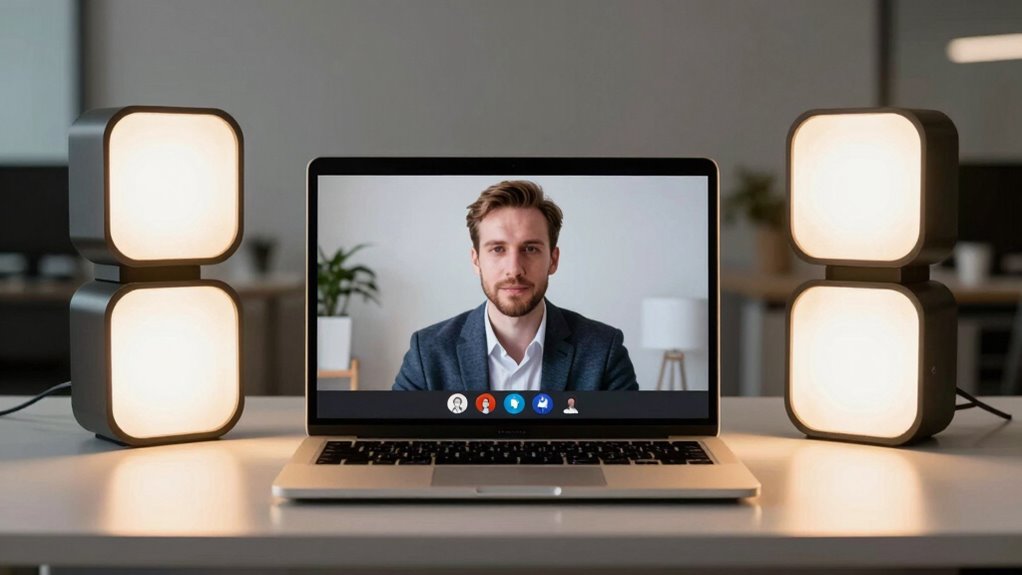

Finding the right key light for Zoom calls can dramatically improve your video quality and professional appearance. The best options offer adjustable brightness, color temperature control, and easy setup, but they vary in price and features. The Logitech Litra Glow stands out as the top overall pick for its balance of simplicity and quality. Meanwhile, the Elgato Key Light offers professional-grade lighting with higher brightness, ideal for those willing to invest more. Many options struggle with either complexity or affordability, making it tough to choose without clear guidance. Continue reading for a detailed breakdown of these options and what makes each one unique.

Get business pricing on office and shipping supplies
- Business-only prices and quantity discounts
- Tax-exempt purchasing
- Multiple users, one account, clear invoices
Key Takeaways
- The top picks balance brightness, color accuracy, and ease of use, with no single product excelling in all areas.
- Adjustability features like dimming and color temperature are essential for tailoring lighting to different environments and skin tones.
- Higher-priced options tend to deliver more consistent light quality and durability, but some budget models perform surprisingly well for casual use.
- Size, setup complexity, and portability vary widely; choose based on whether you need a permanent desk setup or portable solution.
- Most products struggle with glare or uneven light distribution, so look for models with good diffusion and adjustable arms.
| Logitech Litra Glow Premium LED Streaming Light – Graphite | 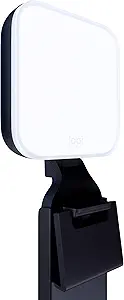 | Best Overall for Professional, Adjustable Lighting | Color: Graphite | Technology: TrueSoft full-spectrum LED | Mount: 3-way adjustable monitor mount | VIEW ON AMAZON | See Our Full Breakdown |
| yAyusi Dual-Lamp Video Conference Lighting with Remote and Touch Control |  | Best Value for Bright, Flexible Dual-Lamp Setup | Color Modes: 3 | Brightness Levels: 10 | Rotation: 360° horizontal, 180° vertical | VIEW ON AMAZON | See Our Full Breakdown |
| EMART Desktop Zoom Meeting Streaming Key Light with Flexible Gooseneck |  | Best for Versatile, Adjustable Desktop Lighting | Brightness levels: 11 | Color filters: Magnetic, customizable | Height adjustment: 14.9-25.6 inches | VIEW ON AMAZON | See Our Full Breakdown |
| LitONES Adjustable Video Conference Desk Light with Stand, 30 Light Modes, CRI 97.8 |  | Best for True-to-Life Color and Adjustable Desk Lighting | CRI: 97.8 | Color Temperature Range: 3000K-6500K | Brightness Levels: 10 | VIEW ON AMAZON | See Our Full Breakdown |
| InnoGear Ring Light for Computer, On-Camera Monitor, Video Conference Light | 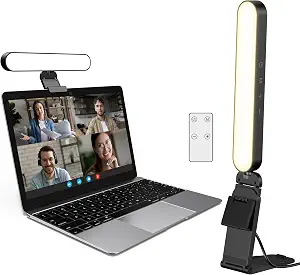 | Best Budget Clip-On Ring Light | Power Requirements: 5V/2A+ | Color Modes: White, Warm, Natural | Brightness Levels: 10 | VIEW ON AMAZON | See Our Full Breakdown |
| Desk Ring Light with Stand, 30 Modes Video Conference Lighting for Computer |  | Best Adjustable Multi-Mode Lighting for Customization | Color Temperatures: 3000K-6500K (3 modes) | Brightness Levels: 10 | Total Modes: 30 | VIEW ON AMAZON | See Our Full Breakdown |
| UBeesize 10″ Key Light with Adjustable Arm – Desk Ring Light for Streaming, Video Calls, and Home Office |  | Best Budget-Friendly, Soft Lighting with Flexible Mounting | Light Size: 10 inches | Lighting Technology: Side-lighting | Timer Options: 2, 4, and 8 hours | VIEW ON AMAZON | See Our Full Breakdown |
| Elgato Key Light, Professional 2800 Lumens Studio Light |  | Best Premium Studio-Quality Light with Remote Control | Lumens: 2800 | Color Temperature: 2900K – 7000K | LED Type: OSRAM | VIEW ON AMAZON | See Our Full Breakdown |
More Details on Our Top Picks
Logitech Litra Glow Premium LED Streaming Light – Graphite
The Logitech Litra Glow stands out for delivering cinematic-quality light with TrueSoft technology, which ensures natural skin tones and color accuracy, making it ideal for professional Zoom calls or streaming. Its frameless diffuser offers a flattering, shadow-free glow, surpassing basic clip-on options like the InnoGear Ring Light in quality and adjustability. The adjustable monitor mount and app control allow precise positioning and preset management, though it requires the Logitech G HUB software for full functionality, adding a layer of complexity. Compared with less customizable lights, this model favors those seeking consistent, high-quality illumination for long sessions, but it’s less portable due to its reliance on software and desktop setup.
Pros:- Cinematic color accuracy with TrueSoft technology
- Flattering, shadow-free diffused light
- Precise positioning via adjustable monitor mount
- Full control with free G HUB app
Cons:- Requires software for full feature access
- Less portable due to desktop setup
Best for: Professionals and content creators who need reliable, full-spectrum lighting with advanced controls
Not ideal for: Casual users or those seeking a portable, plug-and-play solution without software dependencies
- Color:Graphite
- Technology:TrueSoft full-spectrum LED
- Mount:3-way adjustable monitor mount
- Adjustability:Brightness and color temperature
- Power:USB-powered
- Software:G HUB desktop app
Our verdict“This is the best choice for users who prioritize professional-grade, customizable lighting for video calls and streaming.”
yAyusi Dual-Lamp Video Conference Lighting with Remote and Touch Control
The yAyusi dual-lamp kit offers brighter, more even illumination than single-lamp options like the InnoGear Ring Light, thanks to its dual-lamp design. Its 3 color modes and 10 brightness levels, combined with 360° horizontal and 180° vertical rotation, provide versatile control over lighting—ideal for users who want quick, customizable adjustments during calls. The inclusion of remote and touch controls enhances convenience, but the need for a power adapter limits portability, making it less suited for mobile setups. Its wide adjustment range suits users with larger monitor setups, though it might be overkill for casual occasional use.
Pros:- Bright, even dual-lamp illumination
- Flexible control via touch and remote
- Wide rotation and adjustable height
- Simple, quick installation
Cons:- Requires power cable, limiting portability
- May not fit very large or small monitors outside adjustment range
Best for: Streamers, remote workers, and content creators who need bright, adjustable lighting with easy control options
Not ideal for: Travelers or mobile users who require a lightweight, battery-powered solution
- Color Modes:3
- Brightness Levels:10
- Rotation:360° horizontal, 180° vertical
- Adjustable Height:5.5-8.3 inches
- Control Modes:Touch and remote
- Mounting Options:Clip-on or desktop
Our verdict“This setup is ideal for users who want a powerful, adjustable light with straightforward controls at a great value.”
EMART Desktop Zoom Meeting Streaming Key Light with Flexible Gooseneck
The EMART key light offers customizable full-panel illumination with multiple brightness levels and magnetic color filters, providing a tailored lighting experience for streaming or video calls. Its flexible gooseneck and height adjustment from 14.9 to 25.6 inches allow fine-tuning, similar to the LitONES but with a focus on hands-on control. The stable base makes it suitable for static desktop setups, but it relies solely on USB power, limiting portability. Its size makes it less ideal for users needing a compact, portable option, and it’s better suited for dedicated, fixed workspace lighting.
Pros:- Full-panel, customizable illumination
- Flexible gooseneck for precise positioning
- Adjustable height with stable base
- Supports magnetic color filters
Cons:- USB power dependency limits mobility
- Size restricts portability
Best for: Content creators or professionals who want customizable, adjustable lighting with flexible positioning
Not ideal for: Travelers or users needing cordless, battery-powered lights
- Brightness levels:11
- Color filters:Magnetic, customizable
- Height adjustment:14.9-25.6 inches
- Power:15W USB (5V/3A)
- Rotation:360°
- Warranty:3 years
Our verdict“This is an excellent choice for users who need a highly adjustable, stable desktop light with customizable color filters.”
LitONES Adjustable Video Conference Desk Light with Stand, 30 Light Modes, CRI 97.8
The LitONES desk light excels at rendering natural, true-to-life colors thanks to its high CRI of 97.8, making it ideal for high-quality video calls or streaming. Its adjustable height (22-32.5 inches) and 360° rotation provide flexible positioning, comparable to the EMART but with a focus on color accuracy. The sturdy metal base ensures stability, though it takes up more space on the desk and requires a dedicated power source. This makes it a strong choice for users prioritizing color fidelity and adjustable placement over portability or minimal desk footprint.
Pros:- High CRI of 97.8 for true color rendering
- Adjustable height and 360° rotation
- Sturdy, metal base with non-slip pads
- Includes rotating phone holder
Cons:- Requires a dedicated 10W USB power supply
- Larger footprint on desk space
Best for: Professionals and streamers who need highly accurate color rendering and adjustable desk illumination
Not ideal for: Users seeking a compact, portable, or clip-on lighting solution
- CRI:97.8
- Color Temperature Range:3000K-6500K
- Brightness Levels:10
- Height Range:22-32.5 inches
- Light Head Rotation:360°
- Warranty:3 years
Our verdict“This light is perfect for users who require precise color reproduction and flexible positioning for professional-quality video calls.”
InnoGear Ring Light for Computer, On-Camera Monitor, Video Conference Light
The InnoGear Ring Light offers an affordable, easy-to-use solution for even, glare-free lighting during video calls, streaming, or reading. Its simple clip-on design makes it quick to attach to monitors or laptops, and the 10 brightness levels plus three color modes allow for basic customization. However, compared with larger, more adjustable lights like the LitONES or Logitech Litra Glow, it provides less control over light quality and positioning. Its reliance on a stable power source and limited adjustment range can cause flickering or setup challenges for some users, especially if their power adapters are underpowered.
Pros:- Affordable and easy to set up
- Glare-free, even lighting
- Adjustable brightness and color modes
- Flexible clip-on or standalone use
Cons:- Limited control and adjustability compared to premium options
- Potential flickering if power supply is inadequate
Best for: Casual users or students needing an inexpensive, straightforward lighting solution for occasional video calls
Not ideal for: Professional streamers or content creators who require high color fidelity and precise control
- Power Requirements:5V/2A+
- Color Modes:White, Warm, Natural
- Brightness Levels:10
- Adjustability:360° horizontal, 180° vertical
- Clamp Range:1.55-2.35 inches
- Stand Height:5.5-8.3 inches
Our verdict“This light works well for budget-conscious users seeking simple, effective illumination for casual video calls and streaming.”
Desk Ring Light with Stand, 30 Modes Video Conference Lighting for Computer
This desk ring light excels at providing customizable, even illumination with a high CRI of 97.8, making it ideal for those who want natural, true-to-life lighting during Zoom calls. Its wide adjustability—height from 20.5″ to 32″ and 360° head rotation—offers flexibility that surpasses simpler models like the UBeesize, which has a fixed arm. However, the need for a separate power adapter can complicate setup, and phone compatibility is limited to devices up to 3.5″ wide, which might be restrictive for some users. Compared to the Elgato, which offers remote Wi-Fi control but lacks physical adjustability, this light provides tactile, on-the-fly control over multiple settings. It makes the most sense for users who prioritize precise, customizable lighting and a stable base for desk use.
Pros:- High CRI of 97.8 ensures accurate, natural color rendering on camera
- Wide range of adjustability with 30 modes, height, and full head rotation
- Sturdy anti-slip, anti-scratch base protects desk surfaces
- Built-in phone holder for hands-free streaming or recording
Cons:- USB power adapter not included, adding extra cost
- Phone holder only fits devices up to 3.5″ wide, limiting larger smartphones
Best for: Content creators or professionals who want highly adjustable, true-to-life lighting with precise control for video calls.
Not ideal for: Users seeking a wireless or remote-controlled light—since this model relies on manual adjustments and lacks Wi-Fi connectivity.
- Color Temperatures:3000K-6500K (3 modes)
- Brightness Levels:10
- Total Modes:30
- Height Range:20.5″ – 32″
- Head Rotation:360° horizontal, 180° vertical
- CRI:97.8
- Power:5V 2A USB (adapter not included)
- Phone Holder Compatibility:2.24″ – 3.5″ devices
- Materials:Aluminum alloy and ABS
Our verdict“This light suits users who need highly customizable, professional-grade lighting for detailed control during calls and recordings.”
UBeesize 10″ Key Light with Adjustable Arm – Desk Ring Light for Streaming, Video Calls, and Home Office
The UBeesize 10-inch key light offers a gentle, side-lighting approach that flatters skin tone and reduces glare, making it ideal for users who prioritize soft, flattering light over high customization. Its flexible arm and rotating control knob allow easy positioning, but it lacks adjustable color temperature or brightness controls, which limits fine-tuning compared to the more versatile options like the Elgato. The C-clamp mount is space-efficient but requires a desk edge, restricting placement options for some setups. Unlike the high-CRI, broad-spectrum lighting of the InnoGear or the professional features of the Elgato, this model focuses on simplicity and affordability, making it perfect for casual users or those who want a quick upgrade to basic lighting without complexity. It’s a solid choice for less technical users who want effectively soft light without fuss.
Pros:- Soft, even side-lighting reduces glare and enhances skin tone
- Flexible arm with a rotating control knob for easy positioning
- Space-saving C-clamp with non-slip silicone base protects desk surface
- Simple setup and operation suitable for non-technical users
Cons:- Requires a desk edge for mounting, limiting placement options
- Lacks adjustable brightness and color temperature, reducing fine control
Best for: Casual remote workers or gamers seeking a budget-friendly, flattering light with easy setup and adjustable positioning.
Not ideal for: Professionals requiring high color accuracy or extensive control options, as this model lacks adjustable temperature or brightness levels.
- Light Size:10 inches
- Lighting Technology:Side-lighting
- Timer Options:2, 4, and 8 hours
- Mounting:Metal C-clamp with non-slip silicone base
- Adjustability:Multi-position rotating arm
Our verdict“This light makes the most sense for users seeking a gentle, affordable upgrade that’s quick to set up and easy to use for everyday calls.”
Elgato Key Light, Professional 2800 Lumens Studio Light
The Elgato Key Light stands out for its high lumen output of 2800, delivering bright, studio-grade lighting suitable for professional streaming or content creation. Its extensive color temperature range from 2900K to 7000K provides versatile lighting settings, while Wi-Fi control adds significant convenience for remote adjustments—ideal for busy professionals or those who prefer to avoid manual fiddling. Compared with the more manually operated models like the Desk Ring Light, the Elgato’s remote control and adjustable brightness give it an edge in flexibility. The main tradeoff is the lack of included mounting options or a stand, which requires additional accessories. This pick makes the most sense for users who want high-powered, adjustable lighting with remote operation, especially if they already have a dedicated setup for streaming or recording.
Pros:- High brightness of 2800 lumens ensures well-lit video even in less ideal environments
- Wide color temperature range (2900K-7000K) for versatile lighting styles
- Wi-Fi connectivity allows remote adjustments from a desktop app
- Low heat LEDs suitable for extended use without discomfort
Cons:- Requires Wi-Fi connection for full functionality, which can introduce setup complexity
- No included stand or mounting options, adding extra cost and setup effort
Best for: Professional streamers or content creators who need powerful, adjustable lighting with remote control for high-quality broadcasts.
Not ideal for: Casual users or those on a tight budget who don’t require professional-grade brightness or remote operation, as this model is more expensive and lacks a stand.
- Lumens:2800
- Color Temperature:2900K – 7000K
- LED Type:OSRAM
- Features:Wi-Fi enabled, glare-free diffusion
Our verdict“This model is best suited for those needing professional, high-powered lighting with remote control, especially in dedicated streaming setups.”
How We Picked
In selecting these key lights for Zoom calls, I focused on core factors that impact video quality and user experience. Performance was evaluated based on brightness, color rendering (CRI), and ease of adjustment. Build quality and durability were also considered, as well as how straightforward each product is to set up and use during calls. Price-to-value ratio played a significant role, ensuring that choices cater to a range of budgets. Lastly, I looked for features that improve convenience, such as remote control, multiple light modes, and compatibility with different desk setups. These criteria ensure the list provides options suited for casual users, professionals, and content creators alike.Factors to Consider When Choosing Key Light For Zoom Calls
Choosing the right key light for Zoom calls involves more than just brightness. Consider how adjustable the light is, including brightness levels and color temperature, to match your environment and skin tone. Size and setup are crucial; a compact, easy-to-position light works best for small desks, while larger models may offer more powerful illumination but require more space. Price often reflects build quality and features, so determine your budget and needs accordingly. Reliability and ease of use—such as remote controls or app integration—can make a significant difference during frequent calls. Finally, pay attention to diffusion and glare to avoid harsh shadows or reflections that can be distracting during video meetings.Brightness and Light Quality
The primary purpose of a key light is to illuminate your face evenly, avoiding shadows and harsh contrasts. Look for a product with adjustable brightness levels to adapt to different room lighting conditions. Color rendering index (CRI) ratings above 90 ensure natural skin tones and accurate color reproduction on camera. Higher lumen outputs are better for larger rooms or if you prefer a more lit appearance, but more brightness isn’t always better if it causes glare or uneven lighting. Balancing brightness with diffusion features helps produce soft, flattering light that looks professional on video calls.Adjustability and Control
Ease of adjusting the light’s brightness and color temperature is essential for customizing your setup. Some models include remote controls or app integration, making it simple to tweak settings on the fly. Manual controls on the device itself are usually sufficient but can be less convenient if you need quick adjustments. Consider whether the light offers multiple modes or presets—these can save time and help you quickly switch between different lighting scenarios. The more flexible and intuitive the controls, the more natural your appearance will look on every call.Size, Portability, and Setup
A key light should fit comfortably on your desk without cluttering your workspace. Compact models are easier to reposition or take on the go, but they may not produce enough light for larger rooms. Larger, professional-grade lights often include stands or mounting options that require more setup but deliver higher quality illumination. Look for features like flexible goosenecks or adjustable arms that help direct light precisely where you need it. Ultimately, choose a size and setup complexity that matches your space and usage frequency.Price and Value
While higher-priced lights often include more features and better build quality, a well-chosen budget option can suffice for casual or occasional use. Consider what features are essential for your needs and whether the extra cost provides tangible benefits, such as improved color accuracy or durability. Sometimes, investing a bit more upfront results in longer-lasting, more reliable equipment, reducing the need for frequent replacements. Balance your budget against the expected lifespan and performance to find the best value.Diffusion and Glare Management
Harsh light or glare can create unflattering shadows and reflections, detracting from your professional appearance. Look for key lights with built-in diffusion or softboxes that evenly distribute light, preventing hotspots. Adjustable arms or diffusers enable you to customize the softness of the light to suit your environment. Avoid overly bright or direct lights that can cause eye strain or glare on your screen. Proper diffusion ensures a natural, pleasing glow that enhances your video presence.Frequently Asked Questions
Can I use regular LED bulbs as a key light for Zoom calls?
While regular LED bulbs can provide some illumination, they often lack the specific features needed for professional-looking video calls. Most regular bulbs do not have adjustable brightness or color temperature controls, which are key for matching your environment and skin tones. They also might produce uneven light or glare that can be distracting. For a polished appearance, a dedicated video conference light designed for this purpose is usually a better choice, offering softer diffusion and more precise control over light quality.
Is a ring light better than a panel for Zoom calls?
Ring lights are popular for their ability to produce uniform, flattering light with minimal shadows, making them a solid choice for video calls. However, panel-style key lights often offer more control over brightness and color temperature, which can be advantageous in variable lighting conditions. The best choice depends on your workspace setup and personal preference; ring lights are typically simpler to use, while panel lights provide more customization. Both can work well if chosen with adjustable features and good diffusion.
How important is CRI when choosing a key light for video calls?
CRI, or Color Rendering Index, measures how accurately a light source renders colors. For Zoom calls, a CRI above 90 is ideal because it ensures your skin tones and clothing look natural and vibrant on camera. Lights with lower CRI may cause colors to look dull or off-tone, reducing your professional appearance. Investing in a high-CRI light can make a significant difference, especially during longer meetings or when presenting yourself on camera regularly.
Should I prioritize brightness or color temperature control?
Both are important, but for most users, adjustable brightness offers immediate benefits by allowing you to adapt to different ambient lighting conditions. Color temperature control, typically ranging from warm to cool tones, helps match your natural environment and personal preference, providing a more flattering and professional look. If you often change environments or want versatility, prioritize a model with both features. For basic needs, a light with good brightness adjustability can suffice, but for a polished appearance, having control over both aspects is ideal.
Can I rely on a portable or clip-on light for Zoom calls?
Portable and clip-on lights are convenient options for those with limited desk space or who need flexibility. They are generally easy to set up and reposition, making them suitable for temporary or on-the-go use. However, they often lack the power and diffusion of larger, dedicated key lights, which can result in less even lighting and potential glare. If you require high-quality, consistent illumination for frequent or professional calls, a more substantial, adjustable desk or studio light will typically deliver better results. Nonetheless, for casual or infrequent use, clip-ons can be a practical solution.
Conclusion
For most users seeking a reliable, easy-to-use solution, the Logitech Litra Glow offers excellent value with straightforward setup and consistent lighting. If you prioritize professional-grade illumination and are willing to invest more, the Elgato Key Light stands out as the best premium option. Beginners or those on a budget should consider smaller, adjustable ring lights like the InnoGear Ring Light for decent quality without complexity. Content creators and professionals needing maximum control should look toward more advanced models with extensive adjustability. Ultimately, your choice depends on your workspace, budget, and how much you want your video setup to reflect your professionalism.”
Fall Picks
fall essentials
As an affiliate, we earn on qualifying purchases.