If you’re looking for the best standalone mechanical numpads in 2025, I recommend options like the EPOMAKER EK21 with VIA software, customizable RGB lighting, and a long-lasting 1000mAh battery. The 8BitDo Retro 18 offers Bluetooth and retro style, while the BOYI TD31Pro supports multi-device switching and hot-swappable switches. Other top choices include the CIDOO V21 and FKZ GMK26, each offering unique features for different needs. Keep exploring to find the perfect fit for your workflow.
Key Takeaways
- Fully programmable keys and macros improve workflow efficiency for professionals and gamers alike.
- Versatile connectivity options, including wired, Bluetooth, and tri-mode, support multi-device setups seamlessly.
- Compact, durable designs with customizable RGB lighting enhance aesthetics and usability in various working environments.
- Support for hot-swappable switches and high-quality keycaps allows personalized typing experiences.
- Long battery life and power management features enable extended wireless use for increased productivity.
EPOMAKER EK21 VIA Gasket Number Pad with 1000mAh Battery
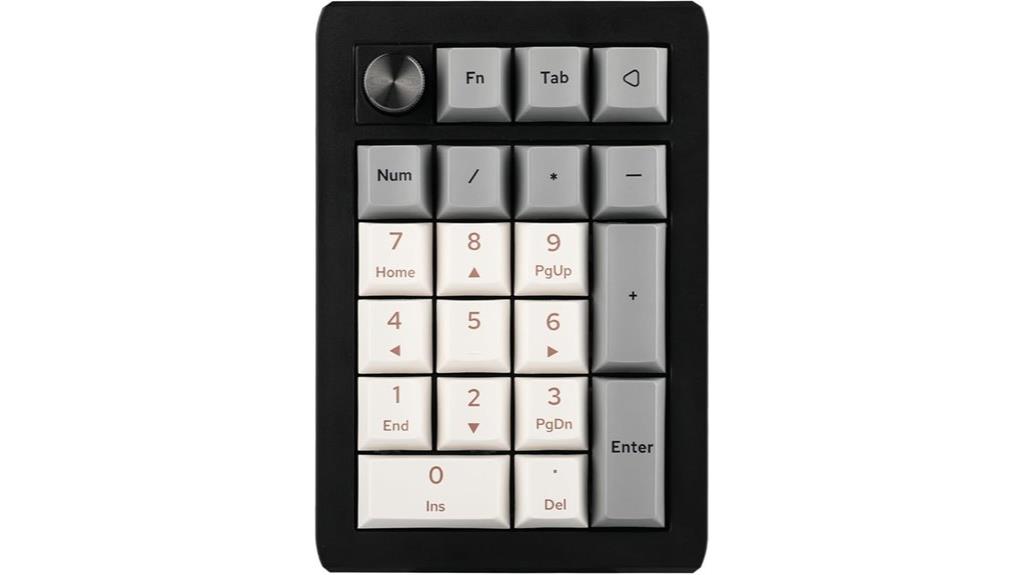
If you’re looking for a versatile and highly customizable numpad that keeps up with your demanding workflow or gaming sessions, the EPOMAKER EK21 VIA Gasket Number Pad is an excellent choice. It features 20 programmable keys that work seamlessly across Windows, Mac, and Android. With three connectivity options—wired, Bluetooth, and 2.4GHz wireless—you can easily fit it into any setup. The 1000mAh battery guarantees long-lasting use without frequent recharging. Plus, the VIA software allows you to customize keys, create macros, and remap functions, giving you full control to optimize your productivity or gaming experience.
Best For: professionals and gamers seeking a highly customizable, versatile numpad with seamless multi-platform compatibility and long-lasting battery life.
Pros:
- Fully programmable keys with VIA software for personalized shortcuts, macros, and remapping
- Supports three connectivity modes: wired, Bluetooth, and 2.4GHz wireless for flexible setup options
- Durable construction with CNC-cut PC plate, sandblasted finish, and noise-reducing, cushioned typing experience
Cons:
- May require initial setup and software configuration for optimal customization
- The 20-key layout might be limiting for users needing more extensive key options
- ABS plastic panels, while durable, may feel less premium compared to metal alternatives
Mechanical Number Pad with Hot Swappable Keys, Wired USB, 17 Keys, White Backlit Numeric Keypad with PBT Keycaps

The Kisnt Mechanical Number Pad stands out for users who value customization and tactile feedback, thanks to its hot-swappable brown switches that can be easily replaced without soldering. Its standard 17-key layout boosts productivity, while the compact size makes it portable for any workspace. The white backlit keys and durable PBT keycaps add a sleek, modern look, with lighting customizable for different moods. Designed for comfort, it features a multi-layer silencing structure that reduces noise and enhances typing feel. Compatible across various operating systems, it’s perfect as a standalone or side keypad, built to last and tailored to your preferences.
Best For: users who seek a customizable, tactile, and durable numeric keypad to enhance their productivity and ergonomics across various operating systems.
Pros:
- Hot-swappable brown switches allow easy customization without soldering.
- Compact and portable design fits seamlessly alongside laptops or on desktops.
- Durable PBT keycaps and multi-layer silencing structure ensure long-lasting use and comfortable, quiet typing.
Cons:
- White backlit effects are not visible through the keycaps, limiting lighting customization.
- Compatibility may vary slightly with certain Mac functions and Chrome OS.
- Higher profile compared to low-profile keyboards, which may not suit all user preferences.
8BitDo Retro 18 Mechanical Numpad with Bluetooth/2.4G/Wired Support
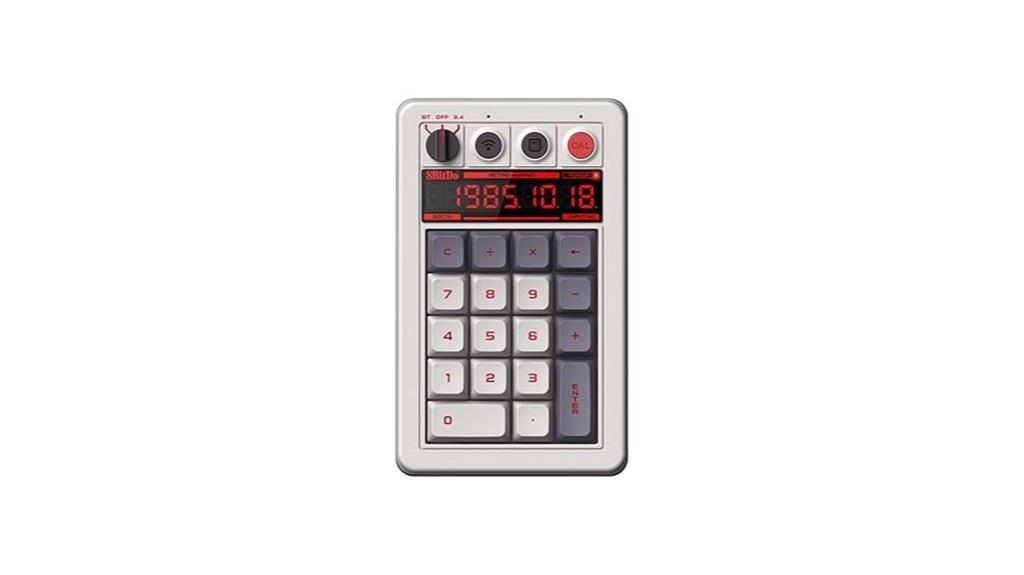
For those seeking a versatile numpad that seamlessly integrates with multiple devices, the BitDo Retro 18 Mechanical Numpad stands out with its support for Bluetooth, 2.4G, and wired connections. Released in July 2024, it’s compatible with Windows and Android, making it perfect for gaming or productivity. Its retro-inspired design features a LED display and an independent control panel, while hot-swappable Kailh Box White Switches and dye-sub PBT keycaps ensure durability. The compact size and lightweight build add portability, and with a high customer rating of 4.7 stars, it’s clear users appreciate its versatility and performance.
Best For: users seeking a versatile, durable numpad compatible with multiple devices for gaming, productivity, or technical tasks.
Pros:
- Supports Bluetooth, 2.4G, and wired connections for maximum flexibility
- Retro-inspired design with LED display and independent control panel
- Hot-swappable Kailh Box White Switches and dye-sub PBT keycaps ensure durability
Cons:
- Slightly compact size may limit extensive key customization
- Requires batteries for standalone use, which need replacement or recharging
- Price may be higher compared to basic numeric keypads due to advanced features
Tri-Mode Mechanical Numeric Keypad with RGB Backlit and Bluetooth 5.0

A standout feature of the Tri-Mode Mechanical Numeric Keypad with RGB Backlit and Bluetooth 5.0 is its versatile connectivity options, making it ideal for users who need seamless switching between devices. It supports wireless 2.4GHz, Bluetooth 5.0, and wired USB-C, with ranges up to 26 feet and 16 feet respectively. You can connect multiple devices simultaneously and switch effortlessly without delays or dropouts. Its rechargeable 1000mAh battery lasts up to 500 hours per charge, with features like auto sleep and low battery indicators. Mechanical red switches provide smooth, effortless keystrokes, complemented by durable PBT keycaps and customizable RGB lighting for a personalized workspace.
Best For: users who need a versatile, high-performance numeric keypad with customizable features for multi-device setups and gaming or professional work.
Pros:
- Supports three connection modes (Wireless 2.4Ghz, Bluetooth 5.0, Wired USB-C) with easy switching and reliable range up to 26ft/8m
- Rechargeable 1000mAh battery offers up to 500 hours of use per charge, with smart auto sleep and low battery indicators
- Mechanical red switches and durable PBT keycaps provide smooth, effortless typing with customizable RGB lighting
Cons:
- Macro customization is only available in wired mode, limiting flexibility for wireless users
- Slightly larger dimensions may not be ideal for very compact setups or portable use
- Customer ratings are moderate at 4.0 out of 5 stars, indicating some users may experience issues or preferences for different features
BOYI TD31Pro Wireless Mechanical Number Pad
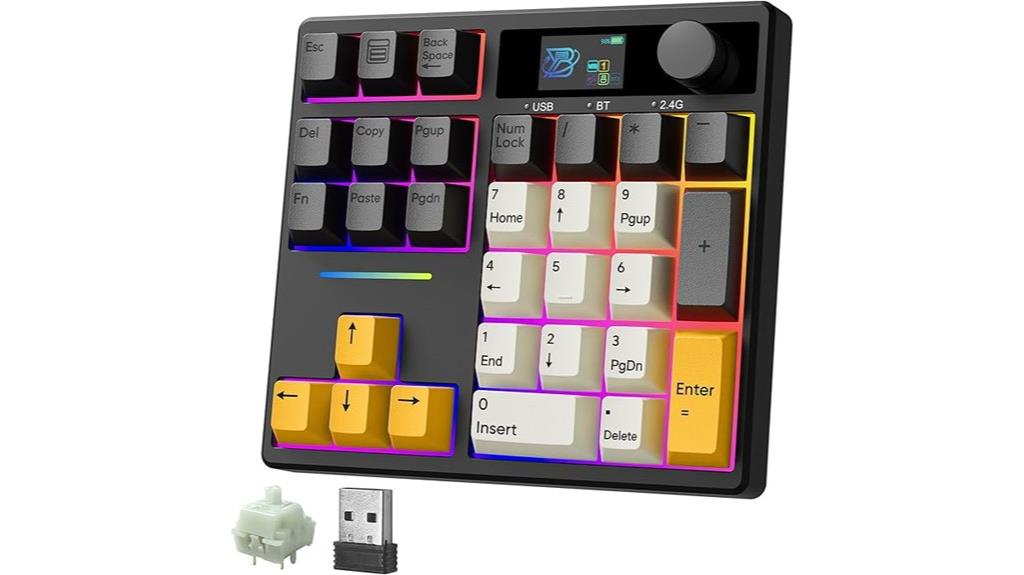
If you’re seeking a versatile and highly customizable numpad that seamlessly integrates with multiple devices, the BOYI TD31Pro Wireless Mechanical Number Pad stands out as an excellent choice. It features a 30-key layout with essential functions like NumLock, ESC, Delete, Copy, Paste, and a calculator shortcut. Connect via Bluetooth 5.0, 2.4GHz, or Type-C, supporting three devices at once. Its premium build includes PBT keycaps, hot-swappable switches, RGB lighting with 16.8 million presets, and a TFT display for real-time info. The rechargeable battery and ergonomic design make it ideal for long-term use, blending functionality, customization, and comfort effortlessly.
Best For: users seeking a highly customizable, multi-device compatible mechanical numpad with premium features for productivity and gaming.
Pros:
- Supports triple connectivity via Bluetooth 5.0, 2.4GHz, and Type-C wired modes for versatile device pairing.
- Features extensive RGB customization with 16.8 million presets and a TFT display for real-time information.
- Hot-swappable switches and PBT keycaps allow easy customization and maintenance without soldering.
Cons:
- Higher price point due to premium build and feature set.
- Plastic construction may feel less durable compared to metal alternatives.
- Non-backlit keys with black lettering can reduce visibility in low-light conditions.
Wireless Mechanical Number Pad with Bluetooth 5.0 & 2.4G Dual Mode
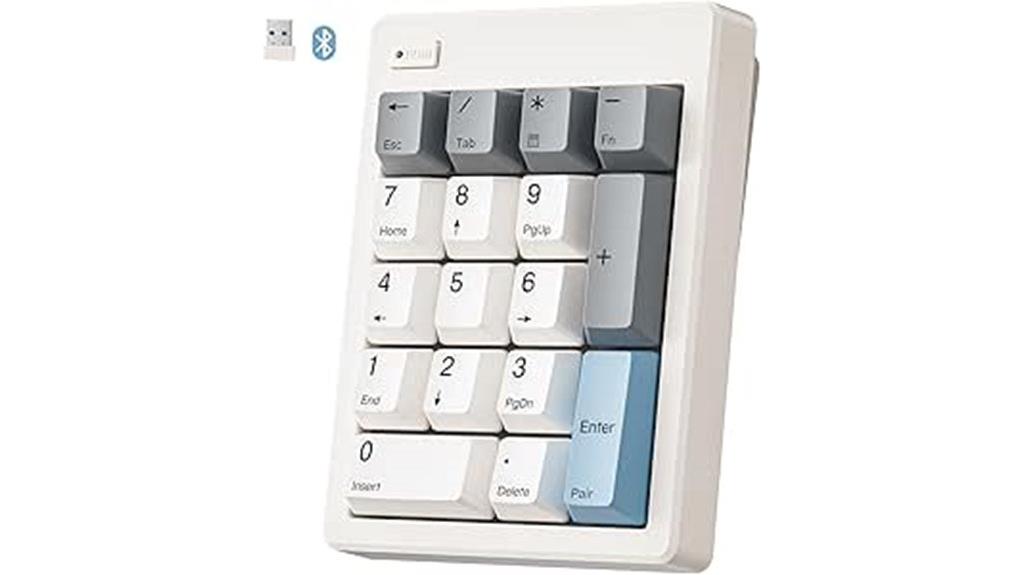
The Wireless Mechanical Number Pad with Bluetooth 5.0 and 2.4G dual mode stands out as an ideal choice for professionals who need seamless, reliable connectivity across multiple devices. Its dual-mode setup allows easy switching between Bluetooth and 2.4G wireless, ensuring minimal latency and smooth operation. Powered by a simple AAA battery, it eliminates cords and charging concerns, while auto-sleep mode conserves power during inactivity. With a practical 17-key layout and compact size, it fits neatly into any workspace. The gasket-mounted construction, sound dampening layers, and pre-lubed switches provide a satisfying typing experience, making it perfect for office, accounting, or personal use.
Best For: professionals and enthusiasts seeking a reliable, customizable wireless number pad for office, accounting, or personal productivity across multiple devices.
Pros:
- Dual-mode Bluetooth 5.0 and 2.4G wireless connectivity for seamless device switching
- Compact, space-efficient design with essential keys and extended functions like ESC and calculator
- Hot-swappable switches and sound-dampening construction for a personalized, quiet, and comfortable typing experience
Cons:
- Not compatible with Chrome OS or fully functional on Mac OS due to external key limitations
- Requires AAA batteries (not included), so ongoing battery replacement is necessary
- Limited layout with only 17 keys, which may not suit users needing more specialized functions
Gasket Mechanical Numpad with Wireless, Wired, RGB Backlit, Hot Swappable, Rechargeable, Metal Knob for Win/Mac

Designed for users seeking versatile connectivity and customizable features, the Gasket Mechanical Numpad with Wireless, Wired, RGB Backlit, Hot Swappable, and a Metal Knob stands out as an excellent choice. It offers tri-mode connectivity—Wireless 2.4GHz, Bluetooth 5.0, and USB-C wired—supporting multiple devices with easy switching. Its gasket-mount design with EVA foam and IXPE pads provides a softer, quieter typing experience. The numpad is hot-swappable, supporting 3-pin and 5-pin switches, and features durable PBT keycaps with customizable RGB lighting. The multifunction metal knob adds volume, backlight control, and an Esc function. Its rechargeable battery lasts up to 60 days, making it perfect for both Win and Mac users.
Best For: users who need a versatile, customizable, and wireless-ready numeric keypad compatible with both Windows and Mac systems.
Pros:
- Tri-mode connectivity allows seamless switching between wireless 2.4GHz, Bluetooth 5.0, and wired USB-C connections.
- Hot-swappable switches and customizable RGB lighting provide personalized typing and aesthetic experience.
- Rechargeable battery offers up to 60 days of use, reducing the need for frequent charging.
Cons:
- Slightly larger size (5.2 x 3.5 inches) may take up desk space for some users.
- Limited to 18 programmable keys, which might be insufficient for highly complex macros.
- The metal knob, while multifunctional, can be inadvertently pressed or turned, potentially changing settings unintentionally.
Mechanical Number Pad, Wired USB Numeric Keypad with Backlit Keys
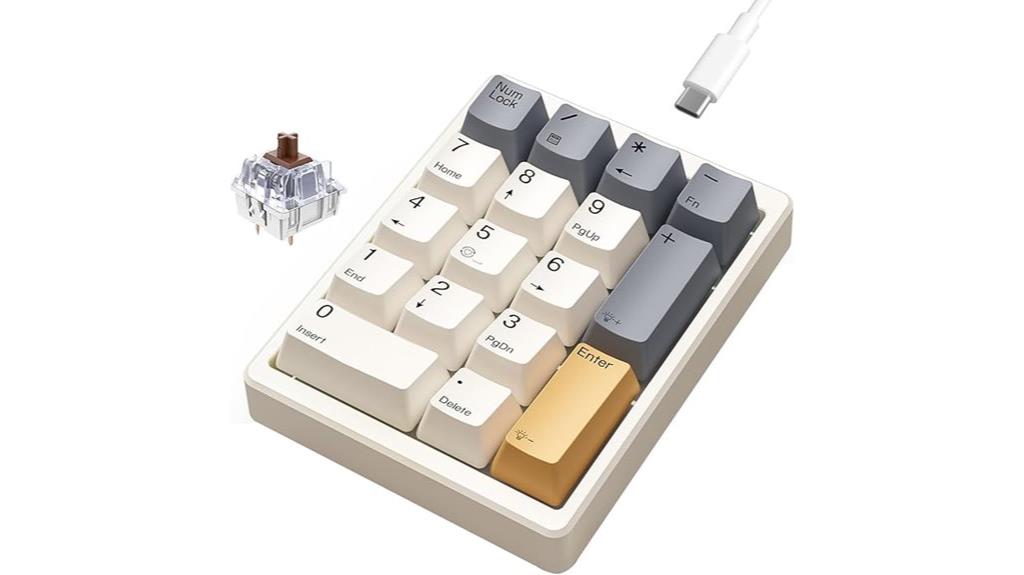
For those seeking precise numeric input with tactile feedback, the Mechanical Number Pad, wired USB numeric keypad with backlit keys offers an excellent solution. It features 17 keys in a compact layout, measuring just 4.41 by 3.39 inches, with white backlit keys and durable PBT dye-sublimated caps. Pre-installed brown switches provide satisfying tactile responses, and they’re hot-swappable, allowing customization with linear or silent switches. Built for home or occasional use, it’s compatible with Windows, Mac, and Android. Its sturdy design, multi-layer noise reduction, and adjustable backlighting make it versatile. Although not fully portable, it’s highly rated for functionality, build quality, and value, perfect for enhancing your workflow.
Best For: users seeking a durable, tactile numeric keypad for home, accounting, or occasional professional use that enhances workflow with customizable switches and backlighting.
Pros:
- Tactile brown switches with hot-swappable design for easy customization
- Durable PBT dye-sublimated keycaps and multi-layer noise reduction for comfortable typing
- Compatible with multiple operating systems and features adjustable backlighting
Cons:
- Not fully portable due to size and weight (7.8 ounces)
- Some reports of non-hot-swappable switches or issues with switch compatibility
- Limited support for ChromeBook and occasional manual language or labeling discrepancies
K19 Wireless Numeric Keyboard, Mechanical Number Keypad

If you need a versatile numeric keypad that adapts seamlessly to various devices, the K19 Wireless Numeric Keyboard stands out with its triple connectivity options—wired, Bluetooth, and 2.4GHz wireless. It’s compatible with Windows, Mac, Linux, Android, and iOS, making it highly versatile. Its compact size (5.2 x 3.5 x 1.25 inches) and 11.7-ounce weight make it portable for any setup. The high-capacity 1500mAh battery guarantees long use without frequent recharging. With a full hot-swappable design, RGB lighting, and a gasket-type structure for a satisfying feel, it’s perfect for demanding tasks and customization.
Best For: users seeking a highly portable, versatile numeric keypad with customizable mechanical switches and RGB lighting for demanding professional or gaming environments.
Pros:
- Supports triple connectivity modes: wired, Bluetooth, and 2.4GHz wireless for flexible device use.
- Full hot-swappable design allows easy switch customization with 3-pin or 5-pin switches.
- Compact, ergonomic sloped layout with durable PBT keycaps and RGB lighting for enhanced aesthetics and comfort.
Cons:
- May be more expensive than standard numeric keypads due to advanced features.
- Limited to 77 reviews with a 4.3-star rating, indicating potential variability in user satisfaction.
- Requires initial setup for Bluetooth or wireless connections, which might be less straightforward for some users.
Gurjot Mechanical USB Wired Numeric Keypad with Backlit 21 Keys
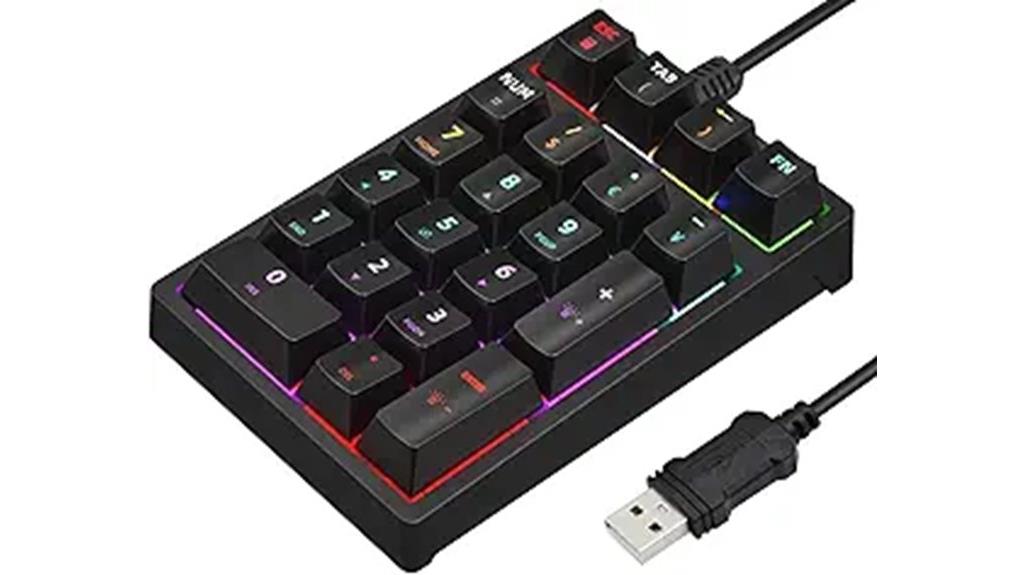
The Gurjot Mechanical USB Wired Numeric Keypad with Backlit 21 Keys stands out for its professional blue mechanical switches, offering quick response and tactile feedback that enhances typing, gaming, and programming. Its durable ABS keycaps are rated for 50 million keystrokes, ensuring long-lasting performance. Designed with ergonomic stepped keys and a 15° tilt, it reduces wrist fatigue during extended use. The keypad supports nine RGB backlight modes, allowing customization with simple toggle controls. Its plug-and-play USB connection makes setup effortless, and compatibility spans Windows systems. Additional shortcut keys for Num, ESC, and calculator access boost productivity, making it a reliable, stylish addition to any workspace.
Best For: power users, gamers, programmers, and professionals seeking a durable, customizable numeric keypad to enhance productivity and comfort during extended use.
Pros:
- Mechanical blue switches provide quick response, tactile feedback, and audible click for an enhanced typing and gaming experience
- Ergonomic design with stepped keys and 15° tilt reduces wrist fatigue during prolonged use
- Supports nine RGB backlight modes for personalized and visually appealing workspace customization
Cons:
- Limited to 21 keys, which may not suit users needing full keypad functionality
- Requires USB connection, which might not be compatible with wireless setups
- Backlit modes and brightness adjustments require familiarity with Fn key combinations, potentially adding a learning curve
EPOMAKER CIDOO V21 VIA Programmable Gasket Number Pad
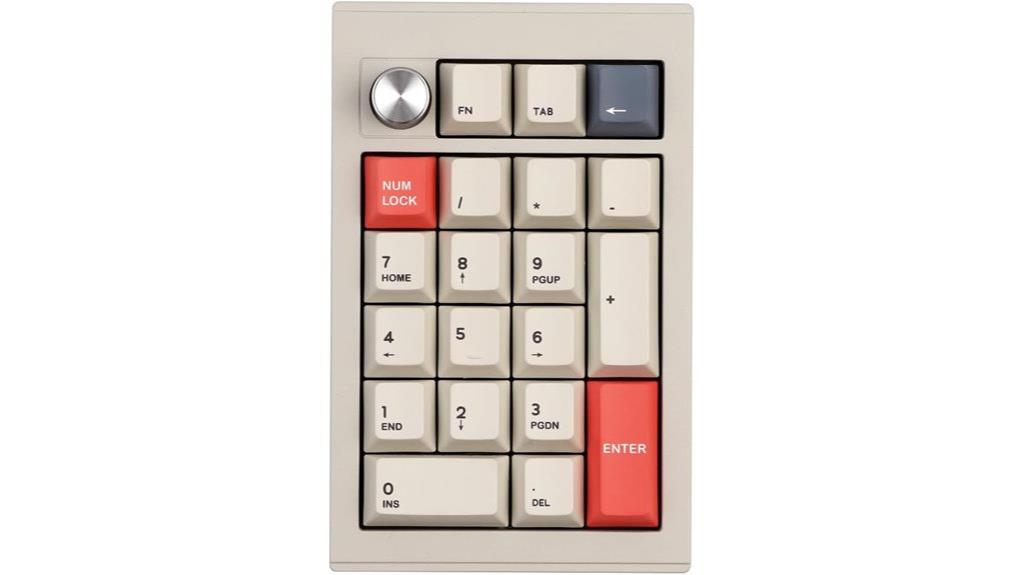
Designed with gamers, programmers, and tech enthusiasts in mind, the EPOMAKER CIDOO V21 VIA Programmable Gasket Number Pad stands out thanks to its customizable keys and versatile connectivity options. Its aluminum build feels robust, while Bluetooth 5.0, 2.4GHz wireless, and wired modes offer seamless flexibility. The hot-swappable keys and VIA software enable personalized macros and RGB lighting, enhancing user experience. The gasket-mounted design reduces typing noise and impact, making it comfortable for long sessions. Plus, the large 1000mAh battery ensures extended use without frequent charging. Overall, it’s a sleek, functional device perfect for those seeking a customizable, high-quality numpad.
Best For: gamers, programmers, and tech enthusiasts seeking a customizable, high-quality number pad with versatile connectivity options.
Pros:
- Customizable keys, macros, and RGB lighting via VIA software for personalized setups
- Multiple connection modes including Bluetooth 5.0, 2.4GHz wireless, and wired for flexible use
- Durable aluminum build with gasket-mounted design and dye-sublimation PBT keycaps for comfort and longevity
Cons:
- Slightly heavier weight at 1.7 pounds, which may affect portability for some users
- Limited detailed information on software customization beyond basic features
- Availability of support and warranty details may vary depending on the retailer or region
Bluetooth Number Pad, Mechanical Numpad, VIA Programmable Aluminum Numeric Keypad

For those seeking a versatile and highly customizable numeric keypad, the Bluetooth Number Pad, Mechanical Numpad, VIA Programmable Aluminum Numeric Keypad stands out. Its compact 21-key design makes it perfect for on-the-go data entry, with options for switch and keycap swaps, lubrication, and modifications. The aluminum case offers durability and a premium feel, while MOA profile keycaps ensure ergonomic, comfortable typing that reduces finger and wrist strain. It supports Bluetooth 5.0, 2.4G wireless, and wired connections, compatible with Mac, Windows, and mobile devices. With VIA software, you can fully customize functions, RGB lighting, and more, enhancing your workflow and personalization.
Best For: users who need a compact, highly customizable numeric keypad for versatile data entry and workflow enhancement across multiple devices and operating systems.
Pros:
- Durable aluminum case with ergonomic MOA profile keycaps for comfortable typing and reduced strain
- Multiple connection modes including Bluetooth 5.0, 2.4G wireless, and wired for versatile compatibility
- Fully programmable via VIA software for personalized functions, RGB lighting, and customization
Cons:
- Limited to 21 keys, which may not suit those needing full-sized keypads for extensive functions
- Requires some technical knowledge for customization and modifications via VIA software and hardware swaps
- Slightly heavier and larger than standard mobile keypads, which could impact portability for some users
FKZ GMK26 Mechanical Numpad, Wireless & Wired RGB Backlit Numeric Keypad
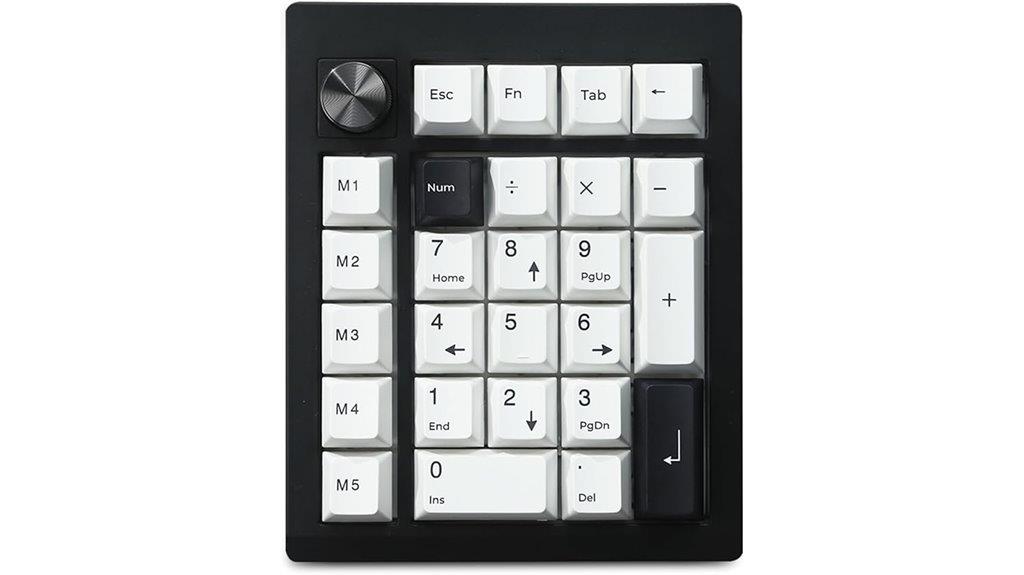
If you’re looking for a versatile numpad that seamlessly adapts to various devices and workflows, the FKZ GMK26 stands out with its triple-mode connectivity—wired USB-C, Bluetooth, and 2.4GHz wireless. It supports VIA programming for key remapping, macros, and RGB adjustments, making it ideal for gamers, programmers, and enthusiasts. The gasket-mounted design with sound-absorbing materials offers a softer, stable typing feel. Its 26 anti-ghosting keys include shortcut buttons, and a multimedia volume knob adds convenience. With high-quality dye-sublimated PBT keycaps and customizable RGB lighting, it’s a compact, portable option that works across Windows, MacOS, iOS, and Android devices.
Best For: users seeking a versatile, customizable numpad suitable for gaming, programming, and multi-device workflows across various operating systems.
Pros:
- Supports VIA programmability for key remapping, macros, and RGB adjustments, enhancing customization.
- Triple connectivity modes (wired USB-C, Bluetooth, 2.4GHz wireless) allow seamless device switching.
- Gasket-mounted design with sound-absorbing materials provides a softer, more stable typing experience.
Cons:
- Limited onboard macro storage (~754 bytes), which may restrict extensive macro use.
- Lacks per-key RGB addressability, offering only overall RGB lighting effects.
- Some users find the plastic build less premium compared to metal or aluminum options.
Factors to Consider When Choosing Mechanical Numpads Standalone

When choosing a standalone mechanical numpad, I focus on connectivity options like wired or wireless to suit my setup. I also consider switch types for the feel, keycap customization for personal style, and backlighting effects for aesthetics. Additionally, features like programmability and macros can boost productivity, so I weigh these factors carefully.
Connectivity Options Available
Choosing the right connectivity options is essential when selecting a mechanical numpad, as it directly affects your setup’s stability, convenience, and versatility. Wired USB connections are known for their reliable, low-latency performance, making them ideal for gaming and professional tasks. Wireless options like Bluetooth and 2.4GHz wireless provide greater portability and reduce desk clutter, with some models supporting multi-device pairing for added flexibility. Many numpads now offer tri-mode connectivity, allowing seamless switching between wired, Bluetooth, and wireless modes, which is perfect for different use cases. Compatibility with various operating systems such as Windows, Mac, Android, and iOS also influences your choice, ensuring your numpad works smoothly across devices. Ultimately, your preferred connectivity method should align with your workflow and environment.
Switch Types and Feel
Selecting the right switch type is essential because it directly influences how your mechanical numpad feels during everyday use. Linear switches offer smooth keystrokes with minimal resistance, making them perfect for fast typing or gaming. Tactile switches provide a noticeable bump, giving you physical confirmation with each press, which can improve accuracy. Clicky switches add both tactile feedback and an audible click, ideal for those who prefer clear, audible confirmation. The feel of switches can also be customized in hot-swappable models, allowing you to experiment and find your perfect match. Your choice impacts typing comfort, noise levels, and overall satisfaction. Whether you prioritize silence, speed, or feedback, understanding switch types helps you select a numpad that enhances your productivity and comfort.
Keycap Customization Choices
Keycap customization options play a crucial role in tailoring your mechanical numpad to suit both your aesthetic preferences and typing experience. I look for keycaps made from durable PBT or ABS plastic, with PBT being preferable for its resistance to wear and oil buildup. The choice of keycap profile, such as OEM or Cherry, influences both how the numpad feels and its look. For longevity, I prefer keycaps with dye-sublimation or double-shot molding, which prevent legends from fading over time. If I want easy swapping, hot-swappable switches and keycaps are a plus, allowing me to change them without soldering. Ultimately, a variety of color options, legends, and transparent backlit keycaps help me personalize my setup to match my style and lighting preferences.
Backlighting and Effects
Backlighting and effects considerably enhance a mechanical numpad’s visual appeal and usability, especially in low-light environments. With options like single-color, RGB, and customizable effects, you can personalize your workspace ambiance to suit your style. RGB backlit numpads often support dynamic modes such as breathing, wave, static, and reactive, which can be tailored via software or onboard controls. Brightness adjustments and multiple lighting modes guarantee ideal visibility in varying conditions. Some models feature side or under-key RGB lighting, adding aesthetic flair and improving workspace illumination. Keep in mind that the clarity of backlit keys depends on keycap transparency and LED quality, impacting both usability and overall look. Well-chosen backlighting not only enhances aesthetics but also boosts efficiency during late-night work sessions.
Programmability and Macros
When choosing a standalone mechanical numpad, considering its programmability and macro capabilities is essential for maximizing productivity. Programmable numpads let me remap keys, create macros, and assign custom functions, making repetitive tasks faster and easier. Support for software like VIA or QMK opens extensive customization options, including key remapping, macro recording, and lighting adjustments, often directly on the device or through companion apps. The number of programmable keys varies, with some models offering up to 21 or more, allowing for complex macro sequences and multi-function shortcuts. Macro functions can handle multi-step commands, text expansion, or system commands, considerably reducing input time and errors. Being able to save multiple profiles on the device itself adds flexibility, letting me switch setups for gaming, coding, or data entry seamlessly.
Build Quality and Durability
Choosing a high-quality mechanical numpad means paying close attention to its build and durability. I look for numpads made from durable materials like PBT keycaps and metal cases, which resist wear, oil, and impact over time. The construction also matters—gasket-mounted designs add stability and provide a softer, more cushioned typing experience, reducing fatigue. Reinforced switch support, especially with hot-swappable sockets for 3-pin and 5-pin switches, allows for easy customization and extends the device’s lifespan. Additionally, sturdy build quality includes reinforced connection points and high-quality plastics or metals that resist cracking with frequent use. Proper padding and sound-absorbing materials, such as Poron foam or IXPE switch pads, help keep operations quieter and protect internal components, enhancing long-term durability.
Battery Life and Power
A key factor in selecting a standalone mechanical numpad is its battery life, as it directly impacts your uninterrupted workflow. A longer-lasting battery means you can work or game for extended periods without constantly recharging. Rechargeable batteries with capacities of 1000mAh or more can last several days or even weeks, depending on usage. Support for multiple connection modes like Bluetooth, 2.4GHz wireless, or wired can influence power consumption, so choose wisely based on your needs. Features like automatic sleep mode or power-saving settings help conserve battery when idle, extending overall use. Additionally, battery level indicators or low-battery alerts are essential to prevent unexpected shutdowns during critical tasks, ensuring your productivity stays smooth and uninterrupted.
Compatibility With Devices
Ensuring your mechanical numpad is compatible with your devices is crucial for a seamless workflow. First, check that it supports your operating system, whether it’s Windows, Mac, Linux, Android, or iOS. Compatibility ensures smooth installation and operation without hiccups. Next, verify the connection mode—wired, Bluetooth, or 2.4GHz wireless—and confirm it matches your hardware, like laptops, desktops, or tablets. Make sure the USB-C, USB-A, or wireless receiver is supported by your device’s ports and standards to avoid needing adapters. Additionally, see if any software or drivers required for customization are compatible with your OS. Lastly, consider the physical design and connection type, ensuring it integrates seamlessly into your workspace without extra hardware or adapters. This guarantees a hassle-free setup and maximum productivity.
Frequently Asked Questions
How Does Wireless Connectivity Affect Latency During Intensive Tasks?
Wireless connectivity can introduce some latency, but modern tech minimizes this gap during intensive tasks. I’ve noticed that high-quality wireless numpads with advanced Bluetooth or RF technology offer near-instant response times, so my workflow isn’t disrupted. It’s essential to choose a device with low latency specs. Overall, if the connection is stable, wireless numpads perform just as well as wired, even during demanding tasks.
Are There Compatibility Issues With Specific Operating Systems?
Absolutely, compatibility can cause concerns! I’ve found that most mechanical numpads work perfectly with Windows and macOS, but Linux support can sometimes be a little lackluster. It’s wise to double-check the device’s specifications and compatibility lists before buying. If you’re switching systems or using less common OS, a quick compatibility check can save significant stress and guarantee seamless, smooth, and satisfying setup sessions.
What Is the Typical Lifespan of the Mechanical Switches Used?
Mechanical switches typically last between 50 million to 100 million keystrokes, depending on the brand and model. I’ve found that higher-quality switches tend to be more durable and maintain their responsiveness longer. If you’re looking for longevity, opt for switches known for their durability, like Cherry MX or Gateron. Regular cleaning and proper use can also help extend the lifespan, ensuring your numpad stays reliable for years to come.
Can These Numpads Be Customized With Different Keycap Styles?
Absolutely, these numpads are like a blank canvas for your creativity. I once swapped out keycaps on my mechanical keypad, and it instantly felt more personalized and comfortable. Most standalone mechanical numpads support custom keycaps, allowing you to choose styles, colors, or textures that suit your taste. Just check compatibility first, but generally, you’ll find plenty of options to make your setup uniquely yours.
Do They Support Macro Programming for Productivity Workflows?
Yes, many standalone mechanical numpads support macro programming for productivity workflows. I’ve found that customizable software often comes with these devices, allowing me to assign complex macros or shortcuts to specific keys. This feature considerably boosts my efficiency, especially when managing repetitive tasks or multi-step processes. Just make sure to check the compatibility of the software with your operating system, so you can fully leverage the macro capabilities for your workflow.
Conclusion
Choosing the right mechanical numpad is like finding the perfect key in a vast keyboard forest—each one offers a unique touch and flair. These standalone gems can transform your workflow from a sluggish crawl to a swift, confident stride. So, don’t settle for a bland backspace—embrace the power of a dedicated numpad and let it be the steady drumbeat driving your productivity forward in 2025. Your perfect match is waiting just a click away.