

Choosing a silent mechanical keyboard for an open office environment involves balancing noise reduction with typing performance and build quality. The Keychron K10 stands out as the overall best for its versatile connectivity and full-size layout, while the AULA F99 Wireless Silent Version offers excellent wireless flexibility and hot-swappable switches for customization. However, many options trade off some tactile feedback or additional features to prioritize quiet operation. Understanding these tradeoffs is key to finding the right fit for your workspace. Continue reading for a detailed breakdown of the best silent mechanical keyboards for open offices in 2026.

Get business pricing on office and shipping supplies
- Business-only prices and quantity discounts
- Tax-exempt purchasing
- Multiple users, one account, clear invoices
Key Takeaways
- Wireless models like the Keychron K2 and AULA F99 offer greater flexibility but may sacrifice some build robustness compared to wired options.
- Silent switches, particularly Cherry MX Silent Red and similar variants, effectively reduce noise without compromising key feel for most users.
- Full-size keyboards like the Keychron K10 provide comprehensive features, but more compact layouts can save desk space and improve ergonomics.
- Hot-swappable switches are a valuable feature for those who want to customize or upgrade without soldering, seen in models like the AULA F99.
- Premium options often include better build materials and additional features such as RGB lighting, but they come at a higher cost.


| silent mechanical keyboards for open office | Switch Type | Connectivity | Layout |
|---|---|---|---|
| Keychron K10 Full Size 104-Key | Keychron Silent K Pro Red | Bluetooth 5.1, USB-C wired | Full-size 104 keys |
| Keychron K2 75% Layout Bluetoo | Red (Linear, Silent) | Bluetooth 5.1, USB-C | 75% |
| Keychron C2 Full Size Wired Me | Keychron Brown | Wired | QWERTY |
| AULA F99 Wireless Mechanical K | Factory pre-lubed silent | Bluetooth 5.0, 2.4GHz, USB-C | 96% compact |
| Keychron V6 Max Wireless Custo | Hot-swappable Silent Red | Bluetooth 5.1, 2.4 GHz, Type-C wired | Full-Size |
| Cherry MX Board 3.0 S Wired Me | Cherry MX Red Silent | — | — |
| Aula H108 Wireless Mechanical | Silent mechanical, hot swappable | 2.4G, Bluetooth 5.0, USB-C | — |
| Cherry KC 200 MX Mechanical Of | MX2A Silent Red / Brown | — | — |
| Cherry KC 200 MX Wired Mechani | Cherry MX2A Silent Red | — | — |
| Keychron K8 Wireless Mechanica | Silent Red | Bluetooth 5.1 and USB-C wired | Tenkeyless (87 Keys) |
| Keychron K10 Pro Wireless Cust | Silent Red (hot-swappable) | Bluetooth 5.1, Wired | Full-size |
| AULA F99 Pro Wireless Mechanic | Pre-lubed linear, hot-swappable | — | 96% compact |
| AUSDOM Wireless Mechanical Sil | Low-profile Silent Linear | Bluetooth 5.0, 2.4GHz, USB-C | — |
More Details on Our Top Picks
Keychron K10 Full Size 104-Key Bluetooth Wireless Mechanical Gaming Keyboard for Mac and Windows
The Keychron K10 stands out as the most adaptable option in this lineup, thanks to its full-size layout, wireless connectivity, and silent switches. Compared with the smaller Keychron K2, the K10 offers a complete key set, making it better suited for users who need a full keyboard for extensive tasks. Its Bluetooth 5.1 supports multi-device pairing, ideal for multitasking in open office environments. However, its battery life remains unspecified, which could be a concern for all-day use. The lack of wired connectivity beyond USB-C may also be limiting for those who prefer or require a wired setup. The quiet Keychron Silent K Pro Red switches deliver a smooth, silent experience, but the absence of programmable keys might limit customization for power users.
Pros:- Full-size layout provides all standard keys for productivity
- Wireless Bluetooth 5.1 supports multiple devices
- Silent switches ensure quiet operation
Cons:- Battery life details are not specified, leaving longevity uncertain
- Limited wired connection options beyond USB-C
- Lacks programmable keys for advanced customization
Best for: Office workers who need a full-sized, wireless keyboard with quiet operation for multitasking and occasional gaming
Not ideal for: Users seeking a compact or ultra-portable keyboard, as the full size can occupy significant desk space
- Layout:Full-size 104 keys
- Connectivity:Bluetooth 5.1, USB-C wired
- Switch Type:Keychron Silent K Pro Red
- Backlight:White LED
- Compatibility:Mac and Windows
- Power Source:Battery powered
Our verdict“This is a strong choice for those needing a complete, quiet wireless keyboard with broad device compatibility.”
Keychron K2 75% Layout Bluetooth Wireless Mechanical Gaming Keyboard with Red Switches, White LED Backlit, USB-C, Anti-Ghosting, N-Key Rollover, 84 Keys, Compatible with Mac and Windows
The Keychron K2 offers a compact 75% layout that balances functionality with desk efficiency, making it ideal for open office users who want to save space. Its wireless Bluetooth 5.1 enables seamless multi-device switching, comparable to the full-sized K10, but in a smaller footprint. The quiet Red switches provide smooth, silent typing, yet the limited backlighting options—only white—might be less appealing for users who enjoy vibrant lighting. Battery life isn’t specified, so frequent recharging could be a concern for all-day use. The support for anti-ghosting and N-Key rollover enhances its gaming and productivity appeal, but some may find the setup for multi-device switching a bit fiddly.
Pros:- Compact 75% layout saves valuable desk space
- Wireless Bluetooth connects multiple devices easily
- Quiet Red switches facilitate distraction-free typing
Cons:- Limited to a single backlight color, reducing aesthetic options
- Battery life details are not provided
- Some setup complexity for multi-device switching
Best for: Desk-bound professionals needing a space-saving, quiet keyboard capable of handling multitasking across multiple devices
Not ideal for: Users who prefer extensive backlit customization or need a numeric keypad for data entry
- Layout:75%
- Connectivity:Bluetooth 5.1, USB-C
- Number of Keys:84
- Switch Type:Red (Linear, Silent)
- Backlight:White LED
- Compatibility:Mac, Windows
Our verdict“Ideal for users who want a compact, quiet keyboard that doesn’t compromise on multi-device support.”
Keychron C2 Full Size Wired Mechanical Keyboard with Mac Compatibility and Retro Color Keycaps
The Keychron C2 combines durability with a distinctive retro aesthetic, making it well-suited for those who prefer a wired connection and vintage-inspired design. Its tactile Brown switches provide a responsive feel, suitable for those who value feedback over silence. Unlike wireless models, this keyboard offers a reliable wired connection, ideal for environments where Bluetooth interference might be an issue. However, the absence of backlit keys limits visibility in low-light settings, and the bulky number pad may be cumbersome for limited desk space. The retro color scheme adds visual appeal but might not match all modern office decors.
Pros:- Retro-inspired color scheme adds character
- Wired connection offers stable, interference-free use
- Durable tactile switches with long lifespan
Cons:- No backlit keys for dim environments
- Bulky number pad may occupy extra space
- Limited customization options for lighting
Best for: Professionals who prioritize aesthetic appeal and wired reliability over wireless convenience
Not ideal for: Those who need backlit keys for low-light working conditions or a more minimalist setup
- Connectivity:Wired
- Switch Type:Keychron Brown
- Number of Keys:104
- Layout:QWERTY
- Compatibility:MacOS, Windows
- Water Resistance:Not Water Resistant
Our verdict“Best for users who want a stylish, reliable wired keyboard with tactile feedback for office or gaming environments.”
AULA F99 Wireless Mechanical Keyboard – Silent Version, Triple-Mode (BT 5.0/2.4GHz/USB-C), Hot Swappable, RGB Backlit, Compact 96% Layout
The AULA F99 excels in multi-device connectivity, supporting Bluetooth 5.0, 2.4GHz wireless, and USB-C, making it ideal for diverse open office setups. Its hot-swappable silent switches and gasket structure promote a quiet, stable typing experience comparable to pricier models like the V6 Max. The RGB backlighting with customizable effects adds aesthetic flexibility, but the extensive feature set could overwhelm beginners or casual users. Its large 8000mAh battery provides long-lasting power, yet the added weight and complexity might be disadvantages for those seeking simplicity. This keyboard suits those who need both high customization and minimal noise for collaborative work.
Pros:- Supports triple connectivity modes for flexible device switching
- Hot-swappable switches for personalized feel and maintenance
- Large 8000mAh battery offers extended use
Cons:- Complex feature set may be overwhelming for newcomers
- Heavy build due to large battery, less portable
- Premium price point for advanced features
Best for: Tech-savvy professionals who want a multi-mode, customizable keyboard with quiet operation and advanced features
Not ideal for: Beginners or users preferring straightforward, plug-and-play setups without extensive customization
- Connectivity:Bluetooth 5.0, 2.4GHz, USB-C
- Number of Keys:99
- Layout:96% compact
- Switch Type:Factory pre-lubed silent
- Backlit:RGB with 16 effects
- Battery:8000mAh rechargeable
Our verdict“Perfect for power users who need multi-device versatility, silent operation, and customization in a single package.”
Keychron V6 Max Wireless Custom Mechanical Keyboard, Full-Size RGB, Hot-swappable Silent Red Switch, Bluetooth 5.1, 2.4 GHz, Mac/Windows/Linux Compatible
The Keychron V6 Max combines a full-size layout with extensive customization options, making it ideal for users who want a tailored experience. Its hot-swappable Silent Red switches ensure quiet, smooth typing, comparable to the AULA F99, but with a more durable, gasket-mounted design that offers enhanced stability and sound absorption. Support for multiple wireless protocols and Linux compatibility broadens its appeal. The vibrant RGB lighting and QMK firmware allow deep personalization, yet the full-size layout may be less suitable for tight spaces. Its premium build and feature set justify a higher price, but beginners might find the setup intimidating.
Pros:- Wireless connectivity with Bluetooth 5.1 and 2.4 GHz for maximum flexibility
- Hot-swappable silent Red switches for durability and quiet use
- Gasket mount design for stable, dampened typing experience
Cons:- Full-size layout may require more desk space
- Complex features could be challenging for newcomers
- Higher cost due to premium build and customization options
Best for: Experienced users who seek a fully customizable, quiet, full-size wireless keyboard with advanced features
Not ideal for: Users new to mechanical keyboards or those with limited desk space looking for a more compact model
- Connectivity:Bluetooth 5.1, 2.4 GHz, Type-C wired
- Switch Type:Hot-swappable Silent Red
- Layout:Full-Size
- Keycaps:Double-shot PBT
- Backlighting:RGB with 22+ effects
- Design:Gasket mount with sound-absorbing foam
Our verdict“Ideal for power users who want a highly customizable, quiet, full-sized keyboard with excellent stability and multi-platform support.”
Cherry MX Board 3.0 S Wired Mechanical Keyboard with Aluminum Housing and MX Red Silent Switches
The Cherry MX Board 3.0 S stands out for its combination of durability and quiet operation, thanks to its aluminum housing and MX Red Silent switches. Compared to the Aula H108, it offers a more polished, premium build but sacrifices wireless flexibility for a wired connection. This makes it ideal for open office environments where stability and a sleek look are priorities, but less so if mobility is needed. The RGB backlighting adds aesthetic appeal, though it’s less functional in a typical office setting. The lack of macOS support and wired-only design are notable tradeoffs. Still, for those prioritizing build quality and quiet responsiveness, this model delivers.
Pros:- Premium aluminum housing offers durability and a refined look
- Quiet Cherry MX Red Silent switches minimize noise disruptions
- RGB backlighting enhances aesthetic appeal
Cons:- Limited to Windows operating systems
- Wired connection restricts mobility and desk placement
Best for: Professionals who want a durable, high-end wired keyboard with a sleek design for everyday office work.
Not ideal for: Users needing wireless connectivity or Mac compatibility, as this model is Windows-only and wired.
- Compatible Devices:Laptop, PC
- Connectivity Technology:Mini USB
- Backlit Keyboard:Yes
- Switch Type:Cherry MX Red Silent
- Enclosure Material:Aluminum
- Number of Keys:104
Our verdict“This keyboard is best suited for users who prioritize durability, aesthetics, and quiet operation in a wired setup.”
Aula H108 Wireless Mechanical Keyboard with RGB Backlit, Hot Swappable, Full Size with Number Pad
The Aula H108 offers a flexible wireless solution supporting Bluetooth 5.0, 2.4G, and USB-C, making it ideal for users who switch devices frequently. Its gasket structure and silent switches create a soft, quiet typing experience, similar to the Keychron K8 but with more connectivity options. The long-lasting 8000mAh battery and RGB customization add value for those working in varied environments. Compared with the Cherry MX Board 3.0 S, it sacrifices a premium build for wireless convenience and multi-device support. The tradeoff is a more complex setup process and a higher price point, which may not appeal to users seeking simplicity or a wired-only setup. Still, it best suits users who need seamless switching across multiple devices.
Pros:- Supports multiple devices via Bluetooth and 2.4G, enabling quick switching
- Quiet, gasket-mounted switches provide comfortable, noise-minimized typing
- Customizable RGB lighting and macro support for personalization
Cons:- Requires driver software for full customization
- Setup may be complex for users unfamiliar with multi-device pairing
Best for: Multitaskers who need a wireless, multi-device setup with quiet, comfortable typing for office and casual use.
Not ideal for: People seeking a straightforward wired keyboard or with limited technical setup experience.
- Connectivity:2.4G, Bluetooth 5.0, USB-C
- Number of Keys:108
- Backlight:RGB with 15 modes
- Switch Type:Silent mechanical, hot swappable
- Battery:8000mAh
- Compatibility:Windows, macOS, iOS, Android
Our verdict“This keyboard is ideal for users who value wireless versatility and quiet operation across multiple devices.”
Cherry KC 200 MX Mechanical Office Keyboard with MX2A Silent Red Switches (Renewed)
The Cherry KC 200 offers a renewed option for those seeking dependable, quiet mechanical performance. Its modern design with a metal frame and white LED indicators for status keys makes it suitable for professional environments. The MX2A Silent Red switches provide smooth, noise-minimized typing, comparable to the Cherry MX Board 3.0 S, but with a slightly more compact footprint. The renewed condition may lead to variability in longevity and tactile feel, which could be a concern for some users. It’s less feature-rich than wireless options like the Aula H108 or Keychron K8, but it excels in durability and simple, quiet operation, which is ideal for traditional office setups.
Pros:- Quiet, smooth MX2A Silent Red switches for comfortable typing
- Modern, professional design with durable metal frame
- White LED indicators for easy status monitoring
Cons:- Refurbished condition may vary in reliability
- Limited switch options and no wireless connectivity
Best for: Office workers who need a reliable, quiet wired keyboard with a modern aesthetic and long lifespan.
Not ideal for: Users wanting wireless flexibility or macro customization, as this is a wired, refurbished model with limited features.
- Switch Type:MX2A Silent Red / Brown
- Design:Modern with Metal Plate Frame
- LED Indicators:White for CAPS, SCROLL, NUM lock
- Service Life:Over 100 million keystrokes
Our verdict“This keyboard suits users seeking a durable, quiet wired option with a clean, professional look for daily office use.”
Cherry KC 200 MX Wired Mechanical Office Keyboard with Aluminum Surface and Silent Red Switches
Compared with the Cherry MX Board 3.0 S, the Cherry KC 200 emphasizes durability and additional functionality. Its aluminum surface provides a sleek, abrasion-resistant finish, while the white status LEDs and extra keys for calculator and volume control enhance productivity. The Cherry MX2A Silent Red switches deliver quiet, smooth typing suitable for open office environments. However, its wired-only design and lack of RGB lighting make it less visually customizable than models like the Aula H108. The inclusion of extra keys can be a major plus for efficiency, but the limited color options and no wireless connectivity may deter those seeking a more flexible setup. Overall, it’s a reliable choice for quiet, professional workspaces.
Pros:- Quiet, smooth typing with Cherry MX2A Silent Red switches
- Durable aluminum surface resists wear and scratches
- Extra keys for calculator and volume control improve workflow
Cons:- Wired connection limits setup flexibility
- Limited aesthetic options without RGB lighting
Best for: Office users who need a sturdy, quiet keyboard with additional keys for quick access and durability.
Not ideal for: Those wanting wireless or colorful lighting features, since it is strictly wired and minimal in visual flair.
- Switch Type:Cherry MX2A Silent Red
- Design:Aluminum surface
- LED Indicators:White for status keys
- Additional Keys:Calculator, volume control
- Durability:Over 50 million actuations per key
Our verdict“This model is well-suited for users seeking a durable, quiet, and functional wired keyboard for daily office tasks.”
Keychron K8 Wireless Mechanical Keyboard – Silent Red Switch, TKL 87 Keys, White LED Backlight, Bluetooth & USB-C Wired, Mac & Windows Compatible
The Keychron K8 offers a compact, wireless solution with a tenkeyless layout that appeals to users who prefer minimal desk clutter. Its Bluetooth 5.1 and wired USB-C options provide versatile connectivity, making it suitable for shared spaces and multi-device workflows. The silent Red switches ensure quiet typing, comparable to the Aula H108, but in a smaller form factor. The white LED backlighting aids low-light work, though it lacks RGB customization. Setup is straightforward for those familiar with Bluetooth pairing, but some may find the 87-key layout limiting if a numeric keypad is essential. This pick makes the most sense for users who want a portable, quiet, and flexible keyboard for daily office tasks and light gaming.
Pros:- Wireless and wired connectivity options provide flexibility
- Quiet, smooth Red switches minimize noise in shared environments
- Compatible with Mac and Windows systems
Cons:- Lacks a numeric keypad, which may inconvenience some users
- Requires Bluetooth pairing, which can be a setup hurdle for some
Best for: Remote workers and multitaskers who need a compact, wireless keyboard compatible with Mac and Windows.
Not ideal for: Users needing a full-size keyboard with dedicated number pad or those who dislike Bluetooth setup complexity.
- Layout:Tenkeyless (87 Keys)
- Switch Type:Silent Red
- Backlight:White LED
- Connectivity:Bluetooth 5.1 and USB-C wired
- Compatibility:Mac and Windows
- Polling Rate:1000 Hz
Our verdict“This keyboard suits users seeking a compact, wireless, and quiet solution for versatile office use and device compatibility.”
Keychron K10 Pro Wireless Custom Mechanical Keyboard, QMK Programmable Bluetooth 100% Layout with Silent Red Switches and White Backlight
The Keychron K10 Pro shines as the most adaptable full-size wireless option for open office environments, offering multi-device Bluetooth connectivity and hot-swappable switches that enable personalized sound levels and tactility. Compared with the AUSDOM Wireless Mechanical Silent Office Keyboard, it provides a more flexible layout and longer battery life, making it ideal for users who need extensive customization and multi-device support without sacrificing silence. However, its premium price might deter budget-conscious buyers, and the full-size design can occupy more desk space than necessary for some users. The software required for advanced customization might also be intimidating for non-technical users. This keyboard is best suited for professionals who want a full-featured, silent, and customizable setup, and don’t mind investing in quality.
Pros:- Wireless connection supporting multiple devices via Bluetooth 5.1
- Hot-swappable switches for personalized typing experience
- Long-lasting 4000mAh battery providing up to 260 hours of use
Cons:- Premium price may be prohibitive for some users
- Full-size layout might be bulky for small desks
- Requires software for advanced customization, which can be complex
Best for: Professionals needing a versatile, full-size wireless keyboard with extensive customization options
Not ideal for: Minimalists or users with limited desk space who prefer compact layouts and simple setups
- Layout:Full-size
- Switch Type:Silent Red (hot-swappable)
- Connectivity:Bluetooth 5.1, Wired
- Backlight:White
- Battery Capacity:4000 mAh
- Compatibility:Mac, Windows, Linux
Our verdict“This pick is perfect for professionals seeking a full-sized, customizable, silent wireless keyboard with broad device support.”
AULA F99 Pro Wireless Mechanical Keyboard – Silent Version, Bluetooth 5.0/2.4GHz/USB-C, Hot Swappable, RGB Backlit, Gasket Structure, Compact 96% Layout, Black
The AULA F99 Pro offers a compelling mix of multi-device connectivity, silent linear switches, and a gasket structure that dampens sound and vibration—ideal for users who switch between work and play. Compared to the Keychron K10 Pro, it boasts a more compact 96% layout, saving desk space while maintaining essential keys, but the RGB backlight with 16 effects might be more flashy than necessary for purely professional environments. Its long 8000mAh battery is impressive, though setup for macro and lighting customization can be somewhat complex. The inclusion of a multifunction control knob adds convenience but may not appeal to minimalists. This keyboard is best for users who want a quiet, space-efficient, multi-device keyboard that can handle both work and gaming tasks.
Pros:- Supports multiple devices (up to 5) with easy switching
- Hot-swappable switches for customization and repair
- Quiet, linear, pre-lubed switches reduce noise and enhance smoothness
Cons:- Setup for macros and lighting effects can be complicated
- Heavier due to large battery, less portable
- RGB lighting may be unnecessary for strict office use
Best for: Users who need a versatile, compact wireless keyboard for multi-device use that balances silence with gaming features
Not ideal for: Purists seeking a simple, professional-grade office keyboard without RGB lighting or complex setup
- Connection Modes:BT5.0, 2.4GHz, USB-C
- Number of Devices Supported:Up to 5
- Switch Type:Pre-lubed linear, hot-swappable
- Keycap Material:PBT
- Battery Capacity:8000mAh
- Layout:96% compact
Our verdict“This keyboard fits users seeking a compact, multi-device silent keyboard with gaming flair and space efficiency.”
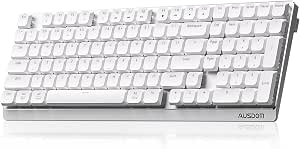
AUSDOM Wireless Mechanical Silent Office Keyboard with Low-Profile Linear Switches
The AUSDOM Wireless Mechanical Silent Office Keyboard emphasizes whisper-quiet operation with its low-profile linear switches, making it a strong candidate for open offices where noise reduction matters. Its hot-swappable switches allow for easy customization, while its adjustable angles support ergonomic comfort. Supported by multiple connectivity options—Bluetooth, 2.4GHz, and USB—this model supports up to five devices, similar to the AULA F99 Pro. However, its limited backlight effects—white only—may disappoint users wanting more visual flair. The bulkier design might not suit minimalists or those with very limited space. Still, the silicone soundproofing and low-profile keys make it a solid choice for quiet, responsive typing. This keyboard is ideal for office workers prioritizing silence and ergonomic flexibility over flashy features.
Pros:- Quiet, responsive low-profile linear switches
- Supports multiple devices with easy switching
- Hot-swappable switches for easy customization
Cons:- Limited to white backlighting effects
- Bulkier design may be less sleek for minimalists
- Requires some setup for switch replacement
Best for: Office workers who prioritize noise reduction, quiet responsiveness, and multi-device support in a minimal footprint
Not ideal for: Users who want extensive RGB lighting or ultra-slim designs for aesthetics or space-saving
- Switch Type:Low-profile Silent Linear
- Connectivity:Bluetooth 5.0, 2.4GHz, USB-C
- Number of Devices:Up to 5
- Backlight:White preset effects
- Battery Life:Up to 100 hours
- Additional Features:Soundproof silicone, adjustable angles
Our verdict“This keyboard suits users seeking a quiet, ergonomic, multi-device wireless solution for professional environments.”

How We Picked
The products in this roundup were chosen based on their ability to deliver quiet, efficient typing suited for open office environments. We prioritized models with proven noise reduction features, such as silent switches and sound-dampening constructions. Usability factors like wireless connectivity, build quality, and compatibility with multiple operating systems played a significant role. We also considered value, ensuring each keyboard offers a balance of performance and price, and included a range of layouts from full-size to compact. Our ranking reflects a combination of noise reduction effectiveness, versatility, durability, and user-friendly features that suit open office workflows.Factors to Consider When Choosing Silent Mechanical Keyboards For Open Offices
Selecting the right silent mechanical keyboard for open offices requires understanding several key factors. Not all silent switches are created equal, and the right choice depends on your typing style and workspace needs. Wireless connectivity can reduce clutter, but may introduce slight latency or durability tradeoffs. Build quality and materials influence long-term comfort and noise dampening, while layout options impact desk space and ergonomics. Considering these factors carefully can help you avoid common pitfalls like sacrificing typing feel for noise reduction or overspending on unnecessary features.Switch Type and Noise Reduction
Silent switches, such as Cherry MX Silent Red or equivalent, are designed to dampen sound without losing tactile feedback. It’s important to test or read reviews on switch sound levels, as some quieter switches still produce faint noise. Keep in mind that switch choice affects typing feel — linear switches tend to be quieter and smoother, while tactile ones might produce more sound. Selecting switches that balance noise reduction with comfort is essential for prolonged use in open spaces.
Wireless vs. Wired Connectivity
Wireless keyboards like the Keychron K2 and Aula F99 provide cleaner desk setups and mobility, which can be advantageous in shared environments. However, wireless models might introduce slight latency or connectivity issues, especially in environments with many wireless signals. Wired keyboards generally offer more consistent performance and are less prone to interference, but can add clutter. Consider how often you need mobility versus the importance of reliable, lag-free input.
Build Quality and Sound Dampening
Materials like aluminum or high-quality plastics contribute to durability and sound dampening. Sound-absorbing features such as foam layers or gasket mounts can further reduce noise. Cheaper models might produce more noise due to loose components or lower-quality switches. Spending more on a well-constructed keyboard can significantly improve noise levels and comfort, especially if you type extensively throughout the day.
Layout and Size
Full-size keyboards offer dedicated number pads and a familiar layout, but they take up more desk space. Compact layouts like TKL or 75% save room and reduce clutter, making them ideal for smaller or shared desks. Keep in mind that smaller layouts may omit features like dedicated function keys, which could impact workflow. Choose a size that balances your workspace constraints with your typing needs.
Additional Features and Customization
Features like hot-swappable switches allow customization without soldering, appealing to enthusiasts. RGB lighting can improve aesthetics but may add noise or distract in quiet settings. Compatibility with multiple OS platforms and firmware programmability can enhance usability. Prioritize features based on your daily needs — extra customization options are beneficial but may not justify a higher price for every user.
Frequently Asked Questions
Will silent switches completely eliminate noise?
Silent switches significantly reduce key noise, making them suitable for open office environments, but they won’t eliminate all sound. Some noise may still originate from bottoming out or case vibrations. Using dampening mats or sound-absorbing materials can further reduce residual noise. This combination provides a quieter experience, but no switch can be perfectly silent, especially during heavy typing sessions.
Is wireless better than wired for open office use?
Wireless keyboards offer a cleaner workspace and more flexibility, which can be beneficial in shared environments. They eliminate cable clutter and allow easier repositioning. However, wired models tend to be more reliable with no latency issues and are generally more durable in terms of connection stability. Choose wireless if desk space and mobility are priorities; opt for wired if consistent performance is more important for your workflow.
Do I need a full-size keyboard, or can I go smaller?
The choice depends on your workspace and usage. Full-size keyboards provide the convenience of dedicated number pads and function keys, but they occupy more space. Smaller layouts like TKL or 75% save desk real estate and can improve ergonomics, especially in shared offices. However, they might omit features you rely on. Consider your typical tasks and available space before deciding.
Are hot-swappable switches worth the extra cost?
Hot-swappable switches allow you to customize or replace switches without soldering, which is appealing for hobbyists and those who want to experiment with different feels. They extend the lifespan of your keyboard and can be a cost-effective way to upgrade. But if you don’t anticipate needing to change switches frequently, the added cost might not be justified. For most users, a well-chosen switch type from the start is sufficient.
How important is build material for noise reduction?
Material quality directly impacts the sound profile of a keyboard. Aluminum cases tend to dampen vibrations and produce a more solid, muted sound, while cheaper plastics may amplify sound or create rattles. Sound-dampening layers inside the case, such as foam padding, also play a role. Investing in a well-made case can significantly improve noise levels, especially in open office environments where minimal disturbance is desired.
Conclusion
For those seeking the best overall balance of noise reduction, performance, and versatility, the Keychron K10 remains the top choice — suitable for most users who need a full-size, wireless, quiet keyboard. Budget-conscious buyers or those new to mechanical keyboards might prefer the AULA F99 Wireless Silent Version for its affordability and hot-swappable switches. Professionals looking for premium build quality and advanced features should consider the Keychron K10 Pro with customizable options. Smaller office setups or users with limited space will find the Keychron K8 or AULA F99 Compact ideal. Ultimately, selecting the right model depends on your specific workspace needs and typing preferences.
Fall Picks
fall essentials
As an affiliate, we earn on qualifying purchases.