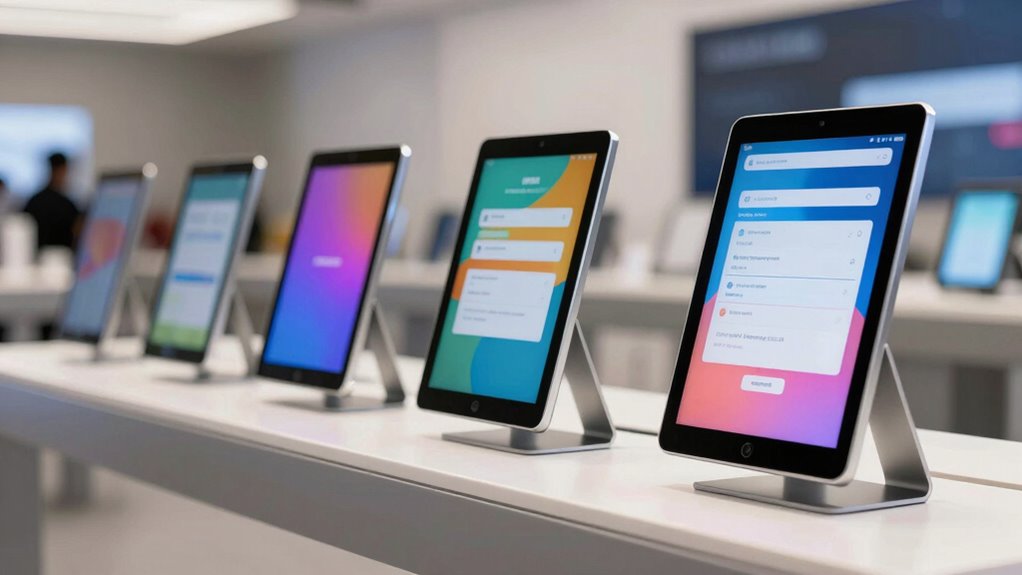

Searching for the best tablet kiosk stand for self-serve signups on Amazon? The ideal stand should balance security, ease of access, and adaptability. The Mount-It! Anti-Theft Kiosk stands out for its robust security features, while the AboveTEK POS Stand offers versatile rotation for user convenience. Tradeoffs often involve choosing between locked security and flexible usability, or between price and durability. Keep reading for a detailed breakdown of these options and how to select the right stand for your setup.

Get business pricing on office and shipping supplies
- Business-only prices and quantity discounts
- Tax-exempt purchasing
- Multiple users, one account, clear invoices
Key Takeaways
- Security features like anti-theft locks are vital for high-traffic environments but can limit flexibility.
- Adjustability, such as height and rotation, greatly enhances user experience but often adds to cost.
- Universal compatibility ensures the stand fits a variety of devices, reducing the need for multiple models.
- Countertop versus floor stands depend on available space and desired customer flow.
- Quality build and materials directly impact durability and long-term value, especially for busy locations.
| Tablet Floor Stand with Locking and Rotation for 10.9″ iPad and Pro Models |  | Best Overall for Versatile Public Spaces | Compatibility: 10.9″ iPad 10th, Pro 11″ 1 2 3 4, Air 4 5, Air 11″ (M2/M3/M4), iPad 11″ (A16) | Material: Metal | Height: 39 inches | VIEW ON AMAZON | See Our Full Breakdown |
| Secure Desk Tablet Kiosk Stand for 10-14 inch Tablets |  | Best for Adjustable Desktop Use in Commercial Settings | Compatibility: 10-14 inch tablets, max thickness 0.39 inches | Mounting Pattern: VESA 75×75 mm | Material: Steel | VIEW ON AMAZON | See Our Full Breakdown |
| Mount-It! Anti-Theft Universal Tablet Floor Stand Kiosk, Retail POS, Silver |  | Best for Versatile Retail and Hospitality Use | Weight: 9.4 lbs | Base Dimensions: 13.6″ x 17.4″ | Material: Metal | VIEW ON AMAZON | See Our Full Breakdown |
| Anti-Theft iPad Kiosk Stand, Adjustable Tablet Floor Stand for POS Checkout |  | Best Heavy-Duty Security for 10-14 inch Tablets | Compatibility: 10 to 14 inch tablets up to 0.39 inches thick | Height Range: 29.53 to 45.28 inches | Base Size: 13.78 inches diameter | VIEW ON AMAZON | See Our Full Breakdown |
| AboveTEK POS Tablet Kiosk Stand – Universal Tablet Locking Mount for 7.9″-11″ Devices |  | Best for Compact, Secure POS Solutions | Compatibility: 7.9″-11″ tablets, up to 0.55″ thick | Height Range: 12.8″ to 16.3″ | Rotation: 360° | VIEW ON AMAZON | See Our Full Breakdown |
| Mount-It! Anti-Theft Tablet Kiosk Countertop Stand, Universal Retail, Black |  | Best Overall Security and Flexibility | Compatibility: 7.9″–11″ tablets | Adjustability: Tilt +20°/-110°, 360° rotation | Base Dimensions: 6.29″ W x 9.05″ D | VIEW ON AMAZON | See Our Full Breakdown |
| Square Kiosk for iPad (USB-C) |  | Best for Seamless iPad Self-Service Payments | Compatibility: iPad (not included) | Mounting Options: Wall, countertop, VESA | Payment Methods: Contactless, chip, Apple Pay, Google Pay | VIEW ON AMAZON | See Our Full Breakdown |
| Mount-It! Anti-Theft iPad Floor Stand, Locking Kiosk Enclosure, White |  | Best Heavy-Duty, Secure Floor Kiosk | Compatibility: iPad Gen 7-11, Air & Pro | Weight: 33 lbs | Base Dimensions: 13.4″ x 11.8″ | VIEW ON AMAZON | See Our Full Breakdown |
| Anti-Theft Tablet Kiosk Stand for 9-14 inch Tablets with Lock and Key | 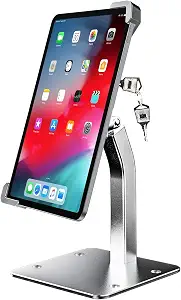 | Best Adjustable Universal Security Stand | Compatibility: 9-14 inch tablets | Material: All-aluminum alloy | Swivel: 360° | VIEW ON AMAZON | See Our Full Breakdown |
| Mount-It! Universal Tablet Countertop Stand, Secure Kiosk Mount, Black |  | Best Versatile, Adjustable Kiosk Stand | Compatibility: 9.7″–13.1″ tablets | Tilt: 180° | Rotation: 90° | VIEW ON AMAZON | See Our Full Breakdown |
| Mount-It! Anti-Theft iPad Floor Stand Kiosk with Literature Holder |  | Best Overall Security and Versatility | Compatible Devices: iPad Gen 7-11, Pro, Air & A16 | Weight Capacity: Up to 2.2 lbs | Rotation: 90 degrees | VIEW ON AMAZON | See Our Full Breakdown |
| AboveTEK Anti-Theft iPad Floor Stand with Lock and Adjustable Height |  | Best for Adjustable Height and Heavy-Duty Security | Compatible Devices: 10.9-11 inch tablets including iPad Pro (11″), iPad Air (10.9/11″) | Material: Aluminum and steel | Height Adjustment: 27.6″ to 45.3″ | VIEW ON AMAZON | See Our Full Breakdown |
| Mount-It! iPad Kiosk Stand, Anti-Theft Steel Countertop Enclosure, White |  | Best for Versatile Mounting and High-Traffic Use | Compatibility: iPad Gen 7-11, A16, Pro, Air (not mini) | Material: Steel | Dimensions: 11.8″ x 7.9″ base | VIEW ON AMAZON | See Our Full Breakdown |
| tablet kiosk stand for self serve signups on amazon | Compatibility | Material | Rotation |
|---|---|---|---|
| Tablet Floor Stand with Lockin | 10.9" iPad 10th, Pro 11" 1 2 3 4, Air 4 5, Air 11" (M2/M3/M4), iPad 11" (A16) | Metal | 120 degrees |
| Secure Desk Tablet Kiosk Stand | 10-14 inch tablets, max thickness 0.39 inches | Steel | 360 degrees |
| Mount-It! Anti-Theft Universal | Tablets 7.9" to 11" | Metal | — |
| Anti-Theft iPad Kiosk Stand | 10 to 14 inch tablets up to 0.39 inches thick | Steel | 360 degrees |
| AboveTEK POS Tablet Kiosk Stan | 7.9"-11" tablets, up to 0.55" thick | — | 360° |
| Mount-It! Anti-Theft Tablet Ki | 7.9"–11" tablets | Steel | — |
| Square Kiosk for iPad | iPad (not included) | — | — |
| Mount-It! Anti-Theft iPad Floo | iPad Gen 7-11, Air & Pro | Powder-coated steel | — |
| Anti-Theft Tablet Kiosk Stand | 9-14 inch tablets | All-aluminum alloy | — |
| Mount-It! Universal Tablet Cou | 9.7"–13.1" tablets | Cold-rolled steel | 90° |
| Mount-It! Anti-Theft iPad Floo | — | — | 90 degrees |
| AboveTEK Anti-Theft iPad Floor | — | Aluminum and steel | — |
| Mount-It! iPad Kiosk Stand | iPad Gen 7-11, A16, Pro, Air (not mini) | Steel | 90° |
More Details on Our Top Picks
Tablet Floor Stand with Locking and Rotation for 10.9″ iPad and Pro Models
This stand stands out for its durable all-metal construction and adjustable rotation, making it ideal for high-traffic environments where security and flexibility are key. Compared to the AboveTEK stand, it offers a more secure lockable enclosure, but its bulkier design may not suit smaller spaces. The 120-degree rotation and ADA-compliant height provide versatile display angles, ensuring accessibility and user comfort. While installation might require some effort, its cable management keeps setups tidy. This pick balances security, adjustability, and durability, making it suitable for busy public areas needing reliable self-service kiosks.
Pros:- Durable all-metal construction with lockable security
- Supports 120-degree rotation for flexible display angles
- ADA compliant height of 39 inches
- Effective cable management for tidy setup
Cons:- Design may be too bulky for small spaces
- Limited color options
- Installation may require some effort
Best for: Business owners setting up secure, flexible self-serve kiosks in public or high-traffic spaces.
Not ideal for: Small retail counters or intimate spaces where a bulky stand might hinder flow or fit.
- Compatibility:10.9″ iPad 10th, Pro 11″ 1 2 3 4, Air 4 5, Air 11″ (M2/M3/M4), iPad 11″ (A16)
- Material:Metal
- Height:39 inches
- Rotation:120 degrees
- Lockable:Yes
- Cable Management:Yes
Our verdict“This stand is best for environments demanding durability, security, and flexible positioning, especially in public spaces.”
Secure Desk Tablet Kiosk Stand for 10-14 inch Tablets
This stand offers full adjustability with a 360-degree rotation and tilt, making it a strong choice for retail or hospitality counters. Compared with the Mount-It! anti-theft floor stand, this model is more compact and designed specifically for desktop use, though it sacrifices some portability. Its heavy-duty steel build ensures stability, but the limited tablet thickness compatibility (max 0.39 inches) restricts use with rugged or thicker cases. The keyless lock adds convenience, but the need for a bare tablet can be a drawback for those with rugged or case-protected devices. This stand strikes a balance between security and ease of use for fixed locations requiring flexible viewing angles.
Pros:- Secure anti-theft locking system with keyless design
- Fully adjustable for optimal viewing angles
- Heavy-duty construction with stable base
- Effective cable management for a tidy setup
Cons:- Not compatible with rugged cases or tablets over 14 inches
- Limited to tablets with maximum thickness of 0.39 inches
- May be too large for small desk spaces
Best for: Retail staff or hospitality workers needing adjustable, secure tablet displays on desks or counters.
Not ideal for: Mobile or floor-based setups where portability and larger size are priorities.
- Compatibility:10-14 inch tablets, max thickness 0.39 inches
- Mounting Pattern:VESA 75×75 mm
- Material:Steel
- Weight:5.38 lbs
- Height:10.43 to 15.94 inches
- Rotation:360 degrees
Our verdict“Ideal for secure, adjustable desktop setups where flexibility and stability are needed in retail or hospitality environments.”
Mount-It! Anti-Theft Universal Tablet Floor Stand Kiosk, Retail POS, Silver
This stand is well-suited for environments needing a flexible, secure solution for tablets from 7.9″ to 11″. Its adjustable height, 360-degree rotation, and tilt make it highly adaptable, aligning with the needs of retail or healthcare settings. Compared to the AboveTEK stand, it supports a wider range of tablet sizes and includes a lock for theft prevention. However, it requires the tablet to be used without a case, which might be inconvenient for some users. Its heavier weight (9.4 lbs) offers stability but can hinder repositioning. Overall, it excels in security and versatility for retail POS or customer engagement stations that require frequent adjustments.
Pros:- Secure locking clamp prevents theft and tampering
- Adjustable height, rotation, and tilt for versatile positioning
- Compatible with a wide range of tablets (7.9″ to 11″)
- Easy to set up and highly adjustable
Cons:- Requires bare tablet, not compatible with cases
- Heavy weight may complicate repositioning
- Limited to tablets within size range
Best for: Retailers or healthcare providers needing a secure, adjustable, and universal tablet stand for customer-facing applications.
Not ideal for: Users with rugged or case-protected tablets, or those who want a lightweight, portable stand.
- Weight:9.4 lbs
- Base Dimensions:13.6″ x 17.4″
- Material:Metal
- Compatibility:Tablets 7.9″ to 11″
- Mounting:Floor stand, bolt or freestanding
- Features:Adjustable height, 360° rotation, tilt, cable management, lockable
Our verdict“Best suited for retail or healthcare environments seeking a highly adaptable, secure, and universal tablet stand for customer interaction.”
Anti-Theft iPad Kiosk Stand, Adjustable Tablet Floor Stand for POS Checkout
This stand provides robust security with a bolt-down base and specialized screws, making it ideal for high-security retail or public kiosks. Its height can be adjusted from 29.53 to 45.28 inches, and the 360-degree rotation plus 180-degree tilt offers comprehensive flexibility for customer interaction. Compared to the Mount-It! floor stand with a more compact base, this model emphasizes stability and security over portability, requiring professional installation for bolt-down options. Its cable routing system keeps the setup professional-looking, but it’s limited to tablets no thicker than 0.39 inches. This model is perfect for environments where security is paramount, but it sacrifices some ease of movement.
Pros:- Secure anti-theft design with specialized screws and wrench
- Fully adjustable height, rotation, and tilt
- Heavy-duty steel base provides excellent stability
- Clean cable management for a professional appearance
Cons:- Requires professional installation for bolt-down mounting
- Limited to tablets no thicker than 0.39 inches
- Not suitable for portable or lightweight setups
Best for: High-security retail or public spaces needing a heavy-duty, bolt-down kiosk for tablets up to 14 inches.
Not ideal for: Locations requiring frequent repositioning or using thicker, rugged tablets.
- Compatibility:10 to 14 inch tablets up to 0.39 inches thick
- Height Range:29.53 to 45.28 inches
- Base Size:13.78 inches diameter
- Material:Steel
- Rotation:360 degrees
- Cable Routing:Hidden through center pole
Our verdict“This stand excels in environments demanding maximum security and stability for large tablets, with less emphasis on portability.”
AboveTEK POS Tablet Kiosk Stand – Universal Tablet Locking Mount for 7.9″-11″ Devices
This stand is designed for smaller tablets, with a height-adjustable locking mount and 360-degree swivel, making it suitable for retail or office POS setups. Compared with larger models like the Mount-It! or the heavy-duty steel options, this stand offers a more compact footprint and easier portability. Its anti-theft screw and wrench system provide a high level of security, though it’s limited to tablets up to 11 inches and 0.55 inches thick, which may exclude rugged or larger devices. The professional cable management and adjustable angles enhance the user experience, but the smaller size limits versatility for larger tablets or more demanding environments. This model makes sense for compact, secure setups where space efficiency matters most.
Pros:- Universal compatibility with 7.9″ to 11″ tablets
- Anti-theft screw with special wrench for security
- 360° swivel and adjustable tilt for flexible viewing
- Height adjustable from 12.8″ to 16.3″ for ergonomic setup
Cons:- Limited to tablets up to 11 inches and 0.55 inches thick
- Not suitable for rugged or larger tablets
- Smaller size may limit versatility in some environments
Best for: Retailers or offices needing a compact, secure, and adjustable stand for smaller tablets in POS applications.
Not ideal for: Environments with larger tablets or those requiring rugged cases and maximum device size.
- Compatibility:7.9″-11″ tablets, up to 0.55″ thick
- Height Range:12.8″ to 16.3″
- Rotation:360°
- Tilt:-60° to 60°
- Locking:Yes
- Construction:Heavy-duty steel
Our verdict“A smart choice for compact, secure POS setups with smaller tablets where space-saving and security are priorities.”
Mount-It! Anti-Theft Tablet Kiosk Countertop Stand, Universal Retail, Black
This stand stands out for combining comprehensive security features with adjustable viewing angles, making it ideal for busy retail or hospitality environments. Compared with the Mount-It! Anti-Theft iPad Floor Stand, this countertop model offers a more stable base with bolt-down options, but sacrifices portability. Its lockable design with anti-theft screws and cable routing ensures a professional, tamper-resistant setup that suits high-traffic areas. The adjustable tilt and 360° rotation provide versatile viewing, critical for self-serve signups or check-ins. However, its size and weight (over 11 inches tall and over 6 pounds) mean it’s less convenient for frequent repositioning. Best for businesses needing a secure, reliable countertop kiosk that won’t be easily tampered with, but less so for mobile or temporary installations.
Pros:- Secure lockable enclosure prevents tampering and theft
- Full tilt and 360° rotation for flexible viewing angles
- Bolt-down capability enhances stability in busy environments
- Cable management for a tidy countertop appearance
Cons:- Heavy weight (33 lbs) makes repositioning difficult
- Requires measuring and compatibility checking for tablets
Best for: Retailers, hotels, or restaurants requiring a secure, stable countertop kiosk setup in high-traffic areas.
Not ideal for: Small offices or mobile event booths where portability and quick setup are priorities, due to its weight and permanent installation options.
- Compatibility:7.9″–11″ tablets
- Adjustability:Tilt +20°/-110°, 360° rotation
- Base Dimensions:6.29″ W x 9.05″ D
- Stand Height:11.2″
- Material:Steel
- Locking System:Anti-theft screw
Our verdict“This stand is best suited for high-traffic retail or hospitality settings that need a durable, secure countertop kiosk with flexible viewing angles.”
Square Kiosk for iPad (USB-C)
This product excels in transforming an iPad into a self-service kiosk with built-in contactless and chip payment options, making it ideal for quick-service restaurants or retail checkouts. Unlike the Mount-It! Anti-Theft iPad Floor Stand, it is designed for countertop or wall mounting, providing a sleek, space-saving solution. Its seamless integration with the Square Kiosk app simplifies setup for merchants who want a user-friendly, all-in-one payment station. However, the need to purchase an iPad separately and the subscription costs for the app can add to the overall expense. It’s limited strictly to iPads, so other tablets are incompatible. This pick makes the most sense for businesses prioritizing fast, contactless payments with minimal fuss for a dedicated self-service station.
Pros:- Easy to set up without professional help
- Multiple mounting options for flexible placement
- Supports contactless and chip payment methods
- Seamless Square app integration
Cons:- iPad not included, increasing initial cost
- Requires subscription to Square Kiosk app
- Limited to iPad devices only
Best for: Small retail outlets or cafes looking for a simple, integrated iPad kiosk for payments and self-ordering.
Not ideal for: Larger enterprises or those using Android tablets, as this is exclusive to iPad and requires an additional device purchase.
- Compatibility:iPad (not included)
- Mounting Options:Wall, countertop, VESA
- Payment Methods:Contactless, chip, Apple Pay, Google Pay
- Connectivity:USB-C
- Included Hardware:Mounting hardware
Our verdict“This kiosk is ideal for small businesses seeking a straightforward, integrated iPad checkout station with contactless payment support.”
Mount-It! Anti-Theft iPad Floor Stand, Locking Kiosk Enclosure, White
This stand offers a secure, tamper-proof solution for iPads in retail, hospitality, or events, standing out from countertop options like the Mount-It! Universal Tablet Countertop Stand. Its heavy-duty steel construction and lockable enclosure prevent theft and vandalism, making it suitable for unattended public spaces. The adjustable rotation and tilt provide flexible viewing angles, but its weight (33 lbs) makes repositioning cumbersome. Compatibility is limited to iPads from Gen 7-11, excluding some newer models like the iPad Pro 12.9”. This stand is best for long-term, stationary deployments where security is a priority, rather than frequent movement or quick setup. It’s ideal for high-traffic environments needing a durable, professional look, but less suited for portable or limited-space needs.
Pros:- Secure locking enclosure prevents tampering
- Adjustable rotation and tilt for optimal viewing
- Heavy-duty steel construction for durability
- Cable management for a clean appearance
Cons:- Heavy weight complicates movement
- Limited compatibility with iPad Pro 12.9″
- Requires a bare tablet without a protective case
Best for: Businesses needing a durable, secure, and tamper-resistant iPad stand for long-term, stationary use in high-traffic areas.
Not ideal for: Organizations requiring frequent repositioning or using iPads larger than 11 inches, due to weight and size restrictions.
- Compatibility:iPad Gen 7-11, Air & Pro
- Weight:33 lbs
- Base Dimensions:13.4″ x 11.8″
- Material:Powder-coated steel
- Adjustability:Rotation 90°, tilt up to 75°
- Locking Mechanism:Yes
Our verdict“This stand is perfect for static, secure iPad deployments in busy environments where security and durability outweigh portability.”
Anti-Theft Tablet Kiosk Stand for 9-14 inch Tablets with Lock and Key
This versatile stand supports tablets from 9 to 14 inches, including popular models like the iPad Pro, Surface Pro, and Galaxy Tabs. It offers a high degree of adjustability with 360° swivel and 270° flip, making it adaptable to diverse use cases. Compared to the Mount-It! Universal Tablet Countertop Stand, its adjustable swivel and flip provide more dynamic viewing angles, but it’s bulkier and heavier, which can limit mobility. The keyed lock adds security, but installation may require tools for screw fixing, which could be a hurdle for some users. Ideal for environments where tablets need to be shared or frequently repositioned, especially when security and flexibility are key, but less suitable for quick, temporary setups.
Pros:- Secure, keyed lock prevents theft
- Swivel and flip for customizable viewing angles
- Universal compatibility with various tablets
- All-aluminum alloy construction provides sturdy support
Cons:- Installation may require tools and effort
- Does not fit tablets smaller than 9 inches
- Heavier and less portable than smaller stands
Best for: Public or retail settings needing flexible, secure tablet displays for a range of larger devices.
Not ideal for: Small-scale or temporary installations where quick setup and lightweight portability are more important than extensive adjustability.
- Compatibility:9-14 inch tablets
- Material:All-aluminum alloy
- Swivel:360°
- Flip:270°
- Locking System:Keyed lock
- Installation:Screw-fixed or freestanding
Our verdict“This stand offers excellent flexibility and security for larger tablets in settings where adjustability and theft prevention are priorities.”
Mount-It! Universal Tablet Countertop Stand, Secure Kiosk Mount, Black
This stand is designed for a wide array of tablets from 9.7 to 13.1 inches, making it highly versatile for various self-serve applications. Its adjustable tilt (up to 180°) and 90° rotation support both portrait and landscape modes, similar to the Anti-Theft Tablet Kiosk Stand for 9-14 inch Tablets, but with a more professional, sleek appearance and a tamper-resistant enclosure. Its multiple installation options—freestanding, desk-mounted, or cable routed—offer adaptability for different environments and space constraints. The steel construction ensures durability for retail or hospitality use, but the enclosure design limits access to the device, which could be a drawback for applications requiring frequent tablet removal or upgrades. Ideal for long-term, secure, professional displays, but less suited for frequent mobility or quick swaps.
Pros:- Universal compatibility with most 9.7-13.1″ tablets
- Adjustable tilt and rotation for flexible viewing
- Multiple installation methods for versatility
- Tamper-resistant, secure enclosure
Cons:- Case incompatibility may limit use with protective covers
- Enclosure restricts easy removal of the tablet
- Heavy steel build may hinder quick repositioning
Best for: Businesses seeking a secure, professional-looking kiosk solution that adapts to various countertop configurations and tablet models.
Not ideal for: Temporary setups or environments needing quick, tool-free tablet swaps, due to its more permanent installation options and enclosure design.
- Compatibility:9.7″–13.1″ tablets
- Tilt:180°
- Rotation:90°
- Material:Cold-rolled steel
- Installation:Various options including desk mount
- Built-in Cable Management:Yes
Our verdict“This stand suits professional environments requiring a secure, adaptable kiosk with a sleek appearance and multiple installation options, but not for mobile or temporary setups.”
Mount-It! Anti-Theft iPad Floor Stand Kiosk with Literature Holder
This stand stands out for combining a robust, lockable steel enclosure with adjustable viewing angles, making it ideal for high-traffic environments where theft prevention is critical. Unlike the AboveTEK Anti-Theft iPad Floor Stand, which offers similar security features, this model provides more flexible rotation (90 degrees) and tilt (75 degrees), along with a removable literature holder that enhances customer engagement. Its customizable mounting plates accommodate a range of iPad models, but it requires a bare tablet, limiting compatibility with cases. The sturdy construction and lifetime warranty make it suitable for busy public spaces, though its limited model compatibility means not everyone will find it fits their device. This pick is perfect for venues needing a secure, flexible, and durable kiosk solution.Pros:- Secure lockable enclosure prevents theft in busy environments
- Adjustable literature holder boosts customer interaction
- Flexible rotation and tilt for optimal viewing angles
- Customizable mounting options for various iPad models
Cons:- Requires a bare tablet, not compatible with cases
- Limited to specific iPad models listed, excluding iPad Pro 12.9″
Best for: Retail stores, trade shows, or hospitality counters needing a secure, adjustable kiosk for multiple iPad models
Not ideal for: Businesses using iPad Pro 12.9″ or requiring case-friendly mounts, as this stand does not support larger or case-equipped tablets
- Compatible Devices:iPad Gen 7-11, Pro, Air & A16
- Weight Capacity:Up to 2.2 lbs
- Rotation:90 degrees
- Tilt:75 degrees
- Mounting Plates:Four interchangeable options
- Locking Mechanism:Key lock with 2 keys
- Warranty:Lifetime
- Support:US-based technical support
Our verdict“This stand offers a secure, flexible setup ideal for venues needing high security and customizable display options.”
AboveTEK Anti-Theft iPad Floor Stand with Lock and Adjustable Height
This model excels in environments where flexible height adjustment and a sturdy, anti-slip base are priorities, making it a strong alternative to the Mount-It! model. Compared with the Mount-It! stand, the AboveTEK offers a wider height range (27.6″ to 45.3″) and a more modern, professional aesthetic that appeals to retail and corporate settings. However, its heavier weight (over 5 kg) can make repositioning less convenient, especially in dynamic spaces. Compatibility is limited to 10.9-11 inch tablets like iPad Pro and Galaxy Tab, so users with larger or case-equipped devices should look elsewhere. The screw-in base adds security but complicates quick setup or removal. If you need a durable, height-adjustable stand for 10-11 inch tablets, this model provides a reliable, professional-grade option.Pros:- Secure locking mechanism prevents theft and unauthorized access
- Adjustable height and tilt for optimal user interaction
- Sturdy, anti-slip base enhances stability
- Cable management feature keeps cords tidy
Cons:- Heavy weight makes moving the stand effortful
- Requires screw-in installation for extra security, less quick to reposition
Best for: Retailers or public spaces needing height flexibility and a stable, secure stand for 10.9-11 inch tablets
Not ideal for: Businesses with larger tablets or those requiring frequent repositioning without tools, due to weight and installation needs
- Compatible Devices:10.9-11 inch tablets including iPad Pro (11″), iPad Air (10.9/11″)
- Material:Aluminum and steel
- Height Adjustment:27.6″ to 45.3″
- Weight:5.24 kg
- Dimensions:33 x 14 x 2.76 inches
- Locking Mechanism:Yes
- Cable Management:Yes
- Base Security:Attachable with screw holes
Our verdict“This stand is well-suited for environments that prioritize adjustable height and durability over portability.”
Mount-It! iPad Kiosk Stand, Anti-Theft Steel Countertop Enclosure, White
This steel kiosk stand offers a versatile solution with multiple mounting options—freestanding or bolt-down—making it ideal for both temporary and permanent setups. Compared to the AboveTEK stand, which emphasizes height adjustability, this model focuses on durability and adaptability with four different mounting plates and a 90-degree rotation feature. Its steel construction ensures durability in busy environments, but it only supports bare tablets, excluding those in cases, similar to the other two options. Its compatibility with a broad range of iPads (Gen 7-11, A16, Pro, Air) makes it versatile, yet verification of model compatibility is recommended before purchase. The keyed lock adds theft prevention, but users must confirm their device fits the mounting plates for seamless use.Pros:- Secure keyed lock with spare keys for theft prevention
- Multiple mounting options for portable or fixed installations
- Adjustable rotation and tilt for optimal viewing
- Steel construction for durability in high-traffic settings
Cons:- Limited to bare tablets, not compatible with cases
- Requires proper model verification before purchase
Best for: Retail, hospitality, or trade show environments requiring a secure, flexible, and mountable kiosk for a variety of iPads
Not ideal for: Users with iPad mini or case-heavy devices, as it only supports bare tablets and requires model checking
- Compatibility:iPad Gen 7-11, A16, Pro, Air (not mini)
- Material:Steel
- Dimensions:11.8″ x 7.9″ base
- Weight Capacity:Up to 2.2 lbs
- Rotation:90°
- Tilt:75°
Our verdict“This stand offers a durable, versatile mounting solution ideal for high-traffic environments needing flexible setup options.”

How We Picked
I evaluated each product based on performance, build quality, security features, ease of installation, and versatility. Priority was given to stands that securely hold tablets while allowing easy access for users, especially in self-serve contexts. Budget options were compared against premium models to identify the best value. The ranking reflects a balance of durability, user-friendliness, and price, with a focus on stands suitable for retail, hospitality, or event environments where theft prevention and ease of use are critical.| tablet kiosk stand for self serve signups on amazon | Material |
|---|---|
| Tablet Floor Stand with Lockin | Metal |
| Secure Desk Tablet Kiosk Stand | Steel |
| Mount-It! Anti-Theft Universal | Metal |
| Anti-Theft iPad Kiosk Stand | Steel |
| AboveTEK POS Tablet Kiosk Stan | — |
| Mount-It! Anti-Theft Tablet Ki | Steel |
| Square Kiosk for iPad | — |
| Mount-It! Anti-Theft iPad Floo | Powder-coated steel |
| Anti-Theft Tablet Kiosk Stand | All-aluminum alloy |
| Mount-It! Universal Tablet Cou | Cold-rolled steel |
| Mount-It! Anti-Theft iPad Floo | — |
| AboveTEK Anti-Theft iPad Floor | Aluminum and steel |
| Mount-It! iPad Kiosk Stand | Steel |
Factors to Consider When Choosing Tablet Kiosk Stand For Self Serve Signups On Amazon
Choosing the right tablet kiosk stand involves weighing several key factors beyond basic features. Security is essential in preventing theft, especially in high-traffic areas, but should be balanced with ease of access for users. Compatibility ensures your stand will fit your specific device, and adjustability enhances the customer experience. Consider the available space—whether a countertop or floor stand makes the most sense. Lastly, evaluate build quality to ensure the stand will withstand daily use and potential tampering.Security and Theft Prevention
Security features like locks and anti-theft designs are fundamental when deploying self-serve kiosks in public spaces. These prevent theft and misuse, especially if the stand is left unattended for long periods. However, overly restrictive locks can hinder user interaction, so look for options that balance security with accessibility. Some stands incorporate features like tamper-proof screws or reinforced enclosures, making them suitable for high-risk environments.
Compatibility and Device Fit
Ensuring the stand supports your specific tablet model is crucial. Many stands advertise universal compatibility but vary in how well they fit different sizes and brands. Confirm the range of device sizes supported and whether adapters or additional mounts are necessary. Choosing a model with adjustable grips or mounts can prevent instability and reduce the risk of device damage over time.
Adjustability and User Experience
Adjustable features like height, tilt, and rotation improve user interaction, making it easier for customers to view and interact with the tablet comfortably. If your setup requires frequent reconfiguration or accommodates different user heights, prioritize stands with flexible adjustment options. Keep in mind that increased adjustability often comes with a higher price tag, which should be weighed against the benefits of improved usability.
Space and Placement Considerations
The choice between a countertop or floor stand depends on your available space and customer flow. Countertop models are ideal for limited space and bring the device closer to the user, enhancing engagement. Floor stands provide more visibility and can accommodate larger tablets or additional signage, but require more room. Consider your environment’s traffic patterns and available area before purchasing.
Build Quality and Long-Term Durability
A sturdy stand made from high-quality materials like steel or reinforced plastics will withstand daily use and potential vandalism. Cheaper models may save money upfront but can break or become unstable over time, leading to replacement costs. Invest in a stand with good reviews for durability if your deployment involves frequent handling or outdoor use, ensuring a longer lifespan and better return on investment.
Frequently Asked Questions
Can I use a regular tablet stand for self-serve signups?
While some regular tablet stands may hold your device temporarily, they often lack the security features needed for unattended use in public spaces. For self-serve signups, a stand with locking mechanisms and tamper-proof design is essential to prevent theft and misuse. Regular stands also may not offer the adjustability or stability required for consistent user interaction, making specialized kiosk stands a better choice.
What size tablet should I look for in a kiosk stand?
The ideal size depends on your specific device, but most stands support tablets between 7.9 inches and 14 inches. Check the product specifications carefully to ensure your device fits securely and can be used comfortably. Adjustable mounts offer flexibility if you plan to switch between different tablet models or sizes over time.
Are anti-theft features worth paying extra for?
Yes, especially in busy or unsecured locations, anti-theft features like locks, reinforced enclosures, and tamper-resistant screws protect your investment. While these features may increase the initial cost, they can save money in the long run by preventing theft, damage, or vandalism. Consider your environment and the risk level before opting for a model with advanced security.
Should I prioritize portability or stability in my kiosk stand?
If your setup requires frequent relocation or temporary installations, portability features like lightweight design and handles are valuable. However, stability should not be compromised, especially in high-traffic areas where the stand might be bumped or tampered with. For permanent setups, a heavier, more stable stand offers better security and durability.
How important is adjustability for customer comfort?
Adjustability directly impacts user comfort and engagement. Features like height adjustment, tilt, and rotation allow customers to interact with the device at a comfortable angle, reducing fatigue and frustration. Even if your current setup doesn’t require frequent adjustments, choosing a stand with these features offers future flexibility for different environments or user groups.
Conclusion
For most users seeking a reliable, secure solution, the Mount-It! Anti-Theft Kiosk offers excellent durability and theft prevention, making it ideal for busy retail or public environments. If budget is a concern, a simpler countertop model without advanced security features can suffice for less exposed settings. Businesses prioritizing flexibility and user comfort should consider models with adjustable height and rotation, like the AboveTEK POS Stand. For those new to self-serve kiosks, starting with an easy-to-use, stable stand is advisable, while experienced users might opt for premium models with enhanced security and customization options.Halloween Picks
halloween
As an affiliate, we earn on qualifying purchases.