
Finding the right NAS drive for a small business involves balancing performance, cost, and ease of management. The UGREEN NAS DXP4800 Plus stands out as the best overall choice thanks to its robust 4-bay design and user-friendly setup. For those prioritizing affordability, the Buffalo LinkStation SoHo 220 offers a solid entry point with included hard drives. Advanced users may prefer the Synology DS225+ with its powerful CPU and media transcoding capabilities, though it comes at a higher price. The main tradeoffs involve selecting between capacity, ease of use, and future-proofing—continue reading for a detailed breakdown of these options and how they compare.

Get business pricing on office and shipping supplies
- Business-only prices and quantity discounts
- Tax-exempt purchasing
- Multiple users, one account, clear invoices
Key Takeaways
- The number of bays (2 vs 4) significantly impacts expandability and data redundancy options.
- Pre-installed hard drives simplify setup but reduce flexibility; diskless models offer customization at a higher initial effort.
- Processing power varies widely; more robust CPUs benefit media tasks and multitasking but increase cost.
- Ease of use and management features often come from higher-end brands like Synology, which may justify premium pricing.
- Price points often reflect capacity, build quality, and included features—balance your current needs with future growth.
| UGREEN NAS DH2300 2-Bay Personal Storage for Beginners & Personal Users |  | Best Overall for Ease of Use and Privacy | Capacity: Up to 64TB | Number of Bays: 2 | Processor: High-performance processor | VIEW ON AMAZON | See Our Full Breakdown |
| UGREEN NAS DXP2800 2-Bay for Advanced Home Users, Remote Workers & Creators |  | Best for Power Users with Large Storage & Security Needs | Processor: Intel N100 Quad-Core | RAM: 8GB DDR5 | Network: 2.5GbE | VIEW ON AMAZON | See Our Full Breakdown |
| UGREEN DXP4800 Plus 4-Bay NAS for Families, Creators & Small Teams |  | Best for High Capacity, Advanced Features, and Virtualization | Digital Storage Capacity: 144 TB | Processor: Intel 5-Core CPU | Network Ports: 1x 10GbE, 1x 2.5GbE | VIEW ON AMAZON | See Our Full Breakdown |
| Synology 2-Bay DiskStation DS223j (Diskless) |  | Best for Secure Private Cloud & Easy Sharing | Storage: 2-bay, diskless | Warranty: 2 years | Type: NAS | VIEW ON AMAZON | See Our Full Breakdown |
| Buffalo LinkStation SoHo 220 2-Bay Personal Cloud NAS 8TB with Hard Drives Included |  | Best for Easy Setup and Out-of-the-Box Use | Total Capacity: 8TB | Number of Bays: 2 | RAID Support: Yes (RAID 0, 1) | VIEW ON AMAZON | See Our Full Breakdown |
| BUFFALO TeraStation Essentials 2025 4-Bay Desktop NAS 16TB with Hard Drives Included | 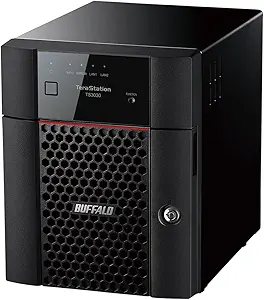 | Best Overall for Small Businesses Needing Reliable, Out-of-the-Box Storage | Capacity: 16TB | Number of Bays: 4 | Hard Drives Included: Yes | VIEW ON AMAZON | See Our Full Breakdown |
| Synology DS225+ Private Cloud Media Server – 2-Bay Diskless NAS with Intel CPU for Hardware Transcoding |  | Best for Media-Rich Small Businesses and Creative Teams | Storage Bays: 2-Bay | CPU: Intel | Transfer Speed: 282 MB/s | VIEW ON AMAZON | See Our Full Breakdown |
| Synology DS223 2-Bay Diskless NAS Home & Office Backup Hub | 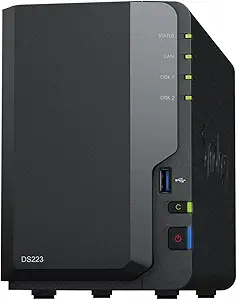 | Best for Centralized Data Management and Small-Scale Surveillance | Model: DS223 | Type: 2-Bay Diskless NAS | Use: Home & Office Backup, Surveillance | VIEW ON AMAZON | See Our Full Breakdown |
| Asustor Drivestor 2 Gen 2 AS1202T 2-Bay NAS Storage, Quad-Core 1.7GHz CPU, 2.5GbE Network, 1GB DDR4, 4K Media Server, Diskless |  | Best for Home and Small Office Users Needing Speed and Ease of Use | Processor: Realtek RTD1619B quad-core 1.7GHz | Network: 2.5GbE Ethernet | Memory: 1GB DDR4 | VIEW ON AMAZON | See Our Full Breakdown |
| nas drives for small businesse | Warranty |
|---|---|
| UGREEN NAS DH2300 2-Bay Person | — |
| UGREEN NAS DXP2800 2-Bay for A | — |
| UGREEN DXP4800 Plus 4-Bay NAS | — |
| Synology 2-Bay DiskStation DS2 | 2 years |
| Buffalo LinkStation SoHo 220 2 | 3 years |
| BUFFALO TeraStation Essentials | 3 years |
| Synology DS225+ Private Cloud | 3 years |
| Synology DS223 2-Bay Diskless | 2 Years |
| Asustor Drivestor 2 Gen 2 AS12 | — |
More Details on Our Top Picks
UGREEN NAS DH2300 2-Bay Personal Storage for Beginners & Personal Users
The UGREEN NAS DH2300 stands out for its user-friendly setup, making it ideal for those new to NAS solutions. Compared to the Synology DS223j, it offers faster transfer speeds and integrated AI-powered photo organization, providing more immediate value for personal media management. However, it lacks built-in Wi-Fi, requiring an external adapter, which adds a layer of complexity. Its emphasis on layered security features like two-factor authentication and encrypted transfers boosts privacy, but it limits its functional scope to basic storage and backups—no virtual machines or advanced server features. This pick makes the most sense for beginners seeking large capacity and privacy without complex configurations.
Pros:- Easy to set up and use for beginners
- Supports large storage capacity up to 64TB
- Fast file transfer speeds and AI-powered photo organization
- Enhanced layered security features
Cons:- Does not support Wi-Fi built-in, requiring external adapter
- Limited to basic storage and backup functions, no server apps
- No support for Docker or virtual machines
Best for: Small business owners or personal users who want simple, secure, and large-capacity storage without technical complexity
Not ideal for: Tech-savvy users or small businesses needing advanced server functionality or integrated Wi-Fi
- Capacity:Up to 64TB
- Number of Bays:2
- Processor:High-performance processor
- RAM:4GB
- Network:1GbE port
- File Transfer Speed:125MB/s
Our verdict“This NAS is best suited for beginners who prioritize privacy, simplicity, and large storage capacity in a wired setup.”
UGREEN NAS DXP2800 2-Bay for Advanced Home Users, Remote Workers & Creators
The UGREEN NAS DXP2800 is tailored for advanced users seeking robust hardware and large storage options. Its Intel N100 quad-core CPU and 8GB DDR5 RAM outperform basic models like the Synology DS223j, making it suitable for media servers, remote work, and even small-scale media editing. Its support for up to 80TB of storage and multiple drive types offers flexibility, but the need to purchase drives separately increases initial costs. The inclusion of AI-powered home surveillance adds security value, yet its setup may challenge less experienced users. This NAS makes sense for those needing raw power, extensive storage, and security features in a wired environment.
Pros:- Supports large storage capacity up to 80TB
- Powerful hardware suitable for media and workloads
- AI-powered home surveillance features
- Supports multiple device types and OS
Cons:- Requires separate purchase of drives, increasing cost
- No included drives, adding initial complexity
- Setup could be complex for less technical users
Best for: Remote workers, content creators, or advanced home users with large storage demands and security priorities
Not ideal for: Beginners or those seeking a plug-and-play solution with included drives and minimal setup
- Processor:Intel N100 Quad-Core
- RAM:8GB DDR5
- Network:2.5GbE
- Drive Bays:2 HDD, 2 M.2 NVMe
- Max Storage:80TB
- HDDs/SSDs Included:No
Our verdict“Ideal for power users needing substantial storage, security, and advanced features in a wired setup.”
UGREEN DXP4800 Plus 4-Bay NAS for Families, Creators & Small Teams
The UGREEN DXP4800 Plus offers massive storage capacity and advanced features like Docker and virtual machines, making it a strong choice for creators and small teams needing a private cloud. Its 144TB capability and 10GbE connectivity surpass smaller options like the Buffalo LinkStation 220, providing faster data transfer and more flexibility. However, it’s more complex to set up, especially with its support for virtualization technologies, requiring some technical knowledge. Since drives are included and it’s wired-only, it’s less suited for environments needing Wi-Fi. This device suits users who want high performance, scalability, and virtualization in a wired network.
Pros:- Massive storage capacity up to 144TB
- Supports Docker and virtual machines
- Fast data transfer with 10GbE and USB ports
- Secure private cloud with encryption
Cons:- Drives are not included, increasing initial cost
- Complex setup for non-technical users
- Supports only wired Ethernet connections
Best for: Small teams, creators, or tech-savvy users requiring high capacity, virtualization, and secure remote access
Not ideal for: Beginners or small businesses with limited technical skills or wireless needs
- Digital Storage Capacity:144 TB
- Processor:Intel 5-Core CPU
- Network Ports:1x 10GbE, 1x 2.5GbE
- RAM:8GB DDR5
- SSD:128G
- Form Factor:2.5-inch, 3.5-inch
Our verdict“Best suited for small teams or creators who need high capacity, virtualization, and wired high-speed connectivity.”
Synology 2-Bay DiskStation DS223j (Diskless)
The Synology DS223j offers a reliable and secure private cloud experience, ideal for users who prioritize data security and simple file sharing. Compared to the Buffalo LinkStation 220, it provides seamless multi-platform access and automated backups, with a focus on home and small office environments. Its diskless design means you need to purchase drives separately, which can delay setup but allows for tailored capacity. While it supports remote access and IP camera integration, it does not include advanced server features or virtualization. This makes it well-suited for small businesses or home users seeking straightforward, secure storage solutions.
Pros:- Secure private cloud with multi-platform access
- Supports automated backups for multiple devices
- Integrates with IP camera security
- Two-year warranty
Cons:- Requires additional drives for storage capacity
- Limited to basic NAS functions without included drives
- No support for virtual machines or advanced server apps
Best for: Small businesses or home users needing secure backup, remote access, and easy file sharing
Not ideal for: Power users requiring virtualization or high-performance media streaming
- Storage:2-bay, diskless
- Warranty:2 years
- Type:NAS
Our verdict“This NAS is ideal for small businesses seeking reliable, secure, and easy-to-manage backup and file sharing with minimal complexity.”
Buffalo LinkStation SoHo 220 2-Bay Personal Cloud NAS 8TB with Hard Drives Included
The Buffalo LinkStation SoHo 220 provides a straightforward solution for small offices and home users with its included 8TB drives and simple setup process. Compared with the UGREEN NAS DH2300, which is geared toward beginners, the LinkStation offers the convenience of pre-installed drives and RAID options like RAID 0 and RAID 1, ensuring data protection without extra purchases. Its support for remote access without subscription fees adds to its appeal, but it falls short in supporting newer macOS versions and lacks mobile app details, which could limit remote management. This NAS suits users needing quick deployment, included drives, and basic sharing capabilities.
Pros:- Pre-installed hard drives with RAID support
- Secure remote access without extra fees
- Supports automated backups and file sharing
- Three-year warranty
Cons:- Limited to macOS 15 and earlier for some features
- No mention of mobile app support
- Setup may be complex for some users
Best for: Small office or home users seeking easy setup, included drives, and reliable remote access
Not ideal for: Users needing high-performance or virtualization features, or those with newer macOS environments
- Total Capacity:8TB
- Number of Bays:2
- RAID Support:Yes (RAID 0, 1)
- Hard Drive Included:Yes
- Connectivity:Gigabit Ethernet, 2.5 GbE
- Warranty:3 years
Our verdict“Best for users who want an easy, out-of-the-box storage solution with included drives and simple remote access.”
BUFFALO TeraStation Essentials 2025 4-Bay Desktop NAS 16TB with Hard Drives Included
The BUFFALO TeraStation Essentials stands out for its combination of professional-grade features and ease of use, especially with pre-installed hard drives and RAID options that simplify setup. Compared to the Synology DS225+, it offers higher native network speed with 2.5GbE, making large data transfers more efficient right from the start. Its cloud integration with major providers enhances remote access for small teams, yet it’s limited to 16TB unless configured with RAID 0, which sacrifices data redundancy. The setup is straightforward for those with network experience, but it lacks dedicated mobile app support or remote management features, potentially complicating access for less tech-savvy users. Tradeoffs include limited capacity with RAID configurations and the absence of advanced remote features. Nonetheless, this pick makes the most sense for small businesses that need a reliable, ready-to-go storage solution with robust data protection.
Pros:- Includes pre-tested hard drives with RAID setup for quick deployment
- High-speed data transfer via native 2.5GbE port
- Supports major cloud services like Dropbox and Amazon S3
- Reliable, enterprise-grade data protection with encryption
Cons:- Limited to 16TB capacity unless RAID 0 is used, which reduces data safety
- Requires some network setup knowledge for optimal configuration
- No dedicated mobile app or remote access features as standard
Best for: Small businesses seeking a plug-and-play, professional-grade NAS with high-speed data transfer and cloud integration
Not ideal for: Businesses needing large capacity beyond 16TB or advanced remote management features
- Capacity:16TB
- Number of Bays:4
- Hard Drives Included:Yes
- RAID Support:RAID 0, RAID 5, RAID 6
- Network Speed:2.5GbE
- Warranty:3 years
Our verdict“This NAS is ideal for small businesses that prioritize straightforward setup and high-speed local and cloud data sharing, accepting capacity limits and basic remote features.”
Synology DS225+ Private Cloud Media Server – 2-Bay Diskless NAS with Intel CPU for Hardware Transcoding
The Synology DS225+ offers a compelling mix of media capabilities and data backup suited for small businesses with media-heavy workflows. Its support for 4K streaming and hardware transcoding distinguishes it from the Asustor Drivestor, providing smoother media playback across devices. The built-in surveillance integration and AI detection add value for small security setups, although the device is diskless, meaning additional costs and effort go into choosing compatible drives. While setup can be complex for users unfamiliar with Synology’s interface, its robust software ecosystem and 3-year warranty make it a dependable choice for those willing to invest time initially. Tradeoffs involve a steeper learning curve and higher initial costs for drives. This model makes the most sense for creative teams or small offices prioritizing media streaming and security features over raw storage capacity.
Pros:- Supports 4K media streaming and hardware transcoding for smooth playback
- Automated backups and multi-layer data protection
- AI-enabled surveillance with remote monitoring
- Reliable 3-year warranty and extensive app ecosystem
Cons:- Requires purchasing and installing drives separately, adding upfront cost
- Setup complexity may challenge beginners
- Limited to 2 bays, restricting maximum storage expansion
Best for: Small businesses with media production needs, remote surveillance, or multimedia file sharing
Not ideal for: Businesses seeking large storage capacity or simple, plug-and-play backup solutions
- Storage Bays:2-Bay
- CPU:Intel
- Transfer Speed:282 MB/s
- Supports:Up to 30 IP cameras
- Warranty:3 years
- Supports:4K media transcoding
Our verdict“This NAS is best suited for small businesses that need media processing, surveillance, and reliable backups, even with higher initial setup effort.”
Synology DS223 2-Bay Diskless NAS Home & Office Backup Hub
The Synology DS223 excels in consolidating data and simplifying backup routines for small offices or home-based businesses. Its two bays support RAID configurations, offering redundancy for critical data, but the total capacity depends on the drives you choose. Compared with the Asustor Drivestor, it emphasizes data management and collaboration over media processing, which makes it more straightforward for general backup needs. Its built-in surveillance support enables transforming IP cameras into a basic security system, yet setup may be challenging for less experienced users. The 2-year warranty is shorter, and with no drives included, initial costs can add up. Tradeoffs include limited capacity and slightly less advanced media features. This NAS makes sense for small teams prioritizing data centralization and easy backup workflows with surveillance capabilities.
Pros:- Centralizes data from multiple devices for easy access
- Supports automatic backups and file sharing
- Transforms IP cameras into surveillance with remote alerts
- Simple collaboration features
Cons:- Requires additional drives to operate, increasing initial cost
- Setup can be complex for non-technical users
- Limited storage capacity due to only 2 bays
Best for: Small offices or home users wanting centralized backup and basic surveillance integration
Not ideal for: Media-heavy workflows or users needing large storage capacity
- Model:DS223
- Type:2-Bay Diskless NAS
- Use:Home & Office Backup, Surveillance
- Warranty:2 Years
Our verdict“This NAS is ideal for small teams seeking straightforward data management and surveillance integration with modest storage needs.”
Asustor Drivestor 2 Gen 2 AS1202T 2-Bay NAS Storage, Quad-Core 1.7GHz CPU, 2.5GbE Network, 1GB DDR4, 4K Media Server, Diskless
The Asustor Drivestor 2 Gen 2 AS1202T offers a compelling blend of speed and simplicity, especially suited for users who need fast local data transfers and easy drive installation. Its 2.5GbE network provides faster throughput than standard Gigabit models, making backups and media streaming more efficient. The tool-free drive bays reduce setup time, appealing to small businesses or home users without extensive IT support. However, with only 1GB of RAM, multitasking or heavy data loads could slow performance, especially if multiple users access the system simultaneously. Since it’s diskless, purchasing compatible drives adds to initial costs. Tradeoffs include limited RAM and the need to select drives separately, which could delay deployment. This model makes the most sense for small offices or households prioritizing speed and ease of use over extensive storage or advanced features.
Pros:- Fast 2.5GbE network for rapid data transfers
- Easy tool-free drive installation
- Supports 4K media streaming
- Creates a secure personal cloud environment
Cons:- Limited 1GB RAM may impact multitasking performance
- No included drives, requiring separate purchase
- Potentially slower for heavy multi-user workloads
Best for: Home users or small offices prioritizing quick data access and simple setup
Not ideal for: Businesses with heavy multitasking needs or requiring large storage capacity
- Processor:Realtek RTD1619B quad-core 1.7GHz
- Network:2.5GbE Ethernet
- Memory:1GB DDR4
- Drive Bays:2
- Form Factor:Diskless
- Media Support:4K Media Server
Our verdict“This NAS is perfect for users needing quick, straightforward data sharing and media streaming, with manageable capacity and simple setup.”

How We Picked
These NAS drives were evaluated based on performance, ease of setup, build quality, expandability, and value for small business users. Priority was given to models that balance affordability with features suitable for small teams, such as reliable data protection, simple management interfaces, and scalability. We considered user reviews, brand reputation, and hardware specifications to rank these options, ensuring that each pick serves a distinct role—from beginner-friendly to advanced performance. The ranking reflects a combination of versatility, cost-effectiveness, and future-proofing, helping small businesses find a solution that fits their specific needs and growth plans.Factors to Consider When Choosing Nas Drives For Small Businesses
Choosing the right NAS drive for a small business requires understanding several key factors. Beyond just capacity, consider how much processing power you need, how easy the device is to manage, and whether you’ll benefit from pre-installed drives or prefer a diskless setup. Each business has unique data needs, so balancing cost with features is vital. Avoid overpaying for unnecessary specs, but also resist the temptation to skimp on future-proofing if growth is expected. The following factors should guide your decision-making process to ensure you select a NAS drive that aligns with your operational demands.Capacity and Scalability
Assess your current data storage needs and future growth plans. Two-bay models are suitable for basic backups and small file sharing, but four-bay units offer more room for expansion and data redundancy through RAID configurations. Remember that adding drives later can be complicated or costly, so investing in a slightly larger initial capacity might save headaches down the line. Consider whether your business needs can be met with current capacity or if you anticipate significant growth soon, which warrants a more scalable setup.
Processing Power and Performance
Look at the CPU and RAM specifications—these directly impact how well the NAS can handle multitasking, media streaming, and backup operations. For small businesses relying on media servers or remote access, a more powerful processor like Intel or quad-core ARM chips can make a noticeable difference. Conversely, basic file storage and backups don’t require high-end hardware, and investing in a more capable CPU may not be justified unless you plan to scale or run multiple services simultaneously.
Ease of Use and Management
User-friendly interfaces and management tools are critical, especially if your team lacks dedicated IT staff. Brands like Synology and Asustor offer intuitive apps and dashboards that simplify setup and ongoing maintenance. However, more advanced features often come with a steeper learning curve and higher prices, so evaluate whether your team needs these capabilities or if a simpler interface suffices. Poor management tools can lead to increased downtime or security issues, so this factor should influence your choice as much as hardware specs.
Build Quality and Reliability
Durability and brand reputation matter, especially since NAS devices are often running 24/7. Cheaper models may save money upfront but can suffer from overheating, noisy operation, or component failures. Investing in a reputable brand with good reviews can lead to fewer disruptions and better support. Also, consider whether the NAS has features like redundant power supplies or cooling options, which can enhance reliability in a business setting.
Cost and Value
Balance your budget against the features you need. Pre-configured systems with drives included are convenient but might cost more upfront, while diskless models require a separate purchase of drives. Sometimes, paying a bit more for a model with better support, warranty, or software features can reduce total ownership costs over time. Be wary of models that seem cheaper but lack essential features or scalability, as these can lead to higher costs or inconveniences later.
Frequently Asked Questions
Should I buy a NAS with pre-installed drives or a diskless model?
Choosing between pre-installed drives and a diskless NAS depends on your comfort with hardware setup and budget. Pre-installed drives save time and effort, making them ideal for small businesses without dedicated IT staff. However, they often come at a premium and limit customization. Diskless models offer flexibility to choose drives that match your capacity and performance needs, but they require additional setup and compatibility checks. Consider your technical expertise and future expansion plans when making this choice.
How much processing power do I need for small business use?
The processing power needed depends on your intended use. Basic file sharing and backups require minimal CPU resources, making entry-level models sufficient. If you plan to run media servers, host virtual machines, or perform frequent remote access, a more powerful CPU such as an Intel dual-core or quad-core ARM processor will provide smoother operation. Investing in higher hardware specs can also extend the device’s lifespan as your data and performance needs grow, but it will cost more upfront.
Is RAID necessary for small business NAS drives?
RAID configurations are highly recommended for small businesses that need data redundancy and protection against drive failure. Even a simple two-bay NAS can benefit from RAID 1, which mirrors data across drives, preventing data loss if one drive fails. For larger setups, RAID offers additional options for balancing performance and redundancy. However, RAID isn’t a substitute for regular backups—it’s an extra layer of data security, and understanding its tradeoffs is key to avoiding false sense of security.
What features should I prioritize for remote access and management?
Look for NAS devices that offer secure remote access via VPN or proprietary apps, along with robust user management controls. Features like multi-user support, activity logs, and easy-to-use mobile apps help manage access and monitor activity remotely. Brands like Synology excel here, providing seamless management tools and regular software updates. If remote access is critical for your business, prioritize models with strong security features and user-friendly interfaces to minimize setup time and potential vulnerabilities.
How important is customer support and warranty for small business NAS devices?
Reliable customer support and comprehensive warranty are vital since NAS devices are critical to daily operations. Good support can help resolve hardware or software issues quickly, minimizing downtime. Reputable brands like Synology and Buffalo typically offer better after-sales service, which can justify higher costs. Consider the warranty duration and what it covers—extended warranties or on-site support can offer extra peace of mind, especially if your business depends heavily on data access and storage uptime.
Conclusion
For small businesses just starting out or with minimal data needs, the Buffalo LinkStation SoHo 220 offers excellent value with included drives and straightforward management. Growing teams or those with more demanding media or virtualization needs should consider the Synology DS225+ for its powerful CPU and user-friendly interface. If your priority is future-proofing and scalability, the UGREEN DXP4800 Plus with its 4-bay design makes a compelling choice. For newcomers, the simple setup of the Buffalo model makes it ideal, while larger or tech-savvy businesses will appreciate the advanced features of Synology’s premium options.Black Friday Picks

Vitamix 5200 Blender with 64 oz. Container, Black
As an affiliate, we earn on qualifying purchases.