
To handle attachments thoughtfully, keep file sizes manageable by compressing or using cloud links for large files, as most email services limit attachment size. Focus on relevance by only sharing necessary files, and clearly label to avoid confusion. Always consider security, especially with sensitive data, by using encrypted platforms. Properly managing attachments enhances your professionalism and keeps communication efficient. If you want practical tips on balancing size and relevance, there’s more to discover below.
Key Takeaways
- Compress large files using ZIP or RAR to meet email size limits and ensure smooth delivery.
- Use cloud storage or file-sharing services for files exceeding email size restrictions.
- Attach only relevant files directly related to the message to maintain clarity and efficiency.
- Clearly label attachments with descriptive filenames to facilitate quick identification and understanding.
- Provide brief context or explanations for each attachment to enhance recipient comprehension and relevance.
Have you ever struggled with managing attachments in your emails or digital files? If so, you’re not alone. Attachments are essential for sharing information quickly, but they can also become a source of headaches if not handled thoughtfully. One of the most important aspects to consider is attachment security. Sending sensitive or confidential files without proper precautions can expose you and your recipients to risks like data breaches or malware. Always verify that your attachments are scanned for viruses and are sent through secure channels. Using encrypted email services or secure file-sharing platforms can further protect your data from interception or unauthorized access. Remember, no matter how urgent your message, safeguarding your attachments is a vital part of responsible digital communication. Additionally, being aware of security practices can help you minimize potential vulnerabilities related to attachment handling.
Alongside security, file size limits are another critical factor. Most email providers impose restrictions on how large your attachments can be, often ranging between 10MB and 25MB. Exceeding these limits means your email might bounce back or get rejected, causing delays and frustration. To avoid this, keep your files within the specified size limits by compressing images, PDFs, or other large documents. Tools like ZIP or RAR can reduce file sizes without sacrificing much quality, making them easier to send. If your files are still too large, consider alternative methods like cloud storage services or file transfer platforms. These options allow you to share larger files securely and efficiently without worrying about size restrictions. When selecting what to attach, think about relevance—only include files that are necessary for the recipient to complete their task or understand the message. Overloading an email with irrelevant attachments can clutter inboxes and reduce the overall effectiveness of your communication.
It’s also worth developing a habit of previewing attachments before sending. This ensures you’re sharing the right files and that they’re current. Double-check the content, format, and quality to prevent misunderstandings or miscommunications. Label your files clearly so recipients can identify their purpose immediately, saving everyone time. When possible, provide context or brief explanations about the attachments, especially if they’re large or complex. This way, your recipients know what to expect and can prioritize their review accordingly.
Handling attachments thoughtfully requires a balance of security, size awareness, and relevance. By paying attention to these factors, you make your digital exchanges more efficient, secure, and professional. It shows respect for your recipients’ time and attention while protecting sensitive information. Remember, thoughtful attachment management isn’t just about avoiding technical issues—it’s about fostering trust and clarity in every communication.

Neewer Teleprompter X14 III with RT113 Remote/App Control, 45° Tilt 14" Beamsplitter All Metal Frame Upgraded Camera Mount QR Plate Compatible with Manfrotto 501PL for iPhone iPad DSLR, Assembly Free
【Assembly Free & Foldable Teleprompter】 X14 III is a foldable teleprompter that requires no assembly and is easy...
As an affiliate, we earn on qualifying purchases.
Frequently Asked Questions
How Do I Compress Large Files for Easier Sharing?
To compress large files for easier sharing, you can use file compression tools like WinRAR, 7-Zip, or WinZip. These programs reduce file sizes through attachment optimization, making them easier to upload and send. Simply select your files, choose a compression format like ZIP or RAR, and start the process. This way, your attachments become smaller without losing quality, streamlining your sharing process efficiently.
What File Formats Are Best for Different Attachment Types?
For images, use JPEG or PNG formats to balance quality and file size. For documents, PDF is best for maintaining layout and compatibility, while DOCX works well for editable files. If you’re sharing presentations, PPTX is ideal. Choose formats based on your attachment type; JPEG for photos, PDF for finalized documents, and DOCX or PPTX for editable content. This guarantees your files are compatible, efficient, and relevant to recipients.
How Can I Verify the Security of Email Attachments?
Ever wondered if your attachments are safe? You can verify their security by checking if your email provider uses encryption protocols like TLS, which protect data during transfer. Additionally, always run malware scanning on attachments before opening them. Do you trust the sender? If not, confirm with them directly. These steps help guarantee your attachments are safe and free from malware or malicious content.
Are There Tools to Automatically Filter Irrelevant Attachments?
Yes, you can use tools like email security gateways and advanced spam filters that feature automatic filtering and relevance detection. These tools analyze attachments for content, size, and context, helping you automatically sort or block irrelevant or suspicious files. By implementing such solutions, you streamline your email management, reduce clutter, and improve security, ensuring you focus only on attachments that truly matter and are safe to open.
How Do I Manage Attachment Storage Limits Effectively?
Think of managing storage limits like tidying up a closet—you need to organize and declutter. Use attachment organization tools to categorize files and regularly delete outdated or irrelevant attachments. Implement storage optimization strategies such as compressing files or setting size limits for new uploads. This way, you keep your storage neat and efficient, preventing overloads and ensuring you have space for truly important files.

Elgato Prompter – Teleprompter with Built-in Screen for YouTube, Twitch, Zoom and More, 1080 pixels, Supports DSLR/Webcam/Smartphone, Drag & Drop Monitor Display, Works with Mac/PC & Stream Deck
Built-in display, Drag-and-drop: No extra tablets or smartphone screens required. Move any window or app onto Prompter’s display,...
As an affiliate, we earn on qualifying purchases.
Conclusion
As you manage your attachments carefully, remember that size and relevance aren’t just details—they’re game-changers. What you choose to send and how you do it can make or break your message. Are you ready to master this art and keep your recipients engaged? The next step could transform your communication forever. Stay mindful, stay strategic—because the way you handle attachments might just hold the key to your success. Are you prepared to take that leap?
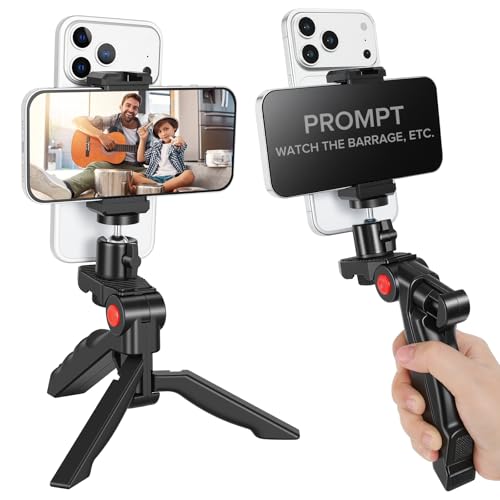
Heliora Teleprompter Kit for iPhone & Android (with Tripod), Double Phone Holder for Video Recording, Easy Storage and Transport for Vlogging, YouTube, Live Streaming, TikTok
【Dual-Camera Mount】 Never worry about forgetting lines during live broadcasts again. Script outlines and dialogue are displayed directly,...
As an affiliate, we earn on qualifying purchases.

LENSGO TC7S Portable Teleprompter for Phone, One-Second Fold Mini Teleprompter with Remote Control,App Compatible with iPhone & Android for Online Teaching Vlog Live Streaming Interview
One-Second Fold Teleprompter for Phone:Ultra-Light 7.9 inch teleprompter can be folded in 1 second.Indoor or outdoor Shooting Compact...
As an affiliate, we earn on qualifying purchases.