
If you’re looking for top business-grade routers for small offices in 2026, I recommend considering models like the D-Link Gigabit VPN Router, TP-Link ER605 V2, ASUS ExpertWiFi AX3000, TP-Link ER7206, ASUS ExpertWiFi EBG15, and the GL.iNet Flint 3. These devices offer multi-WAN support, robust security, load balancing, and easy management, ensuring your network stays reliable and secure. Keep exploring to discover which one fits your needs best.
Key Takeaways
- Look for routers with dual Gigabit Ethernet WAN ports supporting load balancing and automatic failover for high availability.
- Prioritize models with extensive VPN support (up to 700 clients) and advanced encryption like AES or OpenVPN.
- Choose routers with robust security features including firewalls, intrusion prevention, VLAN segmentation, and regular firmware updates.
- Select devices with multiple WAN ports to ensure scalability, redundancy, and reliable internet connectivity.
- Opt for management tools like SDN or centralized dashboards to simplify setup, remote monitoring, and ongoing network oversight.
| D-Link Gigabit VPN Router with Failover and Encryption | 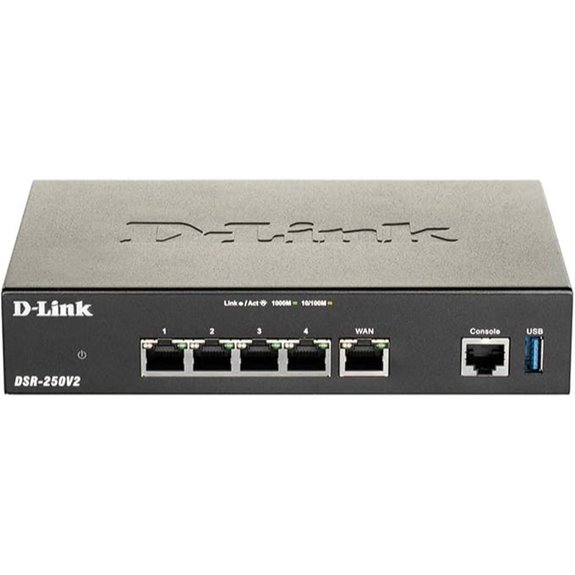 | Enterprise Security | VPN Support: Supports up to 75 VPN tunnels, multiple VPN protocols (IPSec, OpenVPN, L2TP, PPTP, SSL) | WAN Ports: Dual Gigabit Ethernet WAN ports | Load Balancing: Yes, supports dual WAN failover and load balancing | VIEW LATEST PRICE | See Our Full Breakdown |
| TP-Link ER605 V2 VPN Router with Load Balance | 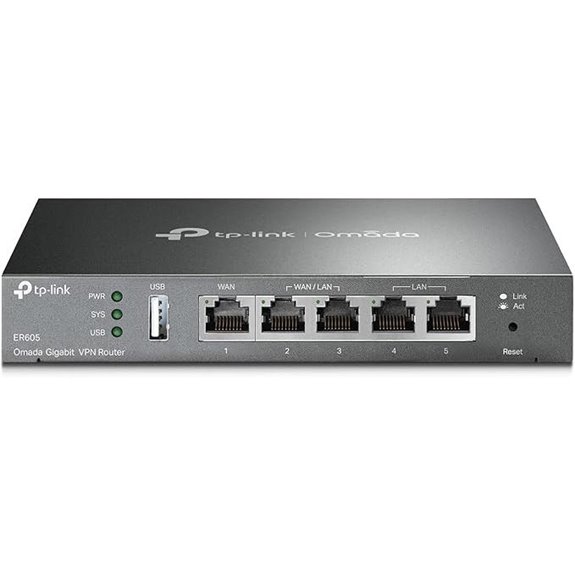 | Flexible Load Balancer | VPN Support: Supports IPsec, OpenVPN, L2TP, PPTP (up to 16 connections each) | WAN Ports: 1 WAN, 2 WAN/LAN, 2 LAN ports | Load Balancing: Yes, supports load balancing across multiple WANs | VIEW LATEST PRICE | See Our Full Breakdown |
| ASUS ExpertWiFi AX3000 Business Router with Security |  | Advanced WiFi Security | VPN Support: Built-in VPN (VPN features supported), secure remote access | WAN Ports: 1 WAN, 2 WAN/LAN ports, backup via USB | Load Balancing: Yes, backup WAN via USB | VIEW LATEST PRICE | See Our Full Breakdown |
| TP-Link ER7206 VPN Router with Load Balance | 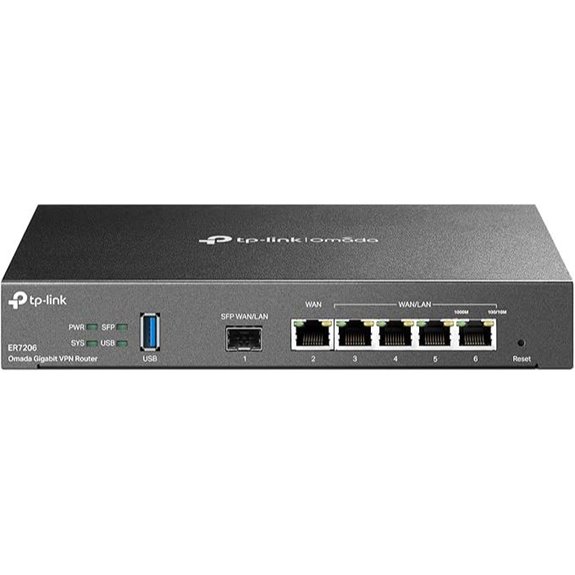 | SDN-Ready Powerhouse | VPN Support: Supports 100 LAN-to-LAN IPsec, 50 OpenVPN, 50 L2TP, 50 PPTP VPN connections | WAN Ports: 1 SFP WAN, 1 WAN, 2 WAN/LAN, 1 LAN port | Load Balancing: Yes, supports up to 4 WAN connections with SDN management | VIEW LATEST PRICE | See Our Full Breakdown |
| ASUS ExpertWiFi EBG15 Gigabit VPN Router | 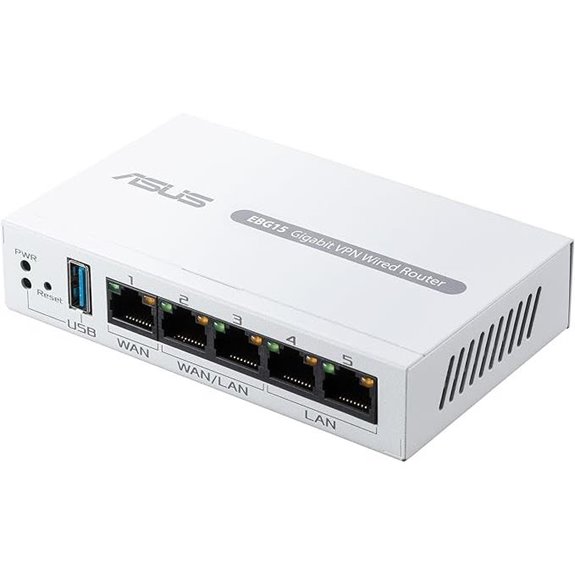 | User-Friendly Management | VPN Support: Built-in VPN with remote access security | WAN Ports: 1 WAN, 2 WAN/LAN, 1 LAN port | Load Balancing: Yes, supports load balancing via multiple WAN ports | VIEW LATEST PRICE | See Our Full Breakdown |
| GL.iNet Flint 3 Tri-Band WiFi 7 Router |  | Cutting-Edge WiFi 7 | VPN Support: Supports OpenVPN and Wireguard VPN speeds up to 680 Mbps | WAN Ports: 1 Gigabit SFP WAN, 1 WAN, 2 WAN/LAN, 1 LAN port | Load Balancing: Yes, supports multiple WAN connections with SDN integration | VIEW LATEST PRICE | See Our Full Breakdown |
More Details on Our Top Picks
D-Link Gigabit VPN Router with Failover and Encryption
If you’re running a small office and need reliable, secure internet connectivity, the D-Link Gigabit VPN Router with Failover and Encryption is an excellent choice. It offers dual Gigabit Ethernet WAN ports for high availability, load balancing, and automatic failover to keep your connection steady. With support for up to 75 VPN tunnels and robust encryption protocols like AES and OpenVPN, it guarantees your data stays protected. Its compact design fits easily into your workspace, while features like mobile broadband support and simplified management make setup and maintenance straightforward. This router combines performance, security, and reliability, making it ideal for small businesses seeking secure, continuous connectivity.
- VPN Support:Supports up to 75 VPN tunnels, multiple VPN protocols (IPSec, OpenVPN, L2TP, PPTP, SSL)
- WAN Ports:Dual Gigabit Ethernet WAN ports
- Load Balancing:Yes, supports dual WAN failover and load balancing
- Security Features:Enterprise-grade security, IPSec, SSL, encryption, firewall, intrusion prevention
- Management Interface:Web-based, SNMP, easy deployment
- Backup Internet:USB mobile broadband support for backup
- Additional Feature:Supports mobile broadband via USB
- Additional Feature:16 VLANs supported
- Additional Feature:Enterprise-grade security protocols
TP-Link ER605 V2 VPN Router with Load Balance
The TP-Link ER605 V2 VPN Router with Load Balance is an excellent choice for small offices that need reliable, secure, and flexible internet connectivity. It features five gigabit Ethernet ports, supporting up to three simultaneous WAN connections, which optimizes bandwidth and guarantees continuous internet access. Its load balancing distributes traffic efficiently, preventing bottlenecks. The router also includes a USB port for mobile broadband backup, adding extra resilience. With advanced security features like firewalls, VPN protocols, DoS defense, and filtering, it keeps data safe. Managed via Omada SDN, it offers centralized control, making it a versatile, robust solution for SMBs seeking dependable network performance.
- VPN Support:Supports IPsec, OpenVPN, L2TP, PPTP (up to 16 connections each)
- WAN Ports:1 WAN, 2 WAN/LAN, 2 LAN ports
- Load Balancing:Yes, supports load balancing across multiple WANs
- Security Features:Firewall, DoS defense, IP/MAC/URL filtering, threat protections
- Management Interface:Omada SDN, centralized management
- Backup Internet:USB port for mobile broadband
- Additional Feature:Centralized network management
- Additional Feature:Supports DoS defense
- Additional Feature:Multiple VPN protocols
ASUS ExpertWiFi AX3000 Business Router with Security
Looking for a router that combines enterprise-grade security with easy management for your small office? The ASUS ExpertWiFi AX3000 Business Router delivers just that. It supports up to five SSIDs, allowing me to separate and prioritize devices easily. With free ASUS AiProtection Pro, I get robust security and safe browsing features. Customizable guest portals let me match the network to my branding. The backup WAN via USB ensures stable internet even if my primary connection drops. Managing the network is straightforward through the ASUS ExpertWiFi app, and scalability with AiMesh ensures future growth. Plus, WiFi 6 AX3000 guarantees fast, reliable wireless connectivity.
- VPN Support:Built-in VPN (VPN features supported), secure remote access
- WAN Ports:1 WAN, 2 WAN/LAN ports, backup via USB
- Load Balancing:Yes, backup WAN via USB
- Security Features:Enterprise security, AiProtection Pro, safe browsing, guest network security
- Management Interface:ASUS ExpertWiFi app, easy setup
- Backup Internet:Backup WAN via USB
- Additional Feature:Supports WiFi 6 AX3000
- Additional Feature:Customizable guest portal
- Additional Feature:Scalable with AiMesh
TP-Link ER7206 VPN Router with Load Balance
For small offices seeking reliable and secure internet connectivity, the TP-Link ER7206 VPN Router with Load Balance stands out as an excellent choice. It offers flexible port configurations, including multiple WAN ports and a Gigabit LAN port, supporting up to four WAN connections for optimized bandwidth. The router integrates seamlessly with the Omada SDN platform, enabling centralized management across devices via hardware, software, or cloud controllers. Security isn’t overlooked, with features like advanced firewall policies, DoS defense, and VPN support for secure remote access. Its capacity to handle up to 700 clients ensures smooth operation even during peak usage, making it ideal for growing small businesses.
- VPN Support:Supports 100 LAN-to-LAN IPsec, 50 OpenVPN, 50 L2TP, 50 PPTP VPN connections
- WAN Ports:1 SFP WAN, 1 WAN, 2 WAN/LAN, 1 LAN port
- Load Balancing:Yes, supports up to 4 WAN connections with SDN management
- Security Features:Firewall, DoS defense, filtering, threat prevention
- Management Interface:Omada SDN, cloud and local management
- Backup Internet:USB for mobile broadband, backup option
- Additional Feature:Supports SDN integration
- Additional Feature:150,000 client capacity
- Additional Feature:Remote cloud management
ASUS ExpertWiFi EBG15 Gigabit VPN Router
If you’re managing a small office network that demands robust security and reliable internet, the ASUS ExpertWiFi EBG15 Gigabit VPN Router stands out as an ideal solution. Setting it up is straightforward via a web browser or the ASUS ExpertWiFi mobile app using Bluetooth, and remote management makes overseeing your network simple. It offers up to three WAN Ethernet ports, including a gigabit WAN and load balancing, plus a USB port for backup via mobile hotspot. Advanced security features like VLAN assignment, Safe Browsing, Layer 7 Firewall, and intrusion prevention keep your network safe. Built-in VPN and free AiProtection Pro ensure privacy, making this router perfect for small office needs.
- VPN Support:Built-in VPN with remote access security
- WAN Ports:1 WAN, 2 WAN/LAN, 1 LAN port
- Load Balancing:Yes, supports load balancing via multiple WAN ports
- Security Features:Layer 7 Firewall, intrusion prevention, Safe Browsing
- Management Interface:Web and app management, remote control
- Backup Internet:USB backup WAN via mobile hotspot
- Additional Feature:VLAN assignment on ports
- Additional Feature:Built-in VPN capabilities
- Additional Feature:Free AiProtection Pro security
GL.iNet Flint 3 Tri-Band WiFi 7 Router
The GL.iNet Flint 3 Tri-Band WiFi 7 Router stands out as an ideal choice for small offices that demand reliable, high-speed connectivity. Supporting Wi-Fi 7 with speeds up to 9 Gbps, it ensures smooth 8K streaming, gaming, and video calls. Its advanced MLO technology, enhanced OFDMA, and 4K QAM provide low latency and strong performance in dense environments. Covering up to 2,000 sq ft, it supports fiber optic modems and multiple high-speed wired connections. With VPN speeds up to 680 Mbps, built-in security features like AdGuard Home, and capacity for over 100 devices, it delivers a robust, easy-to-manage network for small business needs.
- VPN Support:Supports OpenVPN and Wireguard VPN speeds up to 680 Mbps
- WAN Ports:1 Gigabit SFP WAN, 1 WAN, 2 WAN/LAN, 1 LAN port
- Load Balancing:Yes, supports multiple WAN connections with SDN integration
- Security Features:Firewall, DNS filtering, parental controls, ad blocking
- Management Interface:Web admin panel, firmware updates, user-friendly interface
- Backup Internet:Ethernet and fiber, no explicit USB backup but supports multiple WANs
- Additional Feature:Supports WiFi 7 standard
- Additional Feature:Parental controls via Bark
- Additional Feature:High-speed VPN (up to 680 Mbps)
Factors to Consider When Choosing a Business-Grade Router for Small Offices

When choosing a business-grade router for a small office, I focus on key factors like security features to protect sensitive data and support for multiple WAN connections for reliability. I also consider VPN capabilities to ensure remote access, along with how easy it is to manage the network and whether the device meets standard compatibility requirements. These points help me find a router that balances performance, security, and ease of use.
Security Features Importance
Choosing a business-grade router for a small office means prioritizing security features that protect sensitive data and maintain network integrity. I look for enterprise-grade security protocols like IPSec, SSL, and VPN support to enable secure remote access. Advanced measures such as firewalls, intrusion prevention systems (IPS), and deep packet inspection (DPI) are essential for defending against threats and safeguarding critical business information. Support for VLAN segmentation and network isolation helps prevent unauthorized access to vital resources. Built-in VPN capabilities with strong encryption methods like AES and 3DES ensure secure communication channels for remote employees and branch locations. Additionally, ongoing security updates, management tools, and monitoring features are indispensable to keeping my network protected and responsive to emerging threats.
Multiple WAN Support
Supporting multiple WAN connections can considerably enhance a small office network’s reliability and performance. By using two or more internet links, you can increase bandwidth, reducing bottlenecks and improving overall speed. Load balancing distributes traffic evenly across all connections, preventing congestion and ensuring ideal performance. Failover capabilities automatically switch to a backup connection if the primary link drops, keeping your internet connection continuous during outages or maintenance. This redundancy minimizes downtime and keeps your business running smoothly. Additionally, configurable policies allow prioritization of critical applications or devices, ensuring essential services maintain bandwidth during high traffic periods. When selecting a router, ensuring it supports multiple WANs with these features helps create a resilient, efficient network that adapts seamlessly to your small office’s evolving needs.
VPN Capabilities Needed
A key aspect of selecting the right business-grade router for a small office is guaranteeing it has robust VPN capabilities. You’ll want a router that supports essential VPN protocols like IPsec, OpenVPN, L2TP, or PPTP to ensure secure remote access for your team. Check how many VPN tunnels the device can handle simultaneously, so it meets your organization’s connectivity demands. Strong encryption methods such as AES, 3DES, or DES are essential to protect sensitive data during transmission. Additionally, verify if the router supports site-to-site VPNs, which are critical for connecting multiple office locations securely. Finally, consider features like VPN pass-through, remote access options, and user management, as these add flexibility and ease of deployment for your small office network.
Network Management Ease
When selecting a business-grade router for a small office, ease of network management is crucial to guarantee smooth operation and quick troubleshooting. Simplified setup, configuration, and ongoing oversight minimize the need for specialized IT staff. Centralized management tools like SDN let you control multiple devices and network segments from a single interface, saving time. User-friendly mobile apps and web dashboards enable remote management, troubleshooting, and real-time performance monitoring, keeping you agile. Advanced features such as traffic prioritization, VLAN configuration, and automated alerts help maintain peak network performance without manual intervention. Additionally, integration with protocols like SNMP and support for remote firmware updates streamline maintenance, reduce downtime, and ensure your network stays secure and efficient. All these factors make managing your network more straightforward and less stressful.
Device Compatibility Standards
Choosing a business-grade router for a small office means guaranteeing it meets key compatibility standards that keep your network running smoothly. First, check that it supports essential protocols like IEEE 802.3, 802.3u, 802.3ab, and 802.1q for Ethernet and VLAN functionality. Compatibility with common VPN protocols such as IPsec, OpenVPN, L2TP, and PPTP is vital for secure remote access across various devices and platforms. Additionally, the router should adhere to Wi-Fi standards like 802.11ac or Wi-Fi 6 (802.11ax) to guarantee seamless connectivity with wireless clients. Support for network management standards like SNMP allows for centralized control and monitoring. Finally, compliance with regulatory standards like TAA/NDAA guarantees compatibility and security in regulated environments.
Scalability Options Available
As small offices grow, selecting a router with expandable features guarantees your network can keep pace with increasing demands. Many business-grade routers support multiple WAN connections, allowing for load balancing and failover as your bandwidth needs expand. Modular or extendable port configurations enable adding Ethernet or fiber links, supporting future network growth. Support for advanced management protocols like SDN or centralized cloud control makes scaling across multiple locations more manageable. Some models offer flexible VPN capacity, accommodating more remote connections as remote work increases. Scalability is often achieved through firmware updates or hardware upgrades that improve throughput, device capacity, and security without replacing existing infrastructure. These options ensure your network remains adaptable, secure, and ready for future expansion as your business evolves.
Reliability and Uptime
Reliability and uptime are critical considerations for small offices relying on business-grade routers. I look for models with dual WAN ports and automatic failover, which help keep internet connections stable and minimize downtime. Load balancing features are also essential because they distribute traffic evenly across multiple connections, ensuring consistent performance. Reliable routers incorporate hardware and firmware redundancies to prevent failures and maintain network stability during issues. Regular firmware updates and security patches are crucial to keep the network secure and functioning at its best. Additionally, monitoring tools and alerts enable early detection of problems, allowing quick responses before disruptions impact productivity. Overall, prioritizing these features ensures a resilient network, keeping small offices connected and operational with minimal interruptions.
Frequently Asked Questions
How Do These Routers Handle Future Technology Integrations?
These routers are built with future technology integrations in mind. I find they’re designed to support upcoming standards like Wi-Fi 7, 5G, and advanced security protocols. They’re equipped with modular hardware and firmware updates that allow me to easily upgrade features. This means I can seamlessly adapt to new devices, faster speeds, and emerging technologies without needing a complete replacement, ensuring my network stays current and reliable well into the future.
What Maintenance Requirements Do These Routers Have?
These routers require regular firmware updates to fix bugs and enhance security. I also recommend periodically checking and replacing the firmware to ensure peak performance. Additionally, I perform routine reboots and monitor network traffic to catch issues early. Cleaning the hardware and ensuring proper ventilation help prevent overheating. Overall, consistent maintenance keeps the router running smoothly, reduces downtime, and extends its lifespan for your small office needs.
Are These Routers Scalable for Growing Small Offices?
Imagine a small office’s network as a tree that grows taller and wider. These routers are designed with scalability in mind, easily supporting additional devices and increased traffic as your business expands. I’ve found that many models offer modular upgrades, like adding new branches to a sturdy tree. So, yes, these routers can grow with your business, providing reliable performance now and into the future.
How Do These Routers Ensure Data Privacy and Compliance?
These routers prioritize data privacy and compliance by incorporating advanced security features like encryption, VPN support, and regular firmware updates that patch vulnerabilities. I guarantee sensitive information stays protected through strict access controls and real-time monitoring. They also support industry standards, helping my small office meet regulatory requirements effortlessly. This combination of security tools and compliance features gives me peace of mind knowing my data remains safe and compliant.
What Is the Typical Lifespan of These Business-Grade Routers?
Typically, business-grade routers for small offices last around 3 to 5 years. I’ve found that their lifespan depends on usage, maintenance, and technological advancements. Regular firmware updates and proper care can extend their life, but eventually, hardware components wear out or become outdated. When that happens, I recommend upgrading to newer models to guarantee maximum security, speed, and support for evolving business needs.
Conclusion
Choosing the right router is like planting a sturdy tree in your business garden—one that stands firm amid storms. These six options are your seeds of resilience, growth, and connection. Pick the one that best roots your small office in security, speed, and reliability. When you nurture it, it’ll flourish, supporting your dreams and ambitions. Remember, a strong network isn’t just infrastructure—it’s the heartbeat of your business’s future.