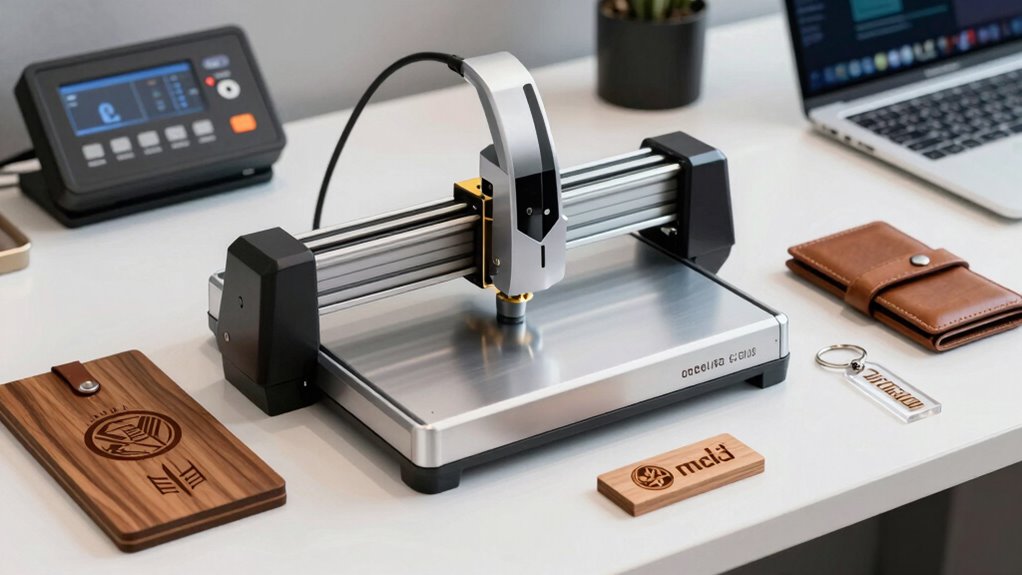
Choosing the right desktop laser engraver for branding materials can be challenging given the variety of options, power levels, and features. The Twotrees TTS-55 Pro stands out as the best overall due to its reliable performance and versatile engraving capacity. For those seeking power and precision, the ACMER S2 Laser Engraver offers a 12,000mW laser for detailed work on a range of surfaces. Meanwhile, the ATOMSTACK 3W Black Laser Engraver is a solid choice for beginners thanks to its user-friendly interface. The main tradeoffs involve balancing power, ease of use, and price—more powerful units can be pricier and more complex to operate. Continue reading for a full breakdown of these options and what to consider when making your purchase.

Get business pricing on office and shipping supplies
- Business-only prices and quantity discounts
- Tax-exempt purchasing
- Multiple users, one account, clear invoices
Key Takeaways
- Power levels from 3W to 12W define the engraving capacity and suitability for different branding materials.
- Ease of use varies significantly—models with app control and automatic focusing are better for beginners.
- Build quality and safety features, like enclosure and certification, are critical for reliable and safe operation.
- Price ranges reflect differences in power, precision, and included features—more expensive options tend to offer greater versatility.
- Size and portability are often overlooked but matter if workspace or mobility is a concern.
| Twotrees TTS-55 Pro Laser Engraver 5500mW |  | Best Overall for Versatile Power and Connectivity | Laser Power: 5500mW | Working Area: 300x300mm | Focus Spot: 0.08*0.46mm | VIEW ON AMAZON | See Our Full Breakdown |
| ELIDOR 6000mW Laser Engraver and Cutter Machine |  | Best for High-Precision Detail in Small-Scale Projects | Laser Power: 6W (6000mW) | Laser Spot Size: 0.04 × 0.14 mm | Engraving Accuracy: 0.01 mm | VIEW ON AMAZON | See Our Full Breakdown |
| A1 Pro 12W Mini Laser Engraver with Camera, App Control |  | Best for Small Crafts with Advanced Placement and AI Features | Power: 12W | Work Area: 3.94 x 3.94 inches | Max Height: 10.63 inches | VIEW ON AMAZON | See Our Full Breakdown |
| ACMER S1 Laser Engraver Machine, 2500mW Laser Cutter |  | Best for Beginners and Light Hobby Use | Laser Power: 2500mW | Wavelength: 455±5nm | Focal Length: 2mm | VIEW ON AMAZON | See Our Full Breakdown |
| ACMER S2 Laser Engraver, 12000mW Laser Cutter Engraving Machine |  | Best for High-Power Professional-Grade Projects | Laser Power: 12W | Total System Power: 72W | Work Area: 300×300mm | VIEW ON AMAZON | See Our Full Breakdown |
| ATOMSTACK 3W Black Laser Engraver for Beginners |  | Best for Newcomers Seeking Ease and Versatility | Weight: 5.77 pounds | Dimensions: 2 x 2 x 1 inches | Material: Aluminum | VIEW ON AMAZON | See Our Full Breakdown |
| BlazeX M3 10W Laser Engraver Machine, Ultra-Precision Desktop Laser Cutter and Engraver for Wood, Metal, Glass, Leather |  | Best for Detailed, Professional-Grade Customization | Laser Power: 10W | Accuracy: 0.01mm | Materials Compatible: Wood, Metal, Glass, Leather | VIEW ON AMAZON | See Our Full Breakdown |
| Laser Engraver 5.5W Enclosed 300×300mm Engraving Area Class 1 5500mW |  | Best for Safety-Conscious Professionals Needing Speed and Precision | Laser Power: 5500mW | Engraving Area: 300×300mm | Focus Precision: 0.01mm | VIEW ON AMAZON | See Our Full Breakdown |
| Artilume T1-P Foldable Laser Engraver 7000mW Laser Engraving Machine |  | Best for Portability and High-Power Versatility | Laser Power: 7000mW | Engraving Area: 8×6 inches / 200×150 mm | Laser Spot Size: 0.04×0.04 mm | VIEW ON AMAZON | See Our Full Breakdown |
| Artilume Laser Engraver 3000mW Laser Engraving Machine |  | Best for Compact, Affordable Precision | Laser Power: 3W or 7W | Working Area: 6×8 inches / 150×200mm | Laser Precision: 0.01mm | VIEW ON AMAZON | See Our Full Breakdown |
| 6W Laser Engraver for Beginners, K15 Pro APP Control 4K HD A4 Laser Engraving & Cutting Machine for Wood, Metal, Leather, Acrylic, Stone, Paper, DIY Crafts, Small Business |  | Best for Beginners and Small Business Expansion | Power: 6W | Workbed Size: 11.8×7.9 inches | Material Compatibility: Wood, leather, acrylic, glass, slate, paper, coated metals | VIEW ON AMAZON | See Our Full Breakdown |
| ACMER Laser Engraver Machine K1 12000mW Desktop Compact Engraving Machine |  | Best for Portability and Fine Detail in Compact Space | Laser Power: 12000mW | Work Area: 150×150mm | Laser Spot Size: 0.08mm | VIEW ON AMAZON | See Our Full Breakdown |
| desktop laser engraver for branding materials buyer guide | Laser Power |
|---|---|
| Twotrees TTS-55 Pro Laser Engr | 5500mW |
| ELIDOR 6000mW Laser Engraver a | 6W (6000mW) |
| A1 Pro 12W Mini Laser Engraver | — |
| ACMER S1 Laser Engraver Machin | 2500mW |
| ACMER S2 Laser Engraver | 12W |
| ATOMSTACK 3W Black Laser Engra | — |
| BlazeX M3 10W Laser Engraver M | 10W |
| Laser Engraver 5.5W Enclosed 3 | 5500mW |
| Artilume T1-P Foldable Laser E | 7000mW |
| Artilume Laser Engraver 3000mW | 3W or 7W |
| 6W Laser Engraver for Beginner | — |
| ACMER Laser Engraver Machine K | 12000mW |
More Details on Our Top Picks
Twotrees TTS-55 Pro Laser Engraver 5500mW
The Twotrees TTS-55 Pro stands out for its high laser power of 5500mW, making it a top choice for users needing both detailed engraving and material cutting. Compared with the ACMER S2, which offers similar workspace but lower power, this model is better suited for thicker materials like 5mm plywood or 3mm acrylic. Its support for Wi-Fi and mobile app control enhances workflow flexibility, though this adds complexity for beginners unfamiliar with laser safety protocols. The machine’s compatibility with popular software like LaserGRBL and LightBurn simplifies integration into existing setups. However, the power level may be overkill for simple projects, and safety precautions are essential given the high wattage. This pick makes the most sense for small businesses or experienced hobbyists who value power and wireless control in a compact form.
Pros:- High laser power enables versatile cutting and engraving
- Supports wireless control via Wi-Fi and mobile app
- Compatible with LaserGRBL and LightBurn software
Cons:- Requires understanding of laser safety procedures
- May be overpowered for simple hobby projects
Best for: Small business owners or advanced hobbyists needing powerful cutting and wireless operation
Not ideal for: Beginners or casual users who prefer plug-and-play simplicity and lower power levels
- Laser Power:5500mW
- Working Area:300x300mm
- Focus Spot:0.08*0.46mm
- Material Compatibility:wood, leather, acrylic, paper, stainless steel
- Cutting Thickness:5mm plywood, 3mm acrylic, 0.7mm leather
- Control Board:32-bit dual-core MCU
- Engraving Speed:up to 30,000mm/min
Our verdict“Ideal for experienced users seeking powerful, wireless-capable laser engraving and cutting capabilities.”
ELIDOR 6000mW Laser Engraver and Cutter Machine
The ELIDOR Z6 offers a precise 6W laser, making it well-suited for intricate engraving on small materials. Unlike the Twotrees TTS-55 Pro, which emphasizes power and cutting capacity, the ELIDOR focuses on detailed results, with a laser spot size of just 0.04 × 0.14 mm, perfect for fine artwork. Its lightweight and compact design favor portability, but this limits its workspace to 300x300mm, similar to the ACMER S1. While it boasts high accuracy (0.01 mm), setup may be more involved, requiring some familiarity with software and laser safety protocols. Its smaller size and high precision make it ideal for hobbyists or small business owners prioritizing detail over large-scale projects. However, it’s less suitable for thicker or larger materials, which could be a drawback for those needing bigger output.
Pros:- High-precision engraving produces detailed artwork
- Compact, lightweight, and portable
- Compatible with popular software and file formats
Cons:- Limited to small projects due to size
- Requires some technical setup and safety precautions
Best for: Hobbyists or small-scale artisans needing detailed engraving on small items
Not ideal for: Users requiring large workspaces or cutting thicker materials
- Laser Power:6W (6000mW)
- Laser Spot Size:0.04 × 0.14 mm
- Engraving Accuracy:0.01 mm
- Max Speed:10,000 mm/min
- Working Area:300 × 300 mm
- Weight:2.13 kg
Our verdict“A strong choice for those prioritizing detailed, high-precision engraving on small objects.”
A1 Pro 12W Mini Laser Engraver with Camera, App Control
The A1 Pro 12W elevates desktop engraving with its integrated 4K camera, ensuring precise placement and detailed work. Compared to the ELIDOR 6000mW, which excels in high-precision small-scale projects, the A1 Pro supports offline batch jobs via TF card, making it more versatile for production runs. Its safety features, including an enclosure and tilt protection, make it more accessible for small business owners or serious hobbyists concerned about safety. Its 3.94 x 3.94-inch work area limits larger projects but suits jewelry, small crafts, and personalized gifts. While setup and software familiarity are required, its AI capabilities and app control streamline operation. This machine is best for users who want high accuracy, offline functionality, and safety in a compact form, but those needing larger engraving areas should look elsewhere.
Pros:- High-precision 4K camera for accurate placement
- Supports offline batch processing via TF card
- Safe, enclosed design with tilt protection
Cons:- Small work area limits project size
- Setup may be complex for beginners
Best for: Small-scale artisans or hobbyists seeking precise placement and offline batch processing
Not ideal for: Users needing large-scale or high-volume production capacity
- Power:12W
- Work Area:3.94 x 3.94 inches
- Max Height:10.63 inches
- Speed:12,000mm/min
- Materials Supported:wood, leather, acrylic, glass, fabric, coated metals, food
- Safety Features:Class 1 safety, tilt protection, auto-shutdown
Our verdict“Ideal for detailed small crafts and personalized projects with advanced placement and safety features.”
ACMER S1 Laser Engraver Machine, 2500mW Laser Cutter
The ACMER S1 offers a user-friendly setup with a 2500mW diode laser, making it accessible for newcomers. Its compact size and preassembled design reduce the learning curve, unlike the more powerful models like the ACMER S2. While its smaller 130x130mm work area limits large projects, it provides reliable, accurate engraving suitable for small crafts and personalized items. Its durable aluminum alloy frame promotes portability, but the lower laser power makes it less effective on thicker or denser materials, such as deep wood cuts or thick leather. This machine is ideal for hobbyists or small business owners starting with low to moderate engraving needs, but not for those planning to scale up or work with larger pieces.
Pros:- Easy to set up with preassembled design
- Compact and portable for small spaces
- Durable aluminum alloy construction
Cons:- Limited working area restricts project size
- Laser power may be insufficient for thick materials
Best for: Beginners or hobbyists seeking an easy, safe, and portable engraving solution
Not ideal for: Professionals or users needing larger workspace or cutting thicker materials
- Laser Power:2500mW
- Wavelength:455±5nm
- Focal Length:2mm
- Engraving Speed:10,000mm/min
- Working Area:130x130mm
- Weight:2kg
Our verdict“Best suited for newcomers or casual users focusing on small projects and ease of use.”
ACMER S2 Laser Engraver, 12000mW Laser Cutter Engraving Machine
The ACMER S2 combines a true 12W laser with a 300x300mm workspace, making it a strong contender for professionals or serious hobbyists who need detailed, high-power engraving and cutting. Its 0.01mm accuracy rivals smaller machines like the ELIDOR 6000mW, but with a larger working area, it supports bigger projects without sacrificing detail. While it requires assembly and some technical familiarity, its compatibility with multiple software platforms like LightBurn and LaserGRBL makes it adaptable to existing workflows. The higher power allows for thicker materials, but this also means safety precautions are more critical, and setup may be more involved. This model is best for users who want professional-grade results within a compact desktop footprint, but it might be overkill for casual hobbyists or those working exclusively on tiny crafts.
Pros:- High-power 12W laser enables deep cuts and detailed engraving
- Large 300×300mm work area supports bigger projects
- Compatible with multiple software including LightBurn
Cons:- Requires assembly and technical setup
- Limited to small-scale projects; not suited for very thick materials
Best for: Small business owners or advanced hobbyists demanding high power and large workspace
Not ideal for: Beginners or users with limited technical skills due to assembly and safety requirements
- Laser Power:12W
- Total System Power:72W
- Work Area:300×300mm
- Laser Spot Size:0.08×0.08mm
- Positioning Accuracy:0.01mm
- Compatible Software:ACMER Studio, LightBurn, LaserGRBL
Our verdict“Designed for users seeking professional-grade engraving with high power and ample workspace in a desktop unit.”
ATOMSTACK 3W Black Laser Engraver for Beginners
The ATOMSTACK 3W Black Laser Engraver stands out for its fully assembled, ready-to-use design that simplifies setup for beginners. Compared with larger or more complex models like the Laser Engraver 5.5W, it offers a more approachable entry point with straightforward connectivity options such as WiFi, Hotspot, and USB. While its 3W laser and limited advanced features mean it may not satisfy seasoned professionals, it excels in providing a safe, versatile tool for small-scale branding tasks across materials like wood, plastic, and leather. The tradeoff is its modest power and user satisfaction rating, which suggests some users find it less robust or reliable over time. This pick makes the most sense for hobbyists or small business owners just starting out who value ease of use and portability, but those seeking high power or advanced features may find it limiting.
Pros:- Fully assembled and ready to operate right out of the box
- Multiple connectivity options for flexible setup
- Supports engraving on various materials with a sizable workspace
- Includes safety gear and features for user protection
Cons:- Limited to beginner-level features, not suitable for advanced or heavy-duty use
- Size and weight could restrict portability for some users
Best for: Beginners and small-scale entrepreneurs needing an easy-to-operate, portable laser engraver for light branding projects
Not ideal for: Experienced users or professionals requiring high power, large workspaces, or complex engraving capabilities
- Weight:5.77 pounds
- Dimensions:2 x 2 x 1 inches
- Material:Aluminum
- Work Area:135×145mm
- Power:3W
- Connectivity:WiFi, Hotspot, USB
- Warranty:1 Year
Our verdict“Ideal for newcomers seeking an easy, portable laser engraver for basic branding tasks on multiple materials.”
BlazeX M3 10W Laser Engraver Machine, Ultra-Precision Desktop Laser Cutter and Engraver for Wood, Metal, Glass, Leather
The BlazeX M3 10W Laser Engraver offers extraordinary precision with 0.01mm accuracy, making it a strong choice for detailed branding work on a wide array of materials like metal, glass, and leather. Unlike the Laser Engraver 5.5W, which emphasizes safety and speed, the M3’s high-precision capabilities make it better suited for intricate logos and small batch branding projects. It provides a safe, user-friendly experience with automatic safety features, but some users may find the setup process slightly technical, especially beginners new to laser software. Its small-batch focus means it’s not ideal for mass production, but for detailed, high-quality branding, this model excels. It is best for those who prioritize accuracy and versatility over sheer power or production volume.
Pros:- Exceptional 0.01mm accuracy for detailed engraving
- Versatile on over 300 materials including metal and glass
- Automatic safety features for secure operation
- Compatible with popular software and devices
Cons:- Setup may be challenging for beginners unfamiliar with laser software
- Limited to small-batch and intricate projects, not ideal for high-volume production
Best for: Small businesses or hobbyists requiring detailed, high-precision branding on various materials
Not ideal for: Large-scale production or users seeking a straightforward, plug-and-play solution without technical setup
- Laser Power:10W
- Accuracy:0.01mm
- Materials Compatible:Wood, Metal, Glass, Leather
- Safety Rating:Class 1
- Included Accessories:Protective enclosure, tool kit, honeycomb laser bed
Our verdict“Best suited for users who need precise, detailed branding on diverse materials with a focus on quality over quantity.”
Laser Engraver 5.5W Enclosed 300×300mm Engraving Area Class 1 5500mW
The Laser Engraver 5.5W Enclosed combines safety features with high-speed operation, making it a solid choice for both beginners and professionals who prioritize safety and efficiency. Its fully enclosed design and focus precision of 0.01mm enable detailed work on metals, wood, and plastics, putting it ahead of open-frame models in terms of safety. However, its complex setup and enclosed design can be frustrating for newcomers who prefer quick, simple assembly, unlike the portable ATOMSTACK 3W. The powerful laser and large 300×300mm workspace make it suitable for detailed branding and small batch production, but the enclosure limits accessibility during operation. This model suits users who want a precise, fast machine with top safety standards, willing to handle a more involved setup process.
Pros:- Enclosed safety design with multiple protective features
- High-speed processing up to 20,000mm/min
- Focus precision of 0.01mm for detailed engraving
- Wide software compatibility
Cons:- Complex setup may challenge newcomers
- Enclosure limits easy access during engraving tasks
- Powerful laser requires strict safety protocols
Best for: Professionals or serious hobbyists who need a safe, fast, and precise engraver for small to medium branding projects
Not ideal for: Beginners seeking a lightweight, easy-to-set-up device or those who require frequent access during operation
- Laser Power:5500mW
- Engraving Area:300×300mm
- Focus Precision:0.01mm
- Speed:up to 20,000mm/min
- Compatibility:LightBurn, LaserGRBL, Cutlabx
- Connectivity:Wi-Fi, USB, APP, TF card
Our verdict“Ideal for safety-conscious users who need fast, precise branding within a secure enclosed environment.”
Artilume T1-P Foldable Laser Engraver 7000mW Laser Engraving Machine
The Artilume T1-P offers a compelling balance of power and portability, with a 7000mW laser capable of detailed branding on a range of materials. Its foldable design and wireless connectivity make it particularly appealing for on-the-go projects or small workshops, standing out against bulkier units like the Laser Engraver 5.5W. Its 8×6 inch work area and adjustable height stand provide flexibility, but the high laser power demands strict safety measures, and its fumes can be problematic in poorly ventilated spaces. While not suitable for engraving reflective metals or PVC, it excels in quick, detailed branding on wood, leather, and acrylic. It’s a strong choice for mobile artisans or those needing a powerful, portable device for diverse branding tasks.
Pros:- Wireless remote operation via smartphone or tablet
- Foldable, space-saving design for easy storage
- High laser power (7000mW) for versatile branding
- Adjustable height stand enhances processing options
Cons:- Produces fumes requiring proper ventilation
- High power necessitates strict safety precautions
- Limited to materials like wood and acrylic, not reflective metals
Best for: Mobile artisans, small-scale branding businesses, or hobbyists needing a portable, powerful laser engraver
Not ideal for: Users without proper ventilation or those focused solely on large-volume production
- Laser Power:7000mW
- Engraving Area:8×6 inches / 200×150 mm
- Laser Spot Size:0.04×0.04 mm
- Engraving Precision:0.01 mm
- Speed:up to 10000 mm/min
- Weight:5.9 pounds
Our verdict“Perfect for mobile users or small workshops needing a high-power, portable laser engraver capable of detailed branding on various materials.”
Artilume Laser Engraver 3000mW Laser Engraving Machine
The Artilume Laser Engraver 3000mW offers a practical, foldable solution for small branding projects, with a 6×8 inch workspace and 0.01mm precision. Compared to larger, more expensive models like the BlazeX M3, it emphasizes affordability and portability, making it ideal for hobbyists or small business owners with limited space. Its inability to connect via mobile apps and limited material thickness capacity could be restrictive for some users. Nonetheless, its high speed and compatibility with common software make it a flexible entry-level option. It’s best for those who need a compact, reliable machine for light branding tasks and are comfortable with a Windows or Mac interface rather than mobile control.
Pros:- Foldable and portable for easy transport and storage
- High precision with 0.01mm accuracy
- Fast engraving speeds of up to 10,000mm/min
- Compatible with popular engraving software
Cons:- Cannot connect via mobile app for remote operation
- Limited material thickness capacity and power for heavy-duty tasks
Best for: Hobbyists or small business owners needing a compact, affordable, and precise engraver for light branding projects
Not ideal for: Professionals requiring mobile app control or high-volume production capabilities
- Laser Power:3W or 7W
- Working Area:6×8 inches / 150×200mm
- Laser Precision:0.01mm
- Engraving Speed:10,000mm/min
- Laser Module Lifespan:over 10,000 hours
Our verdict“A solid, space-efficient choice for hobbyists or small-scale branding needing reliable precision and portability.”
6W Laser Engraver for Beginners, K15 Pro APP Control 4K HD A4 Laser Engraving & Cutting Machine for Wood, Metal, Leather, Acrylic, Stone, Paper, DIY Crafts, Small Business
The Carverall K15 Pro stands out for its high-resolution 4K clarity and user-friendly setup, making it ideal for newcomers who want precise results without a steep learning curve. Compared to the ACMER K1, which is more portable but offers a smaller work area, the K15 Pro provides a larger workspace and expandable features suitable for small business needs. While its 6W power limits the thickness of materials it can handle—especially dense woods or metals—its quick focus and safety features streamline beginner use. The support for multiple materials and WiFi connectivity makes it versatile, but some users will find the need for additional accessories to unlock its full potential. Overall, this model is a great fit for hobbyists or small shops prioritizing ease of use and material variety over raw power.Pros:- High-precision 4K clarity for detailed engraving
- Supports a wide range of materials with expandable options
- Spacious workbed suitable for various small projects
- Simple, one-touch focus and quick setup
Cons:- Limited to 6W power, restricting thick or dense material processing
- Requires some initial learning curve for software and safety features
- Additional accessories may be necessary for advanced projects
Best for: Beginners or small business owners seeking a straightforward, precise laser engraver with expandability.
Not ideal for: Professionals needing to cut or engrave very thick or dense materials or requiring industrial-grade throughput.
- Power:6W
- Workbed Size:11.8×7.9 inches
- Material Compatibility:Wood, leather, acrylic, glass, slate, paper, coated metals
- Max Plywood Thickness:8mm
- Max Acrylic Thickness:5mm
- Focus Precision:0.01mm
Our verdict“This engraver suits beginners and small business owners who prioritize precision, material versatility, and ease of use over raw cutting power.”
ACMER Laser Engraver Machine K1 12000mW Desktop Compact Engraving Machine
The ACMER K1 excels in portability and pinpoint accuracy, making it ideal for hobbyists or small projects that require fine detail within a limited workspace. Compared with the Carverall K15 Pro, which offers a larger workbed and material support, the K1’s compact size (150×150mm) makes it perfect for on-the-go use or tight work environments. Its 12000mW laser provides a significant power boost, enabling more detailed engraving and even light cutting on thin materials, though the smaller work area restricts larger pieces. The software is intuitive and compatible with popular design tools, but some users report a learning curve related to setup and operation. For those needing precise, small-scale engraving with high portability, this model hits the mark—though it’s less suited for larger projects or thicker materials.Pros:- Highly portable and lightweight for easy transport
- High engraving precision with a 0.08mm laser spot
- Compatible with popular design software for ease of use
- Enclosed body with exhaust fan for safer operation
Cons:- Limited work area size may restrict larger projects
- Requires some technical setup and familiarity with software
- Moderate learning curve for new users
Best for: Hobbyists or small-scale businesses needing a portable, precise engraver for detailed work on small items.
Not ideal for: Users requiring larger work areas or the ability to process thick, dense materials or larger projects.
- Laser Power:12000mW
- Work Area:150×150mm
- Laser Spot Size:0.08mm
- Repeat Positioning Accuracy:0.01mm
- Max Speed:10,000mm/min
- Weight:6.89 pounds
Our verdict“This pick is ideal for hobbyists and small-scale artisans who need precise engraving in a compact, portable form factor.”

How We Picked
The products in this roundup were evaluated based on performance, usability, build quality, safety features, and value for money. Power output, engraving area, and precision directly impact branding quality, so those factors were prioritized. Ease of setup and user interface also played a key role, especially for small business owners and hobbyists. The ranking reflects a balance between these technical attributes and practical considerations like price and maintenance, ensuring options for different buyer needs and skill levels.Factors to Consider When Choosing Desktop Laser Engraver For Branding Materials Buyer Guide
Selecting the right desktop laser engraver for branding materials involves understanding your specific needs and weighing several key factors. Power level determines what materials and detail level you can achieve, so consider your typical projects. Ease of operation, including software integration and safety features, influences how quickly you can start producing. Budget constraints also matter, but investing in a slightly higher-quality machine can save money and frustration long-term. Finally, size and portability can impact where and how you work, especially if space is limited or mobility is needed.Power and Laser Capabilities
Power levels, ranging from around 3W to 12W or more, directly affect the engravable materials and detail. Higher wattage models can cut or engrave tougher surfaces like metal and stone, which are common in branding. However, more powerful lasers tend to be more expensive and can require more maintenance. For most branding purposes on wood, leather, and acrylic, a 5W to 10W laser strikes a good balance between capability and affordability.
Ease of Use and Software Compatibility
Intuitive software and features like app control, automatic focusing, and touchscreens reduce the learning curve and speed up workflow. Beginners should prioritize machines with user-friendly interfaces and straightforward setup. More advanced users might prefer software that integrates with design programs or offers greater customization. Avoid models with overly complex interfaces if you’re new, as this can slow down production and increase frustration.
Build Quality and Safety Features
Durable construction, reliable components, and safety features such as enclosures, automatic shutoffs, and certification (like CE or UL) are vital. Enclosed designs help contain fumes and prevent accidental exposure to laser beams, which is especially important in small or shared workspaces. Investing in a well-built machine reduces downtime and ensures consistent results, saving money and effort in the long run.
Size, Portability, and Workspace Needs
Consider the size of the engraver and whether it fits your workspace. Compact models are easier to store and transport, ideal for hobbyists or small businesses with limited space. Larger machines offer more engraving area, increasing productivity for bigger branding projects. Think about your typical projects and whether mobility or fixed installation makes more sense to avoid regret and additional costs later.
Price and Long-Term Value
While budget is a key factor, extremely cheap models may lack durability or necessary safety features, leading to higher costs over time. Conversely, premium units often provide better precision, power, and support, which can be more cost-effective for professional branding. Evaluate the total cost of ownership, including maintenance, replacement parts, and software updates, to ensure your investment aligns with your goals.
Frequently Asked Questions
Can I engrave metals with a desktop laser engraver?
Most desktop laser engravers with lower wattages are better suited for engraving non-metallic surfaces. However, high-power units, typically 10W or above, can mark metals with special coatings or through laser-etching techniques. For precise and consistent metal branding, a dedicated fiber laser system may be necessary, but some high-end CO2 lasers can handle metals with the right settings and surface prep.
Is safety certification enough to guarantee safe operation?
Safety certification indicates the manufacturer has met certain standards, but user vigilance remains essential. Always follow safety guidelines, wear protective gear, and operate in well-ventilated areas. Enclosure features and automatic shutoffs add layers of security, but proper training and routine maintenance are equally important for safe use.
How much maintenance does a desktop laser engraver require?
Regular maintenance includes cleaning lenses and mirrors, checking for dust buildup, and updating software. The frequency depends on usage and dust levels—usually every few months for light use and more often in busy environments. Proper upkeep prolongs machine life and maintains engraving quality, making it a worthwhile investment of your time.
What’s the best laser engraver for a small startup?
For a small startup, look for a machine that balances affordability, ease of use, and sufficient power for your branding projects. Models like the ATOMSTACK 3W or K15 Pro offer good value, straightforward operation, and decent engraving area. Prioritize safety features and software compatibility to streamline your workflow and reduce learning time.
Are enclosed models worth the extra cost?
Enclosed laser engravers provide safety benefits by containing fumes and preventing accidental exposure, which is especially important in shared or small spaces. They often include features like air filtration and automatic shutoff, adding convenience and safety. While they tend to cost more upfront, the long-term safety and reduced cleanup can make them a worthwhile investment for many users.
Conclusion
For casual hobbyists or small-scale branding, the ATOMSTACK 3W Black Laser Engraver offers an excellent starting point due to its simplicity and affordability. Small business owners seeking a balance of power and value should consider the ACMER S2 Laser Engraver, which handles a range of materials with precision. The Twotrees TTS-55 Pro makes a compelling overall choice for those needing reliability and versatility. For users requiring the highest quality, especially in detailed branding projects on diverse surfaces, the BlazeX M3 10W or ACMER S2 stand out. Ultimately, choosing the right model depends on your specific branding needs, workspace, and budget, so weigh these factors carefully before purchasing.
Halloween Picks
halloween
As an affiliate, we earn on qualifying purchases.