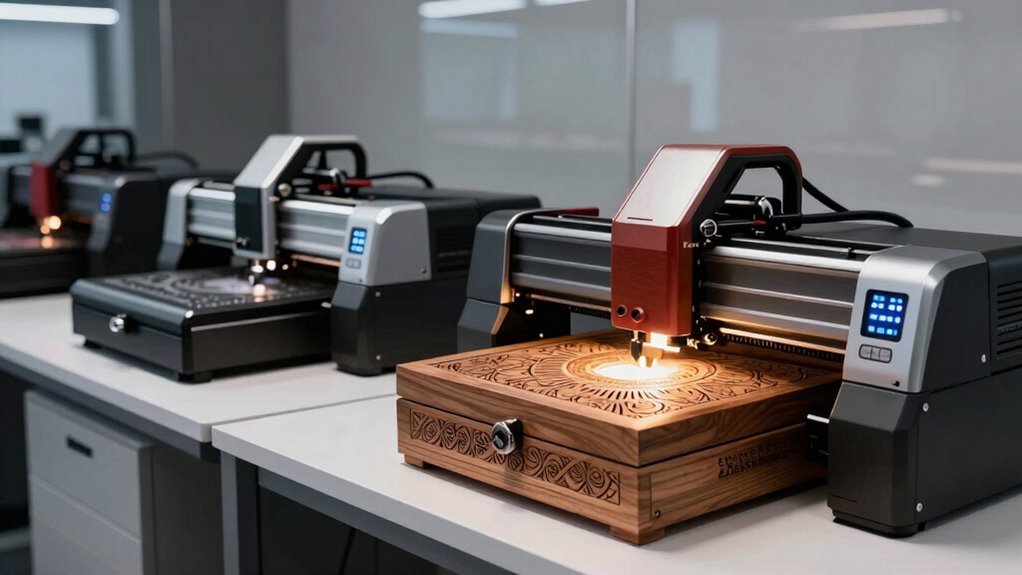

Choosing a high-end desktop laser engraver for custom gifts in 2026 means balancing power, precision, safety, and versatility. For those starting with intricate, small-scale projects, the BlazeX M3 offers unmatched accuracy and all-in-one features. If safety and ease-of-use are priorities, the xTool M2 stands out with its enclosed design and intuitive software. For professionals seeking speed and multi-material capability, the LaserPecker LP5 delivers rapid engraving and metal handling, while the LP4 adds ultra-fine detail and portability. The xTool F2 offers a unique dual-laser setup for color marking and embossing, ideal for on-the-go customization. Each choice involves tradeoffs between power, complexity, and price, but all excel in crafting high-quality, personalized gifts.

Get business pricing on office and shipping supplies
- Business-only prices and quantity discounts
- Tax-exempt purchasing
- Multiple users, one account, clear invoices
Key Takeaways
- Power and precision vary significantly, affecting the ability to handle different materials and detail levels.
- Enclosed safety features are essential for home use, especially with higher wattage or Class 4 lasers.
- Portability and size influence suitability for on-demand, mobile, or small workspace setups.
- Software compatibility and user interface impact ease of use, especially for beginners and hobbyists.
- Tradeoffs often involve balancing cutting/engraving depth, speed, and safety features.
| BlazeX M3 10W Laser Engraver Machine, Ultra-Precision Desktop Laser Cutter and Engraver |  | Best Overall for Precision and Versatility | Laser Power: 10W | Accuracy: 0.01mm | Materials: Wood, metal, glass, leather, coated metal | VIEW ON AMAZON | See Our Full Breakdown |
| xTool M2 20W Laser Engraver with Built-in Dual Cameras |  | Best for Safety and Ease of Use | Laser Power: 20W | Materials: Wood, leather, fabric, paper, cardstock | Safety Class: Class 1 | VIEW ON AMAZON | See Our Full Breakdown |
| LaserPecker LP5 20W Fiber & Diode Dual Laser Engraver |  | Best for Speed and Metal Engraving | Laser Power: 20W (fiber & diode) | Engraving Precision: 0.0027mm | Speed: 10,000mm/s | VIEW ON AMAZON | See Our Full Breakdown |
| LaserPecker LP4 Dual Laser Engraver (10W Diode + 2W IR) |  | Best for Detail and Portability | Laser Power: 10W diode + 2W IR | Engraving Resolution: 8K | Speed: 4000mm/s | VIEW ON AMAZON | See Our Full Breakdown |
| xTool F2 5W IR & 15W Diode Dual Laser Engraver |  | Best for Color Marking and On-the-Go Use | Laser Type: Dual (5W IR + 15W diode) | Camera: 50MP built-in | Max Speed: 6000mm/s | VIEW ON AMAZON | See Our Full Breakdown |
| high end desktop laser engraver for custom gift | Laser Power |
|---|---|
| BlazeX M3 10W Laser Engraver M | 10W |
| xTool M2 20W Laser Engraver wi | 20W |
| LaserPecker LP5 20W Fiber & Di | 20W (fiber & diode) |
| LaserPecker LP4 Dual Laser Eng | 10W diode + 2W IR |
| xTool F2 5W IR & 15W Diode Dua | — |
More Details on Our Top Picks
BlazeX M3 10W Laser Engraver Machine, Ultra-Precision Desktop Laser Cutter and Engraver
The BlazeX M3 distinguishes itself with a 10W laser capable of high-accuracy engraving at 0.01mm, making it ideal for detailed custom gifts on a variety of materials including metal, glass, and leather. Its all-in-one starter kit and compatibility with multiple software platforms simplify setup, especially for hobbyists and small-scale artisans. Compared to other models, it offers a rare combination of safety, precision, and versatility, though its limited batch size and somewhat complex initial setup might challenge absolute beginners. It’s a solid choice for creators who want professional-quality results without moving into industrial territory.
Pros:- High-precision engraving and cutting capabilities
- Safe, quiet operation with safety features
- Compatible with multiple software platforms
- All-in-one starter kit for quick setup
Cons:- Requires some technical setup for beginners
- Limited capacity for small batch production
- Price not specified
Best for: Craftspeople and hobbyists who prioritize precision and material diversity
Not ideal for: Large production runs or those seeking a plug-and-play experience
- Laser Power:10W
- Accuracy:0.01mm
- Materials:Wood, metal, glass, leather, coated metal
- Safety Rating:Class 1
- Accessories:Protective enclosure, tool kit, honeycomb bed
Our verdict“A top choice for those needing detailed, versatile custom gift engraving with high accuracy.”
xTool M2 20W Laser Engraver with Built-in Dual Cameras
The xTool M2 offers a fully enclosed, Class 1 design, making it one of the safest choices for home use. Its dual built-in cameras enable precise placement with real-time previews, significantly reducing waste and errors. The 20W diode laser can handle over 300 materials, including leather, fabric, and paper, and supports optional modules for full-color printing and metal engraving. While the laser power is less than industrial machines, its user-friendly software, combined with safety features, makes it an excellent fit for beginners and small businesses prioritizing safe operation and quick setup. However, the optional add-ons are sold separately, which could increase overall cost.
Pros:- Class 1 fully enclosed design for safe home use
- Dual-camera system for accurate positioning
- Supports 300+ materials and optional upgrades
- Beginner-friendly software with templates
Cons:- Additional modules sold separately
- Laser power limited compared to higher-end models
Best for: Home crafters and small business owners seeking safety and simplicity
Not ideal for: Heavy-duty industrial engraving or large batch production
- Laser Power:20W
- Materials:Wood, leather, fabric, paper, cardstock
- Safety Class:Class 1
- Cameras:Dual built-in
- Software:xTool Studio
Our verdict“Ideal for safety-conscious users who want reliable, precise engravings without advanced technical hurdles.”
LaserPecker LP5 20W Fiber & Diode Dual Laser Engraver
The LaserPecker LP5 combines dual laser types, giving it the edge for engraving metals like gold, steel, and titanium, as well as non-metals. Its 0.0027mm precision and 10,000mm/s speed make it suitable for high-value, detailed items such as coins and relief art. Its portability at just over 6kg allows for mobile setups at kiosks or craft fairs. While its metal cutting is limited to 0.5mm, this machine excels in rapid, precise marking and small batch production. The advanced features, including 3D grayscale, involve a learning curve, potentially challenging beginners but rewarding for pros.
Pros:- Dual fiber and diode lasers for versatile materials
- Ultra-precise 0.0027mm engraving
- Fast 10,000mm/s speed for high productivity
- Lightweight and portable design
Cons:- Limited metal cutting depth
- Advanced features may be complex for novices
Best for: Professional artisans, jewelry makers, and event crafters needing speed and metal handling
Not ideal for: Deep metal cutting or beginners seeking straightforward operation
- Laser Power:20W (fiber & diode)
- Engraving Precision:0.0027mm
- Speed:10,000mm/s
- Max Metal Thickness:0.5mm
- Weight:6.02kg
Our verdict“A strong choice for high-speed, detailed engraving on metals and high-value crafts, suitable for professional environments.”
LaserPecker LP4 Dual Laser Engraver (10W Diode + 2W IR)
The LaserPecker LP4 balances portability with high resolution, offering 8K engraving detail down to 0.003mm. Its dual lasers support over 300 materials, including ceramics and metals, and it can cut wood up to 8mm thick. With speeds up to 4000mm/s and a compact 160 x 120mm work area, it suits small workshops or mobile setups. Its user interface via HD touchscreen and compatibility with LaserPecker Design Space makes it accessible for hobbyists and professionals alike. However, its limited work area and acrylic cutting capacity restrict larger or more complex projects.
Pros:- High-resolution 8K engraving detail
- Dual lasers for versatile material handling
- Portable and lightweight design
- Supports complex 3D grayscale and color engraving
Cons:- Small work area limits large projects
- Acrylic cutting limited to dark opaque types
Best for: Artists, hobbyists, and small-scale custom gift makers needing portable, detailed engraving
Not ideal for: Large batch production or projects requiring extensive cutting
- Laser Power:10W diode + 2W IR
- Engraving Resolution:8K
- Speed:4000mm/s
- Max Wood Thickness:8mm
- Max Metal Thickness:0.5mm
Our verdict“Perfect for detailed, portable engraving on small items, especially where high resolution is desired.”
xTool F2 5W IR & 15W Diode Dual Laser Engraver
The xTool F2 offers a dual-laser setup optimized for color marking on metals and thick material embossing. Its 50MP camera allows precise 0.1mm alignment, simplifying complex designs and reducing waste. Its high speed of 6000mm/s and portability—just 4.6kg—make it suitable for markets, pop-ups, and mobile workshops. Its Class 4 laser requires careful handling, but it opens new possibilities for on-site customization and detailed color effects. Its productivity accessories are sold separately, which may add to the overall investment.
Pros:- Dual lasers for color marking and embossing
- High-speed operation for fast turnaround
- Built-in 50MP camera for precise alignment
- Extremely portable for mobile use
Cons:- Class 4 laser safety considerations
- Additional accessories sold separately
Best for: Event crafters, mobile artisans, and those needing versatile, color-specific marking
Not ideal for: Heavy industrial use or projects requiring deep cuts
- Laser Type:Dual (5W IR + 15W diode)
- Camera:50MP built-in
- Max Speed:6000mm/s
- Alignment Accuracy:0.1mm
- Weight:4.6kg
Our verdict“An excellent pick for on-the-go professionals seeking fast, colorful, and detailed customization.”
How We Picked
Our selection process focused on high-end desktop laser engravers that excel in creating custom gifts, emphasizing power, precision, safety, and versatility. We compared models based on laser wattage, accuracy, material compatibility, safety features, software ease, and portability. Our goal was to identify options suited for serious hobbyists, small business owners, and professional artisans who demand quality and reliability without requiring industrial-grade equipment. Each product was evaluated for its strengths and limitations, ensuring a well-rounded lineup that addresses different user needs and budgets.
Factors to Consider When Choosing High End Desktop Laser Engraver For Custom Gifts
When selecting a high-end desktop laser engraver for custom gifts, it’s important to evaluate your specific needs, including the types of materials you plan to work with, the level of detail required, safety considerations, and your budget. High-power models can cut and engrave thicker materials quickly but often come with increased safety requirements and higher costs. Enclosed systems offer safer operation for home environments, while portable units excel in mobile or event-based settings. Software compatibility and user interface are also key factors that influence how smoothly your projects will flow. This guide breaks down these core aspects to help you find the best fit for your creative ambitions.
Power and Material Compatibility
The laser wattage directly impacts your ability to cut through thicker materials and achieve fast engraving speeds. For detailed gifts on wood, leather, or glass, a 10W to 20W laser usually suffices, but if you want to work with metals or thicker materials, look for models offering higher power or dual-laser systems. Material compatibility varies; some machines handle over 300 materials, including ceramics and metals, while others are optimized for specific substrates. Matching your project requirements with laser capability ensures efficiency and quality.
Safety Features and Enclosure
Safety cannot be overstated, especially with higher wattage or Class 4 lasers. Enclosed, Class 1 systems like the xTool M2 provide peace of mind for home use, reducing risk and limiting exposure. Open or semi-enclosed machines require strict safety protocols and proper training. For mobile setups, portability and safety features like leak-proof designs and fume extraction are vital. Evaluate your environment and safety needs carefully before choosing a model, as safety features directly influence ease of use and compliance.
Precision, Speed, and Software
High precision—down to 0.0027mm—enables intricate, detailed gifts, while fast engraving speeds boost productivity for small batch production. Software compatibility influences how easily you can create, edit, and run designs; beginner-friendly interfaces with templates and AI tools shorten the learning curve. Consider whether your preferred design tools are supported and if the software integrates with your workflow. For professionals, advanced controls and customization options are often worth the extra investment.
Portability and Size
If you plan to take your engraver to markets or craft fairs, portability becomes a major factor. Smaller, lightweight models like the LaserPecker LP4 and xTool F2 excel here, but they may have smaller work areas. Larger, gantry-style units offer greater workspace but are less mobile. Balance your space constraints, project size, and mobility needs to choose an appropriate size that aligns with your business or hobby activities.
Frequently Asked Questions
What is the difference between diode and fiber lasers?
Diode lasers are more common in desktop engravers due to their affordability, safety, and versatility, making them suitable for a wide range of materials like wood, leather, and plastics. Fiber lasers, on the other hand, are more powerful and precise for engraving metals such as gold, steel, and titanium; they are often used in professional settings but tend to be more expensive and require more maintenance. Your choice depends on whether your focus is on multi-material versatility or high-precision metal work.
How important are safety features in choosing a laser engraver?
Safety features are critical, especially for higher wattage or Class 4 laser systems. Enclosed, Class 1 models like the xTool M2 eliminate exposure risks and are safer for home environments. Open systems or those with minimal shielding require strict safety protocols, personal protective equipment, and potentially more training. For hobbyists or small business owners working in shared spaces, safety features can make the difference between a convenient setup and a hazardous environment.
Can these laser engravers handle metal engraving?
Most desktop laser engravers with 20W or higher power, like the LaserPecker LP5, can engrave metals such as gold and steel, especially with fiber or dual-laser setups. However, cutting through thick metal is generally limited to very thin sheets, around 0.5mm. For deeper cuts or thicker metals, industrial-grade machines are required. Carefully consider your metal engraving needs to select a model with adequate power and capabilities.
Are portable laser engravers reliable for professional use?
Portable engravers like the LaserPecker LP4 and xTool F2 are designed for high-detail work and quick setup, making them suitable for mobile businesses, markets, and on-the-spot customization. While they may lack the workspace of larger systems, their compact size and high resolution can produce professional results for small batches or personalized gifts. For large-scale or high-volume production, larger, stationary models tend to be more reliable and efficient.
What should I consider regarding software compatibility?
Software compatibility affects your ability to easily design and execute projects. Many models support common programs like LightBurn or proprietary platforms like xTool Studio, which often include templates, AI tools, and user-friendly interfaces. If you already have preferred design software, verify its compatibility with your chosen machine. Ease of use, feature set, and update support also influence how smoothly your workflow will operate.
Conclusion
For hobbyists and small creators prioritizing precision and safety, the BlazeX M3 or xTool M2 are excellent choices. Professionals seeking rapid, detailed engraving on metals and versatile materials might lean toward the LaserPecker LP5. For those needing portability and high-resolution detail, the LP4 offers a compelling option. Finally, if color marking or embossing on the go is essential, the xTool F2 stands out. Your ideal pick depends on your specific project scale, safety requirements, and budget, but each of these models elevates the art of personalized gift-making in 2026.