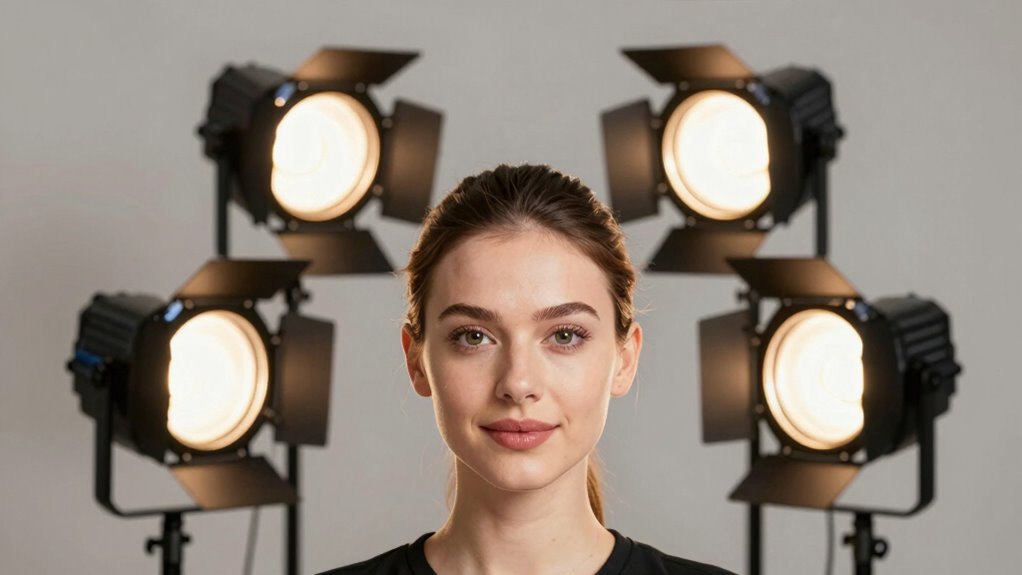

Choosing the right key light for webinars can dramatically improve your on-camera presence. Among the top contenders are the Elgato Key Light, known for its professional-grade brightness and Wi-Fi control, and the Neewer Streaming Key Light, praised for its high CRI and versatile remote control. While the Elgato offers powerful, adjustable lighting ideal for serious streamers, it comes with a higher price tag and requires a Wi-Fi network. The Neewer, meanwhile, offers excellent color accuracy and silent operation, but its lower wattage limits its suitability for larger, more demanding setups. Balancing brightness, control options, and budget will guide your choice.

Get business pricing on office and shipping supplies
- Business-only prices and quantity discounts
- Tax-exempt purchasing
- Multiple users, one account, clear invoices
Key Takeaways
- Elgato Key Light provides high brightness and Wi-Fi control, suited for professional streaming but at a higher cost.
- Neewer offers high CRI, remote control, and silent operation, ideal for detailed color work and versatile setups.
- Elgato Key Light Air is compact with multiple power options, perfect for smaller desks but less bright than professional models.
- Dual-set options like the 2-pack are best for multi-camera setups or conference rooms needing consistent lighting.
- All options involve tradeoffs between power, control, size, and price, depending on your specific webinar needs.
| Elgato Key Light, Professional 2800 Lumens Studio Light |  | Best Overall — High brightness, professional features, Wi-Fi control | Lumens: 2800 | Color Temperature: 2900K – 7000K | LED Type: OSRAM | VIEW ON AMAZON | See Our Full Breakdown |
| Neewer 25W 12.9″ Streaming Key Light with Desk Stand and Remote |  | Best for Versatility — High color accuracy, remote control, silent operation | Power: 25W | Size: 12.9 inches | Color Temperature Range: 2900K-7000K | VIEW ON AMAZON | See Our Full Breakdown |
| Elgato Key Light Air MK.2, 15-inch Edge-Lit LED Panel |  | Best Compact — Portable, versatile, app and touch control | Brightness: Up to 2100 lumens | LED Count: 256 | Color Temperature: 2900K to 7000K | VIEW ON AMAZON | See Our Full Breakdown |
| 2 Pack Streaming Key Light with Desk Stand and C-Clamp, Dimmable Video Panel Light |  | Best for Multi-Light Setups — High CRI, adjustable angles, versatile color options | Number of Lights: 2 | LED Beads: 70 | Color Filters: 9 | VIEW ON AMAZON | See Our Full Breakdown |
| LED Desk Bi-Color Key Light with C-clamp, 2700K-5700K Dimmable |  | Best Budget — High CRI, adjustable color, space-saving design | Size: 9.1×6.2 inches | Color Temperature: 2700K-5700K | Brightness: 0%-100% adjustable | VIEW ON AMAZON | See Our Full Breakdown |
| key light for webinar | Color Temperature | Size | CRI |
|---|---|---|---|
| Elgato Key Light | 2900K – 7000K | — | — |
| Neewer 25W 12.9" Streaming Key | — | 12.9 inches | 98+ |
| Elgato Key Light Air MK.2 | 2900K to 7000K | 15 inches | — |
| 2 Pack Streaming Key Light wit | — | — | ≥97 |
| LED Desk Bi-Color Key Light wi | 2700K-5700K | 9.1×6.2 inches | 95+ |
More Details on Our Top Picks
Elgato Key Light, Professional 2800 Lumens Studio Light
The Elgato Key Light stands out for its powerful 2800 lumens output and adjustable color temperature from 2900K to 7000K, making it perfect for creating a polished, professional look. Its Wi-Fi control allows for seamless remote adjustments, which is especially handy during live sessions. The low heat emission and glare-free opal glass face ensure consistent, soft lighting that minimizes eye strain and shadows. Compared to other options, it’s more expensive but offers a level of control and brightness that suits serious streamers or professionals who need reliable, studio-quality lighting.
Pros:- High lumen output for bright, even lighting
- Wi-Fi control for remote adjustments
- Adjustable color temperature
- Low heat emission with efficient LEDs
Cons:- Expensive compared to basic lights
- Wi-Fi dependence can introduce connectivity issues
- Requires setup and app familiarity
Best for: Professional streamers and content creators needing high brightness and remote control.
Not ideal for: Casual users or those on a tight budget who don’t require advanced features.
- Lumens:2800
- Color Temperature:2900K – 7000K
- LED Type:OSRAM
- Control:Wi-Fi enabled
Our verdict“A top choice for professionals who want powerful, adjustable lighting with remote control capabilities.”
Neewer 25W 12.9″ Streaming Key Light with Desk Stand and Remote
The Neewer Streaming Key Light offers a balanced combination of brightness and precision. Its 25W power and 12.9-inch size make it suitable for smaller or mid-sized setups, providing a bright, diffused light with a high CRI of 98+ for accurate color rendering. The wireless remote and PC/Mac app control make adjustments straightforward, and the fanless cooling system ensures silent operation—great for quiet environments. However, its limited wattage means it’s less ideal for large or very bright setups, and some users may find the control app setup slightly complex.
Pros:- High CRI of 98+ for true color reproduction
- Wireless remote and app control
- Silent, fanless operation
- Adjustable height and tilt
Cons:- Limited to 25W power, less brightness
- Requires external power and stand
- App setup can be complex for some users
Best for: Content creators seeking high color fidelity and remote control in a compact package.
Not ideal for: Large setups or users requiring ultra-bright lighting for big rooms.
- Power:25W
- Size:12.9 inches
- Color Temperature Range:2900K-7000K
- CRI:98+
- Control:Remote and PC/Mac app
Our verdict“Ideal for detailed, accurate color work in smaller spaces with flexible remote control features.”
Elgato Key Light Air MK.2, 15-inch Edge-Lit LED Panel
The Elgato Key Light Air MK.2 offers a more compact, 15-inch panel delivering up to 2100 lumens, making it suitable for smaller desks or spaces where portability matters. Its high color accuracy (>94%) and adjustable brightness and temperature from 2900K to 7000K make it versatile for various lighting needs. The touch controls and app compatibility enable quick adjustments, and multiple power options—including USB-C and battery power—add flexibility. However, its slightly lower brightness compared to full-sized professional lights means it might struggle in very brightly lit or large rooms.
Pros:- Compact and portable design
- Multiple power options including battery
- App and touch control
- Adjustable brightness and temperature
Cons:- Lower brightness than larger professional lights
- Requires external power source
- Cost may be high for casual users
Best for: Streamers and content creators needing a portable, easy-to-control light with flexible power options.
Not ideal for: Large rooms or high-brightness professional setups requiring maximum output.
- Brightness:Up to 2100 lumens
- LED Count:256
- Color Temperature:2900K to 7000K
- Size:15 inches
- Power Options:USB-C, PD 3.0+, battery
Our verdict“Perfect for on-the-go creators or small setups where space and flexibility are key.”
2 Pack Streaming Key Light with Desk Stand and C-Clamp, Dimmable Video Panel Light
This dual-set of Streaming Key Lights provides flexibility for multi-camera or multi-person webinars. Each light features 70 LEDs, 9 color filters, and a 180-degree adjustable panel, making it easy to fine-tune your lighting angles and color balance. The high CRI of ≥97 ensures accurate color reproduction, and the included desk stand and C-clamp make setup straightforward. The main tradeoff is size—these lights are smaller and may not deliver enough brightness for large or highly illuminated spaces, and they lack battery operation, so a power source is necessary.
Pros:- High CRI for accurate colors
- Multiple color filters and adjustable panels
- Includes stands and clamps for flexible mounting
- Suitable for multi-camera or multi-person setups
Cons:- Limited brightness for large rooms
- No battery operation
- Small size may limit light output
Best for: Webinars or recordings requiring multiple light points for even coverage and color control.
Not ideal for: Single-light setups or environments needing intense brightness.
- Number of Lights:2
- LED Beads:70
- Color Filters:9
- Brightness Levels:10
- CRI:≥97
Our verdict“Best suited for multi-person or multi-angle webinar setups where balanced lighting is essential.”
LED Desk Bi-Color Key Light with C-clamp, 2700K-5700K Dimmable
The LED Desk Bi-Color Key Light offers a practical solution for those seeking adjustable, soft lighting without a hefty price tag. Its large diffuser provides natural, eye-friendly illumination, and the adjustable color temperature from 2700K to 5700K allows for customization based on ambient light or mood. The wireless remote control makes it easy to tweak settings during a live session. Its C-clamp mount and adjustable height make it versatile for desks or tables. The main limitation is its reliance on an external power source and the modest maximum weight capacity, which might restrict heavier equipment or larger setups.
Pros:- Adjustable color temperature
- High CRI of 95+ for vibrant colors
- Wireless remote control
- Space-saving clamp mount
Cons:- Requires external power, no battery option
- Limited to desk or table mounting
- Maximum weight support of 10 lbs
Best for: Budget-conscious streamers or professionals needing adjustable, soft lighting for small to medium spaces.
Not ideal for: Large, high-brightness professional setups or outdoor use.
- Size:9.1×6.2 inches
- Color Temperature:2700K-5700K
- Brightness:0%-100% adjustable
- CRI:95+
- LED Count:240
Our verdict“A cost-effective, flexible choice for small-scale streaming or video work requiring soft, adjustable light.”

How We Picked
Our selection focuses on key lights specifically designed for webinar use, prioritizing adjustable brightness, color temperature, control options, and ease of setup. We compared products based on lumen output, color rendering, remote or app control, size, and versatility, considering different user needs—from casual streamers to professional content creators. Durability, price, and power options also weighed heavily, ensuring each pick offers a distinct role in different webinar environments.
Factors to Consider When Choosing Key Light For Webinars
When choosing a key light for webinars, the key factors are brightness, color accuracy, control options, and size. The right light depends heavily on your workspace size, budget, and whether you need portability or high-end features. Here, I break down what to look for and how each feature impacts your webinar presentation.
Brightness and Light Quality
Brightness, measured in lumens, determines how well you illuminate your face, especially in rooms with variable ambient light. For most webinars, 2000-3000 lumens provides a bright, flattering look. High color accuracy (CRI of 95+ or above) ensures your skin tone appears natural, avoiding washed-out or overly warm tones. If you work in a larger or more brightly lit environment, prioritize models with higher lumen output and adjustable color temperature.
Control and Connectivity
Remote and app controls simplify adjustments during live sessions. Wi-Fi control, like in the Elgato Key Light, offers seamless remote operation but adds complexity and cost. Infrared or Bluetooth remotes, as in the Neewer model, provide convenient, cable-free control. Consider your comfort with technology and whether automation (like Stream Deck compatibility) is a priority.
Size, Portability, and Power Options
Size matters if space is limited. Compact lights like the Elgato Key Light Air offer portability and flexibility, while larger panels deliver more power but may be less convenient. Power options vary from AC adapters to USB-C and batteries—choose based on your mobility needs. Battery-powered lights are ideal for on-the-go setups, but often come with tradeoffs in brightness and runtime.
Additional Features and Budget
Features like adjustable color temperature, dimming, and mounting options add versatility. The presence of multiple filters, tilt adjustments, and mounting flexibility can influence your setup’s ease. Budget models may lack some advanced controls but still provide adequate lighting for casual webinars. High-end options tend to include automation, better build quality, and higher lumen output, fitting professional needs.
Frequently Asked Questions
What is the ideal brightness for a webinar key light?
The ideal brightness depends on your room size and ambient lighting, but generally, 2000 to 3000 lumens provides a soft, flattering light without washing out your face. Higher brightness is beneficial if your environment is very bright or if you want more control over shadows and contrast.
Should I prioritize Wi-Fi control or physical remote control?
Wi-Fi control offers more convenience and automation, especially if you want to adjust lighting from your desk or remotely. However, physical remote controls are often simpler and less prone to connectivity issues. Your choice should match your comfort with technology and setup complexity.
Is a higher CRI always better for webinars?
Yes, a high CRI (Color Rendering Index) of 95+ ensures that your skin tones and colors look natural and vibrant on camera. For professional presentations or if color accuracy matters, prioritize lights with high CRI ratings.
Can I use a regular LED panel as a key light for webinars?
While regular LED panels can work, dedicated webinar or streaming lights typically feature adjustable brightness, color temperature, and control options designed for face lighting. Standard panels may lack these features or produce uneven light, reducing your video quality.
What is the best budget-friendly key light for webinars?
The LED Desk Bi-Color Key Light offers adjustable temperature, high CRI, and remote control at an affordable price. It provides a good balance between cost and features, making it suitable for casual or budget-conscious users.
Conclusion
If you’re a professional streamer or content creator seeking maximum control and brightness, the Elgato Key Light remains the best pick. For those with limited space or budget, the LED Desk Bi-Color Key Light offers reliable performance at a lower cost. Content creators needing versatile, silent lighting with accurate color rendering will appreciate the Neewer Streaming Key Light. For multi-camera setups or conference rooms, the 2 Pack Streaming Key Lights provide balanced, multi-angle lighting. Finally, if portability and flexibility matter most, the Elgato Key Light Air MK.2 suits on-the-go professionals best.
Halloween Picks
halloween
As an affiliate, we earn on qualifying purchases.