Choosing a professional live streaming switcher for virtual events involves balancing features, ease of use, and budget. The Magewell Director One 55260 stands out as the best overall for its all-in-one design, combining switching, encoding, and recording in a compact package. The Blackmagic Design ATEM Mini Pro offers excellent value for those who need reliable performance at a lower price point, while the YoloLiv YoloBox Extreme excels for on-the-go streaming with its portable, integrated setup. Each of these options presents tradeoffs: some prioritize versatility, others simplicity or portability. Keep reading for a detailed breakdown of these top picks and what makes each unique in the realm of virtual event production.

Get business pricing on office and shipping supplies
- Business-only prices and quantity discounts
- Tax-exempt purchasing
- Multiple users, one account, clear invoices
Key Takeaways
- The top picks balance performance with ease of use, making complex multi-camera setups accessible.
- Portability varies; some models are compact and mobile, while others are designed for fixed studio setups.
- Built-in streaming features and recording capabilities are common differentiators among the best options.
- Higher-priced switches often offer more inputs, advanced control, and better build quality, but may be unnecessary for smaller setups.
- Compatibility with cameras and control systems is vital; choosing a switcher supporting SDI, HDMI, and IP protocols broadens your options.
| Magewell Director One 55260 – All-in-One Live Production Switcher, HDMI Switcher, Encoder, Streamer & Recorder with 7″ AMOLED Touchscreen |  | Best Overall for Integrated Live Production | Display: 7″ AMOLED touchscreen | Input Sources: 2× HDMI, 2× USB-A, up to 3 IP sources including SRT, RTMP, RTSP, NDI HX | Video Encoding: H.264 and H.265 up to 1080p60 | VIEW ON AMAZON | See Our Full Breakdown |
| FoMaKo KC800 4K 60FPS HDMI Multi-Cam Streaming Video Mixer Switcher with Built-in PTZ Camera Controller and 5.5″ LCD Screen |  | Best for Solo Operators and Multi-Camera Setups | Maximum Supported Devices: 4 | Supported Connectivity: HDMI, UVC, XLR, 3.5mm MIC/Line | Video Output: 4K HDMI loop-through and PGM | VIEW ON AMAZON | See Our Full Breakdown |
| Roland V-160HD Hybrid Streaming Video/Audio Switcher | 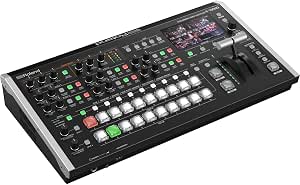 | Best for Broadcast-Style Portable Production | Inputs: Eight 3G SDI, Eight HDMI | Outputs: Seven total outputs including SDI, HDMI, USB-C | Video Effects Engine: Eight-layer | VIEW ON AMAZON | See Our Full Breakdown |
| Osee GoStream Duet 8 ISO Kit – All-in-One Pro Live Streaming Multi-Camera Video Switcher with 14-Inch Monitor |  | Best for Multi-Input ISO Recording and Versatile Live Streaming | Connectivity Technology: HDMI, SDI, USB, NDI, SRT, RTMP | Special Features: 8-Channel, ISO Recording, Built-in Monitor | Resolution: 1080p | VIEW ON AMAZON | See Our Full Breakdown |
| Blackmagic Design ATEM Mini Pro HDMI Live Stream Switcher |  | Best for HD Multi-Camera Streaming on a Budget | Inputs: 4 HDMI | Outputs: HDMI multiview, program output | Connectivity: USB, Ethernet | VIEW ON AMAZON | See Our Full Breakdown |
| Tenveo 4K60FPS HDMI Video Switcher Mixer, 4 SDI & 4 HDMI Inputs, 5-Channel Live Streaming Switcher, 5.5’’ FHD Screen, 1080P60FPS Output, USB/SD Recording, Supports PTZ Camera and Controller, NDI|HX3 Certified |  | Best Overall for Versatile Professional Live Production | Input HDMI: 4 ports (2 supporting 4K60FPS) | Input SDI: 4 ports | USB input: 1 port | VIEW ON AMAZON | See Our Full Breakdown |
| YoloLiv YoloBox Extreme 4K All-in-One Multi-Cam Live Streaming Equipment |  | Best for Extended, Portable Multi-Camera Live Events | HDMI Inputs: 8 | HDMI Outputs: 2 | Display: 11.2-inch OLED | VIEW ON AMAZON | See Our Full Breakdown |
| Osee GoStream Duet Kit All-in-One Pro Live Streaming Multi-Camera Video Mixer Switcher Recorder |  | Best Portable Multi-Camera Switcher for On-the-Go Productions | Display: 14 inch 1080×1920 | Inputs: 4 HDMI/SDI | Outputs: 2 HDMI | VIEW ON AMAZON | See Our Full Breakdown |
| Roland V-8HD HD Video Switcher |  | Best Compact All-HDMI Switcher for Professional Broadcasts | Input Sources: 8 HDMI | Effects and Keying: Five-layer effects | Multi-Viewer: Built-in | VIEW ON AMAZON | See Our Full Breakdown |
| Mixer Plus Compact Video Switcher 4 HDMI with Built-in 4-inch Screen, Portable Live Streaming Switcher for Multi-Camera, Online Class, Event, YouTube, OBS, Zoom |  | Best Budget-Friendly Compact Switcher for Small-Scale Productions | Number of HDMI inputs: 4 | Built-in screen size: 4 inches | Supports PTZ camera control: Yes | VIEW ON AMAZON | See Our Full Breakdown |
| CineTreak Mixer Plus 4-Channel HDMI Video Switcher with 4.5-Inch LCD |  | Best for Compact, On-the-Go Live Production | Display: 4.5-inch multiview LCD | Channels: 4 HDMI inputs | Transition Effects: 30 adjustable effects including Mix and DIP | VIEW ON AMAZON | See Our Full Breakdown |
| Osee GoStream Duet Multiple Camera SDI and HDMI Live Stream Video Mixer Switcher |  | Best for Flexible Multi-Source Streaming with Multiple Inputs | Inputs: 4 SDI, 4 HDMI, USB-C, NDI HX, SD/SSD playback | Control methods: GUI, software for MAC & Win, Bitfocus Companion | Key effects: Multisource, Luma Key, Chroma Key, PIP | VIEW ON AMAZON | See Our Full Breakdown |
| Sony MCX-500 8-Input 4-Video Channel Production Studio Kit Bundle |  | Best for High-Quality, Professional, Multi-Format Production | Inputs: 4 x 3G-SDI, 2 x HDMI, 2 x composite | Video Processing: 1080i | Frame Synchronizer: Discrete per input | VIEW ON AMAZON | See Our Full Breakdown |
More Details on Our Top Picks
Magewell Director One 55260 – All-in-One Live Production Switcher, HDMI Switcher, Encoder, Streamer & Recorder with 7″ AMOLED Touchscreen
This all-in-one device excels in streamlining live production workflows by combining switching, encoding, recording, and streaming into a portable unit. Unlike the Blackmagic ATEM Mini Pro, it offers more versatile input options, including IP sources, which expand its flexibility for complex virtual events. Its 7-inch AMOLED touchscreen makes scene management intuitive, reducing reliance on external controls. However, its focus on 1080p60 streaming may limit future-proofing as 4K becomes standard. The dual hot-swappable batteries add to its portability, but the absence of included 4G service means additional costs for cellular connectivity. This pick makes the most sense for professionals needing a standalone, all-in-one solution for live events that require flexible inputs and easy control, where high cost is justified by workflow efficiency.
Pros:- Combines switching, streaming, and recording in a single device, simplifying setup
- Supports multiple input sources, including IP streams, for versatile event configurations
- Intuitive 7″ AMOLED touchscreen for quick scene adjustments
- Flexible recording options with SD cards and internal storage
Cons:- High cost may be prohibitive for smaller productions
- Limited to 1080p60 streaming, potentially limiting future scalability
Best for: Event producers and broadcasters seeking a compact, all-in-one device for professional virtual event streaming
Not ideal for: Budget-conscious users or those requiring 4K streaming without additional hardware investments
- Display:7″ AMOLED touchscreen
- Input Sources:2× HDMI, 2× USB-A, up to 3 IP sources including SRT, RTMP, RTSP, NDI HX
- Video Encoding:H.264 and H.265 up to 1080p60
- Recording Options:SD cards and internal storage
- Power:DC input, dual hot-swappable batteries
- Connectivity:Ethernet, dual-band Wi-Fi, 4G modem
Our verdict“Best suited for professionals who need an all-in-one, portable solution with flexible input and control options for high-quality live streams.”
FoMaKo KC800 4K 60FPS HDMI Multi-Cam Streaming Video Mixer Switcher with Built-in PTZ Camera Controller and 5.5″ LCD Screen
The FoMaKo KC800 stands out for supporting up to 4 4K HDMI inputs with true color reproduction, making it ideal for multi-camera virtual events. Its built-in PTZ camera control with AI tracking simplifies complex camera setups, unlike the Blackmagic ATEM Mini Pro, which lacks built-in PTZ support. Its user-friendly hardware interface is designed for solo operators who need quick scene changes, but the complexity of managing multiple high-resolution inputs may challenge less experienced users. Its price reflects its advanced features, which can be a stretch for casual or small-scale productions. This device is best suited for event professionals who want a portable, all-in-one multi-camera switcher with AI features, but not for those managing larger or more complex productions requiring more than four inputs.
Pros:- Supports up to 4 4K HDMI inputs with accurate color reproduction
- Built-in PTZ control with AI tracking and presets simplifies camera management
- Supports recording via USB and SD card, providing flexible storage options
- User-friendly interface designed for solo operators
Cons:- Setup can be complex for users unfamiliar with PTZ or multi-camera workflows
- Limited to four HDMI inputs, not suitable for larger productions
Best for: Solo video producers and small teams needing multi-camera control with AI tracking for virtual events
Not ideal for: Large productions or teams requiring more than four HDMI inputs or extensive customization
- Maximum Supported Devices:4
- Supported Connectivity:HDMI, UVC, XLR, 3.5mm MIC/Line
- Video Output:4K HDMI loop-through and PGM
- Color Technology:RGB 24Bit True Color
- AI Tracking:Yes
- PTZ Control:Yes, via VISCA/VISCA-over-IP
Our verdict“Ideal for solo content creators and small teams needing multi-camera switching with intelligent camera control in a compact form.”
Roland V-160HD Hybrid Streaming Video/Audio Switcher
The Roland V-160HD provides a portable, multi-input hybrid switcher combining SDI and HDMI connectivity with a digital audio mixer, making it a solid choice for broadcast-style live events. Compared to the Blackmagic ATEM Mini Pro, it offers more extensive input options, including SDI, suitable for more professional setups. Its built-in audio mixer with effects supports complex audio needs, but its weight of 8.6 pounds and the need for some technical expertise make it less ideal for lightweight or beginner users. Its broadcast-style interface is a plus, yet the setup process can be daunting for those unfamiliar with multi-format workflows. This model fits best in portable, professional environments where a mix of SDI and HDMI inputs and high-quality audio are priorities, but less so for simple streaming needs.
Pros:- Supports extensive connectivity with 8 SDI and 8 HDMI inputs
- Built-in digital audio mixer with effects for professional sound
- Portable design with broadcast-style features
- Flexible output options for various streaming needs
Cons:- Setup complexity may challenge less experienced users
- Heavy for portable use at 8.6 pounds
Best for: Professional live event producers and portable broadcast teams requiring multi-format connectivity and advanced audio mixing
Not ideal for: Beginners or small-scale streamers with minimal input sources or simpler setups
- Inputs:Eight 3G SDI, Eight HDMI
- Outputs:Seven total outputs including SDI, HDMI, USB-C
- Video Effects Engine:Eight-layer
- Audio Mixer Channels:40
- Weight:8.6 pounds
- Model Number:V-160HD
Our verdict“Best suited for portable, professional broadcast environments needing diverse input formats and high-quality audio handling.”
Osee GoStream Duet 8 ISO Kit – All-in-One Pro Live Streaming Multi-Camera Video Switcher with 14-Inch Monitor
The Osee GoStream Duet 8 ISO Kit combines an 8-channel switcher with a 14-inch monitor and multiple input options, including SDI, HDMI, USB, NDI, SRT, and RTMP. Unlike simpler switchers like the YoloBox Extreme, it offers ISO recording, making it ideal for detailed editing and post-production workflows. Its portability at 16.5 pounds is a tradeoff against its rich feature set, and setup can be challenging for those new to multi-camera configurations. The included professional audio and support for numerous power modes make it versatile for event production, education, or broadcast. Its large size may reduce portability for some, but its comprehensive input support makes it a flexible choice for multi-camera live events with recording needs.
Pros:- Supports 8 video channels with ISO recording for post-event editing
- Multiple input options including SDI, HDMI, NDI, SRT, and RTMP
- Built-in 14-inch monitor for easy on-device control
- Portable design with multiple power supply options
Cons:- Heavy weight may limit mobility for some users
- Complex setup could be overwhelming for beginners
Best for: Production teams and educators needing multi-camera ISO recording and versatile input options for complex virtual events
Not ideal for: Casual streamers or users looking for a lightweight, simple switcher with minimal setup
- Connectivity Technology:HDMI, SDI, USB, NDI, SRT, RTMP
- Special Features:8-Channel, ISO Recording, Built-in Monitor
- Resolution:1080p
- Video Codec:H.264, H.265/HEVC
- Item Weight:16.5 pounds
- Item Dimensions:18.7″L x 16.9″W x 8.66″H
Our verdict“Ideal for production teams and educators needing multi-camera ISO recording and multi-input flexibility in a portable package.”
Blackmagic Design ATEM Mini Pro HDMI Live Stream Switcher
The Blackmagic ATEM Mini Pro is a compact, four-input HDMI switcher that offers reliable live production for streaming and multi-camera setups. It excels in straightforward HD streams, especially for gaming, online classes, or small events, thanks to its integrated hardware encoder and Ethernet streaming. Unlike the Roland V-160HD, which supports SDI, the ATEM Mini Pro’s HDMI focus simplifies connections but limits input diversity. Its lack of built-in storage means relying on external drives or cloud storage, which might be a drawback for some users. Its learning curve is manageable but may be steep for complete beginners unfamiliar with live switching. This device is best for small teams or individual streamers prioritizing straightforward HD streaming without extensive setup complexity.
Pros:- Supports multi-camera HD streaming with four HDMI inputs
- Built-in hardware encoder and Ethernet streaming for quick setup
- Multiview monitoring and advanced transition effects
- Compact and easy to transport
Cons:- Limited to four HDMI inputs, requiring adapters for other sources
- No internal recording storage, relying on external drives
Best for: Hobbyists, educators, and small-scale live streamers needing reliable multi-camera HD streaming on a budget
Not ideal for: Large productions or users requiring SDI inputs and advanced broadcast features
- Inputs:4 HDMI
- Outputs:HDMI multiview, program output
- Connectivity:USB, Ethernet
- Supports:BMPCC 4K/6K camera control, tally lights
- Features:Built-in hardware encoder, multiview monitoring
- Model Number:B0FY3YGP73
Our verdict“Best suited for small teams or individual streamers seeking an easy, reliable HD switcher with integrated streaming capabilities.”
Tenveo 4K60FPS HDMI Video Switcher Mixer, 4 SDI & 4 HDMI Inputs, 5-Channel Live Streaming Switcher, 5.5’’ FHD Screen, 1080P60FPS Output, USB/SD Recording, Supports PTZ Camera and Controller, NDI|HX3 Certified
The Tenveo PC500 stands out for its extensive input options, supporting both HDMI and SDI sources, which makes it more adaptable than the Roland V-8HD, which is limited to HDMI only. Its multi-camera control, including PTZ presets and AI tracking, suits complex productions but requires a solid technical background to set up effectively. While the device’s ability to dual stream and record simultaneously offers valuable flexibility, its weight and size make it less convenient for mobile setups. Compared to the YoloBox Extreme, which prioritizes portability and all-in-one design, the Tenveo provides more professional connectivity but at a higher complexity and cost. This switcher is ideal for large-scale, multi-camera events where versatility and control are paramount, but less so for quick setups or casual streaming.
Pros:- Supports multiple input sources including HDMI, SDI, and USB for maximum flexibility
- Advanced multi-camera control with PTZ integration and presets
- Enables dual live streaming to different platforms simultaneously
- Built-in recording options with SD card and USB support
Cons:- Complex setup requiring technical expertise
- Heavier and bulkier than portable options, limiting mobility
Best for: Large production teams needing multi-camera, multi-format support with advanced control features
Not ideal for: Solo streamers or small event organizers seeking simplicity and portability
- Input HDMI:4 ports (2 supporting 4K60FPS)
- Input SDI:4 ports
- USB input:1 port
- Video Output:SDI PGM, HDMI PGM, HDMI AUX, USB3.0
- Recording Output:USB2.0
- Screen Size:5.5 inches
Our verdict“This switcher is best suited for professional environments demanding extensive input options and control, accepting a steeper learning curve and less portability.”
YoloLiv YoloBox Extreme 4K All-in-One Multi-Cam Live Streaming Equipment
The YoloBox Extreme excels in offering an all-in-one solution with 8 HDMI inputs and support for NDI HX, making it more flexible than the Roland V-8HD, which limits users to HDMI sources. Its vivid 11.2-inch OLED touchscreen simplifies control and monitoring during live productions. With a long-lasting 10-hour battery, it’s tailored for outdoor or location-based events where power access is limited. The device’s ability to record ISO feeds supports post-production editing, a feature not available on most portable switchers like the Mixer Plus. However, its weight and complexity might be overkill for small setups or less experienced users. This pick is best for professional productions that need mobility, multiple camera inputs, and extended operation without external power.
Pros:- Supports multiple HDMI and NDI HX inputs for flexible live production
- High-quality 4K60 scaling with a vivid OLED touchscreen for easy control
- 10-hour battery life suitable for extended outdoor events
- Includes ISO recording for post-event editing
Cons:- Relatively heavy at 2 kg, which may affect portability
- Setup complexity can be challenging for beginners
Best for: Mobile production teams requiring high-quality multi-camera management with long battery life
Not ideal for: Casual streamers or small-scale events where simplicity and lightweight equipment are priorities
- HDMI Inputs:8
- HDMI Outputs:2
- Display:11.2-inch OLED
- Resolution:4K60 scaling
- ISO Recording:Up to 4K30 or 1080p60
- Battery Life:10 hours
Our verdict“Ideal for professional, on-the-move productions needing multi-camera control, high-quality output, and extended battery life, despite its weight and setup demands.”
Osee GoStream Duet Kit All-in-One Pro Live Streaming Multi-Camera Video Mixer Switcher Recorder
The Osee GoStream Duet Kit offers a compact, portable solution with a 14-inch monitor and multiple input options, making it more mobile than the Tenveo PC500. Its support for both HDMI and SDI inputs broadens compatibility, but its weight of 12 pounds can challenge portability for some users. The device’s expandable features and multiple power options—including USB power banks—make it suitable for diverse environments, though its setup complexity might deter less tech-savvy operators. Compared with larger, more feature-rich switchers, the Duet Kit strikes a balance between functionality and mobility, ideal for field productions or small studios where space and transport matter.
Pros:- Portable design with a built-in 14-inch display
- Supports multiple HDMI and SDI inputs for versatile connectivity
- Expandable with additional accessories and power sources
- Supports seamless multi-camera switching and scene presets
Cons:- Relatively heavy for frequent portability
- Complex setup may require technical knowledge
Best for: Field producers or mobile teams needing a versatile, lightweight multi-camera switcher
Not ideal for: Large-scale productions or users seeking advanced control and extensive effects
- Display:14 inch 1080×1920
- Inputs:4 HDMI/SDI
- Outputs:2 HDMI
- Power options:AC, DC, USB power bank
- Weight:12 pounds
- Warranty:1 year
Our verdict“Best suited for mobile, on-location productions needing a flexible, portable switcher with multiple input options.”
Roland V-8HD HD Video Switcher
The Roland V-8HD distinguishes itself with its compact, all-HDMI design, making it more portable than the multi-input Tenveo but less flexible in source support. Its integrated multi-view monitoring and five-layer effects engine provide advanced production capabilities, comparable to the Blackmagic ATEM Mini Pro, but with a more intuitive interface. Its built-in audio mixer and still store options enhance live production quality, yet the absence of SDI inputs limits its use in environments requiring professional broadcast-grade connectivity. It is better suited for small to medium-scale live events where HDMI sources dominate, but might struggle in larger, multi-format setups.
Pros:- Compact and lightweight for portability
- Advanced effects and multi-layer keying capabilities
- Built-in multi-view monitor simplifies live control
- Integrated audio mixer with effects for streamlined setup
Cons:- Limited to HDMI sources only, reducing flexibility
- Learning curve for advanced features
Best for: Small to medium professional productions needing a compact, all-HDMI switcher with effects and audio mixing
Not ideal for: Large-scale productions or setups needing SDI support and extensive input variety
- Input Sources:8 HDMI
- Effects and Keying:Five-layer effects
- Multi-Viewer:Built-in
- AUX Output:Yes
- Frame Rate Support:23.98Hz to 30Hz
- Still Store:Eight slots
Our verdict“A solid choice for HDMI-centric productions needing effects, multi-view, and audio mixing in a compact form factor.”
Mixer Plus Compact Video Switcher 4 HDMI with Built-in 4-inch Screen, Portable Live Streaming Switcher for Multi-Camera, Online Class, Event, YouTube, OBS, Zoom
The Mixer Plus offers a highly portable, user-friendly interface with 4 HDMI inputs and a built-in 4-inch screen, making it more accessible than the complex Tenveo PC500. Its support for scene presets, PIP, and chroma key provides essential broadcast tools within a compact package. Compared to the Osee Duet Kit, it’s less expandable but more straightforward for basic multi-camera setups. Its limited input count makes it less suitable for large productions, but its affordability and ease of use make it attractive for small online classes, YouTube streams, or quick event setups. It’s less ideal for demanding professional environments but excels in simplicity and cost-effectiveness.
Pros:- Compact design with a built-in 4-inch display
- Supports seamless multi-camera switching with scene presets
- Includes broadcast features like chroma key and PIP
- Affordable and easy to operate
Cons:- Limited to 4 HDMI inputs, restricting larger setups
- Basic feature set may not meet complex production needs
Best for: Small creators or educators needing a simple, portable switcher for online classes or basic live streams
Not ideal for: Large events or professional broadcasters requiring multiple inputs and advanced features
- Number of HDMI inputs:4
- Built-in screen size:4 inches
- Supports PTZ camera control:Yes
- Transition effects:30 customizable
- Scene presets:4
- Multi View monitoring:Yes
Our verdict“An excellent budget option for small-scale live streaming where simplicity and portability are key.”
CineTreak Mixer Plus 4-Channel HDMI Video Switcher with 4.5-Inch LCD
The CineTreak Mixer Plus stands out for its integrated 4.5-inch multiview display, making it ideal for small studios or mobile setups where space is limited. Unlike larger switchers like the Sony MCX-500, it offers a straightforward interface with essential production tools, though it sacrifices expandability since it’s limited to four HDMI inputs. Its support for live streaming via USB 3.0 and camera control adds flexibility for social media broadcasters or event hosts who need quick, reliable switching without complex gear. However, the lack of built-in recording and its learning curve may deter beginners or those with more extensive multi-camera needs. This pick makes the most sense for solo operators or small teams working in constrained environments who prioritize portability and simplicity over extensive input options.
Pros:- Built-in 4.5-inch multiview display for easy monitoring
- Supports multiple transition effects and live production tools
- Compatible with streaming software via USB 3.0
Cons:- Limited to four HDMI inputs, restricting larger setups
- No onboard recording storage, limiting post-production options
Best for: Content creators, small event producers, or mobile live streamers needing a compact, all-in-one solution
Not ideal for: Large productions requiring more than four HDMI sources or advanced control, or teams needing integrated recording
- Display:4.5-inch multiview LCD
- Channels:4 HDMI inputs
- Transition Effects:30 adjustable effects including Mix and DIP
- Camera Control:VISCA over IP with 4 presets per camera
- Streaming:USB 3.0 UVC for HD live streaming
- Audio Inputs:Two 3.5 mm audio inputs
Our verdict“Best suited for solo operators or small teams seeking an affordable, portable switcher with integrated monitoring.”
Osee GoStream Duet Multiple Camera SDI and HDMI Live Stream Video Mixer Switcher
The Osee GoStream Duet excels in supporting a wide array of input sources, including SDI, HDMI, USB-C, and NDI HX, making it a versatile choice for broadcast-style productions. Compared with the CineTreak Mixer Plus, which is more limited in inputs and designed for smaller setups, this model offers scalability for larger or more complex live events. Its ability to stream to multiple platforms simultaneously and control options via software or external controllers provides significant workflow flexibility. Yet, the complexity of setup and firmware updates to unlock full features like the free NDI HX license can challenge less experienced users. For professional producers managing multi-camera feeds across different formats, this device offers unmatched input diversity, but beginners or those seeking a plug-and-play solution should look elsewhere.
Pros:- Supports multiple input sources including SDI, HDMI, USB-C, and NDI HX
- Flexible control via GUI, software, and external controllers
- Enables streaming to multiple platforms simultaneously
Cons:- Requires firmware update to unlock free NDI HX license
- Setup complexity may be overwhelming for beginners
Best for: Professional live event producers or broadcasters needing extensive camera input options and multi-platform streaming
Not ideal for: Hobbyists or small setups with only HDMI sources, due to its complexity and broader feature set
- Inputs:4 SDI, 4 HDMI, USB-C, NDI HX, SD/SSD playback
- Control methods:GUI, software for MAC & Win, Bitfocus Companion
- Key effects:Multisource, Luma Key, Chroma Key, PIP
- Transitions:MIX, DIP, WIPE, T-Bar
- Streaming capabilities:Up to 3 platforms simultaneously
- Additional features:Supports landscape and portrait modes
Our verdict“Ideal for professional users seeking multi-format input flexibility and multi-platform streaming capabilities.”
Sony MCX-500 8-Input 4-Video Channel Production Studio Kit Bundle
The Sony MCX-500 offers a comprehensive solution with eight inputs, including SDI, HDMI, and composite, suited for complex, multi-format live productions. Its built-in streaming and recording features make it a strong choice for broadcasters or professional studios that require reliable, high-quality output. Unlike the more portable CineTreak or Osee models, this kit is heavier and demands more technical setup, which could be a hurdle for mobile or fast-paced environments. The large touchscreen simplifies control, but the high cost and size mean it’s better suited for dedicated production facilities rather than on-the-move setups. This device is a fit for organizations seeking a robust, all-in-one platform that handles multiple inputs and formats with ease, despite the higher complexity and expense.
Pros:- Supports multiple input formats with frame synchronization
- Built-in streaming encoder and SD card recording
- Touchscreen control simplifies complex workflows
Cons:- Setup complexity requiring technical expertise
- Heavy and less portable for mobile applications
Best for: Broadcast stations, professional studios, or enterprise-level virtual event hosts needing extensive input options and built-in streaming
Not ideal for: Small-scale event organizers or mobile streamers with limited space and budget constraints
- Inputs:4 x 3G-SDI, 2 x HDMI, 2 x composite
- Video Processing:1080i
- Frame Synchronizer:Discrete per input
- Supported Formats:NTSC/PAL, HD
- Built-in Features:Live streaming encoder, SD card recording, audio mixer
- Connectivity:Ethernet, HDMI, SD card slot
Our verdict“Designed for professional, multi-input environments where high-quality, reliable production is paramount, despite increased size and cost.”

How We Picked
I evaluated these live streaming switchers based on several key criteria: performance reliability, ease of use, build quality, versatility in input/output options, and value for cost. Each product was assessed for its ability to handle multi-camera live production in a virtual event context, including features like built-in streaming, recording, and control interfaces. The ranking prioritizes solutions that offer a strong balance of professional features without excessive complexity or cost, making sure each pick addresses a different type of user—from beginners to advanced broadcasters. This approach ensures that every recommended switcher fills a specific role, helping buyers find the best fit for their needs and budget.Factors to Consider When Choosing Professional Live Streaming Switcher For Virtual Events
Choosing the right live streaming switcher requires understanding your specific event needs and technical environment. Beyond basic features, it’s important to consider how the switcher integrates with your existing camera setup, your preferred streaming platforms, and your desired level of control. Mistakes like overpaying for unnecessary inputs or choosing a device with a steep learning curve can hinder your production quality. The following factors will help guide your decision, ensuring you select a switcher that matches your technical skills and event scale.Input and Output Options
The number and types of inputs (HDMI, SDI, IP) determine how many cameras and sources you can connect. Larger productions benefit from multiple SDI inputs for professional cameras, but this adds cost and complexity. Consider your current and future camera setup—if you plan to expand, choose a switcher with more inputs and versatile connections. Compatibility with your cameras and control systems also influences ease of operation and integration.Ease of Use and Interface
An intuitive interface reduces setup time and minimizes errors during live events. Touchscreens, physical controls, and clear layout matter—especially if multiple operators are involved. While advanced models offer extensive control options, they can be intimidating for beginners. Balance your technical comfort level with the complexity of features; sometimes, a simpler switcher with essential controls is more effective for smaller or less frequent events.Streaming and Recording Capabilities
Built-in streaming features eliminate the need for external encoders, simplifying workflows. Look for models that support popular platforms like YouTube, Facebook, and Twitch, and check for options like multi-platform streaming or multi-angle recording. Recording directly on the device adds peace of mind, especially for post-event edits. Consider whether you need multi-camera recording or just a clean feed for live broadcast.Portability and Size
If your events are on the move or require on-site setup, portability becomes a priority. Compact, lightweight models like the YoloBox Extreme provide mobility without sacrificing essential features. Conversely, fixed installations can accommodate larger, rack-mounted switchers with more inputs and advanced controls. Think about your event locations and storage options when selecting a size and form factor.Budget and Future Proofing
While cost is always a factor, investing in a more capable switcher can pay off in professional quality and scalability. Cheap models may lack essential features or reliability, leading to frustration or compromised broadcasts. Conversely, overspending on features you don’t need can drain your budget. Aim for a solution that meets your current requirements but also offers room for growth, such as additional inputs or software updates.Frequently Asked Questions
Can I use a consumer-grade switcher for professional virtual events?
While some consumer-grade switchers might handle basic live streaming, they often lack the robustness, input options, and control features necessary for professional virtual events. These devices may not support multiple camera sources reliably or may lack integrated streaming capabilities, leading to potential disruptions or lower broadcast quality. Investing in a purpose-built professional switcher ensures stability, flexibility, and better integration with your overall production setup, which is vital for high-stakes virtual events.What is the most important feature to consider for a live streaming switcher?
The most critical feature depends on your specific needs, but generally, reliable multi-input support and seamless streaming capabilities top the list. If your event involves multiple cameras, you need a switcher that can handle various inputs without lag or dropout. Additionally, integrated streaming or recording features can simplify your workflow, reducing the need for external devices and potential points of failure. Prioritize ease of control and robustness to ensure your virtual event runs smoothly.Is it better to buy a switcher with built-in streaming or an external encoder?
Choosing between a switcher with built-in streaming and an external encoder depends on your setup and budget. Built-in streaming simplifies the workflow and reduces equipment, making setup faster and less error-prone—ideal for smaller or mobile productions. External encoders often provide higher quality and more streaming platform options but add complexity and cost. Consider your technical skills and event scale when making this decision, aiming for a solution that balances convenience and performance.Do I need a switcher with IP or SDI inputs for virtual events?
For most virtual events, HDMI inputs are sufficient unless you are working with high-end broadcast cameras or long cable runs, where SDI offers better signal integrity over greater distances. IP inputs provide network-based connectivity, enabling flexible and scalable setups, especially in larger or more complex environments. Assess your camera sources, venue infrastructure, and future expansion plans to choose the right input types—this ensures your workflow remains smooth and future-proof.How much should I expect to spend on a professional live streaming switcher for virtual events?
Prices for professional live streaming switchers vary widely based on features, input options, and build quality. Entry-level models can start around $500, suitable for small events or beginners, but they may lack advanced controls and multiple inputs. Mid-range solutions typically cost between $1,000 and $3,000, offering more inputs, control options, and integrated streaming. High-end, feature-rich models can exceed $5,000, designed for large-scale productions with extensive customization needs. Your budget should reflect your event size, technical complexity, and long-term goals.Conclusion
For those just starting with virtual event production, the Blackmagic Design ATEM Mini Pro offers a straightforward, affordable entry point with reliable features. If you need a flexible, portable solution that can handle multi-camera setups on the go, the YoloLiv YoloBox Extreme is an excellent choice. The Magewell Director One 55260 stands out as the best overall, combining versatility, ease of use, and professional features in a compact form. For large, complex productions or professional broadcasters, investing in higher-end models like the Roland V-160HD or Sony MCX-500 makes sense. Ultimately, your decision should align with your event scale, technical skills, and future expansion plans.
Fall Picks
fall essentials
As an affiliate, we earn on qualifying purchases.