
If you’re looking to elevate your speaking game in 2025, I recommend checking out the 14 top presentation clickers. These devices offer features like long-range wireless, intuitive controls, bright laser pointers, and broad compatibility with devices and software. They’ve been designed for comfort, durability, and ease of use, whether you’re in a small meeting or a large venue. Keep exploring, and you’ll find the perfect clicker to boost your presentation confidence.
Key Takeaways
- Highlights top-rated presentation clickers with advanced features like long-range laser pointers and customizable controls for professional use.
- Emphasizes compatibility across various devices and software, ensuring seamless integration into any presentation environment.
- Focuses on ergonomic, durable designs with extended battery life for reliable performance in diverse settings.
- Includes options with secure wireless connections and bright laser pointers to enhance audience engagement.
- Offers insights into the latest innovations and trends shaping presentation tools in 2025.

Logitech Wireless Presenter R400 USB A PowerPoint Clicker with Laser
- Presenter Mode: Includes built-in laser pointer and touch controls
- Bright Red Laser: Highly visible laser pointer for presentations
- Long Wireless Range: Up to 50 feet for unrestricted movement
As an affiliate, we earn on qualifying purchases.
Logitech Wireless Presenter R400 with Laser Pointer

If you’re looking for a reliable presentation remote that’s easy to use and enhances your audience engagement, the Logitech Wireless Presenter R400 with Laser Pointer is an excellent choice. It offers intuitive touch-keys for smooth slideshow control, so steering your presentation feels natural. The built-in Class 2 red laser pointer helps you highlight key points clearly, even against busy backgrounds. No software is needed—just plug in the USB receiver, and you’re ready. With up to 50 feet of wireless range, you can move freely around the room. Its lightweight design makes it comfortable to hold, and the built-in storage for the receiver adds convenience for portability.
Best For: professionals and educators seeking a reliable, easy-to-use presentation remote with a laser pointer to effectively engage their audience.
Pros:
- Intuitive touch-keys for seamless slideshow navigation
- Built-in Class 2 laser pointer for clear highlighting
- Plug-and-play design with a 50-foot wireless range for freedom of movement
Cons:
- Requires two AAA batteries, which need to be purchased separately
- Slightly larger size may be less portable for some users
- Limited to basic presentation control without advanced features or customization
Wireless Presenter, RF USB PowerPoint Remote Control
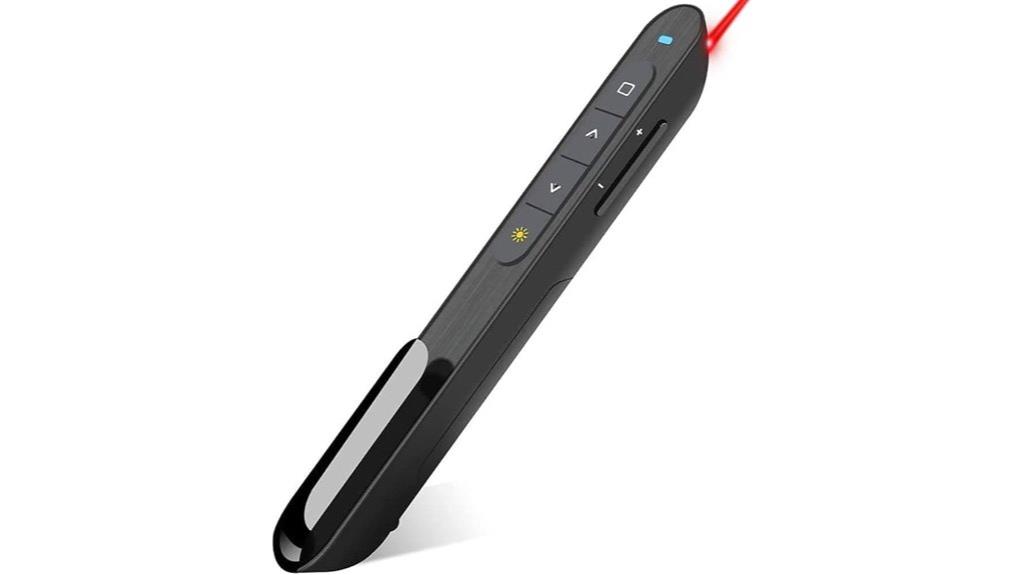
The Wireless RF USB PowerPoint Remote Control is ideal for professionals who need reliable, hassle-free presentation tools. Its plug-and-play design means you can start using it instantly—just insert the USB receiver, no software required. The USB fits conveniently into the bottom of the clicker, preventing loss. It supports essential functions like page navigation, volume control, hyperlinks, and screen switching, making it perfect for daily presentations. With a bright red pointer visible against most backgrounds and a wireless range of up to 100 feet, you can move freely. Its compact, ergonomic design, soft rubber buttons, and long battery life make it a dependable, user-friendly choice.
Best For: professionals and presenters seeking a reliable, easy-to-use wireless remote control for seamless PowerPoint presentations in large or small rooms.
Pros:
- Plug-and-play design allows immediate use without software installation
- Long wireless range of up to 100 feet enables free movement during presentations
- Bright red pointer provides high visibility against most backgrounds
Cons:
- Not recommended for LCD, LED, or TV screens due to pointer visibility issues
- Requires 1xAAA battery (not included), adding an extra item to purchase
- Bumped-buttons may take some getting used to for precise control
Wireless Presenter Remote for PowerPoint and Mac
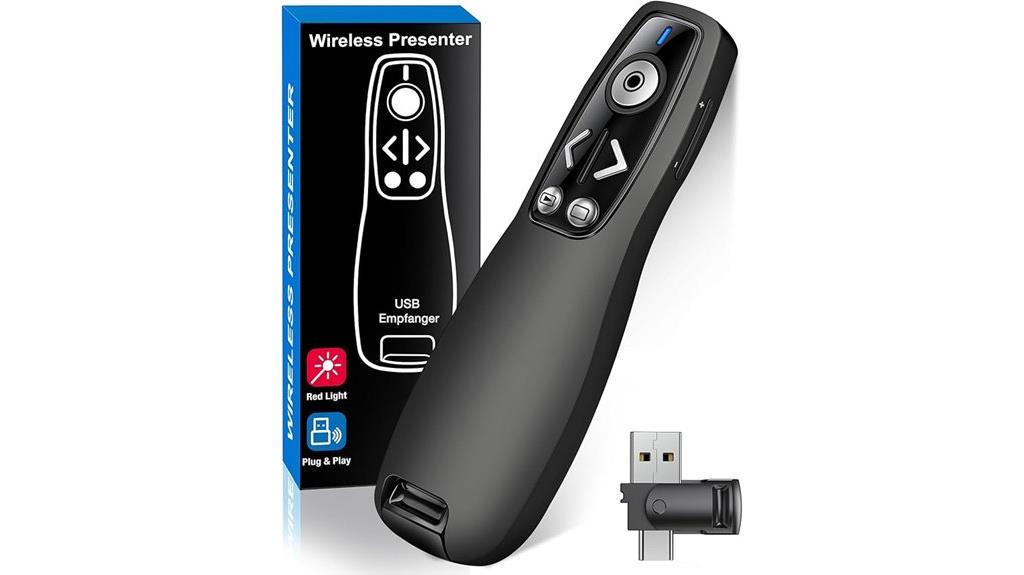
For anyone seeking a versatile and reliable presentation tool, the Wireless Presenter Remote for PowerPoint and Mac stands out with its dual-head design featuring both USB and Type-C connectors. It’s compatible with Mac, laptops, and PCs, making it highly adaptable. The remote supports functions like volume control, window switching, full/black screen, and page navigation, all with one-button ease. Its bright red laser pointer highlights key points effectively. With a 100-foot wireless range, you can move freely during your presentation. No software installation is needed—just plug in the receiver, and you’re ready. Its compact, ergonomic design guarantees comfortable handling, even in dark environments.
Best For: professionals, educators, and presenters who need a versatile, reliable remote control for PowerPoint and Mac presentations with long-range wireless capabilities.
Pros:
- Compatible with Mac, laptops, and PCs with dual USB and Type-C connectors for easy switching between devices
- Bright red laser pointer and intuitive one-button controls for seamless presentation management
- Wireless range up to 100 feet allowing freedom of movement during presentations
Cons:
- Requires 2 AAA batteries which are not included
- No built-in software customization options for advanced features
- Slightly larger size may be less portable for some users
QUI Wireless Presentation Clicker for PowerPoint, RF 2.4GHz Remote with Volume Control

When it comes to delivering impactful presentations, having precise control over your slides and audio can make all the difference. The QUI Wireless Presentation Clicker simplifies this with its RF 2.4GHz USB connection, offering seamless compatibility with PowerPoint, Keynote, Google Slides, and more. Its plug-and-play setup means no software is needed—just connect the magnetic receiver and start presenting. The intuitive buttons let me navigate slides, adjust volume, and switch to full or black screen easily. With a range of up to 100 meters, I can move freely and engage my audience. Lightweight and durable, it’s perfect for meetings, training, or lectures.
Best For: professionals, educators, and presenters seeking a reliable, portable wireless remote for seamless slide control and audio management during presentations.
Pros:
- Easy plug-and-play setup with no software required, compatible across multiple platforms
- Long-range control up to 100 meters for unrestricted movement and audience engagement
- Bright red laser pointer and intuitive buttons enhance presentation clarity and ease of use
Cons:
- Requires 1 AAA battery (not included), adding an extra step for setup
- Limited to basic functions; may lack advanced features found in higher-end remotes
- Slightly lightweight design might feel less sturdy over prolonged use
Wireless Presentation Clicker with Laser Pointer for PowerPoint, Windows, Mac, Linux
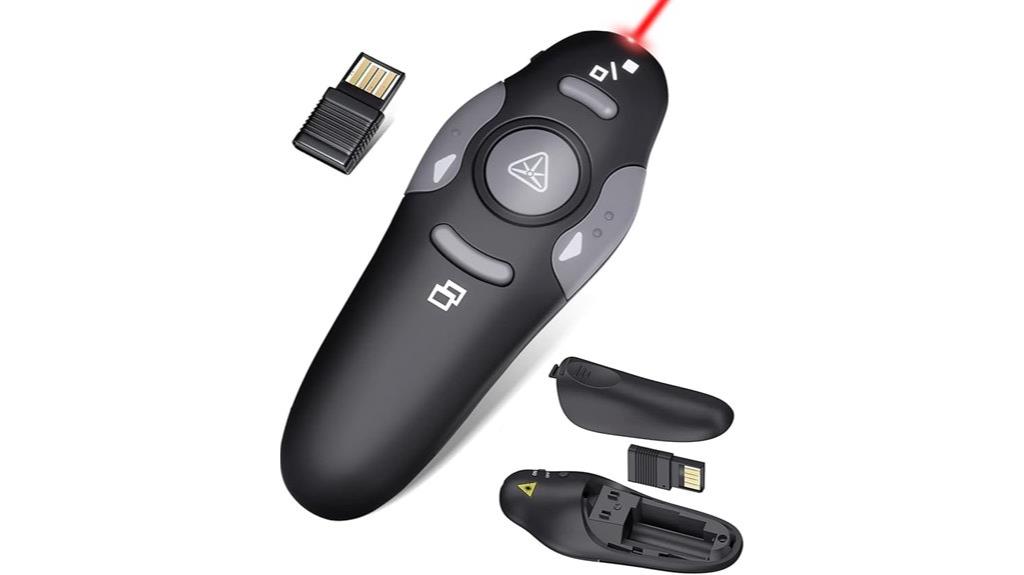
If you’re seeking a reliable presentation clicker that seamlessly works across multiple operating systems, this wireless model with laser pointer is an excellent choice. It supports PowerPoint, Keynote, Google Slides, PDFs, websites, and Office apps on Windows, Mac, and Linux without needing drivers—just plug and play. Its ergonomic, compact design fits comfortably in your hand, with dark gray buttons and a lightweight build. The clicker offers a range of 98 feet and a laser pointer that reaches up to 328 feet, making it perfect for large rooms. It’s powered by a standard AAA battery, lasting around two months, and easily stored in its internal USB dongle.
Best For: those who need a versatile, easy-to-use wireless presentation remote compatible with multiple operating systems and software applications for professional or educational settings.
Pros:
- Supports Windows, Mac, and Linux without requiring drivers, enabling seamless cross-platform use.
- Long control range of 98 feet and laser pointer reach of 328 feet, ideal for large venues.
- Compact, ergonomic design with stored USB dongle for easy portability and convenience.
Cons:
- Requires a standard AAA battery, which needs replacement approximately every two months.
- No additional customizable buttons or advanced features beyond basic presentation controls.
- Laser pointer range may be less effective in brightly lit environments.
Presentation Remote Clicker, Wireless Presenter for PowerPoint
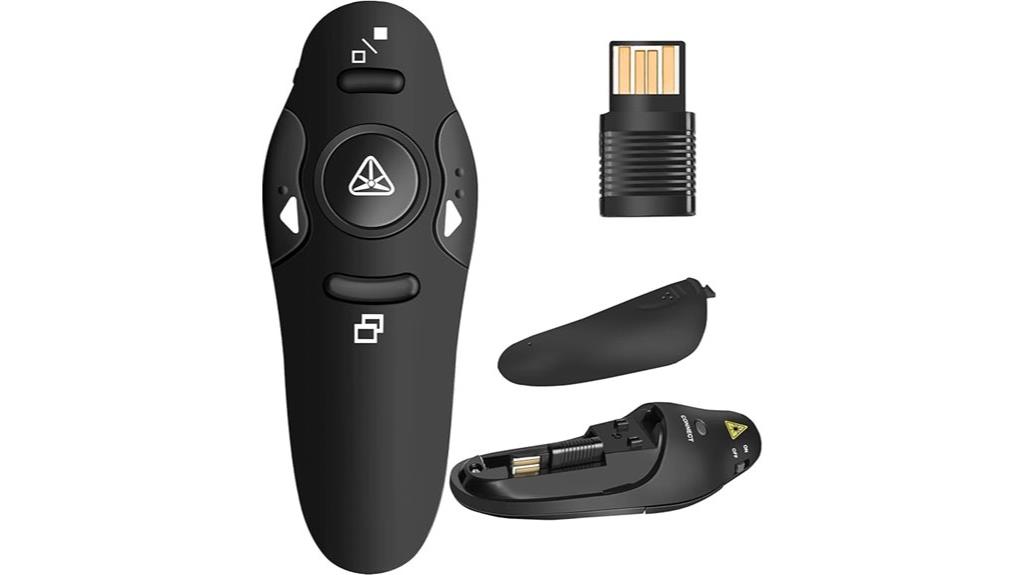
Looking to deliver smooth, professional presentations without being tied to your computer? The Presentation Remote Clicker, Wireless Presenter for PowerPoint, is an excellent choice. It uses RF 2.4GHz USB, compatible with Windows, Linux, Android, and Mac (with setup). Its compact, ergonomic design fits comfortably in your hand and slips into your pocket. With a wireless range of up to 49 feet, you can move freely during your talk. The plug-and-play setup requires no software, and the bright red laser makes your pointer visible against most backgrounds. Simple one-button controls let you navigate effortlessly, helping you focus on your audience instead of your tech.
Best For: professionals, educators, or presenters seeking a reliable, wireless remote to deliver seamless PowerPoint and slide presentations with ease and freedom of movement.
Pros:
- Wireless range up to 49 feet allows for unrestricted movement during presentations.
- Plug-and-play setup requires no software installation, making it easy to use right out of the box.
- Compact ergonomic design with a rubber feel ensures comfortable handling and portability.
Cons:
- Bright red laser may not be suitable for use on TV, LED, or LCD screens.
- Compatibility with Mac may require initial setup steps.
- Requires one AAA battery, which is not included.
Kensington Wireless Presenter with Red Laser Pointer (K33272WW)
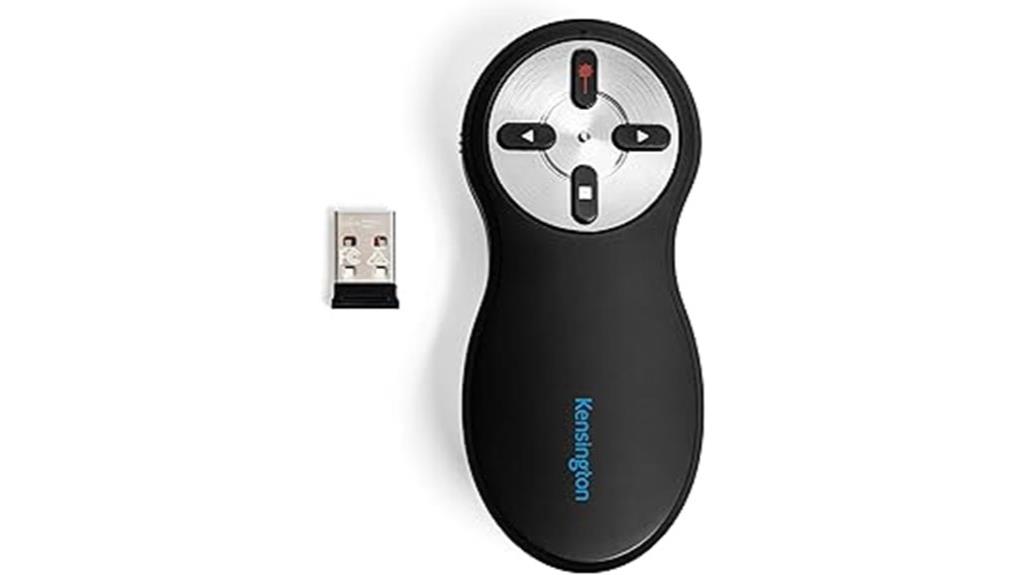
The Kensington Wireless Presenter with Red Laser Pointer (K33272WW) stands out as an ideal choice for professionals who need a reliable, easy-to-use device that enhances their presentation flow. Its intuitive four-button layout—forward, back, hide screen, and laser—makes navigation seamless. The bright red laser pointer highlights key details effectively at the press of a button. With a secure 2.4GHz wireless connection and a 65-foot range, you gain freedom of movement without worrying about drops or interference. Plus, its internal storage for the nano receiver and AES encryption guarantee convenience and security. TAA compliant with a 3-year warranty, it’s a durable, versatile tool for confident presentations.
Presentation Clicker Remote, Wireless PowerPoint & Google Slides Controller
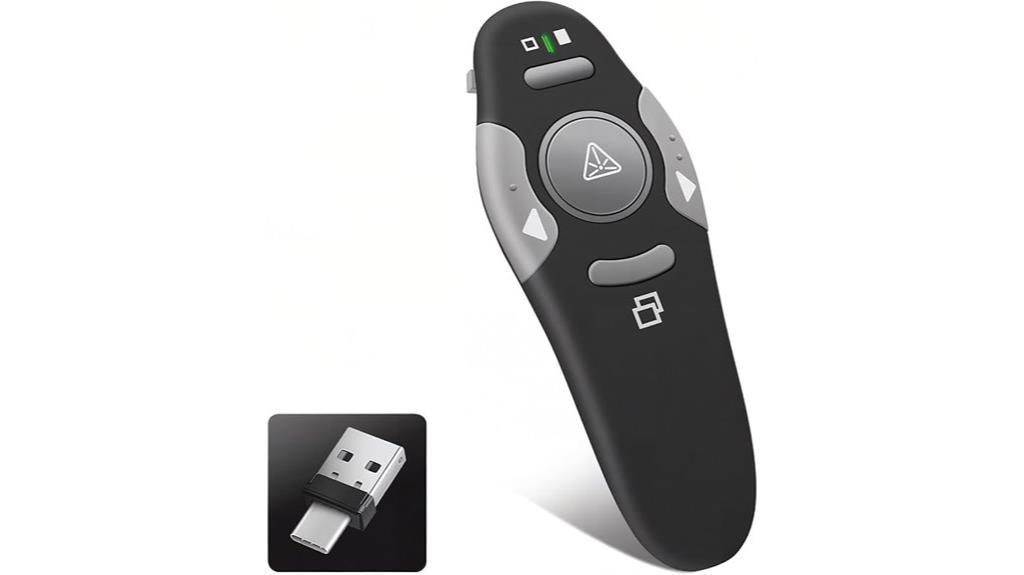
For professionals and educators who need reliable control over their presentations, the Presentation Clicker Remote with wireless connectivity is a must-have. Its 2-in-1 USB Type C and USB-A receiver guarantees instant recognition and seamless compatibility with Windows, Mac, Linux, iPads, Smart Boards, and projectors. The ergonomic, compact design fits comfortably in hand, while the bright LED indicators provide precise navigation on screens. Using advanced 2.4GHz RF technology, it delivers a stable, instant connection. Compatible with PowerPoint, Google Slides, Keynote, and more, this clicker simplifies controlling your slides, making every presentation smooth and professional.
Best For: professionals, educators, and presenters who require reliable, seamless wireless control over their slideshows across multiple devices and platforms.
Pros:
- Compatible with Windows, Mac, Linux, iPads, Smart Boards, and projectors for versatile use
- Ergonomic, compact design with bright LED indicators for precise navigation
- Reliable 2.4GHz RF wireless technology ensures stable, instant connection
Cons:
- Requires 1 AAA battery (not included), adding an extra step for setup
- Limited to a 1-year warranty, which may not cover all potential issues
- May have a learning curve for users unfamiliar with wireless presentation devices
Wireless PowerPoint Remote Presentation Clicker for Classroom and MacBook

If you want to move freely during your presentations, this wireless PowerPoint remote is an excellent choice because it offers a control range of up to 100 feet. It features a long-range red laser pointer, perfect for highlighting content from a distance. The device includes easy controls for page navigation, volume, full-screen mode, and blackout, making your presentation seamless. Compatible with MacOS, Windows, Android, Linux, and popular software like PowerPoint and Google Slides, it’s versatile. Its plug-and-play USB receiver guarantees quick setup, and its ergonomic, compact design makes it comfortable to hold and easy to carry. It’s ideal for classrooms, offices, and auditoriums.
Best For: educators, presenters, and professionals who need a reliable, long-range remote control for seamless presentations across various devices and software.
Pros:
- Wireless control range of up to 100 feet for unrestricted movement during presentations
- Compatible with multiple operating systems and popular presentation software, including PowerPoint and Google Slides
- Ergonomic and compact design for comfortable handling and portability
Cons:
- Not recommended for use with LED, LCD, or TV screens
- Requires 2 AAA batteries, which are not included
- Limited functionality on certain display types, such as LED or LCD screens
Presentation Clicker for PowerPoint and Google Slides Wireless Remote USB Laptop/PC/Mac
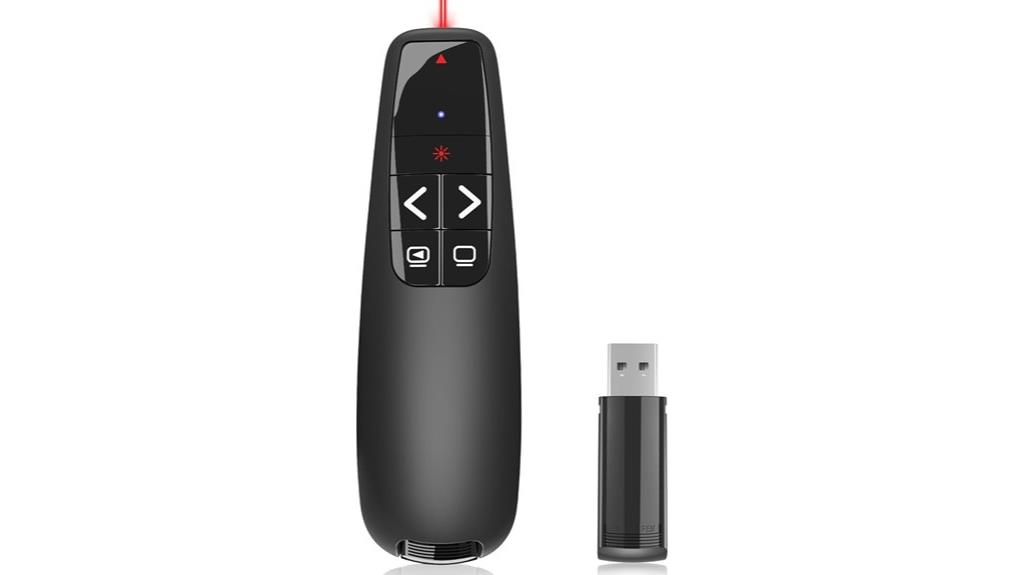
A wireless presentation clicker that seamlessly works with PowerPoint and Google Slides is essential for confident and dynamic presentations. I love how this device offers a range of 98 feet for PowerPoint control and up to 328 feet for laser pointers, giving me freedom to circulate and engage my audience. Its ergonomic design with large buttons prevents accidental clicks, making it easy to use without fuss. Setup is a breeze—just plug in the USB receiver, and you’re ready to go—no drivers needed. Compatible with Windows, Mac, and Linux, it’s a versatile tool that enhances any presentation environment.
Best For: educators, business professionals, and presenters seeking a reliable, versatile wireless remote to enhance their presentation delivery with ease and confidence.
Pros:
- Long-range control and laser pointer capabilities for dynamic presentations
- Plug-and-play setup with broad compatibility across Windows, Mac, and Linux systems
- Ergonomic design with large, comfortable buttons to prevent accidental clicks
Cons:
- Requires two AAA batteries, which need to be replaced periodically
- Laser pointer range of up to 328 feet may be excessive for smaller rooms
- Limited to basic functions without advanced customization options
Wireless Presenter Remote for PowerPoint and Google Slides

The Wireless Presenter Remote for PowerPoint and Google Slides stands out with its impressive 50-foot control distance and 300-foot laser display range, making it ideal for presenters who want freedom to move around the room. Its bright red laser pointer easily highlights key areas, even against busy backgrounds. The remote supports easy navigation—page forward/backward, full/black screen—with one-touch buttons. Compact and lightweight, it fits comfortably in your hand or pocket, and its plug-and-play USB receiver simplifies setup. Compatible with Mac OS, PowerPoint, Google Slides, and more, it’s a versatile tool that boosts confidence and engagement during presentations.
Best For: professionals, educators, and presenters who need a reliable, portable remote to control slides and highlight key points from a distance during presentations.
Pros:
- Long control distance of 50 feet and laser display range of 300 feet for flexible movement
- Compatible with multiple platforms including PowerPoint, Google Slides, Keynote, and Mac OS without complicated setup
- Compact, lightweight design with ergonomic grip for comfortable use and easy portability
Cons:
- Laser pointer may be less visible on some TV or LED screens
- Occasional responsiveness issues requiring multiple clicks for some functions
- Batteries are not included, so additional purchase may be necessary
AMERTEER Bluetooth Wireless Presentation Clicker
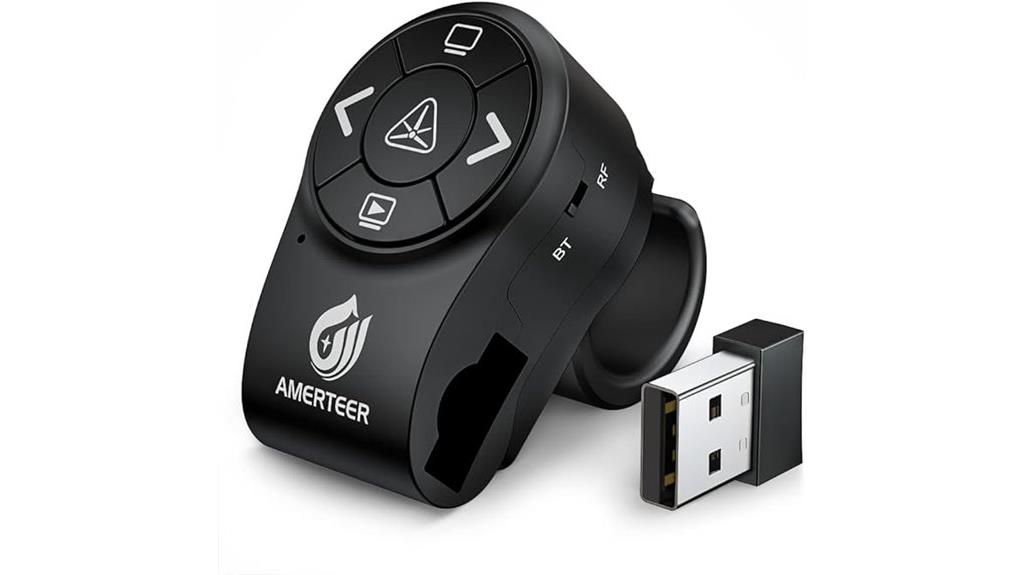
Designed for presenters who need flexibility and reliable control, the AMERTEER Bluetooth Wireless Presentation Clicker offers seamless connectivity with both Bluetooth and RF modes. Its finger ring design with a rubberized slip-resistant grip fits various finger sizes, ensuring comfort during long presentations. The mini USB receiver supports plug-and-play, and its magnetic docking bay reduces the risk of losing it. With five thumb-controlled buttons, you can easily manage slides, laser pointer, and screen blackout. The bright red laser is visible against most backgrounds, and the wireless range extends up to 12 meters. Powered by a rechargeable battery, it’s compatible with Windows, Mac, Linux, and popular presentation software.
Best For: professionals and educators seeking a reliable, versatile wireless presentation remote with flexible connectivity and easy slide control.
Pros:
- Supports both Bluetooth and RF modes for versatile connectivity options.
- Ergonomic finger ring design with adjustable rubberized grip for comfortable long-term use.
- Bright red laser pointer enhances audience engagement across various backgrounds.
Cons:
- May require charging before extended use due to built-in rechargeable battery.
- Compatibility may vary slightly with less common operating systems or presentation software.
- Limited to a 12-meter wireless range, which might be restrictive in very large venues.
Logitech Spotlight Presentation Remote with Laser Pointer and Bluetooth
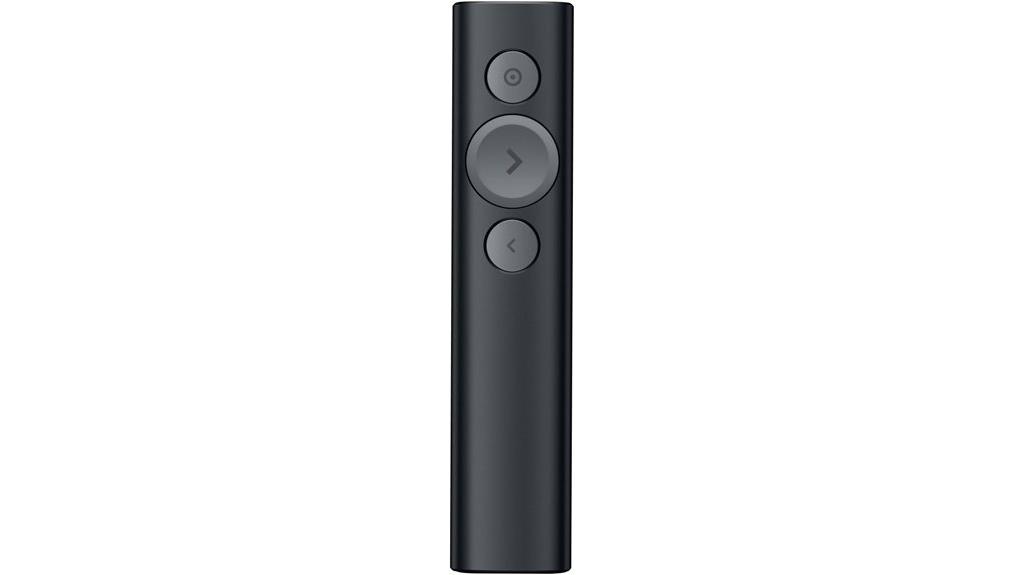
If you’re looking for a versatile presentation remote that combines advanced highlighting with seamless control, the Logitech Spotlight stands out as an excellent choice. It offers digital highlighting, magnification, and a laser pointer for pixel-perfect emphasis. With dual connectivity via USB-A receiver or Bluetooth Smart, setup is quick and reliable—working up to 100 feet away. Its compatibility spans Windows, Mac, PowerPoint, Keynote, and more. The device features customizable timers with vibration alerts and easy integration through the Logi Options+ App. Lightweight and well-built, it’s ideal for professionals seeking precise, flexible control during presentations, making it a top pick in 2025.
Best For: professionals, educators, and speakers seeking a reliable, advanced presentation remote with precise highlighting and seamless control.
Pros:
- Versatile dual connectivity options (USB-A receiver and Bluetooth Smart) for flexible setup.
- Advanced digital highlighting, magnification, and a laser pointer for engaging presentations.
- Long-range operation up to 100 feet with quick setup and excellent build quality.
Cons:
- Lacks a dedicated laser pointer, limiting traditional laser highlighting capabilities.
- USB-C port is for storage, not charging, which can cause initial confusion.
- Some users experience connectivity issues or difficulties with setup instructions.
Wireless Presentation Clicker with Laser Pointer and USB-C for Mac, PC, PowerPoint, Google Slides
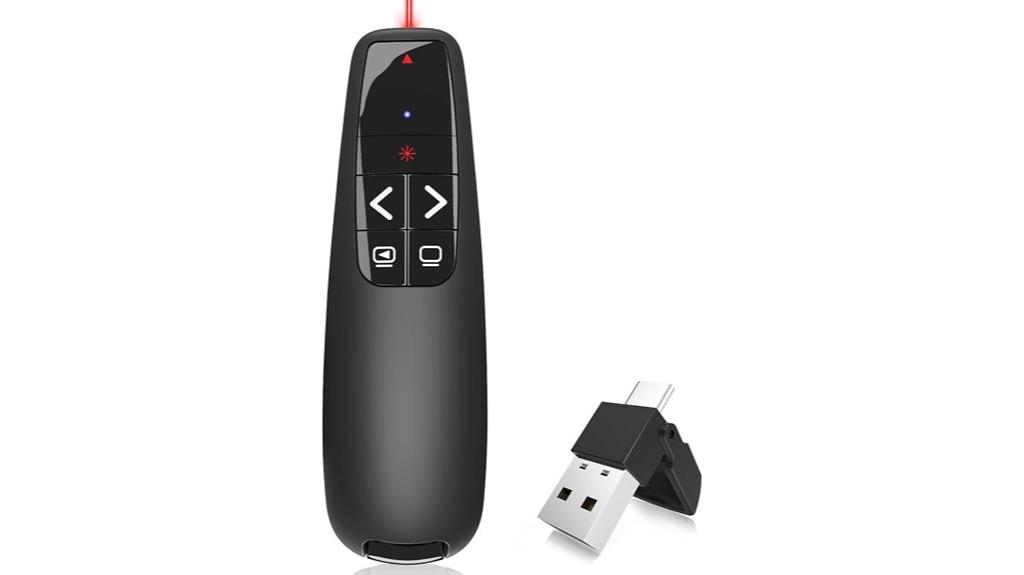
For presenters who need reliable remote control and precise highlighting from a distance, the Wireless Presentation Clicker with Laser Pointer and USB-C stands out as an excellent choice. It offers a 98FT control range and a 328FT laser beam, ideal for large rooms. Compatible with Mac, Windows, and Linux, it works seamlessly with PowerPoint, Google Slides, and more. The ergonomic design with large buttons ensures comfortable use and prevents accidental presses. The plug-and-play USB-C and USB-A receiver makes setup effortless, while two AAA batteries provide long-lasting power. Compact and durable, this clicker keeps you confidently moving across your presentation space.
Best For: professionals and educators who need a reliable, long-range wireless presenter with laser highlighting capabilities for large rooms and multiple device compatibility.
Pros:
- Wide control range of 98FT and laser range of 328FT, suitable for large presentation spaces
- Compatibility with Mac, Windows, and Linux systems, supporting various software like PowerPoint and Google Slides
- Easy plug-and-play setup with USB-C and USB-A dual receivers, no installation required
Cons:
- Requires two AAA batteries, which may need replacement over time
- Large laser range could pose safety concerns if not used carefully
- Ergonomic design, while comfortable, may not fit all hand sizes equally
Factors to Consider When Choosing Presentation Clickers
When choosing a presentation clicker, I always check for compatibility with my devices to guarantee seamless use. I also consider wireless range, stability, and battery life to avoid interruptions. Additionally, ease of use and laser pointer visibility are key factors that can make or break your presentation experience.
Compatibility With Devices
Choosing a presentation clicker that seamlessly works with your device is essential for a smooth presentation experience. First, confirm the clicker supports your device’s operating system, whether it’s Windows, MacOS, Linux, or Android. Check that the connection type—USB-A, USB-C, Bluetooth, or RF 2.4GHz—is compatible with your ports and wireless capabilities. Many clickers offer dual connectivity, like both Bluetooth and a USB receiver, providing extra flexibility. Also, verify if the clicker works with your presentation software—PowerPoint, Google Slides, Keynote, or PDF viewers—to ensure full functionality. Finally, consider the range and compatibility features to make sure it can operate effectively from your typical presentation distance. Compatibility is key to avoiding disruptions and ensuring your focus stays on delivering a great presentation.
Wireless Range and Stability
A presentation clicker’s wireless range and stability can profoundly impact your ability to move freely and control slides smoothly. A longer range, around 50 to 100 feet, lets you move naturally without worrying about losing connection or signal drops. Stable wireless connections, supported by 2.4 GHz RF or Bluetooth, prevent interruptions and ensure your slides respond instantly to your commands. Devices with encryption protocols like AES 128-bit add security, reducing the risk of interference or hacking. Consistent connectivity is especially crucial in large rooms or auditoriums where obstacles can weaken signals. A reliable wireless system minimizes lag or delays, helping you maintain audience engagement and a seamless flow. Prioritizing range and stability ensures your presentation remains smooth and professional from start to finish.
Ease of Use
Ease of use is a critical factor that can make or break your experience with a presentation clicker. A user-friendly device should have intuitive controls with clearly labeled buttons, allowing quick navigation without fumbling. Plug-and-play functionality is essential, so you can start presenting immediately without installing software or dealing with complicated setups. Lightweight and ergonomic designs reduce fatigue, especially during long sessions, and improve handling. Features like large, tactile buttons and visible indicators boost confidence, letting you operate the clicker smoothly without looking down. Additionally, a simple pairing process and a stable wireless connection—whether via 2.4 GHz or Bluetooth—are indispensable for reliable performance. Overall, ease of use ensures a seamless, distraction-free presentation experience.
Laser Pointer Visibility
The visibility of a laser pointer is essential for effective presentations, and several factors influence how well it can be seen by your audience. The color plays a key role; red lasers are the most common and tend to stand out against most backgrounds. Higher milliwatt (mW) ratings produce brighter beams, making them easier to spot, especially in well-lit rooms. Range and contrast with the background also matter—longer range and better contrast improve visibility across larger audiences. Keep in mind that glossy screens or reflective surfaces, like LCD or LED displays, can diminish laser visibility. Additionally, environmental lighting considerably impacts how well the laser is seen; dim or dark rooms make the pointer more visible than brightly lit spaces.
Battery Life and Power
Battery life and power are key considerations when selecting a presentation clicker, as they directly impact how smoothly your session runs. A longer-lasting device guarantees you won’t have to worry about unexpected power loss mid-presentation. Devices powered by standard AAA batteries can last several months with normal use, while rechargeable options offer quick recharging cycles, saving you time. Energy-saving features like auto-sleep or deep sleep modes help conserve power when the remote isn’t in use, extending battery life further. The type of batteries—alkaline, lithium, or rechargeable—can substantially influence performance and longevity. Monitoring battery indicators is also essential; it allows you to anticipate when replacements or recharges are needed, preventing interruptions during critical moments and maintaining your confidence on stage.
Software and Features
When choosing a presentation clicker, prioritizing software compatibility and useful features guarantees a smooth and engaging experience. Make sure the remote supports the platforms you use, like PowerPoint, Google Slides, or Keynote, to avoid connectivity issues. Look for handy features such as laser pointers, slide navigation buttons, volume controls, and full or black screen options — these tools add flexibility and professionalism to your presentation. Additional functionalities like cursor control, highlighting, magnification, or multimedia control can make your delivery more interactive and dynamic. Also, check if the device offers multi-device connectivity options like Bluetooth or RF, ensuring compatibility across different operating systems. Finally, programmable or customizable buttons allow you to tailor controls to your specific needs, making your presentations more seamless and personalized.
Frequently Asked Questions
How Does Battery Life Impact Presentation Performance?
Battery life is vital for my presentation performance because a dead clicker can disrupt my flow and leave me stranded. When my device has long-lasting power, I stay confident and focus on delivering my message without interruption. I always guarantee my clicker is fully charged or has fresh batteries before speaking engagements, so I avoid embarrassing moments and maintain a professional, seamless presentation.
Are Presentation Clickers Compatible With All Operating Systems?
You’re asking if presentation clickers work with all operating systems, and I can tell you they don’t all play by the same rules. Most modern clickers are compatible with popular platforms like Windows, macOS, and sometimes Linux, but it’s not a one-size-fits-all situation. Always check the specifications before buying to guarantee seamless use. It’s better to be safe than sorry, especially when you’re on stage!
Can Clickers Control Multimedia or Only Slides?
Yes, many modern presentation clickers can control multimedia, not just slides. I’ve used some that let me play videos, pause audio, or switch between different media seamlessly during my presentations. It’s a game-changer because I don’t have to switch devices or disrupt my flow. Just make sure to pick a clicker with multimedia control features, and you’ll be able to manage your entire presentation effortlessly.
What Security Features Do Advanced Clickers Offer?
Think of advanced clickers as digital bodyguards—they come with security features that keep your presentations safe. I’ve seen models with encrypted signals that prevent hacking, PIN codes for authorized use, and Bluetooth security protocols that lock out unauthorized devices. These features act like a fortress, ensuring only you control your slides. With such safeguards, I feel confident that my content stays private and secure, no matter where I present.
How Do Ergonomic Designs Affect Long-Term Usability?
Ergonomic designs considerably improve long-term usability by reducing hand fatigue and discomfort during extended presentations. I find that a comfortable grip allows me to focus on delivering my message rather than worrying about pain or strain. It also helps me maintain better control and precision. When a clicker fits naturally in my hand, I can present confidently without distraction, making my delivery smoother and more engaging for my audience.
Conclusion
Imagine confidently commanding the room, your presentation flowing seamlessly thanks to the perfect clicker. The right device can transform your delivery, making you feel unstoppable. But which one will elevate your game in 2025? The choice isn’t easy, and the stakes are high. Get ready to step up your presentation skills—because the moment you find that perfect clicker, everything changes. Are you prepared to take your speaking to the next level?