🔍 Read the full analysis: Which Of The 10 Best 3D Printers Fits Multicolor And Everyday Printing In 2027? on ThorstenMeyerAI.com

Get business pricing on office and shipping supplies
- Business-only prices and quantity discounts
- Tax-exempt purchasing
- Multiple users, one account, clear invoices
TL;DR
A buyer-focused guide from ThorstenMeyerAI.com compares 10 printers for multicolor and everyday use, naming the Bambu Lab P2S Combo its broadest all-around bundle. The ranking is editorial, not a newly announced product lineup; the best fit depends on enclosure needs, multicolor workflow, setup and material waste.
ThorstenMeyerAI.com’s 2027 buyer guide compares 10 3D printers for multicolor projects and routine printing, ranking the Bambu Lab P2S Combo first for buyers seeking an enclosed printer bundled with a multicolor material system. The guide is an editorial comparison, not a report of newly released models or independently verified performance tests; its recommendations turn on each buyer’s materials, workspace and tolerance for setup and waste.
The guide says the P2S Combo offers the most complete general-purpose package in its group because the printer and AMS material-handling system come together. It positions the Bambu Lab A1 Combo as a more approachable option for hobbyists, and the Snapmaker U1 as a distinct alternative with four toolheads. Those are the guide’s assessments, rather than claims of a single best machine for every user.
It draws a distinction between the Bambu Lab P1S and P1S Combo: the standalone printer suits buyers who want an enclosure without bundled multicolor hardware, while the Combo adds that material-handling convenience. The A1 models use an open-frame design, which the guide says may fit hobbyists whose materials and work areas do not call for an enclosed CoreXY machine.
The remaining entries include the Flashforge Adventurer 5M, described as speed-focused, and the Anycubic Kobra X, Flashforge AD5X and Bambu Lab K2 Combo, presented as other routes into multicolor printing. The supplied material identifies the 10 models as a group but does not provide detailed specifications or individual assessments for every entry. Its ranking gives priority to broad usefulness, then to narrower strengths such as access, speed or a particular multicolor workflow.
The 10 picks
- 1
 Snapmaker U1 3D Printer with 4-Toolhead and 5-Second Tool ChangerView on Amazon →
- 2
 Bambu Lab P2S Combo – P2S 3D Printer with AMS 2 Pro (Multi‑Color)View on Amazon →
- 3
 Bambu Lab P1S Combo 3D Printer with AMS – Multi‑Color PrintingView on Amazon →
- 4
 Creality K2 Combo 3D Printer, Multicolor Printing, Max 600mm/s Speed, Auto Le…View on Amazon →
- 5
 Bambu Lab A1 Combo + LED Lamp Kit (with AMS Lite)View on Amazon →
- 6
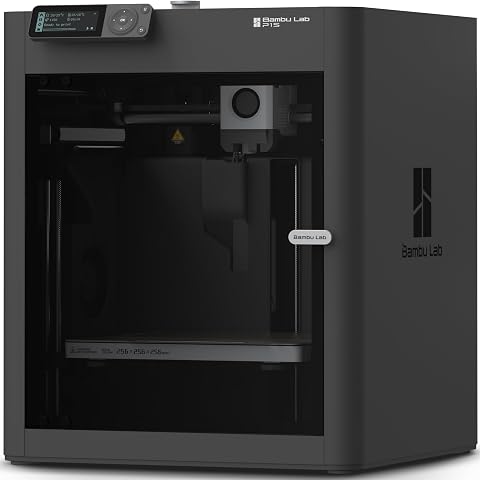 Bambu Lab P1S 3D PrinterView on Amazon →
- 7
 Anycubic Kobra X Multicolor 3D PrinterView on Amazon →
- 8
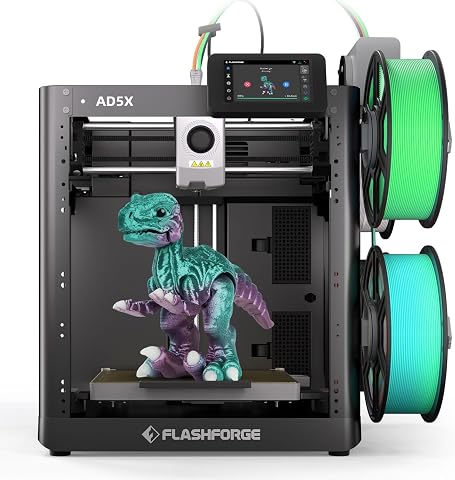 Flashforge AD5X Multi-Material 3D PrinterView on Amazon →
- 9
 Bambu Lab A1 FDM 3D PrinterView on Amazon →
- 10
 FLASHFORGE Adventurer 5M 3D Printer, All-Metal CoreXY, 600mm/s Max TravelView on Amazon →
Choosing a Printer Around Your Workflow
The comparison matters because multicolor capability changes the printing workflow, not just the appearance of a finished part. Filament-switching systems and multiple toolheads handle material changes differently. Repeated changes can add time and purge waste, particularly on designs that use several colors on each layer, so a higher color count does not by itself establish better value.
Enclosure and speed are similarly practical choices. An enclosure can help control drafts and temperature for some materials, but takes space and may require ventilation. Open-frame machines can be easier to access for many hobby prints. Maximum movement speed is not the same as the time needed to produce a finished part at the desired quality: geometry, material and print settings also matter. The guide’s central takeaway is to buy for typical projects and real workspace constraints, rather than a headline feature that may rarely be used.
Popular right now

Apple AirPods Pro 3 Wireless Earbuds with Active Noise Cancellation

Vitamix 5-Speed Immersion Blender, 625-Watt, Stainless Steel/Black

Roborock Qrevo 2 Pro Robot Vacuum and Mop with 20,000 Pa Suction
As an affiliate, we earn on qualifying purchases.
How the Ten Models Were Ranked
ThorstenMeyerAI.com says it compared the machines by print-system design, material handling, enclosure, setup, expected maintenance and versatility. It gave extra weight to whether a multicolor bundle includes its material-handling hardware, since buyers may otherwise need to obtain a separate system. It also assessed enclosed CoreXY printers separately from open-frame options instead of treating stated speed as the sole measure.
The order is a buyer-oriented editorial ranking, with the P2S Combo placed first for its combined feature set. The guide acknowledges that a lower-ranked model may suit a particular use better. It also advises buyers to compare build volume with their intended objects and available bench space, and to account for tasks such as cleaning the build surface and replacing consumables.
“The P2S Combo takes the lead for buyers seeking one package that combines an enclosed printer with an included multicolor material system.”
— ThorstenMeyerAI.com guide
Performance Details Not Supplied
The source material does not provide test results, prices, full specifications, or a dated publication record. It therefore does not establish comparative print times, reliability, print quality, ownership costs or material compatibility across all 10 machines. The ranking should be read as the source’s buying judgment, not as a controlled head-to-head test.
Detailed model-by-model reasoning is also limited for several entries, including the Kobra X, AD5X and K2 Combo. The guide discusses general tradeoffs—enclosure, filament switching, toolheads, setup and waste—but does not quantify how much time or material any particular workflow adds. Buyers should check current manufacturer specifications and bundle contents before purchasing, as the source does not confirm current availability or configurations.
Check Models Against Your Needs
The next step for buyers is to compare the exact configurations available to them against their usual materials, largest planned prints and workspace. Confirm whether the multicolor hardware is included, what materials the printer supports, and how much room is needed for the machine and filament system. For occasional decorative jobs, consider whether manual changes would be adequate; for frequent multicolor work, compare the practical workflow and waste of filament switching with a toolhead-based design.
No follow-up testing or product announcement is specified in the source. The guide’s recommendations may need revisiting as prices, bundles and specifications change, so its 2027 framing should not be treated as confirmation that every configuration will remain available throughout the year.
Key Questions
Which printer does the guide rank first?
ThorstenMeyerAI.com ranks the Bambu Lab P2S Combo first, citing its enclosed printer and included multicolor material system. That is the guide’s editorial recommendation, not a universal verdict.
What is the difference between the P1S and P1S Combo in the guide?
The guide presents the P1S as a standalone enclosed printer and the P1S Combo as the option that adds bundled AMS multicolor hardware. Buyers should verify the exact contents of the version being sold.
Is a multicolor printer a better choice for every hobbyist?
No. The guide says multicolor workflows can add print time, setup decisions and purge waste. Someone who mainly makes small, single-color functional parts may prefer a simpler configuration.
Does the guide prove which model prints fastest or most reliably?
No. The supplied material gives editorial comparisons but no controlled test results or quantified reliability findings. It describes the Adventurer 5M as speed-focused but does not establish a measured fastest model.
Source: ThorstenMeyerAI.com